Day 3: Santa and the Rakupod Wranglers

Santa’s world was increasingly going high-tech, and his IT department was polishing off its new process that could take the millions of letters received from boys and girls around the world, scan them into digital form with state-of-the-art optical character recognition hardware, and produce outputs that could greatly streamline the Santa Corporation’s production for Christmas delivery.

One problem had initially stymied them, but consultants from the Raku community came to their aid. (As you may recall, IT had become primarily a Raku shop because of the power of the language for all their programming needs ranging from shop management to long-range planning.) The problem was converting the digital output from the OCR hardware to final PDF products for the factories and toy makers. The growing influence of Github and its Github-flavored Markdown format had resulted in IT’s post-OCR software converting the text into that format.

That was fine for initial use for production planning, but for archival purposes it lacked the capability to provide textual hints to create beautiful digital documents for permanent storage. The Raku consultants suggested converting the Markdown to Rakupod which has as much potential expressive, typesetting power as Donald Knuth’s TeX and its descendants (e.g., Leslie Lamport’s LaTex, ConTeXt, and XeTeX). As opposed to those formats, the Rakupod product is much easier to scan visually and, although current Raku products are in the early stages of development, the existing Rakupod-to-PDF process can be retroactively improved by modifying the existing Rakupod when future products are improved.

Side note: Conversion between various digital document formats has been a fruitful arena for academics as well as developers. Raku already has excellent converters from Rakupod to:

  • Text – Pod::To::Text
  • Markdown – Markdown::Grammar
  • HTML – Pod::To::HTML

Other non-Raku converters include Pandoc and Sphinx which strive to be universal converters with varying degrees of fidelity depending upon the input or output formats chosen. (However, this author has not been able to find an output format in that set capable of centering text without major effort. That includes Markdown which can only center text through use of inserted html code.)

But back to the immediate situation: getting Markdown transformed to PDF.

The first step is made possible through use of Anton Antonov‘s Markdown::Grammar:ver<0.4.0> module. The code for that is shown here:

use Markdown::Grammar:ver<0.4.0>;
my $markdown-doc = "poem.md";
my $pod-doc      = "poem.rakudoc";
$pod-doc = from-markdown $markdown-doc, :to("pod");

The second step is Rakupod to PDF, but that step can be further broken down into two major paths:

  • Transform Rakupod to PDF directly
  • Transform Rakupod to PostScript
    • Transform PostScript to PDF (ps2pdf)

Santa’s IT group decided, given the current state of Raku modules, one of the easiest ways is to use David Warring‘s module Pod::Lite and his very new module Pod::To:PDF::Lite for the direct transformation. That module has encapsulated the huge, low-level collection of PDF utility routines into an easier-to-use interface to get typesetting quality output. (Note David is actively improving the module, so keep an eye out for updates.)

But that route has a bump in the road: PDF::Lite requires the user to provide the $=pod object (technically it is the root node of a Raku tree-like structure). That is easy if you’re calling it inside a Raku program, but not if you’re trying to access it from another program or module. Thus comes a new Raku module to the rescue. The clever algorithm that makes that possible is due to the Raku expert Vadim Belman (AKA @vrurg), and it has been extracted for easy use into a new module RakupodObject.

So, using those three modules, we get the following code:

use Pod::Lite;
use Pod::To::PDF::Lite;
use RakupodObject;
my $pod-object = rakupod2object $pod-doc;
# pod2pdf $pod-object # args ...

IT used the output PDF documents in its PDF::Lite wrapper program, combine-pdfs.raku, and added some convenience input options. Raku is used World-wide so they allowed for various paper sizes and provide settings for US Letter and A4. Finally, they provided some other capabilities by customizing the PDF::Lite object after the base document was created so it can:

  • Combine multiple documents into a single one
  • Provide a cover and a title for the unified document
  • Provide a cover and a title for each of the child articles

See program combine-pdfs.raku for details, but the flow inside looks something like this:

use PDF::Lite;
use PDF::Font::Loader;
my @pdfs = <list of pdf files to combine>;
# create a new pdf to hold the entire collection
my $pdf = PDF::Lite.new;
$pdf.media-box = 'Letter';
my $centerx = 4.25*72; # horizontal center of the page
# the cover
my PDF::Lite::Page $page = $pdf.add-page;
# add the cover title info...
for @pdfs -> $pdfdoc {
    # the cover
    $page = $pdf.add-page;
    # add the part cover title info...
    my pdf2 = PDF::Lite.open: $pdfdoc;
    my $npages = $pdf2.page-count;
    1..$npages -> $page-num {
        $pdf.add-page: $pdf2.page($page-num);
    }
}
# ...

The end product is usable, but it would take a lot of tweaking to get it into better form for more formal PDF projects. However, it is very useful for a quick solution (see Footnote 3).

Modifying the source Markdown products for Santa’s pet project needed something else: combine the pieces manually into one The single document is named An-Apache-Cro-Web-Server-Recipe.md and minor sructural changes were made to make internal rather than external references to the two parts. When modified with md2pod.raku and pod2pdf.raku it produces An-Apache-Cro-Web-Server-Recipe.pdf.

Summary

Thanks to Raku developers we finally have a direct and robust way to convert complex documents written in Rakupod into the universal PDF format. Using the semantics of Rakupod to affect the conversion to PDF will improve Pod::To::PDF::Lite output to suit authors. Such configuration details would have to be carefully designed and implemented as some kind of standard, perhaps as an RFC. For a simple example of part of such a standard, here is a Rakupod block that could be used to define defaults for PDF output:

=begin pdf-config
=Config :head1 :font<Times-RomanBold> :size<16> :align<center>:
=Config :head2 :font<Times-RomanBold> :size<14> :align<center>:
=end pdf-config

But that project is for another day—Santa’s archivist Elves are happy for now!

The final product of a real-world test of the Markdown-to-PDF work flow is a present from Santa to all the Raku-using folks around the world: a PDF version of a combined version of the two-part article from Tony O’Dell (AKA @tony-o) for creating an Apache website with the Raku Cro libraries of Jonathan Worthington (AKA @jnthn)!

Santa’s 2022 PDF present to you: 🎀 [An-Apache-Cro-Web-Server-Recipe.pdf] 🎀

(See Tony’s original posts at Part1 and Part2.) See the final PDF document at An Apache/Cro Web Server.

Santa’s Epilogue

Don’t forget the “reason for the season:” ✝

As I always end these jottings, in the words of Charles Dickens’ Tiny Tim, “may God bless us, every one!” [1]

Footnotes

  1. A Christmas Carol, a short story by Charles Dickens (1812-1870), a well-known and popular Victorian author whose many works include The Pickwick Papers, Oliver Twist, David Copperfield, Bleak House, Great Expectations, and A Tale of Two Cities.
  2. Code used in this article is available at Raku-Advent-code
  3. See the author’s module-in-work PDF::Combiner. File an issue if would like to use it and what features you would like to see added.

Day 2: Less Variable Wattage = More Flow

Finding flow while coding is sometimes tricky to do – it’s even trickier when encountering ‘someone else’s code’. We’ve all had the experience of reading code and crying, “WAT?!”.

Working with high ‘wattage’ code is not just unpleasant, it costs time and money. The more WATs a program contains, the scarier it is, and sadly, fear is a flow stopper.

By contrast, writing low wattage code can facilitate flow by keeping things cognitively comfortable for yourself and other programmers. Let’s start with some high wattage code and Raku-ify it.

Check out this Rust code (from RosettaCode.org):

extern crate rand;
use std::thread;
use rand::thread_rng;
use rand::distributions::{Range, IndependentSample};
fn main() {
let mut rng = thread_rng();
let rng_range = Range::new(0u32, 100);
for word in "Enjoy Rosetta Code".split_whitespace() {
let snooze_time = rng_range.ind_sample(&mut rng);
let local_word = word.to_owned();
std::thread::spawn(move || {
thread::sleep_ms(snooze_time);
println!("{}", local_word);
});
}
thread::sleep_ms(1000);
}

What do you reckon this Rust does? How would you rate its cognitive comfort? WAT the hell is 0u32 anyway?

Sadly, the happy path of this Rust program is hidden by all the imported libraries, type handling, scope changes and variables etc. Each of these adds a little bit of wattage to the overall program. Fully understanding it requires cognitively juggling all the intermediate variables (e.g., snooze_time, local_word, rng and rng_range etc) while mentally stepping through the program line-by-line.

How can we improve the cognitive comfort of Rust?

Rewrite it in Raku!

my @words = <Enjoy Rosetta Code>;
@words.race(:batch(1)).map: { sleep rand; say $_ };

You get the gist here: race through a list of words in parallel batches and sleep for a random time before saying a word.

The Raku version is more cognitively comfortable: less lines of code, no external libraries and only two variables (@words and the topic $_). Less mental juggling is required and working memory is freed to facilitate flow.

It’s even possible to code in just one line:

<Enjoy Rosetta Code>.race(:batch(1)).map: { sleep rand; say $_ };

But this adds a potential WAT. Sure, the one line version comes with bragging rights, ‘Look Ma, only one line!’, but it’s less understandable than the two line version. It’s not necessarily obvious to Rosetta Code readers that the circumfix operator “< >” constructs a white-space separated word list. Adding the @words variable, however, in the two line version aids understanding. It’s clear @words is a variable and .race() is a method acting on it.

my @words = <Enjoy Rosetta Code>;
@words.race(:batch(1)).map: { sleep rand; say $_ };

Subtle decisions like this are required for flow-friendly code. Optimising a program for flow requires adjusting its cognitive load to make it easier for yourself and others to understand. The computer doesn’t care if a variable is called @r2d2c3pO or @star-wars-droids – but it makes a big difference to the poor hoomans.

Optimising code for flow is a big topic. Let’s focus on just one aspect of programming: variables. Good variable names encapsulate concepts in the problem domain, cutting through complexity, for programmer and maintainer alike. Unlike most languages, Raku variable names include extra flow-friendly features: sigils and twigils.

Sigils, are symbols (i.e., $ @ % &) that tip off the reader to the underlying nature of the variable: $scalar, @positional, %associative or &code. For example:

my $student = 'Joe Bloggs'; # scalar: (Str)
my $total-students = 3; # scalar: (Number)
my @students = <Joe Mary Dave>; # positional: (Array)
my %cs100-scores = ( # associative: (Hash)
'Joe' => 87,
'Mary' => 92,
'Dave' => 63,
);
my &hello = sub { say "hi"; }; # code: (Sub)

Most programming languages have bare, sigil-less variables. To fully understand a variable in these languages the programmer typically needs to trace backwards to where the variable is first declared. This cognitive cost increases with the distance between the variable and its declaration.

Sigils in Raku help reduce this cost by signalling the nature of the variable wherever it’s used. For example, whenever you encounter a variable that begins with the @ sigil you know the variable is Positional, Iterable and its elements are accessible with a subscript (e.g., @students[0]).

Likewise, for an %associative-variable (e.g., %cs100-scores) the contents are Associative, Iterable and the elements are accessed like so:

%cs100-scores{'Joe'}; # 87
%cs100-scores<Mary>; # 92

Twigils, or secondary sigils, further clarify the scope of a variable. For example, the twigil * denotes a dynamic variable available anywhere in your Raku program.

$*CWD # the current working directory
@*ARGS # a list of command-line arguments
%*ENV # environment variables

Upper-cased by convention, variable values twigil-ed with * are looked up when accessed:

say $*CWD.Str; # /home/nige/raku/advent-2022
chdir('/tmp');
say $*CWD.Str; # /tmp

Other variables, set at compile time, are denoted with the ? twigil. For example:

say $?FILE; # test.raku - filename
say $?LINE; # 2 - line number
$?LINE = 100; # BOOM - immutable, can't modify

The ^ twigil is used for positional parameters in blocks and subroutines. Variables containing the ^ twigil are scoped just to the current sub or block and act like parameter placeholders. For example:

sub full-name {
# the Unicode order of the variable names matches
# the positional order of the parameters.
return join(' ', $^b, $^a);
}
say full-name('Wall', 'Larry'); # Larry Wall

The : twigil is used for named parameter placeholders in subs and blocks. For example:

sub full-name {
return join(' ', $:first, $:last);
}
say full-name(last => 'Wall', first => 'Larry'); # Larry Wall

Inside a class the ! twigil denotes access to private attributes.

my class Student {
has $.first-name;
has $.last-name;
method full-name() {
return join(' ', $!first-name, $!last-name);
}
}

The combination of sigils and twigils in variable names gives the programmer an instant understanding of a variable’s scope and how to access it.

To a new Raku programmer the sigils and twigils might appear like line-noise but once over the small learning curve (see above) they help the programmer to go forwards rather than backwards.

Different variables look different in Raku, which, despite the initial learning curve, reduces their overall wattage and helps flow-ability. Sometimes, however, you need to delve deeper into a variable. “What is this?” Just use WHAT to find out its type:

note $*CWD.WHAT; # (Path)

To get the gist of what the variable is:

note $*CWD.gist; # "/home/nige/raku/advent-2022".IO

To see a variable’s contents call raku on it or pass it to the builtin data dumper function (dd):

note $*CWD.raku; # also dd($*CWD)
IO::Path.new("/home/nige/raku/advent-2022",
:SPEC(IO::Spec::Unix),
:CWD("/home/nige/raku/advent-2022"))

Why does a $*CWD variable work like that? Just ask WHY

note $*CWD.WHY;
No documentation available for type 'IO::Path'.
Perhaps it can be found at https://docs.raku.org/type/IO::Path

Or even HOW the variable works – it’s Higher Order Workings, can be accessed with ^ like so:

note $*CWD.^attributes; # attributes it contains
note $*CWD.^methods; # a full list of methods
note $*CWD.^roles; # roles it does
note $*CWD.^mro; # method resolution order

Raku variables include everything you need to understand how to use them. There’s always an answer to the question, “WAT!?”

Introspection, sigils and twigils, means Raku variables are low wattage by design and that helps the code to flow.

Happy Christmas.

Day 1: SparrowCI pipelines for everything

New year is a fun time when the whole family gets together by a table and eat holiday dinner.

Let me introduce some fun and young member of a Raku family – a guy named SparrowCI – super flexible and fun to use CI service.

To find SparrowCI lad – go to https://ci.sparrowhub.io web site and get a login using your GitHub credentials:

login

Pipelines of fun

SparrowCI provides you with some DSL to built a CI for your Raku modules.

For none devops people CI means “continuous integration” – a process allowing to test your code in some centralized service and share results with others.

Let’s create some new year gift module and then build it:

mkdir SparrowBird
cd SparrowBird
git init 
cat << HERE > META6.json
{
  "authors" : [
    "Alexey Melezhik"
  ],
  "description" : "Sparrow::Bird",
  "license" : "Artistic-2.0",
  "name" : "Sparrow Bird",
  "provides" : {
    "Sparrow::Bird" : "lib/Sparrow/Bird.rakumod"
  },
  "version" : "0.0.1"
}
HERE

mkdir -p lib/Sparrow

cat << HERE > lib/Sparrow/Bird.rakumod
unit module Sparrow::Bird;
HERE

The SparrowCI guy is wrapping the gift into a new year paper:

cat << HERE > sparrow.yaml
tasks:
  -
    name: build-sparrow
    default: true
    language: Bash
    code: |
      set -e
      cd source/
      zef install .
HERE

And finally let’s commit everything (aka send to Santa):

git add .
git commit -a -m "my sparrow bird module initial commit"

git remote add origin git@github.com:melezhik/sparrow-bird.git
git branch -M main
git push -u origin main

Once the module in the GitHub land (aka Lapland), let’s register it in SparrowCI:

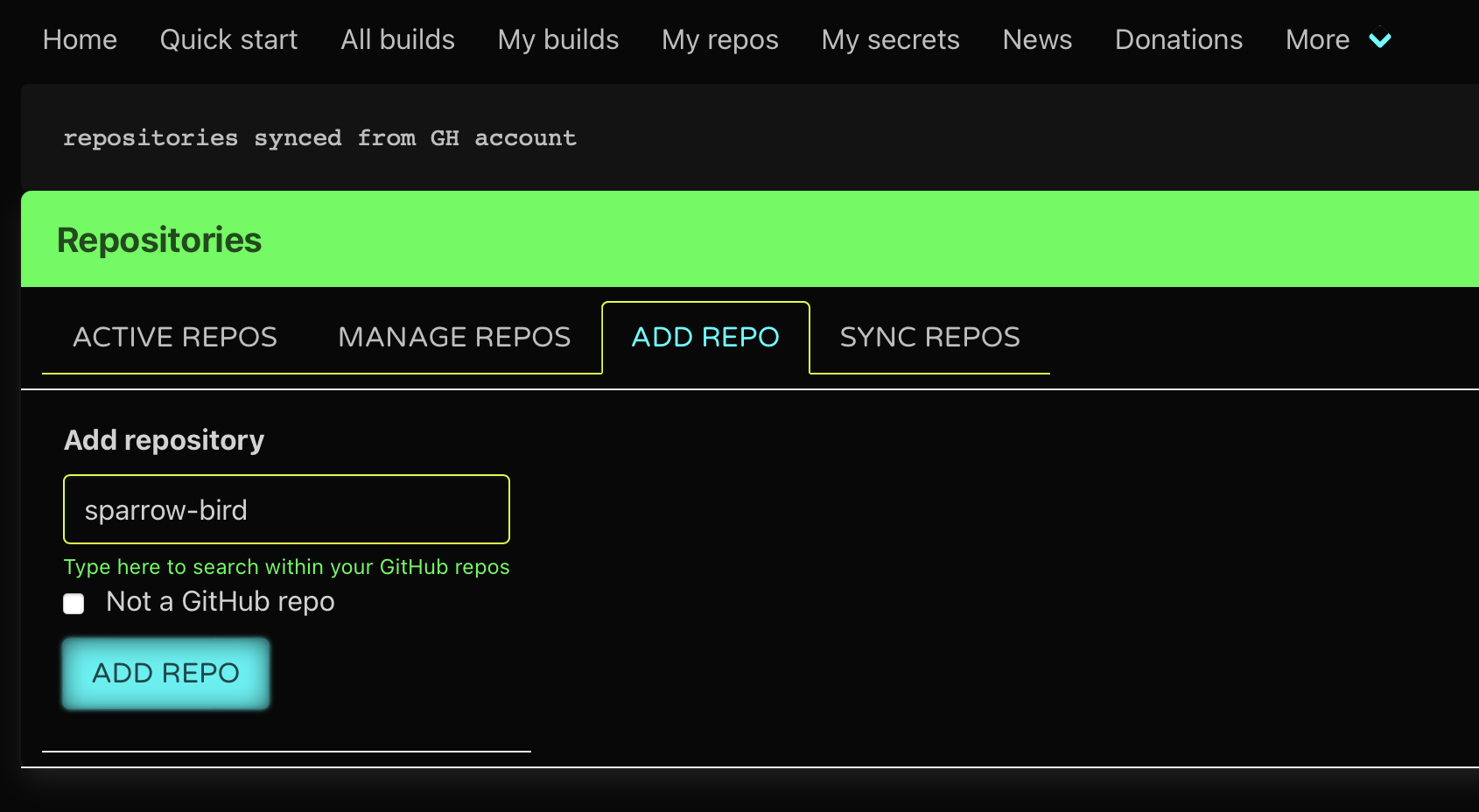
Go to “my repos”, then a repository you want to build – https://github.com/melezhik/sparrow-bird :

add repo

The Gift packaged

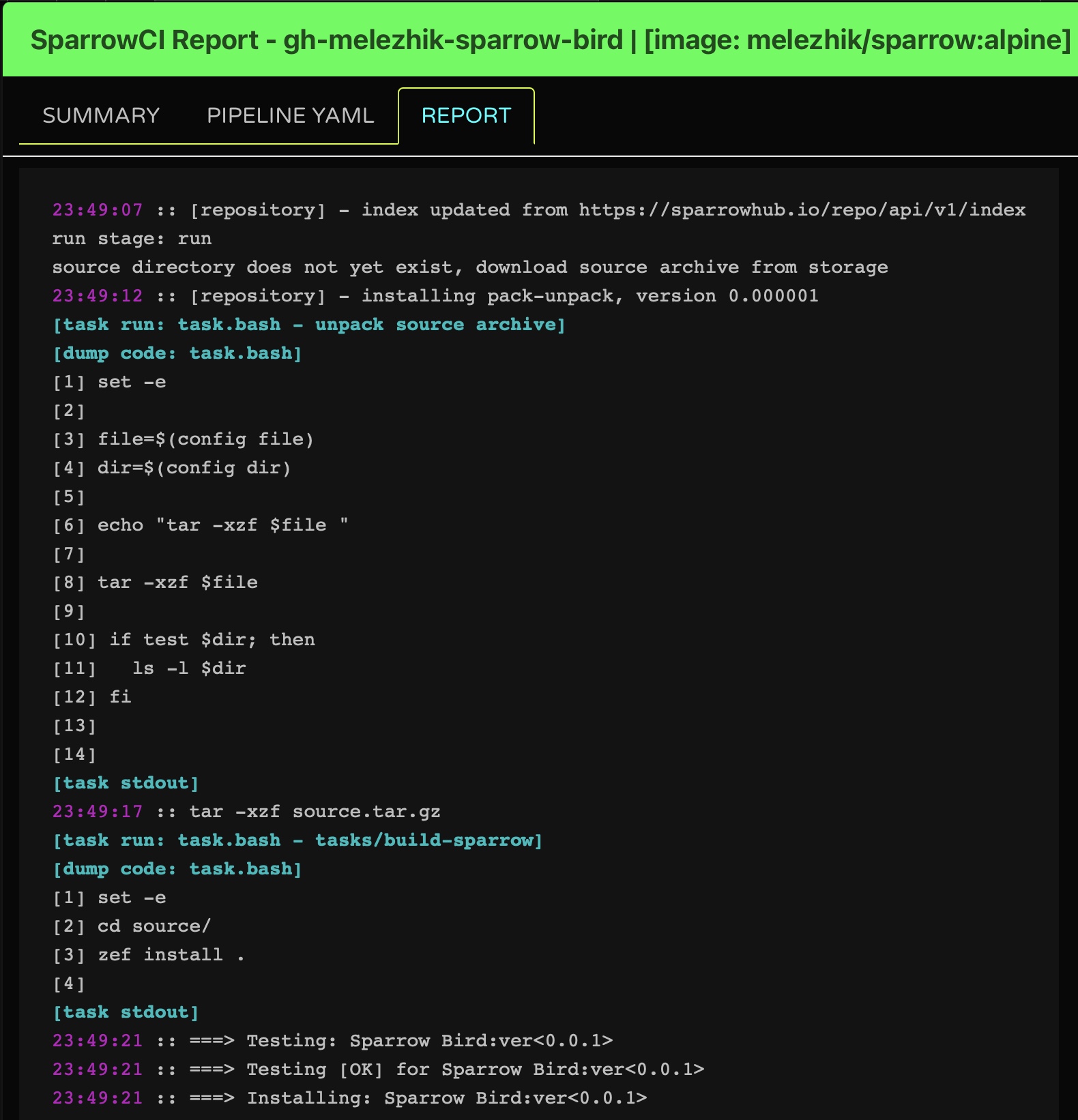
Now it’s time to see the very first new gift wrapped in a holiday paper, please allow SparrowCI a minute do his job, as he is being very busy wrapping up other holiday gifts.

Finally, we will see something like this:

report

That is it?

Well, this is a small new year story not pretending to be a boring technical stuff. But as the title says – SparrowCI pipelines for everything, not just for building Raku modules …

Thus, check out https://ci.sparrowhub.io to see all fun SparrowCI features and happy holidays!

Advent::Calendar

Welcome to the 14th edition of this Advent Calendar, which started at the old site, and continues in this new one. According to the Wikipedia, 14 years marks the ivory anniversary.

If you really want to nitpick, it’s the 13th anniversary since it started in 2009, making it the lace anniversary. I’ll go for that. Lace adds nice touches to fabric, and it semi-transparent, making it a go-to choice for occasions, and also, why not, for your daily life; lace doilies are used for dinner tables, or over furniture.

Same as Raku itself. Already in its teens, it’s a mature language, used in production in many companies, with a non-zero job market, making it great for daily use; but, at the same time, its powerful grammars and data-massaging capabilities (including parallel!) make it an excellent addition to otherwise common languages or applications.

The Raku language is still loyal to its principles. It’s more than semi-transparent, with a transparent Steering Council and community-driven features from the problem-solving repo.

We will have the chance to read about these topics (and then some) in this year’s Advent Calendar. Merry Christmas, and remember to -Ofun!

All the blog posts of 2021

Day 25 – Future-proofing the Raku Programming Language

Around this time last year, Jonathan Worthington was writing their Advent Post called Reminiscence, refinement, revolution. Today, yours truly finds themselves writing a similar blog post after what can only be called a peculiar year in the world.

The Language

Visible Changes

The most visible highlights in the Raku Programming Language are basically:

last / next with a value

use v6.e.PREVIEW;
say (^5).grep: { $_ == 3 ?? last False !! True } # (0 1 2)
say (^5).grep: { $_ == 3 ?? last True  !! True } # (0 1 2 3)

Normally, last just stops an iteration, but now you can give it a value as well, which can be handy e.g. in a grep where you know the current value is the last, but you still want to include it.

use v6.e.PREVIEW;
say (^5).map: { next    if $_ == 2; $_ } # (0 1 3 4)
say (^5).map: { next 42 if $_ == 2; $_ } # (0 1 42 3 4)

Similarly with map, if you want to skip a value (which was already possible), you can now replace that value by another value.

Note that you need to activate the upcoming 6.e Raku language level to enable this feature, as there were some potential issues when activated in 6.d. But that’s just one example of future proofing the Raku Programming Language.

.pick(**)

The .pick(*) call will produce all possible values of the Iterable on which it is called in random order, and then stop. The .pick(**) will do the same, but then start again producing values in (another) random order until exhausted, ad infinitum.

.say for (^5).pick(* ); # 3␤4␤0␤2␤1␤
.say for (^5).pick(**); # 3␤4␤0␤2␤1␤0␤2␤1␤4␤3␤3␤4␤2␤1␤0␤....

Nothing essential, but it is sure nice to have 😀.

is implementation-detail trait

The is implementation-detail trait indicates that something that is publicly visible, still should be considered off-limits as it is a detail of the implementation of something (whether that is your own code, or the core). This will also mark something as invisible for standard introspection:

class A {
    method foo() is implementation-detail { }
    method bar() { }
}
.name.say for A.^methods; # bar␤BUILDALL␤

Subroutines and methods in the core that are considered to be an implementation-detail, have been marked as such. This should make it more clear which parts of the Rakudo implementation are game, and which parts are off-limits for developers (knowing that they can be changed without notice). Yet another way to make sure that any Raku programs will continue to work with future versions of the Raku Programming Language.

Invisible Changes

There were many smaller and bigger fixes and improvements “under the hood” of the Raku Programming Language. Some code refactoring that e.g. made Allomorph a proper class, without changing any functionality of allomorphs in general. Or speeding up by using smarter algorithms, or by refactoring so that common hot code paths became smaller than the inlinining limit, and thus become a lot faster.

But the BIG thing in the past year, was that the so-called “new-disp” work was merged. In short, you could compare this to ripping out a gasoline engine from a car (with all its optimizations for fuel efficiency of 100+ years of experience) and replacing this by an electrical engine, while its being driven running errands. And although the electrical engine is already much more efficient to begin with, it still can gain a lot from more optimizations.

For yours truly, the notion that it is better to remove certain optimizations written in C in the virtual machine engine, and replace them by code written in NQP, was the most eye-opening one. The reason for this is that all of the optimization work that MoarVM does at runtime, can only work on the parts it understands. And C code, is not what MoarVM understands, so it can not optimize that at runtime. Simple things such as assignment had been optimized in C code and basically had become an “island” of unoptimization. But no more!

The current state of this work, is that it for now is a step forward, but also a step back in some aspects (at least for now). Some workflows most definitely have benefitted from the work so far (especially if you dispatch on anything that has a where clause in it, or use NativeCall directly, or indirectly with e.g. Inline::Perl5). But the bare startup time of Rakudo has increased. Which has its effect on the speed with which modules are installed, or testing is being done.

The really good thing about this work, is that it will allow more people to work on optimizing Rakudo, as that optimizing work can now be done in NQP, rather than in C. The next year will most definitely see one or more blog posts and/or presentations about this, to lower the already lowered threshold even further.

In any case, kudos to Jonathan WorthingtonStefan SeifertDaniel GreenNicholas Clark and many, many others for pulling this off! The Virtual Machine of choice for the Raku Programming Language is now ready to be taken for many more spins!

The Ecosystem

Thanks to Cro, a set of libraries for building reactive distributed systems (lovingly crafted to take advantage of all Raku has to offer), a number of ecosystem related services have come into development and production.

zef ecosystem

The new zef ecosystem has become of age and is now supported by various developer apps, such as App::Mi6, which basically reduces the distribution upload / commit process to a single mi6 release↵. Recommended by yours truly, especially if you are about to develop a Raku module from scratch. There are a number of advantages to using the zef ecosystem.

direct availability

Whenever you upload a new distribution to the zef ecosystem, it becomes (almost) immediately available for download by users. This is particularly handy for CI situations, if you are first updating one or more dependencies of a distribution: the zef CLI wouldn’t know about your upload upto an hour later on the older ecosystem backends.

better ecosystem security

Distributions from the older ecosystem backends could be removed by the author without the ecosystem noticing it (p6c), or not immediately noticing it (CPAN). Distributions, once uploaded to the zef ecosystem, can not be removed.

more dogfooding

The zef ecosystem is completely written in the Raku Programming Language itself. And you could argue that’s one more place where Raku is in production. Kudos to Nick Logan and Tony O’Dell for making this all happen!

raku.land

raku.land is a place where one can browse the Raku ecosystem. A website entirely developed with the Raku Programming Language, it should be seen as the successor of the modules.raku.org website, which is not based on Raku itself. Although some of the features are still missing, it is an excellent piece of work by James Raspass and very much under continuous development.

Not forgetting the past

“Those who cannot remember the past are condemned to repeat it.” George Santanaya has said. And that is certainly true in the context of the Raku Programming Language with its now 20+ year history.

Permanent Distributions

Even though distributions can not be removed from the zef ecosystem, there’s of course still a chance that it may become unavailable temporarily, or more permanently. And there are still many distributions in the old ecosystems that can still disappear for whatever reason. Which is why the Raku Ecosystem Archive has been created: this provides a place where (ideally) all distributions ever to be available in the Raku ecosystem, are archived. In Perl terms: a BackPAN if you will. Before long, this repository will be able to serve as another backend for zef, in case a distribution one needs, is no longer available.

Permanent Blog Posts

A lot of blog post have been written in the 20+ year history of what is now the Raku Programming Language. They provide sometimes invaluable insights into the development of all aspects of the Raku Programming Language. Sadly, some of these blog posts have been lost in the mists of time. To prevent more memory loss, the CCR – The Raku Collect, Conserve and Remaster Project was started. I’m pretty sure a Cro-driven website will soon emerge that will make these saved blog posts more generally available. In the meantime, if you know of any old blog posts not yet collected, please make an issue for it.

Permanent IRC Logs

Ever since 2005, IRC has been the focal point of discussions between developers and users of the Raku Programming Language. In order to preserve all these discussions, a repository was started to store all of these logs, up to the present. Updating of the repository is not yet completey automated, but if you want to search something in the logs, or just want to keep up-to-date without using an IRC client, you can check out the experimental IRC Logs server (completely written in the Raku Programming Language).

Looking forward

So what will the coming year(s) bring? That is a good question.

The Raku Programming Language is an all volunteer Open Source project without any big financial backing. As such, it is dependent on the time that people put into it voluntarily. That doesn’t mean that plans cannot be made. But sometimes, sometimes even regularly, $work and Real Life take precedence and change the planning. And things take longer than expected.

If you want to make things happen in the Raku Programming Language, you can start by reporting problems in a manner that other people can easily reproduce. Or if it is a documentation problem, create a Pull Request with the way you think it should be. In other words: put some effort into it yourself. It will be recognized and appreciated by other people in the Raku Community.

Now that we’ve established that, let’s have a look at some of the developments now that we ensured the Raku Programming Language is a good base to build more things upon.

new-disp based improvements

The tools that “new-disp” has made available, haven’t really been used all that much yet: the emphasis was on making things work again (after the engine had been ripped out)! So one can expect quite a few performance improvements to come to fruition now that it all works. Which in turn will make some language changes possible that were previously deemed too hard, or affecting the general performance of Raku too much.

RakuAST

Jonathan Worthington‘s focus has been mostly on the “new-disp” work, but the work on RakuAST will be picked up again as well. This should give the Raku Programming Language a very visible boost, by adding full blown macro and after that proper slang support. While making all applications that depend to an extent on generating Raku code and then executing it, much easier to make and maintain (e.g. Cro routing and templates, printf functionality that doesn’t depend on running a grammar every time it is called).

More Cro driven websites

It looks like most, if not all Raku related websites, will be running on Cro in the coming year. With a few new ones as well (no, yours truly will not reveal more at this moment).

A new language level

After the work on RakuAST has become stable enough, a new language level (tentatively still called “6.e”) will become the default. The intent is to come with language levels more frequently than before (the last language level increase was in 2018), targeting a yearly language level increase.

More community

The new #raku-beginner channel has become pretty active. It’s good to see a lot of new names on that channel, also thanks to a Discord bridge (kudos to Wenzel P.P. Peppmeyer for that).

The coming year will see some Raku-only events. First, there is the Raku DevRoom at FOSDEM (5-6 February), which will be an online-only event (you can still sign up for a presentation or a lightning talk!). And if all goes ok, there will be an in-person/online hybrid Raku Conference in Riga (August 11-13 2022).

And of course there are other events where Raku users are welcome: the German Perl/Raku Workshop (30 March/1 April in Leipzig), and the Perl and Raku Conference in Houston (21-25 June).

And who knows, once Covid restrictions have been lifted, how many other Raku related events will be organized!

Finally

This year saw the loss of a lot of life. Within the Raku Community, we sadly had to say goodbye to Robert Lemmen and David H. Adler. Belated kudos to them for their contributions to what is now the Raku Programming Language, and Open Source in general. You are missed!

Which brings yours truly to instill in all of you again: please be careful, stay healthy and keep up the good work!

Day 24 – Packaging and unpackaging real good

After all Rakuing along all Christmas, Santa realizes it’s a pretty good idea to keep things packed and ready to ship whenever it’s needed. So it looks at containers. Not the containers that might or might not actually be doing all the grunt work for bringing gifts to all good boys and girls in the world, but containers that are used to pack Raku and ship it or use it for testing. Something you need to do sooner or later, and need to do real fast.

The base container

The base container needs to be clean, and tiny, and contain only what’s strictly necessary to build your application on. So it needs a bunch of binaries and that’s that. No ancillary utilities, nothing like that. Enter jjmerelo/raku, a very bare bones container, that takes 15 MBytes and contains only the Rakudo compiler, and everything it needs to work. It’s also available from GHCR, if that’s more to your taste.

You only need that to run your Raku programs. For instance, just print all environment variables that are available inside the container:

time podman run --rm -it ghcr.io/jj/raku:latest -e 'say %*ENV'

Which takes around 6 seconds in my machine, most of it devoted to downloading the container. Not a bad deal, really, all things considered.

The thing it, it comes in two flavors. Alternative is called jj/raku-gha, for obvious reasons: It’s the one that will actually work in side GitHub actions, which is where many of you will eventually use it. The difference? Well, a tiny difference, but one that took some time to discover: its default user, called raku, uses 1001 as UID, instead of the default 1000.

Right, I could have directly used 1001 as the single UID for all of them, but then I might have to do some more changes for GitHub Actions, so why bother?

Essentially, the user that runs GitHub actions uses that UID. We want our package user to be in harmony with the GHA user. We achieve harmony with that.

But we want a tiny bit more.

We will probably need zef to install new modules. And while we’re at it, we might also need to use a REPL in an easier way. Enter alpine-raku, once again in two flavors: regular and gha. Same difference as above: different UID for the user.

Also, this is the same jjmerelo/alpine-raku container I have been maintaining for some time. Its plumbing is now completely different, but its functionality is quite the same. Only it’s slimmer, so faster to download. Again

time podman run --rm -it ghcr.io/jj/raku-zef:latest -e 'say %*ENV'

Will take a bit north of 7 seconds, with exactly the same result. But we will see an interesting bit in that result:

{ENV => /home/raku/.profile, HOME => /home/raku, HOSTNAME => 2b6b1ac50f73, PATH => /home/raku/.raku/bin:/home/raku/.raku/share/perl6/site/bin:/usr/local/sbin:/usr/local/bin:/usr/sbin:/usr/bin:/sbin:/bin, PKGS => git, PKGS_TMP => make gcc linux-headers musl-dev, RAKULIB => inst#/home/raku/.raku, TERM => xterm, container => podman}

And that’s the RAKULIB bit. What I’m saying it is that, no matter what the environment says, we’re gonna have an installation of Raku in that precise directory. Which is the home directory, and it should work, right? Only it does not, because GitHub Actions change arbitrarily the HOME variable, which is where Raku picks it from.

This was again something that required a bit of work and understanding where Rakudo picks its configuration. If we run

raku -e 'dd $*REPO.repo-chain'

We will obtain something like this:

(CompUnit::Repository::Installation.new(prefix => "/home/jmerelo/.raku"),CompUnit::Repository::Installation.new(prefix => "/home/jmerelo/.rakubrew/versions/moar-2021.10/install/share/perl6/site"), CompUnit::Repository::Installation.new(prefix => "/home/jmerelo/.rakubrew/versions/moar-2021.10/install/share/perl6/vendor"), CompUnit::Repository::Installation.new(prefix => "/home/jmerelo/.rakubrew/versions/moar-2021.10/install/share/perl6/core"), CompUnit::Repository::AbsolutePath.new(next-repo => CompUnit::Repository::NQP.new(next-repo => CompUnit::Repository::Perl5.new(next-repo => CompUnit::Repository))), CompUnit::Repository::NQP.new(next-repo => CompUnit::Repository::Perl5.new(next-repo => CompUnit::Repository)), CompUnit::Repository::Perl5.new(next-repo => CompUnit::Repository))

We’re talking about the repository chain, where Raku (through Rakudo) keeps the information or where to find the, effectively, CompUnit repositories or the libraries, precompiled (those are the CompUnit::Repository::Installation) or not (CompUnit::Repository::AbsolutePath). But let’s look at the first one, which is where it will start looking. It’s effectively our home directory, or more precisely, a subdirectory where things are installed in the normal course of things. Where does Rakudo picks that from? Let’s change the HOME environment variable and we’ll see, or rather not, because depending on the installation, it will simply hang. With the RAKULIB defined as above, however, say $*REPO.repo-chain will print

(inst#/home/raku/.raku inst#/tmp/.raku inst#/usr/share/perl6/site inst#/usr/share/perl6/vendor inst#/usr/share/perl6/core ap# nqp# perl5#)

Our CompUnit::Repository::Installation become here inst#/home/raku/.raku, but, what’s more important, the HOME environment variable gets tacked a .raku in the end and an inst# in front, implying that’s the place where Rakudo expects to find it.

This brings us back again to GitHub actions, which change that variable for no good reason, leaving our Rakudo installation effectively unusable. But no fear, a simple environment variable baked in the alpine-raku container (and its GHCR variants) will keep the actual Rakudo installation in check for GitHub actions to come.

Now we’re all set

And we can write our own GitHub actions using this image. Directly run all our stuff inside a container that has Raku. For instance, this way:

name: "Test in a Raku container"
on: [ push, pull_request ]
jobs:
test:
runs-on: ubuntu-latest
permissions:
packages: read
container:
image: ghcr.io/jj/raku-zef-gha
steps:
– name: Checkout
uses: actions/checkout@v2
– name: Install modules
run: zef install .
– name: Test
run: zef –debug test .
view raw raku-test.yaml hosted with ❤ by GitHub
GHA used in Pod::Load

This is decevingly simply, doing exactly what you would do in your console. Install, and then test, right? That’s it. Underneath, however the fact that the container is using the right UID and Raku knows where to find its own installation despite all the moving and shaking that’s going on is what makes it run.

You can even do a bit more. Use Raku as a shell for running anything. Add this step:

  - name: Use Raku to run
    shell: raku {0}
    run: say $*REPO.repo-chain

And with the shell magic, it will actually run that directly on the Raku interpreter. You can do anything else you want: install stuff, run Cro if you want. All within the GitHub action! For instance, do you want to chart how many files were changed in the latest commits using Raku? Here you go:

– name: Install Text::Chart
run: zef install Text::Chart
– name: Chart files changed latest commits
shell: raku {0}
run: |
use Text::Chart;
my @changed-files = qx<git log –oneline –shortstat -$COMMITS>
.lines.grep( /file/ )
.map( * ~~ /$<files>=(\d+) \s+ file/ )
.map: +*<files>;
say vertical(
:max( @changed-files[0..*-2].max),
@changed-files[0..*-2]
);
This can be added to the action above

Couple of easy steps: install whatever you need, and then use Text::Chart to chart those files. This needs a bit of explaining, or maybe directly checking the source to have the complete picture: it’s using an environment variable called COMMITS, which is one more than the commits we want to chart, has been used to check out all those commits, and then, of course, we need to pop the last one since it’s a squashed commit that contains all older changes in the repo, uglifying our chart (which we don’t want). Essentially, however, is a pipe that takes the text content of the log that includes the number of file changed, extracts that number via a regex match, and feeds it into the vertical function to create the text chart. Which will show something like this (click on the > sign to show the chart):

Files changed in the last 10 commits in Pod::Load

With thousands of files at your disposal, the sky’s the limit. Do you want to install fez and upload automatically when tagging? Why not? Just do it. Upload your secret, and Bob’s your uncle. Do you want to do some complicated analytics on the source using Raku or generate thumbnails? Go ahead!

Happy packaging!

After this, Santa was incredibly happy, since all his Raku stuff was properly checked, and even containerized if needed! So he sit down to enjoy his corncob pipe, which Meta-Santa brought for him last Christmas.

And, with that, Merry Christmas to all and everyone of you!

Day 23 – The Life of Raku Module Authoring

by Tony O’Dell

Hello, world! This article is a lot about fez and how you can get started writing your first module and making it available to other users. Presuming you have rakudo and zef installed, install fez!

$ zef install fez
===> Searching for: fez
===> Updating fez mirror: https://360.zef.pm/
===> Updated fez mirror: https://360.zef.pm/
===> Testing: fez:ver<32>:auth<zef:tony-o>:api<0>
[fez]   Fez - Raku / Perl6 package utility
[fez]   USAGE
[fez]     fez command [args]
[fez]   COMMANDS
[fez]     register              registers you up for a new account
[fez]     login                 logs you in and saves your key info
[fez]     upload                creates a distribution tarball and uploads
[fez]     meta                  update your public meta info (website, email, name)
[fez]     reset-password        initiates a password reset using the email
[fez]                           that you registered with
[fez]     list                  lists the dists for the currently logged in user
[fez]     remove                removes a dist from the ecosystem (requires fully
[fez]                           qualified dist name, copy from `list` if in doubt)
[fez]     org                   org actions, use `fez org help` for more info
[fez]   ENV OPTIONS
[fez]     FEZ_CONFIG            if you need to modify your config, set this env var
[fez]   CONFIGURATION (using: /home/tonyo/.fez-config.json)
[fez]     Copy this to a cool location and write your own requestors/bundlers or
[fez]     ignore it and use the default curl/wget/git tools for great success.
===> Testing [OK] for fez:ver<32>:auth<zef:tony-o>:api<0>
===> Installing: fez:ver<32>:auth<zef:tony-o>:api<0>

1 bin/ script [fez] installed to:
/home/tonyo/.local/share/perl6/site/bin

Make sure that the last line is in your $PATH so the next set of commands all run smoothly. Now we can start writing the actual module, let’s write ROT13 since it’s a fairly easy problem to solve and this article really is less about module content than how to get working with fez.

Writing the Module

Our module directory structure:

.
├── lib
│   └── ROT13.rakumod
├── t
│   ├── 00-use.rakutest
│   └── 01-tests.rakutest
└── META6.json

lib is the main content of your module, it’s where all of your module’s utilities, helpers, and organization happens. Each file corresponds to one or more modules or classes, more on in the META6.json paragraph below.

META6.json is how zef knows what the module is, it’s how fez knows what it’s uploading, and it’s how rakudo knows how to load what and from where. Let’s take a look at the structure of META6.json:

t contains all of your module’s tests. If you have “author only” tests then you’d also have a directory xt and that directory works roughly the same. For your users’ sanity WRITE TESTS!

{
  "name": "ROT13",
  "auth": "zef:tony-o",
  "version": "0.0.1",
  "api": 0,

  "provides": {
    "ROT13": "lib/ROT13.rakumod"
  },

  "depends":       [],
  "build-depends": [],
  "test-depends":  [],

  "tags":        [ "ROT13", "crypto" ],
  "description": "ROT13 everything!"
}

A quick discussion about dists. A dist is the fully qualified name of your module and it contains the name, auth, and version. It’s how zef can differentiate your ROT13 module from mine. It works in conjunction with use, such as use ROT13:auth<zef:tony-o>, and in zef: zef install ROT13:auth<tony-o>:ver<0.0.1>. The dist string is always qualified with both the :auth and the :ver internally to raku and the ecosystem, but the end user isn’t required to type the fully qualified dist if they’re less picky about what version/author of the module they’d like. In use statements you can combine auth and ver to get the author or version you’re expecting or you can omit one or both.

It’s better practice to fully qualify your use statements; as more modules hit the ecosystem with the same name, this practice will help keep your modules running smoothly.

  • name: this is the name of the module and becomes part of your dist, it’s what is referenced when your consumers type zef install ROT13.
  • auth: this is how the ecosystem knows who the author is. On fez this is strict, no other rakudo ecosystem guarantees this matches the uploader’s username.
  • version: version must be unique to the auth and name. For instance, you can’t upload two dists with the value of ROT13:auth<zef:tony-o>:ver<0.0.1>.
  • provides: in provides is the key/value pairs of module and class names to which file they belong to. If you have two modules in one file then you should have the same file listed twice with the key for each being each class/module name. All .rakumod files in lib should be in the META6.json file. The keys here are how rakudo knows which file to look for your class/module in.
  • depends: a list of your runtime depencies

Let’s whip up a quick ROT13 module, in lib/ROT13.rakumod dump the following

unit module ROT13;

sub rot13(Str() $text) is export {
    $text.trans('a..zA..Z'=>'n..za..mN..ZA..Z')
}

Great, you can test it now (from the root of your module directory) with raku -I. -e 'use ROT13; say rot13("hello, WoRlD!");. You should get output of uryyb, JbEyQ!.

Now fill in your test files and run the tests with zef test .

Publishing Your Module

Register

If you’re not registered with fez, now’s the time!

$ fez register
>>= Email: omitted@somewhere.com
>>= Username: tony-o
>>= Password:
>>= Registration successful, requesting auth key
>>= Username: tony-o
>>= Password:
>>= Login successful, you can now upload dists

Check Yourself

$ fez checkbuild
>>= Inspecting ./META6.json
>>= meta<provides> looks OK
>>= meta<resources> looks OK
>>= ROT13:ver<0.0.1>:auth<zef:tony-o> looks OK

Oh snap, we’re lookin’ good!

Publish

$ fez upload
>>= Hey! You did it! Your dist will be indexed shortly.

Only thing to note here is that if there’s a problem indexing your module then you’ll receive an email with the gripe.

Further Reading

You can read more about fez here:

Perhaps you’d prefer listening:

That’s it! If there’s other things you’d like to know about fez, zef, or ecosystems then send tony-o some chat in IRC or an email!

Day 22 – Santa Claus is Rakuing Along

Part 4 – The Santa Claus Reports

Prologue

A Christmas ditty sung to the tune of Santa Claus is Coming to Town:

 He’s making a list,
 He’s checking it closely,
 He’s gonna find out who’s Rakuing mostly,
 Santa Claus is Rakuing along.

Santa Claus Operations Update 2021

Part 1 of this article reported on the new journaling process for Santa’s employees and how they keep their individual work logs. Part 2 was a side step to show how to better manage Santa’s code by using the new Zef module repository. Part 3 was another side step because Santa was running out of time.

This article, written by yours truly, junior Elf Rodney, will attempt to showcase the use of Raku’s built-in date, time, and sorting functions along with the ease of class construction to handle the new journals in the aggregate to automate many of the reports that used to take goodly amounts of time. They can now be prepared quickly and thus free resources to research more deeply-observed problem areas.

The Reporting System

The journals are frequently read and manipulated by system-wide programs (most found in the Raku module SantaClaus::Utils) run by root. Individual journals are periodically shortened by extracting older entries which are then concatenated onto hidden .journal.YYYY.MM files (owned by root but readable by all) in the user’s home directory.

The data in the journal files are converted to class instances which are deployed for the moment in two global Raku hashes keyed by task-id and user-id, respectively. (When the new persistent types in Raku are ready, they will be a natural fit to form a large on-disk database).

Before designing classes to use with the journals let’s take a quick look at how we want the data to be accessed and used.

First, the raw data give us, for each user and his assigned task (which may be a sub-task):

  • start time on the task
  • process time
    • one or more reports between start and finish
  • end time of the task
  • notes for each entry

Second, the raw data give us, for each task and sub-task

  • earliest start time
  • latest end time
  • total employee time expended on the task
  • list of employees working on each task and time each expends on the task

It seems that the data we have so far collected don’t yield the task/sub-task relations, but that is solved with a task-id system designed with that in mind. As a start, the task-id is a two-field number with the first field being the task number and the second field being the sub-task number. Supervisors will normally use the task number and their subordinates the sub-task number.

For example, a task number might be 103458 with sub-tasks of 200 and 202. The three numbers entered by the different employees working them would enter:

  • Supervisor: 103458-000
  • Employee A: 103458-200
  • Employee B: 103458-202

The final system could be as detailed as desired, but the two-level task-id is sufficient for now.

[Sorry, this article will  be finished later–I am needed for last minute jobs in the factory!]

Summary

Santa now has a personnel and task reporting system that automatically produces continuously updated reports on current tasks and the personnel resources used for them. Raku’s built-in date, time, and sorting functions help ease the work of the IT department in their job of programming and maintaining the system.

Santa’s Epilogue

Don’t forget the “reason for the season:” ✝

As I always end these jottings, in the words of Charles Dickens’ Tiny Tim, “may God bless Us , Every one! [1]”

Footnotes

  1. A Christmas Carol, a short story by Charles Dickens (1812-1870), a well-known and popular Victorian author whose many works include The Pickwick Papers, Oliver Twist, David Copperfield, Bleak House, Great Expectations, and A Tale of Two Cities.

Day 21 – Santa Claus is Rakuing Along

Part 3 – Santa Takes a Break

Prologue

A Christmas ditty sung to the tune of Santa Claus is Coming to Town:

He’s making a list,
He’s checking it closely,
He’s gonna find out who’s Rakuing mostly,
Santa Claus is Rakuing along.

Santa Claus Operations Update 3, 2021

Santa was tired. He wanted to brag about his new reporting and analysis tools as he had planned, but he knew he had to rest up for his big day coming up soon (sorry, my friend Juan Merelo, for the quick shift!).

He was sure that boys and girls around the world would be anxiously awaiting his visit, but he also realized he was just a stand-in for the real gift of Christmas annually celebrated during the Christian Advent season. He knew the First Sunday of Advent was related to Christmas in a way that varied year-to-year somewhat like Easter, which needs a complex algorithm to calculate its actual calendar date, but more regular with just a simple rule to follow. (Actually, he knew there are at least three rules that could be applied, but each rule delivering the correct result.)

He thought it would be relaxing to see how Raku’s powerful, built-in Date system could be applied to the task.

He started by writing down the three rules he knew:

  1. Find the Sunday closest to November 30 (The Feast of St. Andrew), either before or after. If November 30th is a Sunday, then that’s First Advent and St. Andrew gets moved.
  2. Find the Sunday following the last Thursday in November.
  3. Find the 4th Sunday before Christmas, not counting the Sunday which may be Christmas.

“Those look pretty easy to implement,” he thought to himself, “let’s see what I can do without calling in the experts over in IT!

“The Date object should make the job easy enough. Let’s try the first method.

my $d = Date.new($y, 11, 30); # Feast of St. Andrew
my $dow = $d.day-of-week; # 1..7 (Mon..Sun)
# sun mon tue wed thu fri sat sun
# 7 1 2 3 4 5 6 7
# 0 1 2 3 -3 -2 -1 0
if $dow == 7 {
# bingo!
   return $d
}
elsif $dow < 4 {
# closest to previous Sunday
   return $d $dow
}
else {
# closest to following Sunday
   return $d + (7 $dow)
}

“Now the second method.

my $d = Date.new($y, 11, 30); # last day of November
my $dow = $d.day-of-week;
while $dow != 4 {
   $d -= 1;
  $dow = $d.day-of-week;
}
# found last Thursday in November
# following Sunday is 3 days hence
$d += 3

“And finally, the third method.

my $d = Date.new($y, 12, 25); # Christmas
my $dow = $d.day-of-week;
if $dow == 7 {
# Christmas is on Sunday, count 28 days back.
   return $d 28
}
else {
# find prev Sunday, count 21 days back from that
# sun mon tue wed thu fri sat sun
# 7 1 2 3 4 5 6 7
# 0 1 2 3 -3 -2 -1 0
   return $d $dow 21
}

“Which method should I choose? They all work properly as I know from running each against a set of data collected from several sources. I know, I should choose which one is fastest since it will probably be part of a calendar creation module someday!

“If I were really serious I would run them using Raku’s Telemetry class, but I’ll leave that to the experts. But, what I can do is run each over many iterations and measure elapsed time using the Raku GNU::Time module, then compare results and then judge the best.

Santa started to work on speed testing but soon discovered the author of GNU::Time didn’t give a good example of how to use it for this situation and he didn’t have time to experiment any more–he knew from experience that programming in Raku is addictive (just ask Mrs. Claus!), and he couldn’t take a chance on being late for his date for Christmas. So he did the next best thing: he filed an issue with GNU::Time.

He concluded that, since he couldn’t easily determine a clear winner, he would select method 3 since it seemed to him to be the most elegant of the three, and the simplest. After all, TIMTOWTDI!

Summary

Raku has numerous capabilities that endear it to even novice programmers, but for those who have to pay attention to time and dates, its Date and DateTime classes take the Christmas Pudding!

Note: See new Raku modules Date::Christian::Advent and Date::Easter. Both use App::Mi6 for management and use the new, and recommended, Zef module repository.

Santa’s Epilogue

Don’t forget the “reason for the season:” ✝

As I always end these jottings, in the words of Charles Dickens’ Tiny Tim, “may God bless Us , Every one!” [1]

Footnotes

  1. A Christmas Carol, a short story by Charles Dickens (1812-1870), a well-known and popular Victorian author whose many works include The Pickwick Papers, Oliver Twist, David Copperfield, Bleak House, Great Expectations, and A Tale of Two Cities.