Day 20 – Create beautiful text charts

Santa got his weekly gift-wrapping report from the Gift Wrapping department. It contained lots of numbers

1 3 7 8 5 3 2 1 3

Every number corresponded to the gifts wrapped by every elf in the department in alphabetical order, starting with Alabaster Snowball, and continuing with Bushy Evergreen. But numbers don’t sing, and that made Santa not sing either. A simple way to check visually what was going on was needed.

Simple, text charts

The Unix philosophy is doing one thing, and doing it well. Small utilities, with just a few lines of code and no dependencies, are easy to build upon, understand, modify, whatever.

They are also good to learn a language. Text::Chart was created six years ago almost to the day, also slightly one year after Raku, then called Perl 6, was officially born with its Christmas release. I didn’t know too much about the thing, and even less about how to release a module, but I tried and do it anyway. Essentially, it’s a single function:

unit module Text::Chart;
constant $default-char is export = "█";
sub vertical ( Int :$max = 10,
Str :$chart-chars = $default-char,
*@data ) is export {
my $space = " ";
my @chars = $chart-chars.comb;
my $chart;
for $max^…0 -> $i {
for 0..^@data.elems -> $j {
$chart ~= @data[$j] > $i ?? @chars[$j % @chars.elems] !!
$space;
}
$chart ~= "\n";
}
return $chart;
}
view raw text-char.raku hosted with ❤ by GitHub

Uses a default block character to build the bars that compose the chart, and then defines a function that takes a maximum value (arbitrarily set by default to 10), a set of chars to build the bars, and then a couple of nested loops (which originally even used loop) that, line by line and starting from the top, build the chart. There’s no high magic, nothing fancy. And many errors, some of them I only discovered when I was writing this article.

To help and use it directly, a command line script is installed along with the module

Santa builds himself a chart

Using the downloaded module, Santa types:

raku-text-chart 1 3 7 8 5 3 2 1 3

Obtaining:

The first and next-to-last elf are going to fail their next review

Hey, not perfect, but at least it’s clear by how much the fourth elf, Shinny Upatree, outwraps the others in the bunch.

However, this reminded him of something. What if…?

use Text::Chart;
my @data = < 1 2 3 4 5 6 7 6 5 4 3 2 1 >;
my $midway = (@data.elems/2).truncate;
my $max = max(@data);
my &left-pad = { " " x $midway ~ $_ ~ "\n"};
say left-pad("✶") ~ vertical( :$max, @data ) ~ left-pad("█") x 2;
view raw xmas-tree.raku hosted with ❤ by GitHub

We can’t help but use a leftpad, right? And mightily useful here. We get this:

One Christmas tree…

Not as nice as the magic tree, but as useful as my friend Tom Browder post to wish y’all a merry Christmas!

Day 19 – Let it Cro

Ah, advent. That time of year when the shops are filled with the sound of Christmas songs – largely, the very same ones they played when I was a kid. They’re a bit corny, but the familiarity is somehow reassuring. And what better way to learn about this year’s new Cro features than through the words of the Christmas hits?

Dashing through the Cro

The Cro HTTP client scores decently well on flexibility. The asynchronous API fits neatly with Raku’s concurrency features, and from the start it’s been possible to get the headers as soon as they arrive, then choose how to get the body – including obtaining it as a Supply of Blobs, which is ideal for dealing with large downloads.

Which is all well and good, but a lot of the time, we just want to get the request body, automatically deserialized according to the content type. This used to be a bit tedious, at least by Raku standards:

my $response = await Cro::HTTP::Client.get:
    'https://www.youtube.com/watch?v=8ZUOYO9qljs';
my $body = await $response.body;

Now there’s a get-body method, shortening it to:

my $response = await Cro::HTTP::Client.get-body:
    'https://www.youtube.com/watch?v=8ZUOYO9qljs';

There’s post-bodyput-body and friends to go with it too. (Is there a head-body? Of course not, silly. Ease off the eggnog.)

Oh I wish it could TCP_NODELAY

Cro offers improved latency out of the box for thanks to setting TCP_NODELAY automatically on sockets. This disables Nagle’s algorithm, which reduces the network traffic of applications that do many small writes by collecting multiple writes together to send at once. This makes sense in some situations, but less so in the typical web application, where the resulting increased latency of HTTP responses or WebSocket messages can make a web application feel a little less responsive.

I saw mummy serving a resource

Cro has long made it easy to serve up static files on disk:

my $app = route {
    get -> {
        static 'content/index.html';
    }
}

Which is fine in many situations, but not so convenient for those who would like to distribute their applications in the module ecosystem, or to have them installable with tools like zef. In these situations, one should supply static content as resources. Serving those with Cro was, alas, less convenient than serving files on disk.

Thankfully, that’s no longer the case. Within a route block, we first need to associate it with the distribution resources using resources-from. Then it is possible to use resource in the very same way as static.

my $app = route {
    resources-from %?RESOURCES;

    # It works with exact resources
    get -> {
        resource 'content/index.html';
    }

    # And also with path segments
    get -> 'css', *@path {
        resource 'content/css', @path;
    }
}

We’ve also made it possible to serve templates from resources; simply call templates-from-resources, and then use template as usual. See the documentation for details.

Last Christmas I gave you Cro parts

And the very next day, you made a template. And oh, was it more convenient than before. In many applications pages have common elements: an indication of what is in the shopping cart, or the username of the currently logged in user. Previously, Cro left you to pass this into every template. Typically one would write sub kind of sub to envelope the main content and include the other data:

sub shop($db) {
    my $app = route {
        sub env($session, $body) {
            %( :user($session.user), :basket($session.basket), :$body )
        }

        get -> MySession $session, 'product', $id {
            with $db.get-product($id) -> $product {
                template 'product.crotmp', env($session, $product);
            }
            else {
                not-found;
            }
        }
    }
}

This works, but gets a bit tedious – not only here, but also inside of the template, where the envelope has to be unpacked, values passed into the layout, and so forth.

<:use 'layout.crotmp'>
<|layout(.body, .basket)>
  <h1><.name></h1>
</|>

Template parts improve the situation. Inside of the route block, we use template-part to provide the data for a particular “part”. This can, like a route handler, optionally receive the session or user object.

sub shop($db) {
    my $app = route {
        template-part 'basket', -> MySession $session {
            $session.basket
        }

        template-part 'user', -> MySession $session {
            $session.user
        }

        get -> MySession $session, 'product', $id {
            with $db.get-product($id) -> $product {
                template 'product.crotmp', $product;
            }
            else {
                not-found;
            }
        }
    }
}

Page templates are now simpler, since they don’t have to pass along the content for common page elements:

<:use 'layout.crotmp'>
<|layout>
  <h1><.name></h1>
</|>

Meanwhile, in the layout, we can obtain the part data and use it:

<:macro layout>
  <html>
    <body>
      <header>
        ...
        <div class="basket">
          <:part basket($basket)>
            <?$basket.items>
              <$basket.items> items worth <$basket.value> EUR
            </?>
          </:>
        </div>
      </header>
      ...
    </body>
  </html>
</:>

The special MAIN part can be used to obtain the top-level object passed to the template, which provides an alternative to the topic approach. One can provide multiple arguments for the MAIN part (or any other part) by using a Capture literal:

sub shop($db) {
    my $app = route {
        get -> MySession $session {
            my $categories = $db.get-categories;
            my $offers = $db.get-offers;
            template 'shop-start.crotmp', \($categories, $offers);
        }
    }
}

The template would then look like this:

<:part MAIN($categories, $offers)>
    ...
</:>

The Comma IDE already knows about this new feature, and allows navigation between the part usage in a template and the part data provider in the route block.

While shepherds watched their docs by night

A further annoyance when working with Cro templates was the caching of their compilation. Which this is a fantastic optimization when the application is running in production – the template does not have to be parsed each time – it meant that one had to restart the application to test out template changes. While the cro development tool would automate the restarts, it was still a slower development experience than would have been ideal.

Now, setting CRO_DEV=1 in the environment will invalidate the compilation of templates that change, meaning that changes to templates will be available without a restart.

The proxy and the IP

In many situations we might wish for your application to handle a HTTP request by forwarding it to another HTTP server, possibly tweaking the headers and/or body in one or both directions. For example, we might have several services that are internal to our application, and wish to expose them through a single facade that also does things like rate limiting.

Suppose we have a payments service and a bookings service, and wish to expose them in a single facade service. We could do it like this:

my $app = route {
    # /payments/foo proxied to https://payments-service/foo
    delegate <payments *> => Cro::HTTP::ReverseProxy.new:
        to => 'https://payments-service/';

    # /bookings/foo proxied to https://bookings-service/foo
    delegate <bookings *> => Cro::HTTP::ReverseProxy.new:
        to => 'https://bookings-service/';
}

This is just scratching the surface of the many features of Cro::HTTP::ReverseProxy. Have fun!

God REST ye merry gentlemen

Whether you’re building REST services, HTTP APIs, server-side web applications, reactive web applications using WebSockets, or something else, we hope this year’s Cro improvements will make your Raku development merry and bright.

Day 18 – Santa and the Magic Tree (M-Tree)

It was Christmas Eve in the Workhouse and Santa was getting worried about how the weight of all those presents would reduce the height of his sled’s flighpath. Would he be able to clear the height of the tallest Christmas trees on his worldwide journey?

He asked one of his helpers to whip up a quick script to see how much danger he would be in and in stepped p6elf to do the job.

Naturally p6elf (pronounced “Physics Elf”) wanted to show off his raku skills to grow his reputation with Santa, the reindeer and all the other elves (knowing how much Santa is into the whole raku thing). So he started by picking up two modules and mixing them together. To share with the others so that they could see how they could easily make their own models so he used Brian Duggan’s cool Jupyter notebook module.

#This setup cell inherits from the Math::Polygons classes such as Point and Triangle provided by Math::Polygons and overrides their plain Numeric variables with Physics::Measure classes of Length and Area.
use Math::Polygons;
use Physics::Measure :ALL;
$Physics::Measure::round-val = 1;
class M-Point is Point {
has Length $.x;
has Length $.y;
}
class M-Polygon is Polygon {
has M-Point @.points;
}
class M-Rectangle is Rectangle {
has M-Point $.origin;
has Length $.width;
has Length $.height;
method area( --> Area ) {
$!height * $!width
}
}
class M-Triangle is Triangle {
has M-Point $.apex is required;
has Length $.side is required;
method height( --> Length ) {
sqrt($!side**2 - ($!side/2)**2)
}
method area( --> Area ) {
( $.height * $!side ) / 2
}
}

That was quick, he thought, the raku OO approach really is cool and concise and just seamlessly applies my classes as types to check the correctness of my work.

p6elf then went back on the keys to use his new classes and get to a model tree…

my $tri1 = M-Triangle.new(stroke => "green", fill => "green",
apex => M-Point.new(100m, 50m),
side => 50m,
);
my $tri2 = M-Triangle.new(stroke => "green", fill => "green",
apex => M-Point.new(100m, 75m),
side => 75m,
);
my $tri3 = M-Triangle.new(stroke => "green", fill => "green",
apex => M-Point.new(100m, 100m),
side => 100m,
);
my $rect = M-Rectangle.new(stroke => "brown", fill => "brown",
origin => M-Point.new(90m, 185m),
width => 20m,
height => 40m,
);
my @elements = [ $tri1, $tri2, $tri3, $rect ];
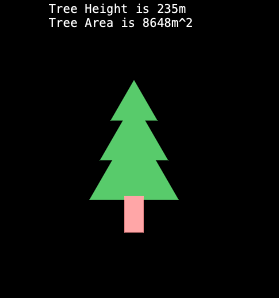
say "Tree Height is ", [+] @elements.map(*.height);
say "Tree Area is ", [+] @elements.map(*.area);
my $tree = Group.new( :@elements );
my $drawing = Drawing.new( elements => $tree );
$drawing.serialize.say;

Wowee, look how I can just type in 100m and the Physics::Measure postfix<m> operator magically makes a Length object … no need to repetitively type in my Length $d = Length.new(value => 100, units => ‘m’); every time (provided I have an SI unit / SI prefix such as cm, kg, ml and so on). And, like magic, a beautiful Xmas tree appeared on the screen.

Then p6elf realised his mistake. While Santa would need to fly over the towering trees that surround the North Pole – where sizes are measured in metric units, he would also need to deliver many, many presents to the kids in America – and their tree are purchased by the foot. Of course, raku to the rescue – since p6elf was too lazy to retype all the embedded unit values in his first model, he created a Magic Tree (M-Tree) class and parameterized the dimensions of the elements like this:

class M-Tree {
has M-Point $.apex;
has Length $.size;
has M-Triangle $!top;
has M-Triangle $!middle;
has M-Triangle $!bottom;
has M-Rectangle $!base;
method elements {
[ $!top, $!middle, $!bottom, $!base ]
}
method height( --> Length ) {
[+] $.elements.map(*.height)
}
method area( --> Area ) {
[+] $.elements.map(*.area)
}
method TWEAK {
my $stroke := my $fill;
$fill = "green";
#calculate x co-ords relative to top of drawing, according to height
my \x := $!apex.x;
my \s := $!size;
my \p = [ (s / 4) , ( s * 3/8), (s / 2) ];
$!top = M-Triangle.new( :$stroke, :$fill,
apex => M-Point.new(x, p[0]),
side => p[0] );
$!middle = M-Triangle.new( :$stroke, :$fill,
apex => M-Point.new(x, p[1]),
side => p[1] );
$!bottom = M-Triangle.new( :$stroke, :$fill,
apex => M-Point.new(x, p[2]),
side => p[2] );
$fill = "brown";
$!base = M-Rectangle.new( :$stroke, :$fill,
origin => M-Point.new(( 0.9 * x ), (([+] p) - (0.2 * s))),
width => 0.1 * s,
height => 0.2 * s );
}
}
#my $size = 200m;
my $size = ♎️'50 ft';
my M-Point $apex .= new(($size / 2), ($size / 4));
my M-Tree $us-tree .= new(:$apex, :$size);
say "Tree Height is {$us-tree.height} (including the base)";
say "Tree Area is {$us-tree.area}";
my $drawing = Drawing.new( elements => $us-tree.elements );
$drawing.serialize.say;

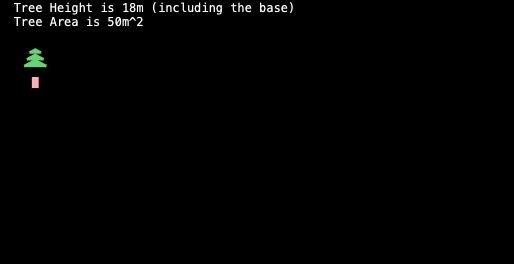
Look how cool programming is, I can capture the shape of my object and just need to set the control dimension $size in one place. Instead of 200m via the postfix syntax,I can use the libra emoji prefix<♎️> that uses powerful raku Grammars to read the units and automatically convert. Let’s take a look at the result:

Phew, no need to worry, Santa can easily get over these smaller forests even when the reindeer are tired and low on energy…

… energy – hmmm maybe I can use raku Physics::Measure to work out how much energy we need to load up in terajoules(TJ) and then convert that to calories to work out how much feed Rudy and the team will need … mused p6elf in a minced pie induced dream.

~p6steve.com

With inspiration from: Jonathan Stowe’s perl6 advent calendar Christmas Tree and Codesections’ Learn Raku With: HTML Balls

Day 17 – Generic data structure traversals with roles and introspection

Generic datastructure traversals with roles and introspection

I am a lambdacamel and therefore I like to adapt concepts and techniques from functional programming, and in particular from the Haskell language, to Raku. One of the techniques that I use a lot is generic traversals, also known as “Scrap Your Boilerplate” after the title of the paper by Simon Peyton Jones and Ralf Lämmel that introduced this approach. In their words:

Many programs traverse data structures built from rich mutually-recursive data types. Such programs often have a great deal of “boilerplate” code that simply walks the structure, hiding a small amount of “real” code that constitutes the reason for the traversal. ”Generic programming” is the umbrella term to describe a wide variety of programming technology directed at this problem.

So to save you having to write your own custom traversal, this approach gives you generic functions that do traversals on arbitrary data strucures. In this article, I will explain how you can easily implement such generics in Raku for arbitrary role-based datastructures. There is no Haskell in this article.

Roles as datatypes by example

I implemented of these generics for use with role-based datatypes. Raku’s parameterised roles make creating complex datastructures very easy. I use the roles purely as datatypes, so they have no associated methods.

For example, here is an example code snippet in a little language that I use in my research.

map (f1 . f2) (map g (zipt (v1,map h v2)))

The primitives are map, . (function composition), zipt and the tuple (...), and the names of functions and vectord. The datatype for the abstract syntax of this little language is called Expr and looks as follows:

# Any expression in the language
role Expr {}
# map f v
role MapV[Expr \f_,Expr \v_] does Expr {
    has Expr $.f = f_;
    has Expr $.v = v_;
}
# function composition f . g
role Comp[Expr \f_, Expr \g_] does Expr {
    has Expr $.f = f_;
    has Expr $.g = g_;
}
# zipt t turns a tuple of vectors into a vector of tuples
role ZipT[Expr \t_] does Expr {
    has Expr $.t = t_
}
# tuples are just arrays of Expr
role Tuple[Array[Expr] \e_] does Expr {
    has Array[Expr] $.e = e_
}
# names of functions and vectors are just string constants
role Name[Str \n_] does Expr {
    has Str $.n = n_
}

The Expr role is the toplevel datatype. It is empty because it is implemented entirely in terms of the other roles, which thanks to the does are all of type Expr. And most of the roles have attributes that are also of type Expr. So we have a recursive datatype, a tree with the Name node as leaves.

We can now write the abstract syntax tree (AST) of the example code using this Expr datatype:

my \ast = MapV[ 
    Comp[
        Name['f1'].new,
        Name['f2'].new
    ].new,
    MapV[
        Name['g'].new,
        ZipT[
            Tuple[
                Array[Expr].new(
                    Name['v1'].new,
                    MapV[
                        Name['h'].new,
                        Name['v2'].new
                    ].new
                )
            ].new
        ].new
    ].new
].new;

The typical way to work with such a datastructure is using a given/when:

sub worker(Expr \expr) {
    given expr {
        when MapV {...}
        when Comp {...}
        when ZipT {...}
        ...        
    }
}

Alternatively, you can use a multi sub:

multi sub worker(Mapv \expr) {...}
multi sub worker(Comp \expr) {...}
multi sub worker(ZipT \expr) {...}
...        

In both cases, we use the roles as the types to match against for the actions we want to take.

(For more details about algebraic datatypes see my earlier article Roles as Algebraic Data Types in Raku.)

Generics

If I want to traverse the AST above, what I would normally do is write a worker as above, where for every node except the leaf nodes, I would call the worker recursively, for example:

sub worker(Expr \expr) {
    given expr {
        when MapV {
            \my f_ = worker(expr.f);
            \my v_ = worker(expr.v);
            ...
        }
        ...        
    }
}

But wouldn’t it be nice if I did not have to write that code at all? Enter generics.

I base my naming and function arguments on that of the Haskell library Data.Generics. It provides many schemes for traversals, but the most important ones are everything and everywhere.

  • everything is a function which takes a datastructure, a matching function, an accumulator and an update function for the accumulator. The matching function defines what you are looking for in the datastructure. The result is put into the accumulator using the update function.

    sub everything(
        Any \datastructure, 
        Any \accumulator, 
        &joiner, 
        &matcher 
        --> Any){...}
    
  • everywhere is a function which takes a datastructure and a modifier function. The modifier function defines which parts of the datastructure you want to modify. The result of the traversal is a modified version of the datastructure.

    sub everywhere(
        Any \datastructure, 
        &modifier 
        --> Any){...}
    

The most common case for the accumulator is to use a list, so the updated function appends lists to the accumulator:

sub append(\acc, \res) {
    return (|acc, |res);
}

As an example of a matching function, let’s for example find all the function and vector names in our AST above:

sub matcher(\expr) {
    given expr {
        when Name {
            return [expr.n]
        } 
    }
    return []
}

So if we find a Name node, we return its n attribute as a single-element list; otherwise we return an empty list.

my \names = everything(ast,[],&append,&matcher); 
# => returns (f1 f2 g h v1 v2)

Or let’s say we want to change the names in this AST:

sub modifier(\t) {
    given t {
        when Name {
            Name[t.n~'_updated'].new 
        }
        default {t}
    }
}

my \ast_ = everywhere(ast,&modfier); 
# => returns the AST with all names appended with "_updated"

Implementing Generics

So how do we implement these magic everything and everywhere functions? The problem to solve is that we want to iterate through the attributes of every role without having to name it. The solution for this is to use Raku’s Metaobject protocol (MOP) for introspection. In practice, we use the Rakudo-specific Metamodel. We need only three methods: attribute, get_value and set_value. With these, we can iterate through the attributes and visit them recursively.

Attributes can be $, @ or % (and even & but I will skip this). What this means in terms of Raku’s type system is that they can be scalar, Iterable or Associative, and we need to distinguish these cases. With that, we can write everything as follows:

sub everything (\t, \acc,&update,&match) {
    # Arguments a immutable, so copy to $acc_
    my $acc_ = acc;
    # Match and update $acc_
    $acc_ =update($acc_,match(t));
    # Test the attribute type
    if t ~~ Associative {
        # Iterate over the values
        for t.values -> \t_elt  {
            $acc_ = everything(t_elt,$acc_,&update,&match)
        }
        return $acc_; 
    }     
    elsif t ~~ Iterable {
        # Iterate
        for |t -> \t_elt  {
            $acc_ = everything(t_elt,$acc_,&update,&match)
        }
        return $acc_; 
    }

    else { 
        # Go through all attributes
        for t.^attributes -> \attr {
            # Not everyting return by ^attributes 
            # is of type Attribute
            if attr ~~ Attribute {
                # Get the attribute value
                my \expr = attr.get_value(t);
                if not expr ~~ Any  { # for ContainerDescriptor::Untyped
                    return $acc_;
                }
                # Descend into this expression
                $acc_ = everything(expr,$acc_,&update, &match);
            }
        }
    }
    return $acc_
}

So what we do here essentially is:

  • for @ and % we iterate through the values
  • iterate through the attributes using ^attributes
  • for each attribute, get the expression using get_value
  • call everything on that expression
  • the first thing everything does is update the accumulator

everywhere is similar:

sub everywhere (\t_,&modifier) {
    # Modify the node
    my \t = modifier(t_);
    # Test the type for Iterable or Associative
    if t ~~ Associative {
        # Build the updated map
        my %t_;
        for t.keys -> \t_k  {
            my \t_v = t{t_k};
            %t_{t_k} = everywhere (t_v,&modifier);
        }
        return %t_; 
    }     
    elsif t ~~ Iterable {
        # Build the updated list
        my @t_=[];
        for |t -> \t_elt  {
            @t_.push( everywhere(t_elt,&modifier) );
        }
        return @t_; 
    }

    else {
        # t is immutable so copyto $t_
        my $t_ = t;
        for t.^attributes -> \attr {            
            if attr ~~ Attribute {
                my \expr = attr.get_value(t);
                if not expr ~~ Any  { # for ContainerDescriptor::Untyped
                    return $t_;
                }
                my \expr_ = everywhere(expr,&modifier);                
                attr.set_value($t_,expr_);
            }
        }
        return $t_;
    }
    return t;
}

So what we do here essentially is:

  • for @ and % we iterate through the values
  • iterate through the attributes using ^attributes
  • for each attribute, get the expression using get_value
  • call everywhere on that expression
  • update the attribute using set_value

This works without roles too

First of all, the above works for classes too, because the Metamodel methods are not specific to roles. Furthermore, because we test for @ and %, the generics above work just fine for data structures without roles, built from hashes and arrays:

my \lst = [1,[2,3,4,[5,6,7]],[8,9,[10,11,[12]]]];

sub matcher (\expr) {
    given expr {
        when List {
            if expr[0] % 2 == 0 {                
                    return [expr]                
            }            
        }
    }
    return []
}

my \res = everything(lst,[],&append,matcher);
say res;
# ([2 3 4 [5 6 7]] [8 9 [10 11 [12]]] [10 11 [12]] [12])

Or for hashes:

my %hsh = 
    a => {
        b => {
            c => 1,
            a => {
                b =>1,c=>2
            } 
        },
        c => {
            a =>3
        }
    },
    b => 4,
    c => {d=>5,e=>6}
;

sub hmatcher (\expr) {
    given (expr) {
        when Map {
            my $acc=[];
            for expr.keys -> \k {                
                if k eq 'a' {
                    $acc.push(expr{k})
                }
            }
            return $acc;
        }
    }
    return []
}

my \hres = everything(%hsh,[],&append,&hmatcher);
say hres;
# ({b => {a => {b => 1, c => 2}, c => 1}, c => {a => 3}} {b => 1, c => 2} 3)

Conclusion

Generic datastructure traversals are a great way to reduce boilerplate code and focus on the actual purpose of the traversals. And now you can have them in Raku too. I have shown the implementation for the two main schemes everything and everywhere and shown that they work for role based datastructures as well as traditional hash- or array-based datastructures.

Day 16 – Reindeer Express

Santa didn’t know if he should be worried or angry, and that made him angry.

Unbeknown to the world he had been outsourcing a lot of the production of Christmas gifts to low cost countries like China. The elves had not liked it. They had threatened to unionize and bring the whole operation to a halt. At a non-specified future date. December 24th was explicitly not mentioned, but one of the senior elves had said «ho, ho ho» in a menacing tone of voice. The memory made Santa shudder.

But the elves were not the problem. He had bought them off with fancy titles. CTO (Chief Transportation Officer) was easy. The next hundred or so, not so bad. But the rest of them had been a struggle. He was not particularly proud of D1C (Dispatch team 1 Coffee maker). But as they say, somebody has to make the coffee.

The problem was shipping. The pandemic had caused problems for everybody, and the shipping companies answered “Force Majeure” when asked what they intended to do about the inevitable delays. The problem was the sheer amount of goods. Whereas normal companies measured the goods in terms of containers, he measured them in terms of whole ships.

The CWO (Chief Whatever Officer, another not-so-inspired title) approached him apprehensively.

Santa sighed. He could smell trouble when it stared him in the face. Or something. Whatever.

“You remember the order for bootleg Lego bricks to the elves’ Christmas party?” The elf looked miserable.

Ah, Santa thought. That shipment will also be delayed. He felt somewhat better at the idea of one thousand elves without a single Lego brick. They had made quite a fuss about it, and he had agreed to the Lego bricks to get them on board with the outsourcing. Titles are fine, but bricks are better. Apparently.

“There has been a terrible mix up. The order was for 20,000 bricks, and the shipping company was told to put them on the first ship with space to spare.” He looked even more miserable. “Well. They didn’t. They would not fit on the teddy bear boat. Not all of it. We only got 40,000 bricks. They just called, and asked us for a revised shipping schedule.” He looked if possible even more miserable. “For 20 billion bricks.”

Santa was livid. 20 billion bricks! They could not give them away (as Christmas gifts), as they were bound to be discovered as counterfeit. The ensuing litigation from the overlords at Lego would be unbearable. From a PR, economic and legal perspective. It could sink the entire operation!

Santa opened his mouth, about to scream at the elf.

But the elf got in first. “But all is not lost, sir. The GHWF came up with an idea.” GHWF? though Santa. He could not remember that title. It sounded made up. Well. They all were.

The emboldened elf continued. “He proposed building our own custom containers, as the real ones are in short supply, by Lego. Superglued together. And then we can use the Reindeer Express to haul them here.

Santa closed his mouth, and sat down. He had not realized that he was on his way up, but the elves had a way of getting at you. Very conscientious and literal, devoid of humor and double entendres, but most of all incapable of getting the important part up front.

“Yes”, the elf continued. “The CRO has done the calculation, and it works out. As long as we start right away.” CRO, Santa mused. Surely that was the Chief Reindeer Officer? He almost smiled. In charge of getting rid of the muck, if he remembered correctly. The title came with a big office, and an even bigger shovel.

The elf came closer, and laid a sheet of paper in front of Santa. “Here is the proposed schedule.”

                 R201  R202  R203  R204  R205  R206  R207  R208  R209  R210
----------------------------------------------------------------------------
Santa/RE1   dep   0000  0030  0100  0130  0200  0230  0300  0330  0400  0430 
Mega        arr   0040  0110  0140  0210  0240  0310  0340  0410  0440  0510 
Mega/RE2    dep   0110  0140  0210  0240  0310  0340  0410  0440  0510  0540 
America     arr   0155  0225  0255  0325  0355  0425  0455  0525  0555  0625 
America/RE2 dep   0215  0245  0315  0345  0415  0445  0515  0545  0615  0645 
Mega        arr   0250  0320  0350  0420  0450  0520  0550  0620  0650  0720 
Mega/RE1    dep   0330  0400  0430  0500  0530  0600  0630  0700  0730  0800 
Santa       arr   0425  0455  0525  0555  0625  0655  0725  0755  0825  0855 
Santa/RE1   dep   0500  0530  0600  0630  0700  0730  0800  0830  0900  0930 

                 R301  R302  R303  R304  R305  R306  R307  R308  R309  R310
---------------------------------------------------------------------------
Santa/RE1  dep   0007' 0037' 0107' 0137' 0207' 0237' 0307' 0337' 0407' 0437'
Mega       arr   0047' 0117' 0147' 0217' 0247' 0317' 0347' 0417' 0447' 0517'
Mega/RE3   dep   0117' 0147' 0217' 0247' 0317' 0347' 0417' 0447' 0517' 0547'
Africa     arr   0158' 0228' 0258' 0328' 0358' 0428' 0458' 0528' 0558' 0628'
Africa/RE3 dep   0240  0310  0340  0410  0440  0510  0540  0610  0640  0710 
Mega       arr   0309  0339  0409  0439  0509  0539  0609  0639  0709  0739 
Mega/RE1   dep   0330  0400  0430  0500  0530  0600  0630  0700  0730  0800 
Santa      arr   0425  0455  0525  0555  0625  0655  0725  0755  0825  0855 
Santa/RE1  dep   0507' 0537' 0607' 0637' 0707' 0737' 0807' 0837' 0907' 0937'

                R401  R402  R403  R404  R405  R406  R407  R408  R409
--------------------------------------------------------------------
Santa/RE1 dep   0015  0045  0115  0145  0215  0245  0315  0345  0415 
Mega      arr   0055  0125  0155  0225  0255  0325  0355  0425  0455 
Mega/RE4  dep   0125  0155  0225  0255  0325  0355  0425  0455  0525 
Asia      arr   0137  0207  0237  0307  0337  0407  0437  0507  0537 
Asia/RE4  dep   0210  0240  0310  0340  0410  0440  0510  0540  0610 
Mega      arr   0218  0248  0318  0348  0418  0448  0518  0548  0618 
Mega/RE1  dep   0300  0330  0400  0430  0500  0530  0600  0630  0700 
Santa     arr   0355  0425  0455  0525  0555  0625  0655  0725  0755 
Santa/RE1 dep   0445  0515  0545  0615  0645  0715  0745  0815  0845 

                    R501 R502 R503 R504 R505 R506 R507 R508 R509 R510 R511 R512 R513
------------------------------------------------------------------------------------
Santa/RE1     dep   0022 0052 0122 0152 0222 0252 0322 0352 0422 0452 0522 0552 0622
Mega          arr   0102 0132 0202 0232 0302 0332 0402 0432 0502 0532 0602 0632 0702
Mega/RE5      dep   0132 0202 0232 0302 0332 0402 0432 0502 0532 0602 0632 0702 0732
Australia     arr   0312 0342 0412 0442 0512 0542 0612 0642 0712 0742 0812 0842 0912
Australia/RE5 dep   0340 0410 0440 0510 0540 0610 0640 0710 0740 0810 0840 0910 0940 
Mega          arr   0458 0528 0558 0628 0658 0728 0758 0828 0858 0928 0958 1028 1058 
Mega/RE1      dep   0522 0552 0622 0652 0722 0752 0822 0852 0922 0952 1022 1052 1122
Santa         arr   0617 0647 0717 0747 0817 0847 0917 0947 1017 1047 1117 1147 1217
Santa/RE1     dep   0652 0722 0752 0822 0852 0922 0952 1022 1052 1122 1152 1222 1252

R200: Number of vehicles: 10
R300: Number of vehicles: 10
R400: Number of vehicles: 9
R500: Number of vehicles: 13
---------------------------------------
Total number of vehicles: 42

Santa looked at the paper. Then tried turning it upside down, to see if that would help. It didn’t. The elf made a discreet cough. “As you can see, sir, the trick is to send some of the goods directly to the regional distribution centres.”

Ah, yes. Santa thought. The battle of the A’s. The first one should have been called A, the next one B, and so on. They never got past A. America, Asia, Australia and Africa.

“We have divided them into 5 routes, and they do one tour to a regional centre each, before coming here for maintenance and so on”, the elf continued.

The elf pointed at the bottom of the paper. “We need 42 reindeer haulers, and we have 45 of them. So we even have some to spare, if – or when – things go haywire”.

Haywire? Santa thought. The name Rudolph popped up, unbidden. “Rudolf?” he inquired. The elf looked smug. “He is on a top secret mission in the Bahamas, checking the best width/length ratio for surfboards..”. The elf looked even smugger, if that is a word. “We forgot to equip him with a return ticket. He will inquire about it eventually, we think, but in the meantime – he is not here.”

Clever man. Er, elf, thought Santa. Too clever, perhaps? A candidate for a future top secret mission to, somewhere? Santa filed the thought for later.

Santa pointed at the paper. “Very impressive. How did you manage this?” The elf brightened. “A guy in Norway has made a program for us, called networkplanner, written in Raku. We only have to pass it some data, and it will compute the rest for us. All by itself. (Note to the readers: The elf didn’t really understand all the numbers on the paper, but the programmer had written a nice explanation for him. Not that he understood much of it, but it looked impressive.)

The elf seemed to read his mind, and continued. (Note to the readers: Santa worried about expenditures. No amount too little to worry about. The elves knew all about it, with the Lego incident fresh in memory.) “And he did it free of charge, as open source.”

Amazing, Santa thought. Giving away valuable programs free of charge. Then he thought some more, about the spirit of Christmas, and his own role in giving away presents for free. The humans may have caught on, he thought. Perhaps we should send the guy some Lego bricks? Real ones, even.

Something did not add up.

Finally he got it. “And the Lego bricks?”

The elf looked smug again. “We need them all for the shipping containers. More than we got, actually, so we have to ship the used parts back to China from the distribution centres for reuse. So all of it, or at least 19,998 billion bricks will end up here. By Christmas.”

He looked even smugger. Santa made a mental note to look it up. Smugger. More smug, perhaps?

He thought about the elves’ Christmas party, and 19,998 billion bricks. It could put you out. It really could…

Then he had a thought. “Norway?”, he said. “One of the countries squabbling about where I live?”. “Quite so”, the elf confirmed. “Finland is the other one”. He leaned closer. “The CHO thinks it may be to keep warm. The squabbling, that is”. Santa was fed up with titles, so did not ask what CHO meant. Wasn’t it a shoe brand, or shop? Or was that Shoo? He looked at his own shoes, considering the expected new pair he would get from the elves at Christmas. They did not quite get it right, so he had to exchange them later on. Discreetly.

And Finland, of all the places. Santa was fed up with the cold, so had moved the whole operation to Spain centuries ago.

The Elf left. Santa chuckled, quite satisfied. Everything had a way of sorting itself out in the end.

Then he had a terrible thought. The invoice for the 20 billion Lego bricks!

Day 15 – 1 year of Comma

This year was yet another productive year for Comma, the Raku programming language IDE. Our small team has worked on numerous small improvements and bug fixes, as well as bigger features. In this article we’ll take a look at some bigger things that has landed this year.

Duplicates detection

OPEN IN NEW TAB TO SEE THE ORIGINAL SIZE

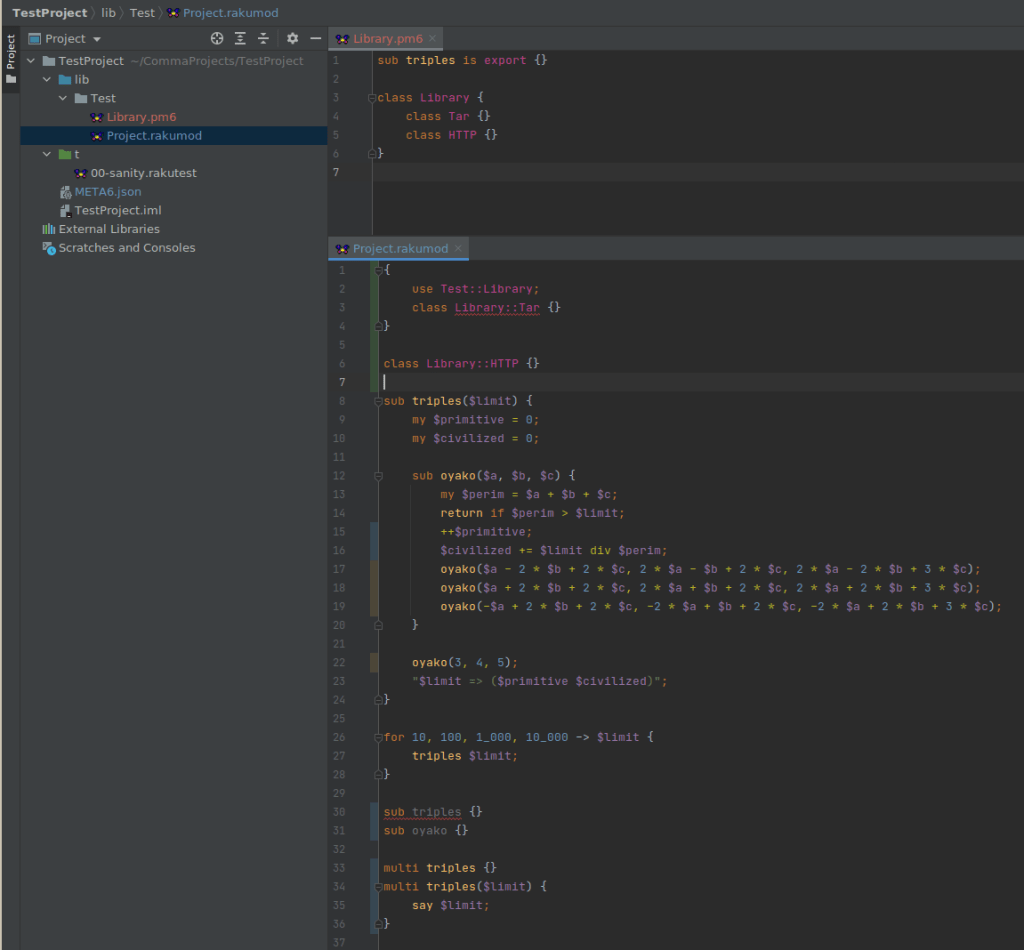
Let’s take a look at this case to start with some code-y example. Copy-paste mistakes resulting in re-declarations are common in cases where a lot of similar code needs to be produced, and the Rakudo compiler is usually very helpful at detecting duplicate classes or subroutines.

Here we have two files, Library.pm6 and Project.rakumod. One declares a subroutine available for importing and a couple of classes. The second one has quite a lot going on, so let’s go step by step.

First, we have an import line for the Test::Library compilation unit. Comma will auto-complete names from the project as well as from the ecosystem for you.

Next, we have a re-declaration of a class from the outer file, Comma also notes where the class from an external source was first declared. The symbols are also not leaking between the files.

Next, we have a subroutine triples declared with an argument and its usage. It also contains a lexical subroutine inside.

Next, we have the subroutine re-declaration and not a re-declaration of its inner lexical oyako. Of course, when we have multi subroutines, we can have them without errors.

Note how some subroutine names are greyed out, that’s because they are declared, but not used – another heuristic, working also for private attributes, private methods, parameters and lexical variables.

Last, but not the least: colour highlight on the left side of the code editor and in the project files viewer describes current state of the files in the VCS.

Pod documentation preview

OPEN IN NEW TAB TO SEE THE ORIGINAL SIZE

Nobody likes documenting the code, right? Sure thing, nobody except those who do.

At least in Comma you have more meaning to do it: as it renders your documentation, for you and for your users.

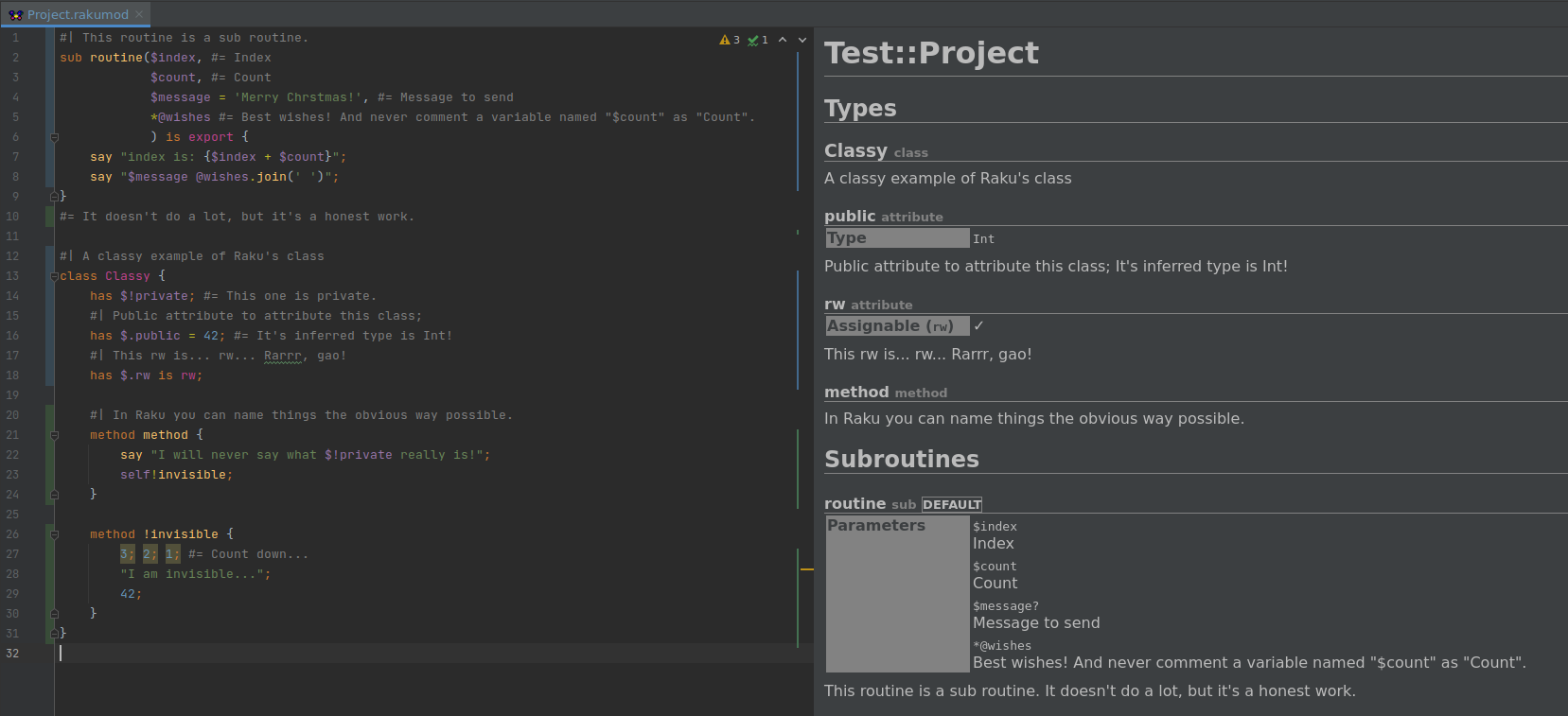
In the preview tab on the right of the editor we see rendered HTML generated from the Pod in the editor. Generated documentation is for things that are visible externally, such as packages (classes are packages) or exported subroutines. Items are divided into categories Types and Subroutines. For a Raku entity which can carry documentation, the documentation lines are merged into a single description.

For a subroutine, parameters and its return type are considered, such as things like if the parameter is optional and its type.

For packages, such as a class, methods and attributes are considered. Comma understands traits like is rw or how private methods should not be documented.

As a side note, Comma understands when things in a string are interpolated, such as just variables or calls, indicating it with highlighting, thus preventing silly mistakes of trying to interpolate with just "@wishes.join".

As yet another side note, note highlighting in the !invisible method: integer literals are marked, indicating they were detected as “useless use” by Comma.

And last, but not the least: if you run Comma with raku-doc option and a path to a Raku distribution, it will analyse the files and create the same structure of directories containing HTML files with API of the distribution documented.

Raku migration tool

More than a year has passed since Perl 6 was renamed to Raku, and there are still a lot of old extensions in the distributions around. To help with the migration Comma provides a tool to detect outdated files in the project, allow to select which ones you want to update and auto-magically apply changes.

The heuristic is activated on the project opening, but only sure Perl 6 extensions are detected (as it can be a mixed Raku+Perl project, so it won’t be nice to rename .t or .pm files). Invoking the tool from the Tools menu allows to update all possible extensions.

Worth to note how updating also updates the META6.json file for you, so updating a project can take a couple of clicks.

Concluding

Those are just some of the major features landed this year I picked, they are of importance as they touch three topics related to writing software: the code, its documentation and the project organization itself, all in a single place!

The latest public builds of Comma can be found at https://commaide.com/download.

Write software, debug, do not push yourself too hard – and happy holidays!

Day 14 – Santa Claus is Rakuing Along

Part 2 – Santa Moves from CPAN to Zef with App::Mi6

Prologue

A Christmas ditty sung to the tune of Santa Claus is Coming to Town:

He’s making a list,
He’s checking it closely,
He’s gonna find out who’s Rakuing mostly,
Santa Claus is Rakuing along.

Santa Claus Operations Update 2, 2021

Santa just heard that Rakoons using best practices are being urged to start putting their modules into the Raku-only module repository called Zef. He wanted to do that soon, since his philosophy is to be a good example of always trying to do the right thing, and helping guide his IT department in the direction of Zef is certainly the right thing to do according to the experts on IRC #raku.

One problem he found, though, was that how to do that with an existing module created by App::Mi6 in its default mode (to generate the new module for CPAN) is not clearly found in one place yet. So, he directed the IT folks to (1) create such a checklist and (2) follow it to put the new SantaClaus::Utils module on Zef.

After a bit of research, Santa’s Rakoons in IT published this checklist:

Install fez, the Zef repository tool

First ensure you have the latest version of Raku (2021.10 as of this writing).

(Note to install with zef or fez you need quotes around module names with adverbs attached as shown in following examples.)

  1. Install or upgrade zef to at least version ‘0.13.1’:
    $ zef install zef:ver<0.13.1>
  2. Install or upgrade the Zef repository tool fez to at least version ’31’:
    $ zef install fez:ver<31>
  3. Execute fez with no arguments to see its menu options. Note it has its own Zef installation tools, but we want to use App::Mi6 which will execute them correctly for us.
  4. Use fez to get a Zef account (unless you have one already). After a successful effort, the user will find a new file in his or her home directory: .fez-config.json. That file contains the user’s secret key and selected Zef user name (the value of key ‘un’).
  5. Install at least version 2.0.1 of App::Mi6:
    $ zef upgrade App::Mi6


Convert the module to use Zef instead of CPAN

Change the current working directory to that of the module to be converted.

Then, following the FAQ in the README.md file at https://github.com/skaji/mi6/, complete the following steps:

  1. Remove any Raku :auth or :ver ‘adverbs’ from the module name lines in directory ‘lib’. (This step is optional but recommended: any such information in the modules will be compared to that in the ‘META6.json’ file. That information in the ‘META6.json’ file is now required and authoritative to establish those values for a published module, and an exception will be thrown if the module adverbs conflict with the ‘META6.json’ file.)
  2. Modify the ‘dist.ini’ file in the module directory to include this line:
    [UploadToZef]
    
    
  3. Recently created modules may have the following line in the ‘dist.ini’ file:
    [UploadToCPAN]


If so, remove it or comment it out with a leading semicolon.

  1. Optional, but recommended: add a line in the ‘Changes’ file to make the top of it look something like this:
    {{$NEXT}}
    Publish to the Raku module Zef repository
    
    
  2. Ensure the ‘META6.json’ file’s entry for the following key has the correct information:”auth”: “zef:fez-username”,
  3. Execute $ mi6 build; mi6 test;
  4. Commit changes:
    $ git commit -mnow publishing on Zef
    
    
  5. Release the module. Following are the expected outputs from a successful release:
    $ mi6 release
    ==> Release distribution to Zef ecosystem
    There are 13 steps:
    * Step 1. CheckAuth Make sure auth in META6.json is zef:xxx
    * Step 2. CheckChanges Make sure Changes file has the next release description
    * Step 3. CheckOrigin
    * Step 4. CheckUntrackedFiles
    * Step 5. BumpVersion Bump version for modules (eg: 0.0.1 -> 0.0.2)
    * Step 6. RegenerateFiles
    * Step 7. DistTest
    * Step 8. MakeDist
    * Step 9. UploadToZef
    * Step10. RewriteChanges
    * Step11. GitCommit Git commit, and push it to remote
    * Step12. CreateGitTag Create git tag, and push it to remote
    * Step13. CleanDist
    ==> Step 1. CheckAuth
    ==> Step 2. CheckChanges
    ==> Step 3. CheckOrigin
    ==> Step 4. CheckUntrackedFiles
    ==> Step 5. BumpVersion
    Next release version? [0.0.4]:


The dialogue pauses after asking for the desired version. If the version offered is as expected or desired, accept it by merely pressing return, otherwise, enter the desired version number which must be greater than that offered.

Note that in some circumstances, such as attempting a release after a failure, the version number may be incorrect and a manual edit of the "version" value in the ‘META6.json’ file may be required. It may be difficult to identify which program is at fault, but soliciting help on IRC #raku is a good place to start if in doubt.

Continuing after the user response, in this case a bare return only…

==> Step 6. RegenerateFiles
==> Step 7. DistTest
t/01-basic.rakutest .. ok
All tests successful.
Files=1, Tests=1, 0 wallclock secs
Result: PASS
==> Step 8. MakeDist
==> Step 9. UploadToZef
Are you sure you want to upload SantaClaus-Utils-0.0.4.tar.gz to Zef ecosystem? (y/N)

The user can enter ‘y’ to continue or ‘N’ to quit the release process.

Again, after a previous failed attempt the ‘N’ response may be ignored and the user may have to break out of the dialogue with a ctl-C.

Continuing with a ‘y’ response…

Executing fez file=SantaClaus-Utils-0.0.4.tar.gz upload
>>= Looking in SantaClaus-Utils-0.0.4.tar.gz for META6.json
>>= meta<provides> looks OK
>>= meta<resources> looks OK
>>= SantaClaus::Utils:ver<0.0.4>:auth<zef:santa-it-dept> looks OK
>>= Hey! You did it! Your dist will be indexed shortly.
It will appear in https://360.zef.pm/
==> Step10. RewriteChanges
==> Step11. GitCommit
==> Step12. CreateGitTag
* [new tag] 0.0.4 -> 0.0.4
==> Step13. CleanDist

If there are any problems found by fez or mi6, you should see an error message indicating the problem. You should file an issue with the appropriate program if the error message doesn’t help.

With a normal conclusion, there should be no unrecognized objects in the directory. If there were problems, the clean-up step may not have happened and you may have a GNU *.tar.gz file or an ./sdist directory. They can be safely deleted.

A Christmas Present

The researchers had one more pitch to make: Why go to all this trouble again? Take advantage of the newly-capable mi6 to create a new module to be used by Zef!

The task, create a new module for Santa’s reports:

$ mi6 new fez Santa::Reports

Note mi6 accepts either --fez or --zef as the same option. Continuing…

Loading author’s name and email from git config global user.name / user.email
Loading zef username from ~/.fez-config.json
Successfully created Santa-Reports

Voila, a new skeleton module ready for new code, good testing, and publishing on Zef! See the directory listing:

Santa-Reports/
dist.ini
.gitignore
t/
01-basic.rakutest
.github/
workflows/
test.yml
LICENSE
META6.json
README.md
lib/
Santa/
Reports.rakumod
bin/
Changes

And the important dir.ini file for the Zef repository:

name = Santa-Reports
[ReadmeFromPod]
; enable = false
filename = lib/Santa/Reports.rakumod
[UploadToZef]
[PruneFiles]
; match = ^ xt/
[Badges]
provider = github-actions/test

Finally, the fez-critical part of the ‘META6.json’ file:

auth: zef:santa-user,

Summary

Programs fez and mi6 can now interoperate successfully, thus a user can easily move mi6-created modules to Zef, as well as create new modules for Zef.

Raku module authors are encouraged to move all their modules to Zef for its many features including security and fine-grain differentiation of modules with the same name.

Santa’s Epilogue

Don’t forget the “reason for the season:” ✝

As I always end these jottings, in the words of Charles Dickens’ Tiny Tim, “may God bless Us , Every one!” [1]

Footnotes

  1. A Christmas Carol, a short story by Charles Dickens (1812-1870), a well-known and popular Victorian author whose many works include The Pickwick Papers, Oliver Twist, David Copperfield, Bleak House, Great Expectations, and A Tale of Two Cities.

Day 13 – Coloring your tools holidays

Jingle bells, jingle bells,
Santa's busy guy,
Don't we bother him with what
We can make ourselves…

And if you’re in doubt yet whether Santa was really overloaded last year, just check out the advent calendar of 2020. That’s why back then I fetched out an old, dusty reddish-white cap, pulled it over my ears and started a small home-brew project to help my wife in her job.

To be fully honest here, it was a gift to myself too since for some time I planned to learn more about front-end programming. A good chance to look at Vue and TypeScript, why not to take it? There is Cro, Cro::RPC::JSON for APIs, Red for databases. Of course, there is Raku to bind them all… Oh, pardon me, it’s a different epic story to be told when time comes!

This article (is it really a post? ah, whatever…) started with something, any one doing backend development knows well about: the need to monitor the server script, restart it upon failures, or when sources changes, etc., etc. Aside of that, I also wanted to keep my eye on rebuilds of the frontend code. And since I didn’t like keeping both tasks in two different shell sessions, I came up with a script runner.raku which was controlling them and juggling processes the way I needed.

As always, there is a “but”. This time I quickly realized that often simultaneous changes of both server and frontend sources results in a chaotic mixture of outputs, hard to read and to locate errors. Having some experience in creating a prototype of a text UI framework, I soon started considering something for the runner script to separate and manage outputs of each task. Unfortunately, Vikna was not nor yet ready for real use; and however much I’d like to complete the project, I just don’t have enough time for it. So I gave up…

… Until Terminal::UI by Brian Duggan was released. “Oh!” – I said to myself. And… Well, nothing. Because then I started thinking: since npm build outputs in colors and it is really easy to spot any useful bits of information this way, I’d like to preserve these colors. But this would require parsing the input, picking any control sequences from it, analyzing them, translating into… Oh, my, thanks! After all, not everything is that bad about the old plain flat stream of sometimes mixed up output. Not that often it happens, isn’t worth the troubles…

But once there was a day when I thought: perhaps there is a module for parsing ANSI sequences? And thrown I a dragnet into the waters of Raku Land, and came it back empty, and made I a helpless gesture… Only to see in two days an announcement of Geoffrey Broadwell releasing his Terminal::ANSIParser! It was the sign. After all, having something for UI, something for parsing the input, and an already working process orchestrator – how long would it take to forge them into something? Yes, my naïvety again and again. Once started, I wanted to get from it:

  • Split coloring for stdout/stderr
  • Split process output from related runner script status change messages
  • A specialized current state indication row (state bar)
  • print/say methods for outputting different kinds of messages, because Terminal::UI only has put which doesn’t even wrap lines. Basically, it’s what the module is primarily designed for: output lines and navigate them.
  • Search for strings or regexes with color marking of matches found
  • Input line with history for the above feature

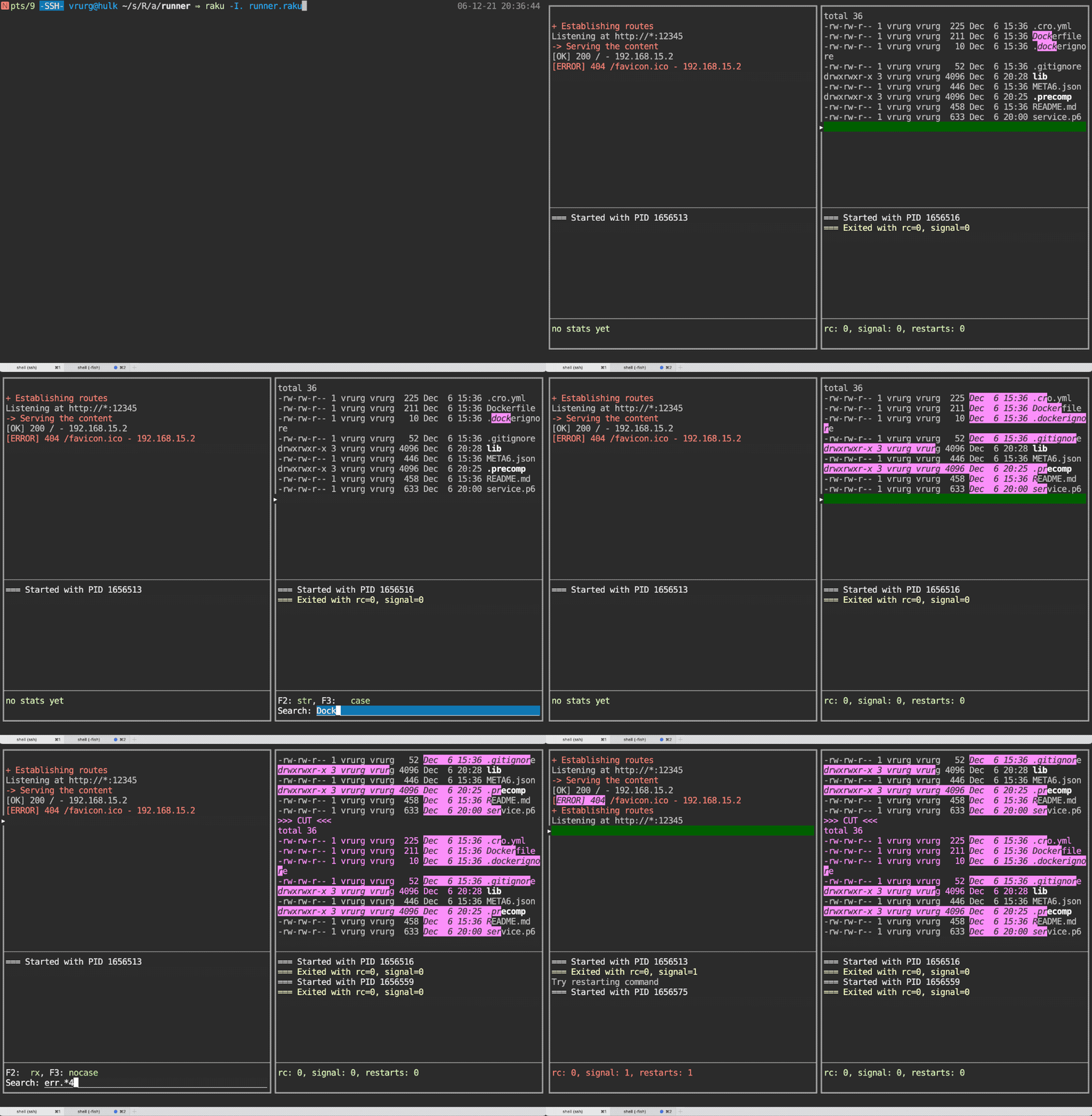
And I got it. All. Not that it took me a couple of days, but here is what the result looks like:

Only later as it came to me: look, it’s a simple terminal emulator! Without keyboard passing into subprocesses, though. But with ANSI sequence parsing, and translating, and showing the result back to user.

It would be too much to discuss all the aspects of the resulting code. For adventurous ones the source is available. It consist of an UI module, which is responsible for all the in/out interactions; and of a runner module, doing the management work. The latter primarily consists of the process orchestrator, and barely of much interest here. So, let’s focus on the UI.

The core of it is Terminalish role which is responsible for gathering text streams, seasoned with ANSI ESC-sequences, from different sources, buffering their intermediate representation, possibly doing some processing work like applying search requests, and sending the result to some kind of output.

For example, to colorize your own message the following is expected to be done:

use Terminal::ANSI::OO 'ansi';
...
$terminalish-pane.say:
    ansi.blue,
    "This is blue",
    ansi.text-reset, 
    " this is in default colors";

$terminalish-pane is a pane object of Terminal::UI with Terminalish role mixed in. Remove it and leave the say alone and it will work as expected on a terminal emulator of your choice.

Even though I made it around Terminal::UI, with limited amount of changes the role can be adapted to any other kind of UI library/framework since output is just a side effect of its primary purpose.

Internally the role is using the following components:

  • CSIProcessor is responsible for filtering input, passed through Terminal::ANSIParser, and translating it into the internal representation implemented by BufLine. This is the component which knows the ANSI sequences meaning.
  • BufLine, which holds a single line of scroll buffer with all the attributes necessary to display it correctly. It also responsible for transforming the line into output-ready form, providing support for line wrapping, highlighting search results, and colorizing stdout/stderr if requested.

The Terminalish role itself manages input, scroll buffer, and interacts with user code. It would better off to have it as a class, inheriting from Terminal::UI::Pane, but Terminal::UI doesn’t support inheritance of its components.

One of the biggest lessons learned, while implementing the role, was not to operate the ESC-sequences directly unless there are no plans to manipulate them in either way. Even a simplest manipulation in plain sight may bring troubles, except for bare removal.

Or it would be fine if the plan is to produce highly ineffective stream of output symbols, bloated with rubbish ESC-sequences…

Way more effective approach is to keep all the style attributes as bit-masks; and all the colors in whichever form you like, but one color per foreground/background, per symbol. Eventually, I introduced a Style class, which is a commonplace solution, but it works. Instances of the class are attached to each individual symbol.

A big advantage of Style is it’s ability to produce a difference of its two instances. The difference, in turn, is a highly effective approach to determine when an ANSI ESC sequence is to be inserted into the output. And even more importantly, what this sequence must consist of! Because only changes will make it through. For example, if we have a string “ab”, and “a” styled with green on blue + italic, whereas “b” is yellow on blue + bold + italic then the output would be made of:

ansi.green ~ ansi.bg-blue ~ ansi.italic ~ "a"
~ ansi.yellow ~ ansi.bold ~ "b"

I was rather surprised to see how effective the approach is when the firsts test runs resulted in rather decent performance, even though no real code optimization were done. Actually, since the whole thing was never planned for publication, no optimization has been done yet and not even planned to.

Also, as I mentioned already, the approach works extremely well when one needs to mark some part of the text with special colors of attributes. It is sufficient just to apply them to the correct symbols – and the rest will happen automatically! Oh, and don’t forget that as soon as the search results are not needed any more, the original style must be restored. This requirement resulted in an overlay style layer, which is applied over the original style. No need to say how much easier is it to flatten down two well-structured objects!

There one more trick I’d like to mention. When I started implementing SearchInput role, which is responsible for implementing input field for text search functionality, I realized that Terminal::UI doesn’t have support for turning the cursor on only when it is needed; and to maintain its position at where it is needed. I could send a sequence to enable it, but if a process generates some output at the time, you know what happens: it “snows”. And, worse of all, when its done snowing, the cursor is located anywhere else, but inside the input field.

I didn’t have time for a PR and came up with a workaround, which takes the $*OUT handle, wrapps it into my OUTWrapper object. The object can be told about when the cursor is needed and where exactly it is needed. Then it intercepts print method of the original $*OUT handle, hides the cursor before passing the control to the original method, and restores after that. All this only whenever necessary. The solution is so simple, that I like it despite its hackyness! Best of all, it doesn’t care about edge cases because I found none. Aside of service methods, the core of it is this method:

    method print(|c) {
        if $!force {
            $!out.print: ansi.cursor-off,
                         |c,
                         ansi.cursor-on, ansi.move-to($!row, $!col);
        }
        else {
            $!out.print: |c
        }
    }

That’s all, folks… With OUTWrapper.new, all I is needed to achieve the goal is: $*OUT.force-at($x, $y) – and visible cursor will stick to the required position.

Now, as I’m finishing and looking back at this text, it feels somewhat guilty of how little code it has. But the feeling lasts for only a short moment because the article has a whole project attached to it. The project is a demo with regard to it using only a dummy Cro server as a persistent process; and ls -lA command as a replacement for the frontend building. But otherwise it’s a fully functional, though unpolished, code. Just take it and use if there is a use for it. Let it be my little hand-made gift to the community for the upcoming holiday!

And what about the gift for my wife? Well… I turned out to be a terrible elf as it is not done it yet, in the year passed! With good excuses, though, like Vue+TypeScript learning from the scratch is very time consuming, especially when done in spare time. But more importantly, it allowed me to make great advances in Cro::RPC::JSON module, especially in areas, related to WebSockets support. I created Config::BINDish module, a beast of configuration formats, to which I hope to come back in a later article, if time allows. Even a couple of Rakudo bugs were squashed as a result of working on the gift. So, a lot has been done, except… But there is no way I’d give up on this!

Day 12 – A long journey to Ethereum signatures

The Ethereum blockchain is essentially a transaction-based state machine. We begin with a blank state, before any transactions have happened on the network, and move into some final state when transactions are executed. The state of Ethereum relies on past transactions. These transactions are grouped into blocks and each block is chained together with its parent.

Transactions are processing by own Turing complete virtual machine – known as the Ethereum Virtual Machine (EVM). The EVM has its own language: EVM bytecode. Typically a programmer writes a program in a higher-level language such as Solidity. Then the program should be compiled down to EVM bytecode and commited to the Ethereum network as the new transaction. The EVM executes the transaction recursively, computing the system state and the machine state.

The EVM is included into the Ethereum node client software that verifies all transactions in each block, keeping the network secure and the data accurate. Many Ethereum clients exist, in a variety of programming languages such as Go, Rust, Java and others. They all follow a formal specification: it dictates how the Ethereum network and blockchain functions.

In this article we will consider Geth as the basic Ethereum node software.

Transaction signing problem

Every transaction must be signed before sending to Ethereum network. This signature should be recoverable and actually is needed for a few reasons: the first one is to validate the origin, and the second one — to keep the basics of blockchain: transparency and traceability. Traditionally on Ethereum networks transactions could be signed remotely on the nodes with enabled authentication and locally at the application level with some black-box magic.

The first problem for the beginners (and not only) is that most Ethereum gateways (such as Infura, Alchemy, Zmok and others) do not support authentication on their nodes due to security reasons. So, you have to run your own node or sign transactions locally.

The second problem: there’s no clear and efficient cross-language interface for Ethereum signatures management. Well, you have use some things in Python, some in JavaScript and obviously low level implementations in C or Go.

In this article I would like to pass these tricky checkpoints with the explanations and examples and introduce fast Ethereum signing application in (almost pure) Raku.

Signing node: the prototype

The remote signing node prototype was considered during Multi-network Ethereum dApp in Raku talk at The 1st Raku Conference 2021. The idea is to use the node pair per application: target node in private or public Ethereum network and local node running in docker just for transaction signing.

We should set up the mocked/shared account at local signing node: the account with the same private key and obviously address as we use for sending transactions to target node.

To set up the mocked/shared account we need to get the private key for origin account. A lot of account managers (like MetaMask) allow to export private key. Since the private key is exported you should generate keyfile and copy it to your keystore folder. A new account will be imported on the fly.

On the other hand you can add new account with given private key via JSON RPC HTTP API — just post the next request to your Geth driven local signing node running at port 8541:

curl --data '{"method":"personal_importRawKey","params":["ACCOUNT_PRIVATE_KEY","ACCOUNT_PASSWORD"]}' -H "Content-Type:application/json" -X POST localhost:8541

Since the local signing node is set up and running, we can try to sign a few transactions from a Raku application. The generic tool is Net::Ethereum module — Raku’s interface for interacting with the Ethereum blockchain via JSON RPC API. This is the short code snippet for Ethereum transaction signing in Raku:

use Net::Ethereum;
# https://docs.soliditylang.org/en/v0.8.10/introduction-to-smart-contracts.html
constant sol_abi = slurp "./abi/SimpleStorage.abi";
constant sol_method = 'set';
constant sol_data = {
x => 2021
};
my UInt $gasqty = 8_000_000; # default gas limit in Geth (go-ethereum client)
my UInt $gprice = 1_000_000_000; # 1 gWei
my UInt $nonce = 0; # let's consider no trxs before
my Str $accntpwd = "node1";
my Str $accntadr = "0x901d5f3ad1ec4f9ab1a31a87f2bf082dda318c2c";
my Str $contract = "0x7f31b5bfb29fd3c0f456ba5f2f182683274ee2ae";
my $eth = Net::Ethereum.new(:abi(sol_abi), :api_url('http://127.0.0.1:8541'));
$eth.personal_unlockAccount(:account($accntadr), :password($accntpwd));
my %sign = $eth.eth_signTransaction(
:from($accntadr),
:to($contract),
:gas($gasqty),
:gasprice($gprice),
:nonce($nonce),
:data($eth.marshal(sol_method, sol_data))
);
say (%sign<raw>:exists && %sign<raw> ~~ m:i/^ 0x<xdigit>+ $/) ?? %sign<raw> !! "😮";

You can dive deeply:

  1. Pheix::Controller::Blockchain::Signernaive signer;
  2. Pheix::Model::Database::Blockchain::SendTxsmart signer;
  3. Net::Ethereum — signing unit tests.

Pheix CMS uses Pheix::Model::Database::Blockchain::SendTx as the default signing module. The full integration test on Rinkeby test network with local signing node in docker container runs about 2½ hours.

Make it possible to sign transactions locally

Obviously Ethereum transaction could be signed manually. We need the next tools to make it possible: rlp, Secp256k1 and Keccak-256. Finally, when transaction is successfully signed we have to send sendRawTransaction request to the target Ethereum node.

Recursive Length Prefix (RLP)

I have started with recursive Length Prefix (RLP). The purpose of RLP is to encode arbitrarily nested arrays of binary data, and RLP is the main encoding method used to serialize objects in Ethereum. It looks trivial and ready for direct porting to Raku.

Well, Node::Ethereum::RLP module was implemented: it delivers rlp_encode and rlp_decode methods in pure Raku. The usage is quite straight-forward:

use Node::Ethereum::RLP;
my $rlp = Node::Ethereum::RLP.new;
my buf8 $encoded_str = $rlp.rlp_encode(:input('lorem ipsum'));
my buf8 $encoded_arr = $rlp.rlp_encode(:input(['lorem'], ['ipsum']));
say $encoded_str.gist; # Buf[uint8]:0x<8B 6C 6F 72 65 6D 20 69 70 73 75 6D>
say $encoded_arr.gist; # Buf[uint8]:0x<CE C6 85 6C 6F 72 65 6D C6 85 69 70 73 75 6D>
my $decoded_str = $rlp.rlp_decode(:input($encoded_str));
say $decoded_str.gist; # {data => Buf[uint8]:0x<6C 6F 72 65 6D 20 69 70 73 75 6D>, remainder => Buf[uint8]:0x<>}
say $decoded_str<data>.decode; # lorem ipsum
my $decoded_arr_str = $rlp.rlp_decode(:input($encoded_arr));
my $decoded_arr_buf = $rlp.rlp_decode(:input($encoded_arr), :decode(False));
say $decoded_arr_str<data>.gist; # [[lorem] [ipsum]]
say $decoded_arr_buf<data>.gist; # [[Buf[uint8]:0x<6C 6F 72 65 6D>] [Buf[uint8]:0x<69 70 73 75 6D>]]

The direction of Node::Ethereum::RLP improving — to extend unit test suite. You can check brilliant paper «Ethereum’s Recursive Length Prefix in ACL2» by Alessandro Coglio about RLP, and see that there are a few non-trivial cases to be covered by module tests.

ECDSA (Secp256k1)

It was a little bit weird to figure out that Ethereum uses cryptography engine for signatures and keys management from Bitcoin. Not the own fork with any mods or any specific improvements, no — it’s totally borrowed “as is”. Anyway, it’s even better.

The path is clear: we need the Raku binding to Bitcoin’s Secp256k1 library: optimized C library for ECDSA signatures and secret/public key operations on elliptic curve secp256k1.

Usage

So, the next stop is Bitcoin::Core::Secp256k1 module. It has bindings to generic and recoverable APIs. In context of Ethereum we have to use recoverable ones, cause of explicit recovery_param (parity of y coordinate on ecliptic curve) and ChainID usage in signature. Synopsis:

#!/usr/bin/env raku
use Bitcoin::Core::Secp256k1;
my $secp256k1 = Bitcoin::Core::Secp256k1.new;
my $data = {
key => 'e87c09fe1e33f5bd846e51a14ccbdf1d583de3eed34558f14406133fa5176195',
recover => {
0 => '445228b342475e525b26adc8587a6086fab77d33f4c40b00ed418f5243f24cdb',
}
};
my $pubkey = $secp256k1.create_public_key(:privkey($data<key>));
my $signature = $secp256k1.ecdsa_sign(:privkey($data<key>), :msg($data<recover><0>), :recover(True));
my $serialized = $secp256k1.recoverable_signature_serialize(:sig($signature));
say "recovery_param: " ~ $serialized<recovery>; # 0
say $secp256k1.verify_ecdsa_sign(:pubkey($pubkey), :msg($data<recover><0>), :sig($signature.subbuf(0, 64))); # True
say $secp256k1.ecdsa_recover(:pubkey($pubkey), :msg($data<recover><0>), :sig($signature.subbuf(0, 64))); # True

Some implementation details

The implementation was much more complicated against Node::Ethereum::RLP. The most tricky things were (and are) the pointers to CStructs. If you will go through Secp256k1 C library headers, you will notice — just pointers to structs are moving between the functions. Since the Raku does not allocate memory for typed pointers, we need some manual magic.

Consider Secp256k1 ECDSA signature struct in Raku:

class secp256k1_ecdsa_signature is repr('CStruct') {
HAS uint8 @.data[64] is CArray;
}

Implementation bellow was buggy and crashes from run to run with segfaults:

my $sigobj = secp256k1_ecdsa_signature.new;
my $sigptr = nativecast(Pointer[secp256k1_ecdsa_signature], $sigobj);

But this one works perfect (just allocated 64 bytes for data member):

my $buf = buf8.new(0 xx 64);
my $sigptr = nativecast(Pointer, $buf);
# call any API func with $sigptr
my $data = nativecast(secp256k1_ecdsa_signature, $sigptr).data;
# retrieve bytes from $data

So any details are very welcome and any explanations are highly appreciated, let’s discuss it in comments.

Keccak-256

Keccak is a family of sponge functions — the sponge function takes an input of any length and produces an output of any desired length — developed by the Keccak team and was selected as the winner of the the SHA-3 National Institute of Standards and Technology (NIST) competition. When published, NIST adopted the Keccak algorithm in its entirety, but modified the padding message by one byte. These two variants will have different values for their outputs, but both are equally secure. SHA-3 is often used interchangeably to refer to SHA-3 and Keccak. Ethereum was finalized with Keccak before SHA-3.

We are actually unable to use SHA-3 from Gcrypt module, because it gives an absolutely different hash.

And finally we have the third module Node::Ethereum::Keccak256::Native. This module is inspired by Digest::SHA1::Native and also has some magic in pointers as we discussed above. C implementation was taken from Firefly DIY hardware wallet project, by the way, there is original Keccak-256 from SHA-3 submission.

#!/usr/bin/env raku
use Node::Ethereum::Keccak256::Native;
my $keccak256 = Node::Ethereum::Keccak256::Native.new;
say $keccak256.keccak256(:msg('hello, world!')).gist;
# Buf[uint8]:0x<FB C3 A5 B5 69 F8 03 19 72 6D 3C C7 7C 70 8B 0D 34 63 3E 56 72 AA C0 69 9E A6 FF A5 00 D0 BE E2>

To be honest we can fetch keccak-256 hashes from Ethereum node. But you should convert your message to hex before the request:

#!/usr/bin/env raku
use Net::Ethereum;
use Node::Ethereum::Keccak256::Native;
use HTTP::UserAgent;
my $kcc = Node::Ethereum::Keccak256::Native.new;
my $eth = Net::Ethereum.new(:api_url('http://127.0.0.1:8541'));
my $hex = $eth.string2hex('hello, world!');
my $req = { jsonrpc => "2.0", method => "web3_sha3", params => [ $hex ] };
say $eth.node_request($req)<result>.gist; # 0xfbc3a5b569f80319726d3cc77c708b0d34633e5672aac0699ea6ffa500d0bee2
# check performance
my $start_rpc = now;
for ^1000 {
my $h = $eth.string2hex(~$_);
my $r = { jsonrpc => "2.0", method => "web3_sha3", params => [ $h ] };
$eth.node_request($r);
}
my $start_ntv = now;
for ^1000 {
$kcc.keccak256(:msg(~$_));
}
say 'keccak256 via NativeCall: ' ~ (now - $start_ntv);
say 'keccak256 via JSON RPC: ' ~ ($start_ntv - $start_rpc);
#keccak256 via NativeCall: 0.42564941
#keccak256 via JSON RPC: 10.717903576

As you see keccak-256 via NativeCall is ~25x faster against keccak-256 via RPC to local Ethereum node. I guess it could be x100 or even more speed up against public nodes.

Run the prototype

Let’s go back to Signing node: the prototype section and figure out what’s happening under the hood of the eth_signTransaction method from Net::Ethereum module:

  1. Net::Ethereum is creating the transaction object with all fields in hex;
  2. Net::Ethereum is packing and sending the request to the signing node;
  3. Then magic on signing node happens.

And let’s do this once again locally in Raku — with full explanation what kind of magic Geth node hides while signing.

Retrieve signature from Geth endpoint

First let’s run local-signer.raku script and save the signature from Geth to ETHEREUM_SIGNATURE env variable:

$ export ETHEREUM_SIGNATURE=`raku -I$HOME/git/raku-node-ethereum-rlp/lib -I$HOME/git/raku-bitcoin-core-secp256k1/lib -I$HOME/git/raku-node-ethereum-keccak256-native -I$HOME/git/net-ethereum-perl6/lib local-signer.raku` && echo $ETHEREUM_SIGNATURE
# 0xf88a80843b9aca00837a1200947f31b5bfb29fd3c0f456ba5f2f182683274ee2ae80a460fe47b100000000000000000000000000000000000000000000000000000000000007e5820f9fa05b9c309781e3ee43083d8f44c86e10d08395109b446f41f5fe5c42745f423e36a02e45dceae07f31fdab033fd557a125d2c65deba6a4b0c4609cabe6e529cfc2e0

Calculate signature locally

Consider local-signer.raku script: there are a few constants on the top, then trivial fetching logic with Net::Ethereum comes.

First, let’s remove Geth endpoint from Net::Ethereum object initialization, to be sure — we are fully local, and create Node::Ethereum::RLP object:

my $eth = Net::Ethereum.new(:abi(sol_abi));
my $rlp = Node::Ethereum::RLP.new;

Then let’s add a few constants more and create the transaction object to be signed:

constant transactionFields = <nonce gasPrice gasLimit to value data>;
constant chainid = 1982;
constant pkey = 'e87c09fe1e33f5bd846e51a14ccbdf1d583de3eed34558f14406133fa5176195';
my $tx = {
from => $accntadr,
to => $contract,
gas => $rlp.int_to_hex(:x($gasqty)),
gasPrice => $rlp.int_to_hex(:x($gprice)),
nonce => $nonce ?? $rlp.int_to_hex(:x($nonce)) !! 0,
data => $rlp.int_to_hex(:x($eth.marshal(sol_method, sol_data).Int)),
};

Now let’s convert transaction object to array of buffers @raw with chainid and 2 blanks in the end: (nonce, gasprice, startgas, to, value, data, chainid, 0, 0), as it’s required at EIP-155:

my @raw;
for transactionFields -> $field {
my $tkey = $field === 'gasLimit' && $tx<gas> ?? 'gas' !! $field;
my $data = $tx{$tkey} ??
buf8.new(($tx{$tkey}.Str ~~ m:g/../).map({ :16($_.Str) if $_ ne '0x' })) !!
buf8.new();
@raw.push($data);
}
my $hex_chainid = $rlp.int_to_hex(:x(chainid));
@raw.push(buf8.new(($hex_chainid.Str ~~ m:g/..?/).map({ :16($_.Str) if $_ && $_ ne '0x' })));
@raw.push(buf8.new, buf8.new);

Well, let’s get RLP of @raw and then get Keccak-256 hash from it:

my $rlptx = $rlp.rlp_encode(:input(@raw));
(my $hash = $eth.buf2hex(Node::Ethereum::Keccak256::Native.new.keccak256(:msg($rlp))).lc) ~~ s:g/ '0x' //;

It’s time to sign the $hash, here we go:

my $secp256k1 = Bitcoin::Core::Secp256k1.new;
my $signature = $secp256k1.ecdsa_sign(:privkey(pkey), :msg($hash), :recover(True));
my $serialized = $secp256k1.recoverable_signature_serialize(:sig($signature));

$serialized is the Hash, where the member signature is 64 bytes long and first 32 bytes are R value and others are S value. In some cases we have leading zero bytes (0x00) there, so we should sanitize the nulls with skip_lead_nulls() helper subroutine:

sub skip_lead_nulls(buf8 :$input) returns buf8 {
my $buf = $input;
for $buf.list.kv -> $index, $byte {
if !$byte {
$buf = $buf.subbuf($index + 1,*);
}
else {
last;
}
}
return $buf;
}
my $r = skip_lead_nulls(:input($serialized<signature>.subbuf(0,32)));
my $s = skip_lead_nulls(:input($serialized<signature>.subbuf(32,32)));

Almost done, now let’s calculate Ethereum recovery parameter according the recovery bit from the serialized signature, see EIP-155 reference again:

my $v_data = $rlp.int_to_hex(:x($serialized<recovery> + chainid * 2 + 35));
my $v_rcvr = buf8.new(($v_data.Str ~~ m:g/..?/).map({ :16($_.Str) if $_ && $_ ne '0x' }));

Just patch the @raw: remove some data required for Keccak-256 hashing (did you remember chainid and 2 zeros in the end?) and add R, S and recover parameter values:

@raw = @raw[0..*-4];
@raw.push($v_rcvr, $r, $s);

Yep! Let’s do the final steps: get RLP from updated @raw and validate the signature:

my $signed_trx = $eth.buf2hex($rlp.rlp_encode(:input(@raw)));
is $signed_trx.lc, %*ENV<ETHEREUM_SIGNATURE>, "it's signed in Raku";

Full source code: raku-signer.raku, try it out:

$ raku -I$HOME/git/raku-node-ethereum-rlp/lib -I$HOME/git/raku-bitcoin-core-secp256k1/lib -I$HOME/git/raku-node-ethereum-keccak256-native -I$HOME/git/net-ethereum-perl6/lib raku-signer.raku
# ok 1 - it's signed in Raku

Also you can find more interesting examples at this repository: https://gitlab.com/pheix-research/manual-ethereum-transaction-signer.

Conclusion

One of the main advantages of local signer node — the ability to inherit authentication and signing features from node software. If your request could be authenticated on signer node, you can easily add mocked/share accounts, sign and commit transactions with no any headache.

Obvious disadvantage — maintenance, configuration, update and health monitoring. There also is the economic reason: standalone node requires sufficient resources like memory and disk space. So, you should check out advanced VPS plan for this task. If you try to use own physical server it will impose additional financial and organizational costs.

From this perspective dApp with self-signing options is the best solution. By the way, I should mention a few more valuable features. I guest the important one is the quick on-boarding — just register your free endpoint at one the external Ethereum providers (Infura, Alchemy, Zmok and others) and start the development of your dApp in Raku.

The next — flexibility while the external Ethereum providers usage: JSON RPC API stacks ary varying from one provider to another. For example, zmok.io is the fastest one, but does not provide web3_sha3 API call. Now it’s not the problem as we have Node::Ethereum::Keccak256::Native in place at Net::Ethereum.

Finally, let’s discuss the performance. We create a lot of additional HTTP/HTTPS requests while we are using the standalone node for signing. As it was demonstrated at Keccak-256 section — just the migration to Node::Ethereum::Keccak256::Native can bring x25 boost.

All sources considered in this article are available here, Merry Christmas!

Day 11 – Unix philosophy without left-pad, Part 2: Minimizing dependencies with a utilities package

In my previous post, I made the case that programming languages use a utility library to provide small-but-commonly-needed functions. Today I’m introducing a new module that I hope will play this role for Raku.

In this post, I’ll introduce you to this new package as it exists today. Next, I’ll turn to plans for the future and how I’d like to see a Raku utility package grow over time. Then we’ll wrap up by taking a step back and discussing how all of this fits with the Unix philosophy.

_

The name

First of all, the name: the utility package I’ve released is named _ (pronounced/also known as lowbar just like in the HTML spec). I recognize that most people will think that this name is a nod to JavaScript’s underscore and lodash libraries, but it’s not really meant as one. Lodash is a good library, but its goals/contents are different enough that I don’t feel any desire to reference Lodash with _’s name

Instead, the name _ just falls naturally out of Raku’s topic variables: in Raku, if you want to refer to the current topic without giving it a specific name, you use the appropriate sigil followed by _: $_ @_, or %_. So it’s only natural that a utilities package – which, by its nature, can’t have a particularly descriptive name – would use _ (in this case without a sigil, since modules/packages don’t use sigils).

Besides, if it wasn’t named _, the other obvious name would be util – but that name is more-or-less occupied by a fellow Rakoon. And, finally, this name gives us the helpfully short use statement of use _ – a nice feature for quick prototyping if _ ends up being widely used. (For production use, you might want to qualify that use statement, as I’ll discuss later in this post. But starting with a short name is also helpful if our fully qualified use statement risks getting a bit long).

The goal

_’s purpose is to be a meta utility package that lets Raku programs avoid rewriting the same helper functions without embracing the excessive use of micro packages in the Raku ecosystem. When I say that _ is a meta utility package, I mean something analogous to the idea of a Linux distro metapackage. Specifically, I mean that unlike many utility packages, _ is comprised of individual sub-packages. Each sub-package has its own documentation/tests and is an independent unit. My intent is that you can read the README for a _ sub-package and then use (and fully understand!) that sub-package without needing to know anything about any other _ sub-package.

Additionally, every sub-package in_ makes three promises:

  1. To have zero dependencies (with a grudging exception for _ files or Core modules)
  2. To have all its code in a single file (not counting tests/docs)
  3. To keep that file to 70 or fewer lines

If you have a package or script that meets those requirements and that you’d like to include, please feel free to open a PR. (Or even if it slightly exceeds the requirements; I’m willing to talk about how flexible _ will be.)

Why those rules?

These rules might strike some of you as a bit odd. In particular, why is _ so focused on keeping the total code size down? I talked a bit about the value of reducing lines of code a bit in the previous post, but I know that not everyone was convinced. And it is a reasonable question – if taken too far, writing concise code can reduce readability, which is rather the opposite of our goal.

Here’s the answer: _ packages are short so you can fully understand them. And, by understanding them, trust them.

My goal for _ it that anyone fluent in Raku can open file for a _ sub-package, read the code on their screen, and see 100% of the functionality that package implements. (That’s where the “70 lines” limit comes from – it’s my best guess for the number of lines that can fit on a typical screen.) Getting this global view will give you a very different level of confidence than we typically get from software – or at least that’s my hope.

I believe that _ can provide this much-higher-than-normal level of confidence because the three rules above cut sub-packages off from something our profession is absolutely enamored with: black box abstraction. The idea of black box abstraction is that you can implement some complex functionality, box it up, and expose it to the outside world so carefully that the world can totally ignore the implementation details and can care only about the inputs and outputs.

An image depicting a function as a box that takes apples as input and produces bananas as output
apples go in, bananas come out. You can’t explain that!

Now, don’t misunderstand me: I fully agree that it’s a phenomenally powerful tool. Without black box abstraction, there’s simply no way that the vast majority of software in use today – including Raku – would be remotely possible.  Indeed, Raku makes great use of abstraction and I’m looking forward to the whole new set of abstractions that Jonathan Worthington’s work on the Raku AST seems poised to deliver soon-ish.

As programmers like to say, there’s no problem that can’t be solved by adding another layer of abstraction – and, as a profession, we sure have solved a lot of problems. But we’ve also created a lot of problems.  And I think one reason we’ve created so many is that we often reach for black box abstraction too quickly, without putting enough consideration into the not-inconsiderable costs of additional abstraction.

In particular, whenever code depends on a black box, that means that the author of that code chose to rely on code that, by design, they didn’t need to understand. And they’re claiming that you also don’t need to understand that black-box code. But that means that you can never fully understand the code you’re currently reading either; the very best you can do is reach a partial understanding subject to the disclaimer “assuming both that I correctly understood the black box’s promises and that the black box keeps all its promises”.

The slight flaw is that black boxes never keep all their promises. Well, OK, that might be too strong; software sometimes works. But, at the least, you can never guarantee that any black box will keep any particular promise. As a result, anyone who relies on a black box will, sooner or later, need to open that box up and debug the tangled wires inside. And, as anyone who has ever followed a deep callstack can attest, that often means discovering all the various black boxes nested inside the first box and getting to play with your very own set of software matryoshka dolls.
A meme-style image of a set of matryoshka dolls with the caption "RUSSIAN DOLLS \n So full of themselves"
In fact, you could say that the whole reason for _ is that we can’t fully trust black box abstraction. If we had a way to guarantee that our black boxes would Just Work™, then having thousands of dependencies would hardly be a problem at all. But, since that’s one thing we cannot guarantee, _ is deeply committed to not adding additional abstraction. And thus, _ packages follow the three rules above, and present their entire codebase – dependencies and all – for you to view at once, on a single screen.

When viewing a _ sub-package, you can look at a single file and, without needing any  outside context or info, see whether the code in that file is correct.  After all, outside the fairly limited domain of formal methods, pretty much no software is provably correct.  But, if we can make the code short and readable enough, maybe we can at least reach what mathematicians (jokingly) call “proof by inspection“: something so simple, that we can tell that it’s correct just by looking at it.

Or at least that’s the theory.  But, as Knuth famously reminds us, don’t trust code if you’ve only proved it true, not run it. I’m sure this advice covers proof-by-inspection at least as much as proof by any other method and, accordingly, _’s brevity hasn’t stopped me from adding significant numbers of unit tests.

Even with the tests, and even as simple as each sub-package is, I’m sure that _ still contains plenty of bugs – probably far more than I’d like it to. But hopefully, the lack of abstraction in each of _’s sub-packages also means that we’ll all be able to more easily debug any issues that we encounter: doing so won’t require anyone to understand any code or systems outside of a single, short file. In other words, to borrow a phrase from Aaron Hsu, _ embraces “transparency over abstraction”.

The scope

The rules we just talked about limit on what sub-packages _ can include – but these rules don’t indicate what _ should include. Let’s address that now.

_’s scope is easy enough to state in broad terms: _ should include a package if that package follows our rules and provides functionality that many Raku packages would get utility from.  (That’s what “utility package” means!) If the package’s scope is small enough that it can be implemented in 70 lines, then having it as an independent package would create a micro package; if that micro package would be useful in a bunch of Raku programs, then it would likely become a widely used micro package. Since _’s goal is to limit the number of widely depended-on micro-packages in the Raku ecosystem, any package that meets these two criteria is a good candidate for _.

But all that basically boils down to “_ should include packages that are (1) small and (2) useful”. While I doubt that many of you will disagree, knowing what “useful” means in practice is the hard part.

And I’m not entirely sure what exact view of usefulness will be turn out to be the best fit for _. I do know that many utility libraries implement basic helper functions – reverse, zipWith, sortBy, etc – that wouldn’t have any utility in _ because they’re either already built in to Raku or a trivial combination of Raku builtins. So _ can and should include higher-level utilities; I guess that we’ll have to discover together what exactly that looks like. If you have ideas for _ packages, please let me know – or, even better, submit a PR!

That said, I do have three general categories of packages that be good fit for _:

Code that should be in Raku’s standard library (one day)

In addition to reducing the pressure for micro packages,_ can also help Rakoons to test out packages that might one day belong in Raku but that need a bit more user feedback/time to bake before Raku commits to adding them (and the fairly strong backwards compatibility guarantee entailed by inclusion in Raku itself). Raku’s use experimental pragma already fills a part of this role , but _ could provide a good home for packages that are a bit too experimental even for that pragma.

Code that ought to stay out of Raku’s standard library

There are some small packages that we can reasonably expect to be widely used but that, for one reason or another, aren’t a good fit for Raku’s standard library; _ can provide a home for those. Just as the packages in the first category share a lot with packages behind the use experimental pragma, this category shares a lot with Raku’s Core modules. And, again, _’s role could be a testing ground of sorts for modules that might one day graduate to being added as a Core module. (Though of course most packages won’t and shouldn’t “graduate” in this sense: I don’t want to suggest that being a _ sub-package is or should be a temporary status. The vast majority of _ sub packages will stay _ sub-packages, which is exactly as it should be.

Code that is already in Raku(do)’s standard library but that we shouldn’t use

Raku and Rakudo both quite correctly make fairly strong guarantees about not breaking spec’d code. But, in return, it asks us to not rely on code outside that guarantee – that is, not to rely on implementation details. Unfortunately Rakoons, just like everybody else, are fairly rubbish at keeping up our end of that bargain – it’s all too easy have thoughts like:

well, this function is already installed and does just what I need. And it’s in Rakudo, so I know it’s decently well-written. So what if it’s marked with is implementation-detail, I’m sure it’ll be fine.

I’m not judging those thoughts too harshly – I’ve had them myself – but the fact is that it’s not fine. When we, as a community, ignore signposts like is implementation-detail, the inevitable negative result is that we force Rakudo developers to chose between not changing the implementation detail or breaking user code. Even if they’re “allowed” to break that code under the terms of the agreement (the one that we users are ignoring by relying on the code!), none of the Rakudo devs enjoy breaking things.

If changing an implementation-detail makes blin runs start failing, then devs will think twice about that change – even if it’s a good change. What’s worse is that the (totally understandable!) desire to discourage users from depending on implementation details risks tempting Rakudo devs to avoid fully documenting those details – which creates/exacerbates the problem of tacit knowledge (sometimes called “tribal knowledge“) – the knowledge possessed by many people in the community, but which isn’t written down or otherwise accessible to new people. Tacit knowledge, in turn, creates barriers to new developers looking to understand how to improve the Raku’s main language implementation, which hurts everyone. Accordingly, one additional goal for _ is to head this problem off by providing alternatives to any of Rakudo’s implementation-details that developers might be tempted to depend on.


So, let’s see: a package is a good fit for _ if it

  • should be in the standard library but isn’t
  • shouldn’t be in the standard library
  • or is in the standard library but shouldn’t be used.

I think that covers all possible packages except for those that are in the standard library and should be used, so I’m not sure we really managed to narrow it down!  But maybe taking a look at _’s initial packages will provide some examples of packages that, at least in my view, were worth including.

Current status

As of today (December 11, 2021), _ includes 7 sub-packages and is beta software.  _’s source code and documentation are on GitHub and _ itself can be installed via Zef with the command:
zef install '_:ver<0.0.1>:auth<zef:codesections>'
The beta period will be fairly brief, but will last long enough to get initial feedback on the existing functions/APIs.

During this beta period, _ explicitly makes no guarantees about backwards compatibility. In particular, ensuring that _ is strongly backwards compatible once promises to be may require breaking changes to every _ when 1.0.0 version is released. Because backwards compatibility is very important for a package like _, my goal is to reach 1.0.0 as soon as possible, with an exact date depending in part on what approach _ takes to compatibility (more on that below – and, as you’ll see, it’s pretty likely that _’s 1.0.0 version won’t actually be called “1.0.0”).

sub-packages

Currently _ includes the following sub-packages. You can find more info and usage examples for each sub-package in its README file, linked from its name.

  • Pattern::Match – provides a choose function that enables pattern matching using Raku’s signature destructuring as an alternativegiven/when. choose lets you bind variables to elements of the match, supports placeholders and literals, and can detect unreachable/shaddowed patterns. (Fun fact: musing about a function like choose but not wanting to create a micro package is what first started me on the trail towards _). [source code]
  • Print::Dbg – provides a dbg function designed to support more ergonomic print-debugging (compared to Rakudo’s dd). dbg accepts any number of arguments and return the same values (i.e., effectively a no-op). As a side effect, dbg prints (to stderr) the file and line on which it was invoked and a .raku representation of each argument; if any of those arguments are variables, dbg prints the variable name. Because dbg returns the values it was passed, you can use it to add debugging code without altering the behavior of the code being debugged. An example: my $new-var = $old1 + dbg($old2) + $old2. dbg was inspired by Rust’s dbg! macro. Compare with guifa’s Debug::Transput, which provides similar functionality. [source code]
  • Self::Recursion – provides &_ as an alias for &?ROUTINE and thus provides a “topic function” that allows for convenient self-recursion. Compare with APL’s ∇ function. [source code]
  • Text::Paragraphs – provides a paragraphs function analogous to Raku’s lines: that is, it splits a Str or the contents of a file into paragraphs. It can detect paragraphs that are separated by blank lines and/or paragraphs that are  marked by first-line indentation. It is also able to distinguish between the start of a new paragraph and the a bulleted or numbered list (which is not a new paragraph). [source code]
  • Text::Wrap – provides wrap-words, a replacement for the Rakudo implementation-detail method Str.naive-word-wrapper. wrap-words is slightly less naive because it provides basic support for wide Unicode (supporting character width without knowing the font is impossible in theory but works OK in practice).  Additionallly, wrap-words respects the existing whitespace in between words so, unlike Rakudo’s version, it doesn’t need to have an opinion about how many spaces to put after a period (though, for the record, Rakudo’s view that periods should be followed by two spaces is the correct one). wrap-words uses the same greedy wrapping algorithm as Rakudo (if anyone is up for a challenge, I’d welcome a PR that implements the Knuth & Plass line-breaking algorithm … in under 70 lines of code – here’s a JS implementation in only ~300 lines to get you started)! [source code]
  • Test::Doctest::Markdown – provides a doctest funtion that tests Raku code contained in a Markdown file with the goal of testing example code in a README or other documentation. (Nothing’s worse than broken examples!) doctest tests each code block as follows: If the code block has OUTPUT: «…» comments, doctest tests the code’s output against the expected output; if the code block doesn’t have OUTPUT comments, doctest tests whether the code can be EVALed ok. doctest also supports adding configuration info by preceding the code block with a <!-- doctest --> comment; currently, the only config option is to provide setup code that’s run as part of the test without being displayed in the Markdown file. Inspired by Rust’s documentation tests. [source code]
  • Test::Fluent – provides a thin wrapper over Raku’s Core Test module that supports testing in a more fluent style as shown in the example below. Most notably, this style supports providing test descriptions in pod6 declarator comments. Inspired by the Fluent Assertions (.NET’s) and Chai (JS) packages. [source code]
# with Raku's Test:
unlike escape-str($str), /<invalid-chars>/, 
    "Escaped strings don't contain invalid characters";

# with Test::Fluent:
#| Escaped strings don't contain invalid characters
escape-str($str).is.not.like: /<invalid-chars>/;

sub-package selection

As I mentioned earlier, you can import all of _’s sub-packages with use _.  This imports all the non-test functions; to import the test functions, pass ‘Test’ as a named parameter: use _ :Test or import both test and non-test functions with use _ :ALL.  If you would like more control over the imports, you can pass a list of the specific functions you’d like. For example, to import only the two text-processing functions, you would write use _ <&paragraphs &wrap-words>.

Future plans/questions

I have one medium-term goal for _ that I’d like to take care of before a stable release.  I also have several questions I’m pondering (thoughts/ideas appreciated!).  And, of course, I’d like to keep building out the functionality and robustness (more tests!) of the existing sub-packages.

Versioning

The goal – and the largest blocker for a 1.0.0 release for _ – is to figure out the best way for _ to version sub-packages and to implement that a versioning system.

I’m still in the design phase for this part of _, but I’m optimistic.

Raku offers nearly unique opportunity to get versioning right. With the exception of the in-alpha-testing language Unison, I’m not aware of any language that supports versioning as a first-class concept to the degree that Raku does; Raku goes so far as letting us set both version and api info for nearly every language construct. Even better, Raku’s strong support for multiple dispatch lets us “grow” Raku functions without breaking them: when we define a new multi candidate with a narrower signature, we add something new without breaking any existing calls. (I’m using “grow” in the sense Rich Hickey introduced – you grow a function by either requiring less from or providing more to that function’s callers).

Given all these advantages, I’m hoping that _ 1.0.0 will manage versions in a way that gives users fine-grained control over which version of a _ function they use – but where exercising that control is largely optional for most users because nothing ever breaks.

But will that 1.0.0 release actually be a “1.0.0” release? I have always used semantic versioning and think it’s a useful tool for communicating changes to users. That said, it’s also true that semver has real problems. In particular, it seems like _ nature –  a collection of independent sub-packages, in which changes to one sub-package have no effect on any other – might not be a great fit for the binary nature of semver.

Consequently, I’m strongly considering calendar versioning (calver) or some other non-semver versioning scheme.

Output from the terminal command 'cal -3' showing calendars for three months

At the very least, having periodic scheduled _ releases would provide a natural way to bundle sub-package fixes. It might even make sense to track Raku’s version and backwards compatibility stance (which would mean not allowing any breaking (non-growing) changes except for when a new Raku language version is released).

I also want to put some thought into letting users select a version at the sub-package (or even function) level.  One of the advantages of a meta package like _ is that it bundles administrative issues like upgrading, so I don’t want to set anything up that would add work for users.  At the same time, giving users more control would be a great feature.  There’s also the question of what version to provide when users don’t specify an exact version: I don’t want to reinvent the wheel or to be needlessly inconsistent with zef, but the arguments for/against golang-style minimal version selection have me intrigued (especially the ones Russ Cox raised in this 2018 talk).

Finally, _ needs to have a decent responsible disclosure process before it’s ready for a stable release (maybe that’s not technically a “versioning” issue, but it’s close enough; a security bug would certainly lead to a new version!). The inherent simplicity of _ sub-packages should make security flaws much less likely – but that phrase has “famous last words” written all over it, so _ will definitely err on the side of caution. I don’t think there’s a whole lot to decide here; it’s just a matter of setting it up.

So, lots to think about, several decisions to make, and some implementation code to write.

Packages that outgrow _

Another question I’m mulling over is how _ should act when a package is removed from _. This seems like something that could happen because the package adds enough features that it can’t fit in 70 lines without sacrificing clarity – in which case it makes sense for the sub-package to spin off into a full package of its own.  Or a sub-package might leave  _ because it “graduates” into Raku’s standard library/Core modules. (Or a package could be removed because it was a bad idea in the first place, but that’s hopefully rare and can be handled as a normal deprecation/breaking change).

If a sub-package is removed from _ and a user tries to use one a function from that sub-package then, unless we handle that as a special case, the user would get an error.  So the question is if we want to add any special logic for removed packages.  If that sub-package still exists but just lives elsewhere, then _ could import it as a dependency and re-export it as a sub-package.  This would prevent needlessly breaking user code but would mean that someone could believe that they were use a _ sub-package but actually be using an external package – which risks drastically weakening _’s guarantees (and we’d no longer have 0 dependencies).

I suspect that the best answer here is to re-export the old packages but to throw an is DEPRECATED warning. But I’d put bit more thought into whether there’s an alternative that would avoid the dependency.

Micro packages already in the ecosystem

Next, I’d like to put some thought into how (if at all) _ should approach existing micro packages in the Raku ecosystem. For the initial packages in _, I focused entirely on preventing new micro packages from becoming widely used dependencies. In particular, I avoided knowingly duplicating any existing Raku packages (well, with the slight exception of guifa’s Debug::Transput, but that, as that package notes in its README, Debug::Transput was based off an idea I mentioned to guifa on IRC).

But it might make sense for _ to one day include the code from Raku packages (or slightly modified versions of them). To keep its guarantees, _ would need to create a sub-package based on the package’s code, i.e. fork the package. I would want to be very careful about this – even though forking and re-distributing a free software package is entirely allowed by the license, it can sometimes come off as a bit rude. And I don’t want anyone to think of _ as a package that’s interested in taking credit for other people’s work.

Despite those reservations, there’s one really compelling reason to consider forking packages: _’s purpose is to reduce the number of widely-used micro-package dependencies in the Raku ecosystem, and there’s no better way to do that than to find packages that are already widely used micro packages. (Or, said differently, to find packages that are furthest upstream in the Raku River.) And, fortunately, this sort of hard data for the Raku ecosystem is easy to get, either directly through zef or using the ModuleCitation module to generate a visual/interactive display similar to the Raku Ecosystem Citation Index:

A line chart with unlabeled lines depicting the most Raku modules with the most dependencies from January 2016 through January 2019.  The top line is at about 40%, and 6 others are above 20%
This sort of info would let us find modules that are small and widely depended on; in short, ones that are perfect candidates for adding to _.

Given that we can do this, I’d like to put some thought into whether we should and, if so, how to best do so. I can see a few options: we could look for modules with a high citation index that are also good targets for re-writing (perhaps because they were written some time ago or with a different goal) and create sub-packages based on those (without forking them). Or we could look for packages that might be abandoned and, if so, fork them as sub-packages. Or try to work with package maintainers to have them add (a version of) the package to _. And I’m sure there are other approaches too; something else to ponder.

Making _ trustworthy

Finally, I’ve been musing about how _ can be as trustworthy as possible (even before the subject came up last time). The goal, of course, is for _ to be as close as possible to zero trust: because each sub-package is a single short, readable (I hope!) file with zero dependencies, you shouldn’t need to trust me – just read the code (and tests) and see for yourself.

That’s a fine theory, but in practice there’s still a big difference between “as close as possible to zero trust” and “actually zero trust”. And it’s true that at least some aspects of _ depend on its maintainers (i.e., right now, me) being trustworthy. That’s great if you trust me – which I’m kind of stuck with anyway!  For the not-me people in the world, I hope earned the trust of many in the Raku community, but I can fully understand anyone who doesn’t share that trust, and I’d like to put some thought into the best ways to add some additional safeguards (both against malicious code and against insecure/buggy code).

In any event that’s definitely a someday-well-after-1.0.0 question – after all, maybe no one else will find _ useful, and I’ll be its only user. If so, being trusted won’t be an issue at all.

Conclusion: _ and the Unix philosophy

I want to close with a few bigger picture thoughts about _ and its relationship to the values that (imo) contribute to well-designed software. One comment I got on the first post in this series was “I’m all for left-pad-sized packages”. I think that was meant as a point of disagreement, but my immediate internal response was “me too!”

I love left-pad-sized packages; if I didn’t, I’d hardly have written a seven of them for _’s initial release. This post has said something about “reducing the number of micro packages” so often that it’d be easy to forget, so I want to be perfectly clear: I think micro packages are great and that we should have more of them. If you’re considering writing a micro package, please do!

What I don’t like is having hundreds or thousands of dependencies. I especially don’t like having a reasonable number of direct dependencies but still having hundreds of transitive dependencies many layers deep. My goal with _ is to address that problem: I want to have my cake and eat it too.

I want each of my dependencies to be small and also to have as few transitive dependencies as possible. And I believe that _ (if successful) can help us all to get both. For example, if three of my dependencies need to wrap text and each uses a different micro package, then I’ve just picked up three new dependencies; but if they all use _, then I’ve only picked up one (or even zero, if one of them already used_). This sort of thing – where different dependencies import similar-but-different packages to perform the same task – happens all the time in many language ecosystems and is a major contributor to dependency bloat.

In all these ways, I hope that _ can flatten dependency trees and help us have both micro packages and fewer dependencies.

This dual goal of minimizing dependency size and dependency number also ties into a point that came up in an interesting and thoughtful set of reactions to my previous post. Paraphrasing a bit, the overall critique was that I’d misunderstood the Unix philosophy and that a correct understanding of that philosophy wouldn’t lead to massive dependency graphs or any of the other problems that I described as coming from following the Unix philosophy too far.

In some ways, this is a semantic disagreement: by “Unix philosophy”, do we mean the nuanced but not fully consistent set of practices that emerged in the early days of UNIX? Or do we mean the simplified version that most people mean when they refer to “the Unix philosophy” today? I’m not interested in debating the definitions of our terms but, to be clear, when I say that following “the Unix philosophy” leads to micro-package multiplicity, I’m using the phrase in its more contemporary, simplified sense – a.k.a., the way “many [people have] misapplied ‘The Unix Philosophy’ [as] justif[ying] ‘micro-packages’, when it really doesn’t”, according to at least one commenter (a friend and fellow Rakoon).

So it may well be that the True Unix Philosophy™ wouldn’t lead to programs with 1,000+ dependencies. I view _ as striking a balance between the Unix philosophy’s push towards micro packages and my simultaneous desire to keep my code’s dependency count in the double digits. But it’s fine if view the Unix philosophy differently and say that (correctly understood) it doesn’t encourage micro packages in the first place.  From that point of view, _ could be about correctly (albeit still partially) applying the Unix philosophy by encouraging shallower and narrower dependency trees.

I’m happy with either framing; either way is a path towards simpler, more reliable, and more composable software. I hope that, by reducing abstraction, having code that’s “correct by inspection”, and providing a coordination point for small-but-useful sub-packages, _ can play its small part in making that happen in the Raku ecosystem.  And, regardless of how well _ fares, I hope that other languages embrace the use of utility packages and the role they can play in reducing the depth and breadth of dependency trees.