When we start all over again with advent calendars, publishing one article a day until Christmas. This is going to be the first full year with Raku being called Raku, and the second year we have moved to this new site. However, it’s going to be the 12th year (after this first article) in a row with a Perl 6 or Raku calendar, previously published in the Perl 6 Advent Calendar blog. And also the 5th year since the Christmas release, which was announced in the advent calendar of that year.
Anyway. Here we go again! We have lined a up a full (or eventually full by the time the Advent Calendar is finished) set of articles on many different topics, but all of them about our beloved Raku.
So, enjoy, stay healthy, and have -Ofun reading this nice list of articles this year will be bringing.
Let’s first start with the technical stuff, as nerds do!
Rakudo
Rakudo saw about 1650 commits (MoarVM, NQP, Rakudo, doc) this year, which is about 20% less than 2024. All of these repositories now have “main” as their default branch (rather than “master”).
About 58% of the Rakudo commits were in the development of RakuAST (up from 33% in 2024), of which more than 95% were done by Stefan Seifert. This work, that was supported by a TPRF grant, resulted in being able to build the part of Rakudo that’s written in Raku using RakuAST (often referred to as the “bootstrap“).
However there are still quite a few issues that need to be fixed before RakuAST-based Rakudo can be made the default. And thus be ready for the next language level release. Still, an amazing amount of work done by Stefan Seifert, so kudos!
Under the hood, behind the scenes
Geoffrey Broadwell has done a major update of the internal MoarVM Unicode tools. Based on that work Shimmerfairy developed an update of the MoarVM Unicode support from 15.0 to 17.0. This includes support for some new emojis such as FINGERPRINT , SPLATTER , HARP . This means that all of the changes of Unicode 16 and Unicode 17 were implemented to a very high degree. Quite a feat!
Patrick Böker was really busy this year: new script runners not only made execution of CLI-scripts a bit faster, it also made it possible to run CLI-scripts on Windows without any issues.
Again, a lot of work was done on making the Continuous Integration testing produce fewer (and recently hardly any) false positives anymore. Which makes life for core developers a lot easier!
Very important for packagers: Rakudo now again has a reproducible build process, thanks for Timo Paulssen and others.
Also the REPL (Read, Evaluate, Print Loop) has been improved: grammar changes are now persistent, and it’s also possible to enter multi-line comments. Some of these changes were backported from the REPL module, as described in this blog post.
The tests for experimental Raku features (such as :pack, :cached, :macros) have been moved from the Raku test-suite (roast) to the Rakudo repository, as they are technically not part of the definition of the Raku Programming Language.
Sadly, the JVM backend has hardly seen any updates the past year. It was therefore decided to not mention the JVM backend in releases anymore, nor to make sure that there would not be any ecosystem breakage on the JVM backend before a release.
If you want the JVM to remain a viable backend, you are very much invited to get involved!
New features in 6.d
The most notable new features in the default language level:
Varargs support in NativeCall
After many years of people asking for this feature, Patrick Böker actually wrote the infrastructure in MoarVM and Rakudo to support calling C-functions that support a variable number of arguments using the va_arg standard.
To give an example, it’s now possible to create a foo subroutine that will call the printf C-function (from the standard library) that takes a format string as the first argument, and a variable number of arguments after that:
use NativeCall;
sub foo(str, **@ --> int32) is native is symbol('printf') {*}
foo "The answer: %d\n", 42;  # The answer: 42
The printf()C-function is a good example of using varargs.
Support for pseudo-terminals (PTY)
Writing terminal applications has become much simpler with the support for pseudo-terminals that Patrick Böker has written. This Advent post explains the how and why of this development, and the new Anolis terminal emulator module.
Support is still a bit raw around the edges: pretty sure the coming year will see a lot of smoothing over, so that it can e.g. be used to create a full featured terminal-based Raku debugger!
Hash.new(a => 42, b => 666)
A common beginner mistake was trying to create a new Hash (or Map) object by using .new and named arguments. This would silently create an empty Hash (or Map) because by default any unexpected named arguments are ignored in calls to .new. This was changed so that if Hash.new (or Map.new) is called with named arguments only, they will be interpreted as key/value pairs to be put into the Hash (or Map):
dd Hash.new(a => 42, b => 666);
# {:a(42), :b(666)}
dd Map.new(a => 42, b => 666);
# Map.new((:a(42),:b(666)))
exit-ok
The Test module now also provides an exit-ok tester subroutine, making it a lot easier to test the exit behaviour of a piece of code. It takes a Callable, and an integer value. It expects the code to execute an exit statement, and will then compare the (implicitly) given exit value with the given integer value.
use Test;
exit-ok { exit 1 }, 1;
# ok 1 - Was the exit code 1?
exit-ok { exit }, 1;
# not ok 2 - Was the exit code 1?
exit-ok { 42 }, 0;
# not ok 3 - Code did not exit, no exit value to check
Language changes (6.e.PREVIEW)
The most notable additions to the future language level of the Raku Programming Language:
Hash::Ordered
An implementation of ordered hashes (a hash in which the order of the keys is determined by order of addition) has become available:
use v6.e.PREVIEW;
my %h is Hash::Ordered = "a".."e" Z=> 1..5;
say %h.keys;    # [a b c d e]
say %h.values;  # (1 2 3 4 5)
This will probably get some easier syntactic sugar. Until then, the above syntax can be used.
Language changes in RakuAST
The following changes are only seen when using RakuAST (by calling raku with the RAKUDO_RAKUAST=1 environment variable set), and thus available by default when the next language level is released.
Setting default language version
The RAKU_LANGUAGE_VERSION environment variable can be used to indicate the default language level with which to compile any Raku source code. Note that this does not affect any explicit language versions specified in the code.
$ RAKUDO_RAKUAST=1 RAKU_LANGUAGE_VERSION=6.e.PREVIEW raku -e 'say nano'
1766430145418821670
$ RAKUDO_RAKUAST=1 RAKU_LANGUAGE_VERSION=6.e.PREVIEW raku -e 'use v6.d; say nano'
===SORRY!=== Error while compiling -e
Undeclared routine:
    nano used at line 1
Although of limited use while RakuAST is not yet the default, it will make it a lot easier to check the behaviour of code at different language levels, e.g. when running tests in the official test-suite (aka roast).
$?SOURCE, $?CHECKSUM
The compile-time variables $?SOURCE and $?CHECKSUM have been added. The $?SOURCE compile-time variable contains the source of the current compilation unit. If for some reason one doesn’t want that to be included in the bytecode, then the RAKUDO_OMIT_SOURCE environment variable can be set.
The $?CHECKSUM compile-time variable contains a SHA1 digest of the source code.
These additions are intended to be used by the MoarVM runtime debugger, as well as by packagers for verification.
Localization
Most of the localization work has been removed from the Rakudo core and put into separate Raku-L10N project. And there it gained a few new contributors! For a progress report, checkout out habere-et-dipertire‘s advent blog post titled Hallo, Wêreld!
To make it easier to work with code in a specific localization, each localization comes with a “fun” command line script, and an official one. So for instance, the Dutch localization has a “dutku” (for dutch raku) executable (well, actually a CLI script), but also a “kaas” one. Same for French (“freku” and “brie”), etc. The fun one is usually associated with a favourite foodstuff of the language in question.
The RakuDoc v2.0 specification was completed in December 2024, and 2025 was spent implementing it. A compliant renderer is now available by installing the Rakuast::RakuDoc::Render distribution. Work then began on a document management system called Elucid8 which renders the whole Raku documentation (development preview).
From September onwards, Damian Conway and Richard Hainsworth worked on a enumeration system (originally envisioned for RakuDoc v3.0) so that any block – meaning any paragraph, heading, code snippet, formula, etc – can be enumerated simply by prefixing the blocktype with num. It is a far more flexible system than anything encountered in the editor space.
The RakuDoc specification is now at version 2.20.2. The new enumeration specification has not yet been merged to main because work is still being done on getting Rakuast::RakuDoc::Render to implement the new standard.
It really looks like RakuDoc has the potential to becoming the markup language for any type of serious documentation, and a direct competitor to markdown.
According to raku.land in 2025, 503 Raku modules have been updated (or first released): up from 367 in 2024 (an increase of 37%). There are now 2431 different modules installable by zef by just mentioning their name. And there are now 13808 different versions of Raku modules available from the Raku Ecosystem Archive, up from 12181 in 2024, which means more than 4.4 module updates / day on average in 2025 (up from 3.9 updates / day).
Interesting new modules
The modules that yours truly found interesting, so a very personal list! In alphabetical order:
AI::Gator – AI Generic Assistant with a Tool-Oriented REPL.
A new experimental bot has appeared on the #raku-dev IRC channel: rakkable. It is basically an interactive front end for the new “rakudo-xxx” features of App::Rak. Which in turn is based on the new Ecosystem::Cache module. This allows easy searching in all most current versions of modules in the ecosystem.
For instance: look in the Raku ecosystem for code mentioned in “provides” sections that contain the string “Lock.new” and which also have the string “$!lock”:
<lizmat> rakkable: eco-provides Lock.new --and=$!lock
<rakkable> Running: eco-provides Lock.new --and=$!lock, please be patient!
<rakkable> Found 30 lines in 25 files (24 distributions):
<rakkable> https://gist.github.com/fa2424aebf085ea656b436c63722bf9d
The bot currently only lives on the #raku-dev, but can also be accessed directly without needing the “rakkable:” prefix.
Non-technical stuff
Yes, there’s also non-technical stuff in the Raku world!
Websites
The raku.org website has been completely renewed, thanks to Steve Roe who has taken that on. It’s now completely dogfooded: hypered with htmx. Aloft on Åir. Constructed in cro. Written in raku. & Styled by picocss.
Documentation
The Raku Documentation Project has gained quite a few collaborators, who are working on making the Raku documentation more accessible to new users. One factor making this easier, is that the CI testing for the documentation has become about 4x as fast by using RakuAST RakuDoc parsing.
Social Media
Yours truly stopped using what is now X (formerly Twitter). It hurt. But Bluesky and Mastodon are good alternatives, and the people important to yours truly have moved to them. If you haven’t yet, you probably should. As well as the people important to you.
Sadly it has turned out to be impossible to organize a Raku Conference (neither in-person or online) this year. Hoping for better times next year! It just really depends on people wanting to put in the effort!
The Rakudo Weekly News has been brought to you by Steve Roe in the 2nd half of 2025 (and for the foreseeable future). With some new features, such as code gists! Kudos!
Problem Solving
The Problem Solving repository has seen an influx of 36 new issues the past year. They all deserve your attention and your feedback! Some of them specifically ask for your ideas, such as:
Sadly, Vadim Belman and Stefan Seifert have indicated that they wanted to step down from the Raku Steering Council. They are thanked for all that they have done for Raku, the Raku Community in general, and the Raku Steering Council in particular.
John Haltiwanger has accepted an invitation to join the Raku Steering Council. The seat opened by Stefan Seifert will not be filled for at least the coming 6 months.
Looking back, again an amazing amount of work has been done in 2025! And not only on the technical side of things!
Hopefully you will all be able to enjoy the Holiday Season with sufficient R&R. Especially Kane Valentine (aka kawaii) who is still going strong in their new role:
This document (notebook) describes three ways of making mazes (or labyrinths) using graphs. The first two are based on rectangular grids; the third on a hexagonal grid.
All computational graph features discussed here are provided by “Graph”, [AAp1]. The package used for the construction of the third, hexagonal graph is “Math::Nearest”, [AAp2].
TL;DR
Just see the maze pictures below. (And try to solve the mazes.)
Procedure outline
The first maze is made by a simple procedure which is actually some sort of cheating:
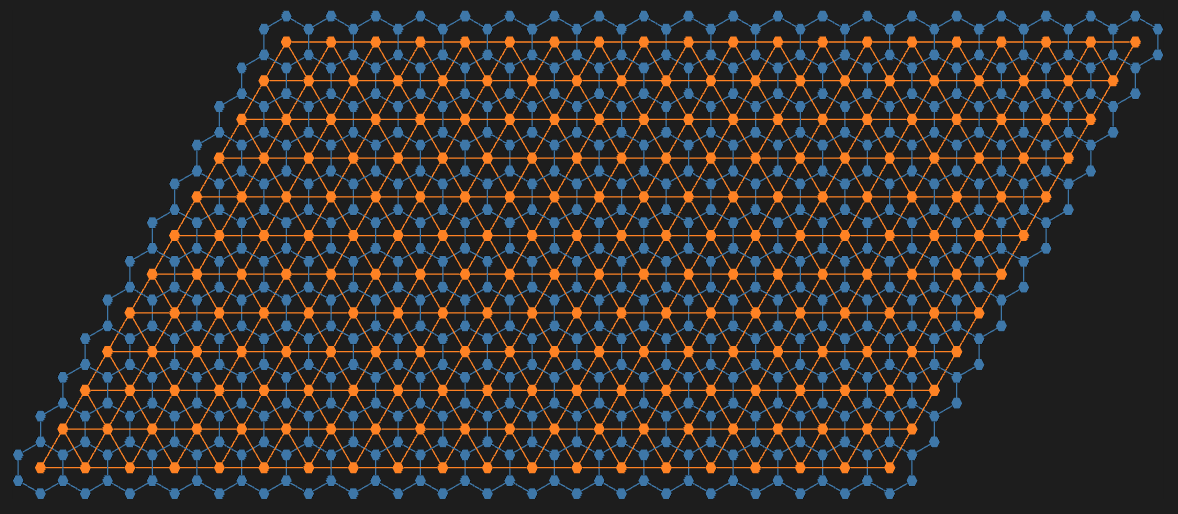
A regular rectangular grid graph is generated with random weights associated with its edges.
The (minimum) spanning tree for that graph is found.
That tree is plotted with exaggeratedly large vertices and edges, so the graph plot looks like a maze.
This is “the cheat” — the maze walls are not given by the graph.
The second maze is made “properly”:
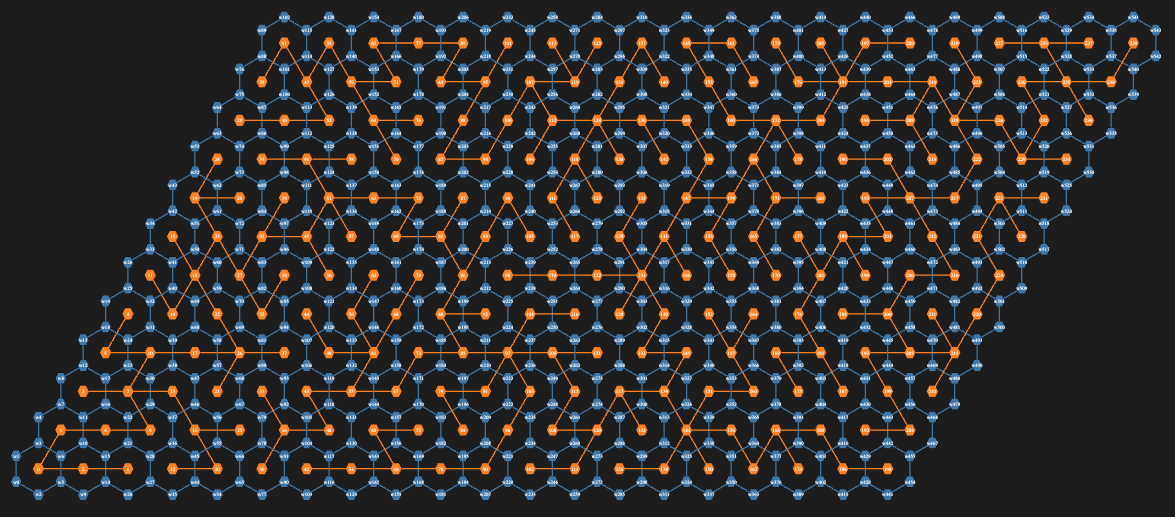
Two interlacing regular rectangular grid graphs are created.
The second one has one less row and one less column than the first.
The vertex coordinates of the second graph are at the centers of the rectangles of the first graph.
The first graph provides the maze walls; the second graph is used to make paths through the maze.
In other words, to create a solvable maze.
Again, random weights are assigned to edges of the second graph, and a minimum spanning tree is found.
There is a convenient formula that allows using the spanning tree edges to remove edges from the first graph.
In that way, a proper maze is derived.
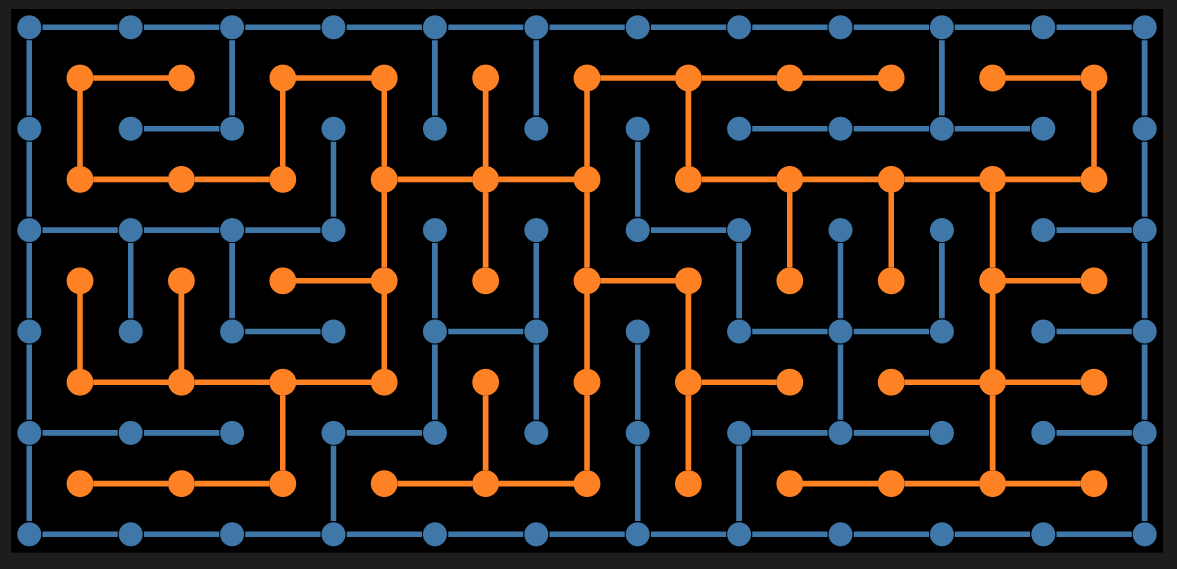
The third maze is again made “properly” using the procedure above with two modifications:
Two interlacing regular grid graphs are created: one over a hexagonal grid, the other over a triangular grid.
The hexagonal grid graph provides the maze walls; the triangular grid graph provides the maze paths.
Since the formula for wall removal is hard to derive, a more robust and universal method based on nearest neighbors is used.
Setup
Packages
Here are the packages loaded for use in the rest of the notebook:
use Graph;
use Graph::Classes;

use Math::DistanceFunctions;
use Math::Nearest;

use Data::TypeSystem;
use Data::Translators;
use Data::Generators;
Conversion
This sub is used to invoke the Graphviz graph layout engines:
sub dot-svg($input, Str:D :$engine = 'dot', Str:D :$format = 'svg') {
    my $temp-file = $*TMPDIR.child("temp-graph.dot");
    $temp-file.spurt: $input;
    my $svg-output = run($engine, $temp-file, "-T$format", :out).out.slurp-rest;
    unlink $temp-file;
    return $svg-output;
}
Simple Maze
In this section, we create a simple, “cheating” maze.
Remark: The steps are easy to follow, given the procedure outlined in the introduction.
# Maze dimensions
my ($n, $m) = (10, 25);

# Base grid graph
my $g = Graph::Grid.new($n, $m, :!directed);

# Using the edges of the grid graph make a new graph assigned random edge weights
my $gWeighted = Graph.new($g.edges(:dataset).map({ $_<weight> = random-real([10,1000]); $_}))
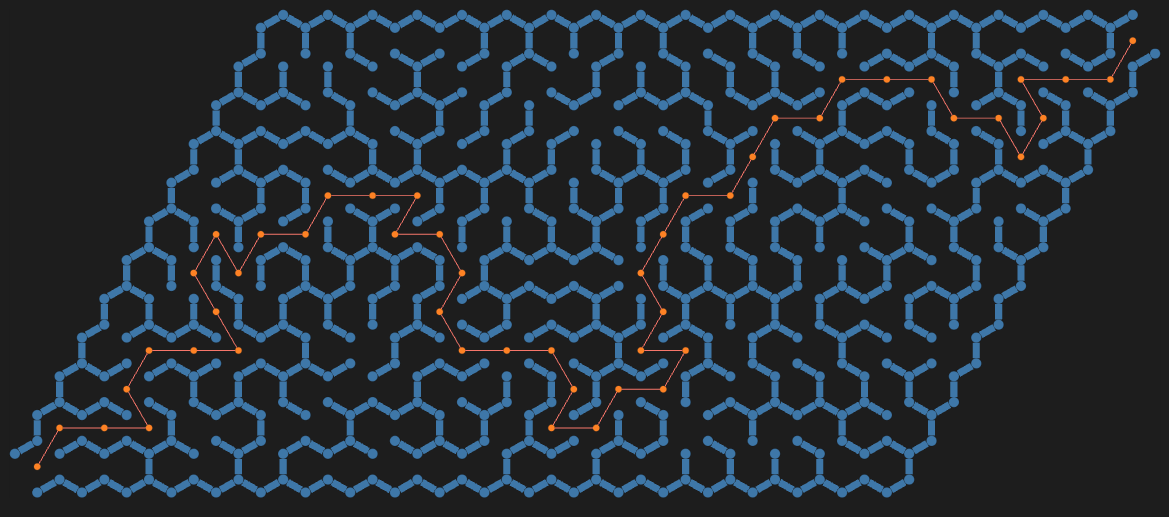
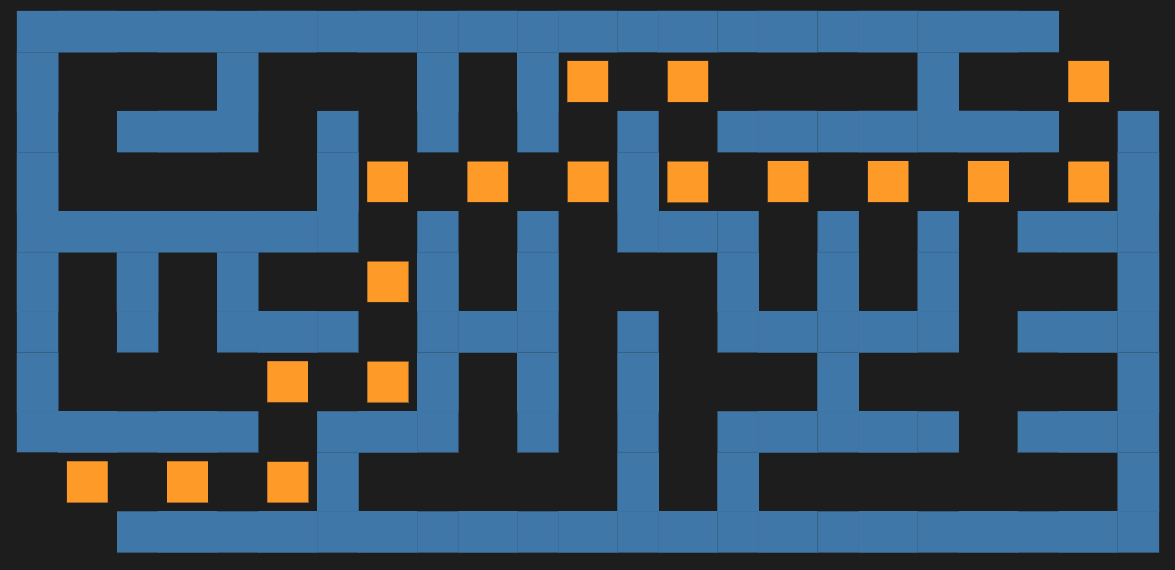
The “maze” above looks like a maze because the vertices and edges are rectangular with matching sizes, and they are thicker than the spaces between them. In other words, we are cheating.
To make that cheating construction clearer, let us plot the shortest path from the bottom left to the top right and color the edges in pink (salmon) and the vertices in red:
#%html
my $gPath = Graph::Path.new(@path);
$simpleMaze.dot(highlight => {Salmon => $gPath.edge-list, Red => $gPath.vertex-list}, |%opts):svg
Proper Maze
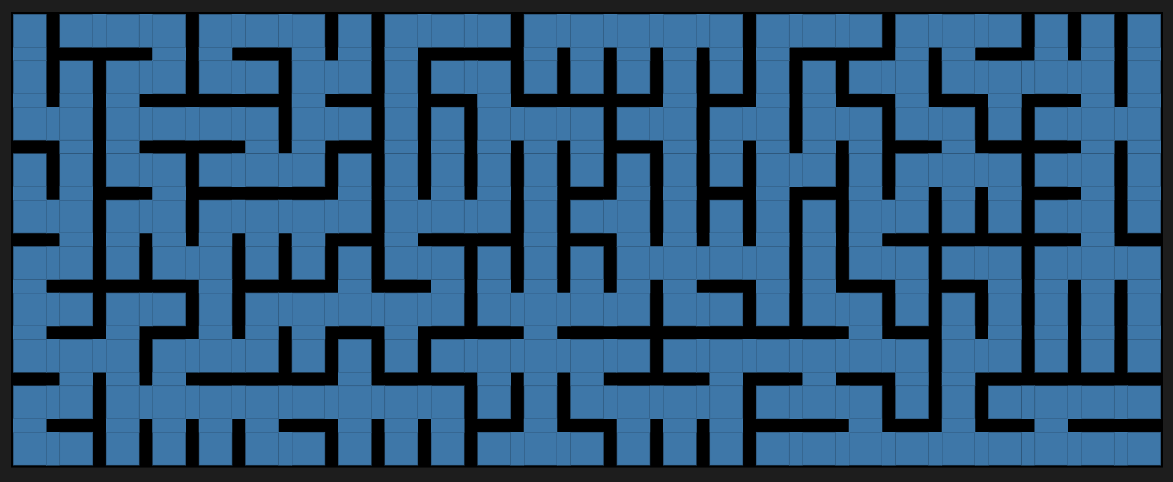
A proper maze is a maze given with its walls (not with the space between walls).
Remark: For didactical reasons, the maze in this section is small so that the steps—outlined in the introduction—can be easily followed.
Make two regular graphs: one for the maze walls and the other for the maze paths.
# Maze dimensions
my ($n, $m) = (6, 12) »*» 1;

# Walls graph
my $g1 = Graph::Grid.new($n, $m, prefix => 'w');

# Space graph
my $g2 = Graph::Grid.new($n-1, $m-1);
$g2.vertex-coordinates = $g2.vertex-coordinates.map({ $_.key => $_.value >>+>> 0.5 }).Hash;

$g2
Hello again! I return during this week of winter solstice to tell you about my experience participating in the Langjam Gamejam. I planned to use Raku, partially so that you could have an advent blogpost to read today, but also because Raku’s builtin support for grammars ensure that I would not get stuck when writing my parser.
Preparation
I did a few things to ensure that I would be able to complete the game jam. The first was to be realistic about what I could achieve; with seven days of time, I could realistically expect to produce about three weekends worth of working code. This is only going to be a few hundred lines, maybe one or two files total, and prioritizing basic functionality over any fancy features.
I decided to make an idle game.
There’s no rule against deciding that ahead of time. I also decided to use Raku. That’s allowed too. I read the source of a couple different idle games too, mostly to get ideas of what not to do. In particular, big thanks to Idle Game Maker by Orteil, Antimatter Dimensions by Ivar K., and Trimps by the Trimp authors for publishing reasonably-readable source code. All three of these have some notion of programmability, although I ended up doing something quite different.
Sunday
The first place to start when making a game is with the scenario that the player will be asked to experience. Games are fundamentally about roleplay, and roles only exist within scenarios. Fortunately, I didn’t have to come up with any of this.
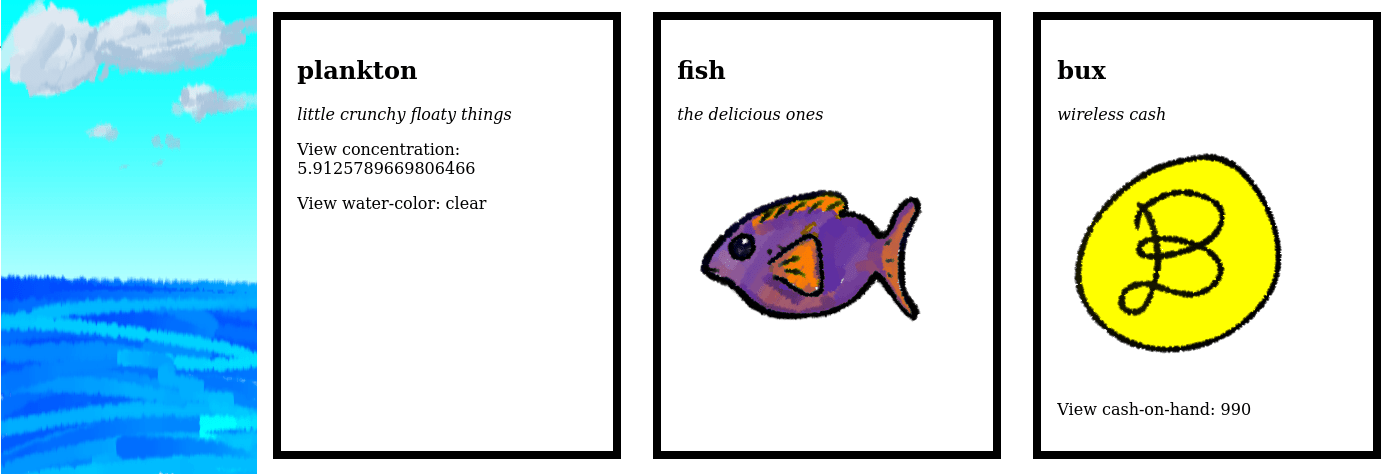
Instead, I asked my friend Remi to come up with something interesting. We spent a couple hours adapting an idea for a Zelda-style fishing minigame, with the novel twist that the game would mechanically be an idle game; instead of putting in the athletic effort to retrieve the fish, the player manages a fishing business and delegates the work to employees.
It’s important to allow a genuine brainstorm at the beginning of the process. Yes-and reasoning is essential for developing concepts. At the same time, it was important that we not plan for work that we couldn’t schedule. Remi committed to drawing a few icons and I committed to carrying out the core of the gamejam objectives:
Design and implement a programming language
Design and implement a game using that language
Monday
The first place to start when making a language is with the objects of that language. I don’t mean object-oriented design but the idea that the language expresses some sort of manipulation of reality. What are we manipulating? How do we manipulate them?
At a high level, idle and incremental games are about resource management. They can also include capacity planning. Thus, I decided that resources are the main objects of study. I also needed some way for the player to interact with the game world, and clickable buttons are a traditional way to express idle games. For each button, I’d thought to have a corresponding action in the game, which I’d also express in language.
I also needed to figure out what substrate I’m going to use. I mean, of course I’m using Raku, but how deeply do I want to embed the game? At one end, I could imagine compiling the game into a single blob which runs wholly in the end user’s windowing system or Web browser, so that there’s nothing of Raku in the end product.
At the other end, I could imagine shallowly embedding the game by writing some Raku subroutines and having the game developer write in ordinary Raku. I initially decided to go with the shallowest embedding that would still allow me to use Raku’s syntax for arithmetic: a Raku sublanguage, or Raku slang. Technically, a slang is its own programming language, or so I was prepared to argue.
One open question concerned the passage of time. A resource evolves in time, perhaps growing or shrinking; it also has some invariants in time, particularly identity. What did I actually want to store internally? All hand-coded games devolve into a soup of objects cross-referenced by string-keyed maps, or at least that was the case for a half-dozen idle games that I’ve looked at. Maybe we can organize all of that into one big string-keyed map?
Another question is how the game will be experienced. I’d assumed that it should be possible to put up some simple HTTP server and run it locally. My notes are unclear, but I think that this is around the first time that I took a serious look at Humming-Bird.
Tuesday
Let’s actually write some code. I started by writing a slang that abused the Raku metamodel. I was inspired by OO::Actors, which introduces an actor keyword, as well as the implementation of the standard grammar keyword. I can just introduce my own resource and action keywords which manage some subexpressions, including Raku arithmetic, and that’ll be my language. To prototype this, I first wrote out a file which I want to be able to load, and then I wrote the parser which handles it.
Here’s a snippet from that first prototype:
resource fishmonger {
  flavor-text "employee with knives and a booming voice for telling stories";
  eats seafood by 0.017 per second;
  eats bux by 15 per second;
  converts from seafood into bux by 75 per second;
}
action hire-fishmonger {
  flavor-text "employ a fishmonger to sell seafood";
  costs 10 bux;
  pays 1 fishmonger;
}
Several features are very important here. One big deal is that flavor text is inalienable from the resources and actions. I was very conflicted about this. Languages like Idle Game Maker are basically enlightened CSS and HTML; they are extremely concerned with presentation details rather than getting to the essential mechanics and handling time.
At the same time, Remi and I are both big fans of flavor text both for its immersive value as well as for its ability to create a memorable experience. Another important idea here is that costs and pays are two distinct attributes in concrete syntax, even though they’re going to be implemented as the same underlying sort of amount-and-currency pair.
This syntax is a little heavy. I was imagining that this would be a sort of Ruby or Tcl DSL where each command takes a row of arguments, some of which are literal tokens, and imperatively builds the corresponding resources and actions.
At this point, the scenario is complete. The game will have a few natural resources, like plankton, fish, and sharks; a conversion from fish to seafood; employees like fishers, fishmongers, and white mages; and an enhancement that white mages apply to fishers. There is no objective; it’s a population-dynamics sandbox.
Wednesday
After a day of trying to understand Raku’s metamodel, I concluded that a slang is the wrong layer of integration. I really wanted to run an input file through a parser in order to build a small nest of Resource and Action objects in memory, set up an HTTP server displaying them, and repeatedly take one tick per second, integrating changes over all of those objects.
This was a gumption trap for me; I completely lost motivation for a few hours. In those times, it is essential to allow one’s emotions to flow in order to move past them, and also essential to rest in order to restore energy.
After recovering a bit, I cleaned up my repository and thought about what I should do next. I might as well write a proper grammar. What should that language look like? I agonized over this for a few minutes, went through the possibilities of fixity and bracketing, and eventually decided that a nice little S-expression language would work for my needs.
This did mean that I would need to internalize arithmetic, but I also knew one of the standard cheats of game development: it’s okay to not implement arithmetic operations which aren’t actually used. Consider the following snippet:
(resource plankton 1e15
    "little crunchy floaty things"
    (growth 0.004 /s)
    (view water-color (if (< .count 1e20) "clear" "cloudy"))
    (view concentration (str (/ .count 2e14)))
)
(action look-at-water-color
    "gaze at the ocean"
    (enables view plankton water-color)
)
(action measure-plankton
    "buy a plankton meter and put it in the water"
    (enables view plankton concentration)
    (costs 10 bux)
)
This is from my prototype. The only arithmetic that’s required is in the views, which format internal numbers about resources into strings. For those, I have a mini-language which allows the user to specify any arithmetic they want, as long as it’s either division or less-than comparisons. The formatting language is strongly typed; the parser won’t allow a non-Boolean operation as an if conditional, for example.
Some other design decisions stand out. Flavor text is now required. Resources have starting counts, which are also required. Rates always end with “/s”, an abbreviation for “per second” that is supposed to easily distinguish them from non-rates.
Gumption management requires not just succeeding, but having a feeling of understanding and competence. I probably could have started on the parser that night, but instead I walked to the bar and speedran Zelda 3, doing any% No Major Glitches and finishing in about two hours and change. Not a superb time, because I grabbed quite a few backups, including an entire extra heart and two bottles; but I didn’t die. The parser can wait until tomorrow.
Thursday
Parsing an S-expression is really easy, especially when the list of special forms (the words that can legally follow an opening parenthesis) is short. For each special form, we have a rule that parses each of the required components in order, followed by an optional zero-or-more collection of modifiers / attributes / members / components / accessories. The resource special form from Wednesday is parsed with a rule like:
rule thing:sym { '(resource' <s> * ')' }
The parser bottoms out on some very simple tokens. For parsing numbers, we parse a subset of what Raku accepts and then use .Rat or .Num methods to convert those strings to live values by reusing Raku’s parser. I may not have been able to reuse arithmetic but I was certainly able to reuse the numerals!
    token id { + }
    token s { '"' + '"' }
    token n { + ('.' +)? ('e' +)? }
As I wired up the parser, I also set up a Humming-Bird application. I’m a fan of Ruby’s Sinatra and Python’s Flask, so it seemed like Humming-Bird would be a good fit for me. It doesn’t come with a preferred HTML-emitting library, so I tried a few options. I started with HTML::Tag, which I had added to the project on either Tuesday or Wednesday, but after a few minutes of practical usage, it became totally unusable due to syntactic zones of ceremony (Subramaniam, Seemann, myself): making a fresh HTML tag requires many source characters. I ended up using HTML::Functional, which is much lighter-weight but occasionally allows me to misuse Nil as a string.
I’m hacking out two roles. I’m presenting them here in their final versions; initially they didn’t take any parameters, which was too restrictive. One role is for rendering HTML and the other role is for evolving with each tick.
The %context is all of the resources and actions, and the $resource is the resource currently being acted upon. This sort of late-bound approach is technically too flexible for what I’m building, but I don’t feel like restricting it.
    role Render { method html(%context, $resource) { ... } }
    role Evolve { method tick(%context, $resource) {;} }
I committed, pushed, and asked Remi for feedback.
Friday
Remi approves! They’ll make a few cute little icons for some resources. At this point, I stopped and reflected upon what I’d made so far. Pastafarians typically take Fridays off, and I’m not about to work when I could rest instead. What works? What doesn’t work? Where should I spend the rest of my time? What should I have for dinner?
The parser works. The Resource and Action objects operate as nodes of an AST. Exporting the AST as HTML with Render.html() works. Traversing the AST for a tick with Evolve.tick() also works. The Nix environment, which Ihaven’t mentioned yet, also works; I’m using direnv to configure the environment and install Raku packages.
Arithmetic operations don’t work yet. Actions don’t actually act on anything. Remi’s artwork isn’t visible and I haven’t split out the CSS yet.
I should spend the rest of my time getting the core mechanics of rendering and evolution to work properly. Easy to say; harder to do.
For dinner, I’ll have noodles of some sort, because it’s Friday. I ended up having spaghetti and meatballs in red sauce.
Before dinner, I went to the bar and speedran Mario 1. I played for about 90 minutes but I didn’t finish a single run. On 8-3, the penultimate level, I was repeatedly defeated by a gauntlet of tough enemies.
Saturday
Humming-Bird got in my way a little; it blocks by default and the documentation doesn’t explain how to fix it. After reading the relevant code, I had to change this line:
listen(8080);
To have a non-blocking annotation:
listen(8080, :no-block);
I also explore how to perform ticks in the background. I do find Supply.interval, but that will let the interpreter exit. Instead, I end up with the following hack:
while 1 { sleep 1; $venture.tick };
As I wired up operations and fixing display bugs, I became increasingly stressed as my CSS changes aren’t being applied. By doing some testing, I discovered that the Humming-Bird convenience helper for attaching static directories is not working. I had initially written:
static('/static', 'static');
But this doesn’t work, or it had worked on Friday but not on Saturday, or I had somehow mistyped “static”, or any of a dozen other impossible considerations. I knew that I can’t get distracted by this, and I finished up all of the rest of the functionality; the game works, but it’s not styled and Remi’s artwork isn’t visible.
That’s the end of the game jam. I produced a language and a game. However, the game doesn’t display properly and I wouldn’t consider it to be playable. What a frustration.
Sunday
I’m not done yet! I want to ensure that the release version has Remi’s artwork displayed. First, I hand-wrote the static routes; these do correctly route the CSS and images.
I found a few holes in our scenario. For example, there’s no way to see how many Bux the user has. By default, resource amounts are hidden both to keep the UI uncluttered and to provide a sense of mystery; however, for Bux or seafood, we want to give the user precise numbers. Our existing syntax can fully accommodate this! The view is enabled by an action which doesn’t have any line items (costs or pays) and it prints the .count variable as-is.
With these two fixes, we now have a working interface that allows the scenario to be fully accessed! The new view looks like this:
Finally, I’m not going to be able to deploy this version as written. I’ll have to do some reading on production HTTP setups for Raku. When the game loads, it tries to load one image for every visible resource. If more than about five images are requested then the page fails to load. Every action is an HTTP POST which causes everything to reload again.
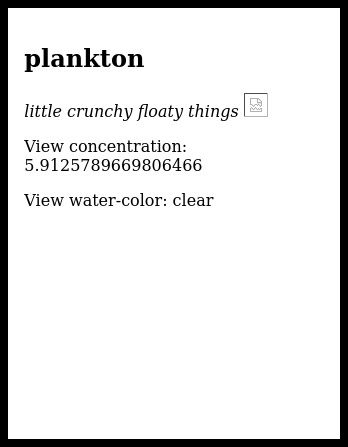
I imagine that this is properly fixed by adding entity tags to the HTTP backend so that images can be cached. For example, I took the screenshot in the header of this blog post while Firefox was still considering whether it could load the image for plankton; it eventually gives up:
Every load of the page causes a different set of images to not load. This is an unacceptable game experience.
Closing thoughts
The idea of a declarative idle-game maker is reasonable and it was only a week’s effort to prototype a basic interpreter which simulates a simple scenario. I think that the biggest time sinks were trying to make a slang instead of a deeper language with a parser, fighting with Humming-Bird, and generally trying to keep code clean. On that last point: I found that cleaning up my code was necessary to let bugs and mistakes become visible.
The game comes out to about three hundred lines of Raku and fewer than one hundred lines of S-expressions. It’s within my coding budget for sure. I don’t think that I went for more than I could reasonably accomplish. The entire code is available in this gist. Remi quite reasonably doesn’t want their art uploaded to GitHub, but you can check out more of their work at their website.
This document (notebook) discusses number theory properties and relationships of the integer 2026.
The integer 2026 is semiprime and a happy number, with 365 as one of its primitive roots. Although 2026 may not be particularly noteworthy in number theory, this provides a great excuse to create various elaborate visualizations that reveal some interesting aspects of the number.
The computations in this document are done with the Raku package “Math::NumberTheory”, [AAp1].
Setup
use Math::NumberTheory;
use Math::NumberTheory::Utilities;

use Data::Importers;
use Data::Translators;
use Data::TypeSystem;

use Graph;
use Graph::Classes;
use JavaScript::D3;
A happy number is a number for which iteratively summing the squares of its digits eventually reaches 1 (e.g., 13 → 10 → 1). Here is a check that 2026 is happy:
is-happy-number(2026)
# True
Here is the corresponding trail of digit-square sums:
The decomposition of 2026 as 2 * 1013 means the multiplicative group modulo 2026 has primitive roots. A primitive root exists for an integer n if and only if n is 1, 2, 4, p^k, or 2 p^k, where p is an odd prime and k > 0.
We can check additional facts about 2026, such as whether it is “square-free”, among other properties. However, let us compare these with the feature-rich 2025 in the next section.
Comparison with 2025
Here is a side-by-side comparison of key number theory properties for 2025 and 2026.
Property
2025
2026
Notes
Prime or Composite
Composite
Composite
Both non-prime.
Prime Factorization
3⁴ × 5² (81 × 25)
2 × 10¹³
2025 has repeated small primes; 2026 is a semiprime (product of two distinct primes).
– (20 + 25)² = 2025 – Sum of first 45 odd numbers – Deficient number – Many pattern-based representations
– Even number – Deficient number – Few special patterns
2025 is packed with elegant properties; 2026 is more “plain” beyond being happy.
Overall “Interest” Level
Highly interesting—celebrated in math communities for squares, cubes, and patterns
Relatively uninteresting—basic semiprime with no standout geometric or sum properties
Reinforces blog’s angle.
To summarize:
2025 stands out as a mathematically rich number, often highlighted in puzzles and articles for its perfect square status and connections to sums of cubes and odd numbers.
2026, in contrast, has fewer flashy properties — it’s a straightforward even semiprime — but it qualifies as a happy number and it has a primitive root.
Here is a computationally generated comparison table of most of the properties found in the table above:
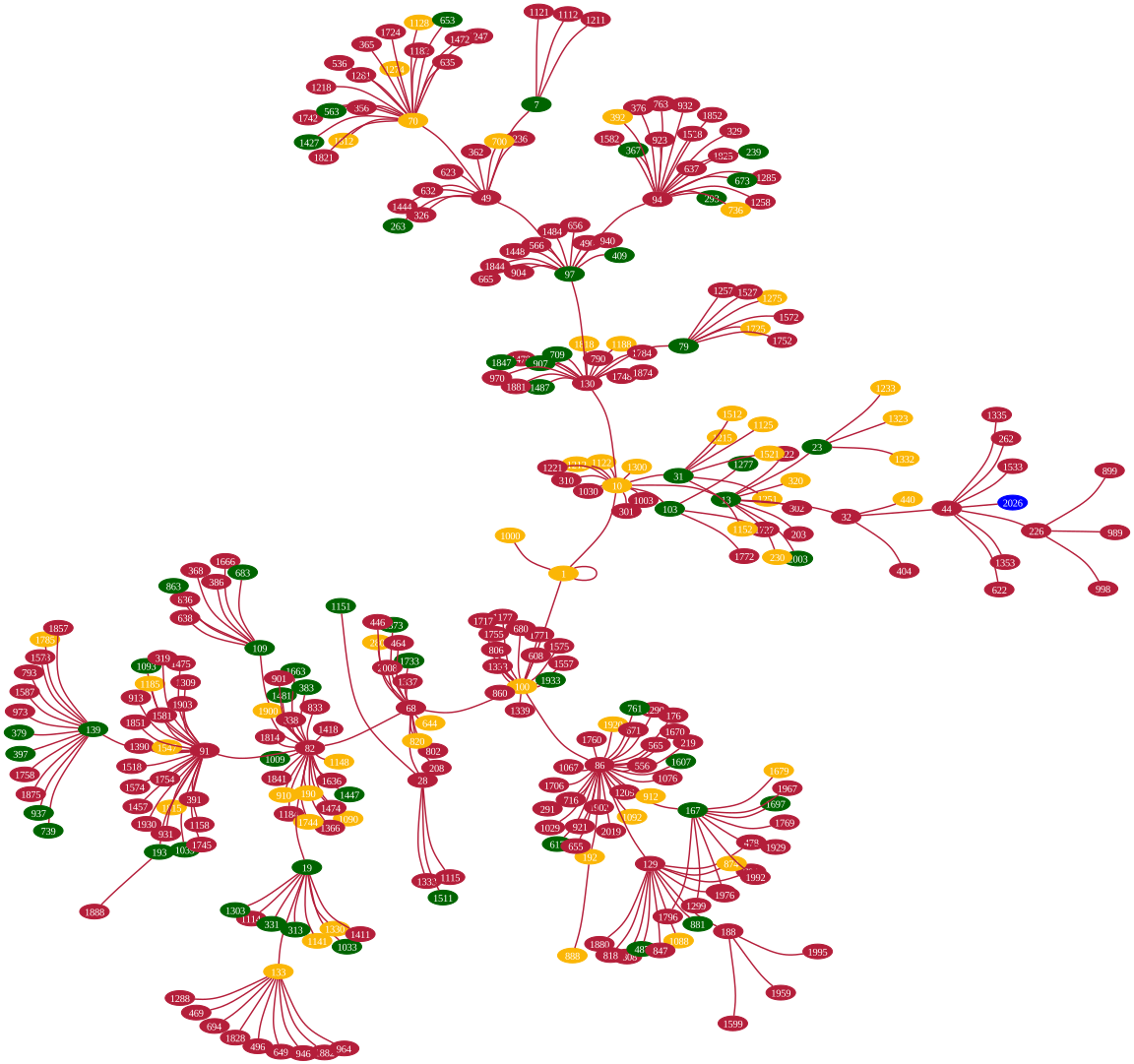
Let us create and plot a graph showing the trails of all happy numbers less than or equal to 2026. Below, we identify these numbers and their corresponding trails:
my @ns = 1...2026;

my @trails = @ns.map({ is-happy-number($_):trail }).grep(*.head);

deduce-type(@trails)
# Vector((Any), 302)
Here is the corresponding trails graph, highlighting the primes and happy numbers:
#% html
my @prime-too = @trails.grep(*.head).map(*.tail.head).grep(*.&is-prime);
my @happy-too = @ns.grep(*.&is-harshad-number).grep(*.&is-happy-number);

my %highlight = '#006400' => @prime-too».Str,    # Deep Christmas green for primes
                'Blue' => [2026.Str, ],            # Blue for the special year
                '#fbb606ff' => @happy-too».Str;  # Darker gold for joyful numbers

my @edges = @trails.map({ $_.tail.head(*-1).rotor(2 => -1).map({ $_.head.Str => $_.tail.Str }) }).flat;

my $gTrails = Graph.new(@edges):!directed;

$gTrails.dot(
    engine => 'neato',
    graph-size => 12,
    vertex-shape => 'ellipse', vertex-height => 0.2, vertex-width => 0.4,
    :10vertex-font-size,
    vertex-color => '#B41E3A',
    vertex-fill-color => '#B41E3A',
    arrowsize => 0.6,
    edge-color => '#B41E3A',
    edge-width => 1.4,
    splines => 'curved',
    :%highlight
):svg
Triangular Numbers
There is a theorem by Gauss stating that any integer can be represented as a sum of at most three triangular numbers. Instead of programming such an integer decomposition representation in Raku, we can simply use Wolfram|Alpha, [AA1, AA3], or wolframscript to find an “interesting” solution:
Remark: It is interesting that 365 (the number of days in a common calendar year) is a primitive root of the multiplicative group generated by 2026. Not many years have this property this century; many do not have primitive roots at all.
Here we find the position of 2026 in that sequence:
@seq.grep(2026):k
# (17)
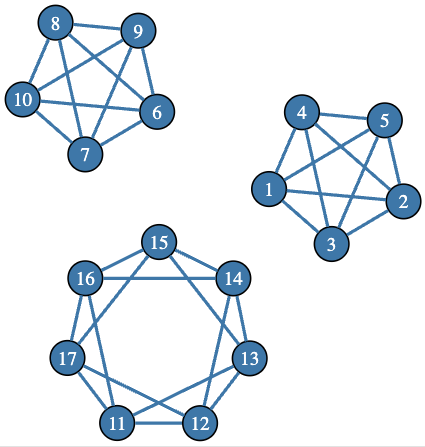
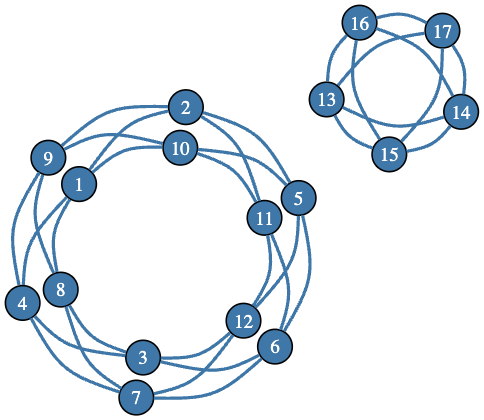
Given the title of the sequence and the extracted position of 2026, this means that the number of disconnected 4-regular graphs with 17 vertices is 2026. Let us create a few graphs from that set by using the 5-vertex complete graph (K₅) and circulant graphs. Here is an example of such a graph:
Most notably, “Math::NumberTheory” is extended to work with Gaussian integers, and the operators GCD and LCD are also extended to work with rationals.
One of my current goals is to make Raku extremely good for researching Number theory phenomena.
One of the most significant features of Raku is its bignum arithmetic and its good built-in numeric functions applicable in Number theory.
Number theory provides many opportunities for visualizations, so I included utilities for some of the popular patterns in “Math::NumberTheory”, [AAp1, AAp2].
I use the package “JavaScript::D3”, [AAp3], for almost all Number theory visualizations with Raku.
Often, I visualize associated graphs using the DOT language specs provided by the package “Graph”, [AAp4] (as seen above).
The number of years in this century that have primitive roots and have 365 as a primitive root is less than the number of years that are happy numbers.
I would say I spent too much time finding a good, suitable, Christmas-themed combination of colors for the trails graph.
To get the quartic graph counting sequence A033483, I tried to use “Math::Sequences”, but since that package does not provide the sequence, I used an ad hoc retrieval (for which Raku is perfect.)
While working on this document, I implemented in “Math::NumberTheory” a set of new functions: integer-digits, is-happy-number, is-harshad-number, is-abundant-number, is-perfect-number, is-deficient-number, abundant-number, deficient-number, and perfect-number.
All of these functions — except integer-digits — had lower implementation priority.
Another implementation effort was to finally come up with a Command Line Interface (CLI).
I advocate that a CLI should be considered for all Raku packages, and most should have one.
#%bash
number-theory is happy number 2026
# True
#%bash
number-theory primitive root list 2026 | grep 365
Today’s story is about my naiveness and terminals.
The original task is simple. Show the output of some program in a sub frame of a TUI application. (TUI == Text User Interface, i.e. apps like tmux, vim, k9s) For those that wonder, there is a yet to be finished TUI debugger application I’m working on, the child program is the thing to debug, the TUI debugger should put the child’s output in a frame.
So without knowing what I was getting into, I tried the obvious and retrieved the program output via Proc::Async. This looks something like this:
myProc::Async$proc.= new: 'raku'; mySupply$receive=$proc.stdout(:bin); $receive.tap: ->$v { # Write program output somewhere on my screen. say$v; };
But when doing the above, the usual thing that happens, is that one receives no output. This is because of output buffering. Most programming languages, including Raku automatically detect whether the output goes to a display or some other place. Whenever the output does not go to a display, it’s buffered, i.e. not written immediately, but in larger chunks for better performance. Sometimes it’s possible to turn off output buffering on the client side. In Raku this is done with:
$*OUT.out-buffer=False;
But oftentimes we can’t modify the child. So this is not a general solution. A better idea would be to somehow tell the child that the output is a display, while in reality we are intercepting it. Then we’ll receive the output just like a display would. This is indeed possible. But since program input and output are things that happen on the operating system side, this requires support by the OS. The name for that feature is Pseudo Terminal or PTY for short. In recent years even Microsoft Windows gained support for it. In general the idea is to request such a PTY from the OS and then start the child with that PTY attached to the in and out pipes. (Side note: In contrast to the standard process pipes, terminals and in extension pseudo terminals do not distinguish between standard out and standard error.)
But (this is the third paragraph starting with a “But”) Rakudo does not provide support for starting a process with a pseudo terminal attached. My initial idea was to create a Raku module to create a PTY and connect that to the pipes via Proc::Async.
But (that’s the next one) that turned out to be impossible, as on Windows, PTYs are coupled to process creation. Process and PTY can only be created together. So it’s impossible to do as a module. The next escalation step is implementing PTY support in MoarVM. That’s what I actually started doing. I managed to make it work just fine on Unix. Since PTY and process creation are coupled on Windows, it’s not possible to utilize the process creation machinery of the platform abstraction C library MoarVM uses – libuv. We have to do process creation ourself to utilize a PTY.
But (really?!) looking at how libuv creates processes on Windows, I noticed that this involves many hundred lines of code to get process creation right. I absolutely oppose copying over hundreds of lines of code from libuv just for the PTY special case on Windows.
The Solution
So the final (finally!) solution is to add PTY support to libuv itself. The work on this is mostly finished, the PR is up and went through a few rounds of review.
Until that PR is merged we now use a temporary fork libuv in MoarVM. Two PRs, one in MoarVM, one in Rakudo, later, it’s finally possible to create processes with a PTY in front with Rakudo. All of this was released in Rakudo 2025.12 yesterday.
But (what?!?) just putting a process behind a PTY is not enough to allow robust embedding of the process’ output in a frame. To understand the issue we have to learn a bit about computer history.
Background
There is a partly standardized, partly shaped by convention, protocol of how applications can command the terminal to do interesting things. Terminals are hardware devices consisting of a keyboard, a monitor and some state handling logic. These devices were the normal way to use computers a few decades ago.
Such a terminal is wired up to a computer via a serial cable. One wire for input (the keyboard) and one wire for output (the display). These devices fundamentally receive bytes representing characters on the wire and put those on the screen. They keep a history of lines allowing scroll back, have two screen buffers to allow saving and restoring screen content (e.g. to restore the screens content after a vim or tmux or less session), and introduce a pretty large set of special commands to make the terminal do all sorts of interesting things.
These special commands are sequences of characters mixed into the output. To give an example: ESC[1mHelloESC[m world! (With ESC being the actual escape byte – 0x1B) will print “Hello world!” on the screen. Some were introduced (in many iterations) by the original hardware terminals, some were added later. Some examples of features some of these original terminals featured:
Putting the cursor some place on the screen.
Scrolling up and down to see the history.
Erasing parts of the screen.
Changing the color of the background cells and characters to be written.
A speaker that can beep.
VT100
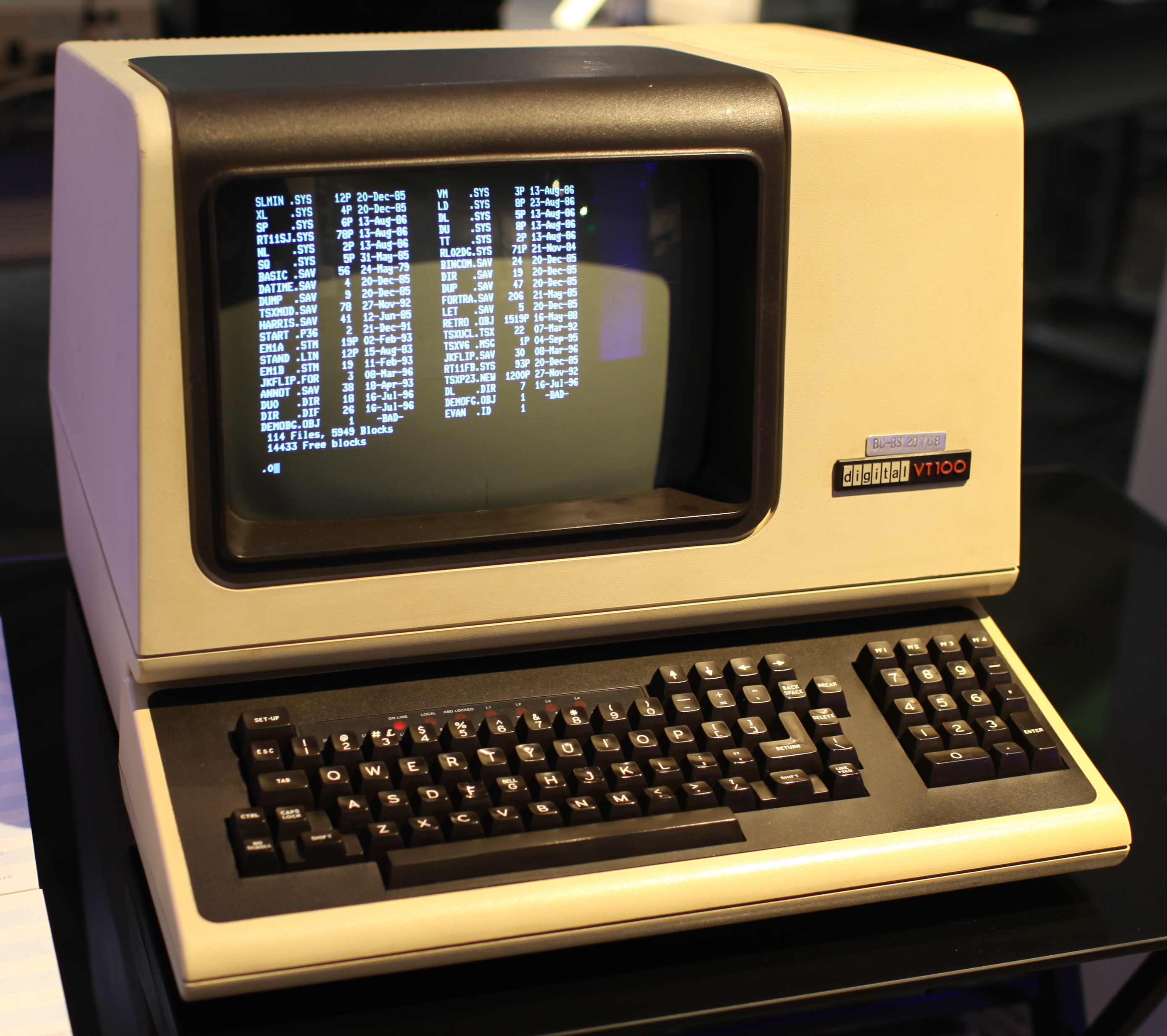
These terminals always represented the screen as a grid of character cells of a fixed width. The arguably most influential of these terminals was the VT100.
Many of today’s terminal emulators are compatible with what a VT100 could do. But they usually sport many additional, sometimes obscure, features, e.g. colored text (very common) or drawing pictures (kinda obscure).
These special commands are standardized. That’s the ANSI Escape Codes.
So when we don’t pay attention to all this and trying to embed the output of some program that puts any of these escape codes in its output it will quickly mess up our terminal. Just imagine the child frame’s top left corner to be at row 15, column 40 and the child moving the cursor to row 5, column 32 and then writing some text. That text will happily be written outside of its frame.
Emulating
What we’ll have to do is creating a virtual representation of a terminal and applying the output of the child process to this virtual terminal. This includes implementing a parser that can detect escape codes in the stream of output text and providing implementations for many of them. The screen of that virtual terminal can then be copied into the frame we want the output of the child to appear.
Every current day’s Terminal Emulator is – as the name suggests – doing just that, it emulates in software a terminal device including the screen grid, history and many of the escape codes.
So to finally be able to embed the child program’s output in a frame of the debugger I’m working on, I had to write a terminal emulator! Luckily there already is a module – Terminal::ANSIParser in the ecosystem for extracting escape codes from a stream of text (which is a pretty complex task all by itself, requiring a mid sized state machine that you have to get just right). Thanks go to Geoffrey Broadwell (japhb) for this module! So that’s at least one part of the task out of the way.
Anolis
The module that fell out of the effort is named Anolis in reference to the color-changing lizards. It’s a pure Raku terminal emulation library.
Using it is pretty simple:
use Anolis::Interface; use Anolis;
class Interface does Anolis::Interface { method heading-changed(Str$heading) {} methodlog(Str$text) {} method grid-changed(@changed-areas) { # Do stuff with the changes. # Or access $anolis.screen.grid to read from the virtual screen.
} }
myProc::Async$proc.= new: :pty(:rows(32), :cols(72)),'bash'; my Interface $interface.=new; my$anolis= Anolis.new: :$proc-async,:$interface;
$anolis.send-text('ls\n');
To use Anolis you need to provide an implementation of Anolis::Interface. Via that interface you’ll be notified whenever the screen contents change. In the simplest form one can just copy the entire screen contents over to wherever one wants the content to appear whenever it changes.
The implementation is far from complete, but enough escape codes are implemented to get bash and vim running.
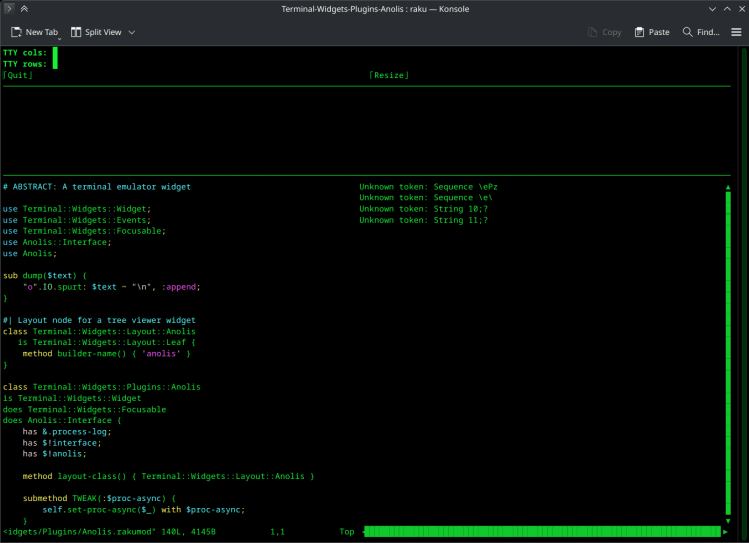
In the Terminal-Widgets-Plugins-Anolis distro I’ve implemented a minimal integration of Anolis and Terminal-Widgets, a pretty epic TUI widget toolkit (also by japhb++). I’ve created a small script that demonstrates Anolis and the Terminal-Widgets integration. That same script is also pretty helpful in implementing further escape codes.
On the left it shows a frame with the client screen, on the right a log of unknown escape codes. So the process is usually as simple as running that script, interacting with the child and whenever a log entry shows up, implement the escape code that is reported as unknown.
I’ll conclude with a list of resources on escape codes:
We left Rudi hanging by his hooves on Day 8. He had quickly whipped up his first website, but felt that more could be done to add some Christmas Decorations.
A snowman perhaps? His mind wandered to the iconic Snowman tale by Raymond Briggs and the accompanying song (1982) which was sung by Peter Auty, who was a choirboy at St Paul’s Cathedral at the time.
We’re walking in the air We’re floating in the moonlit sky The people far below Are sleeping as we fly
Walking
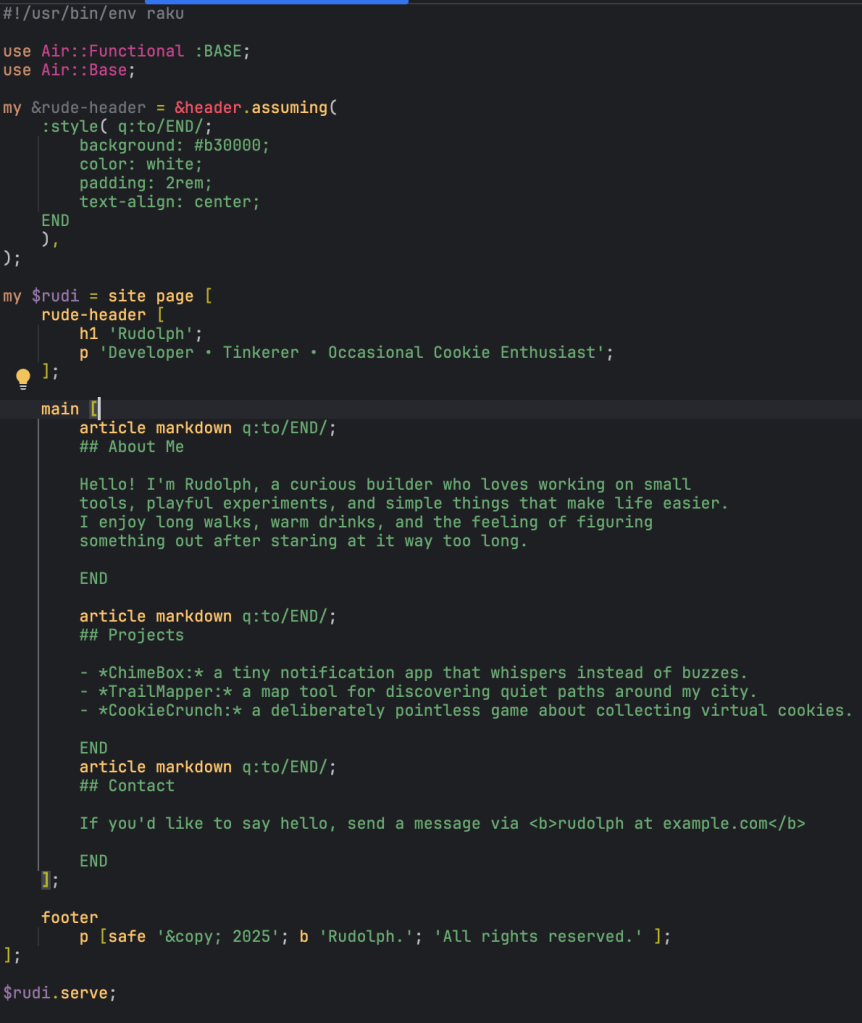
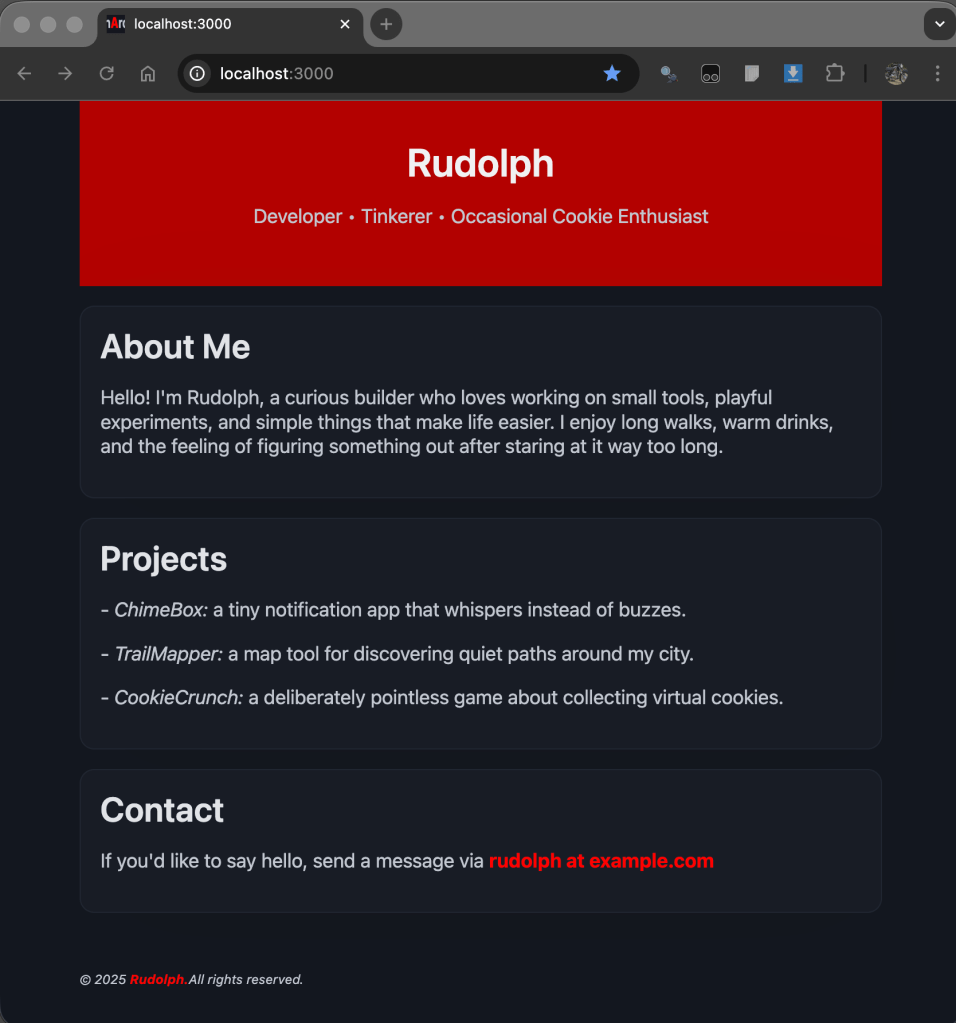
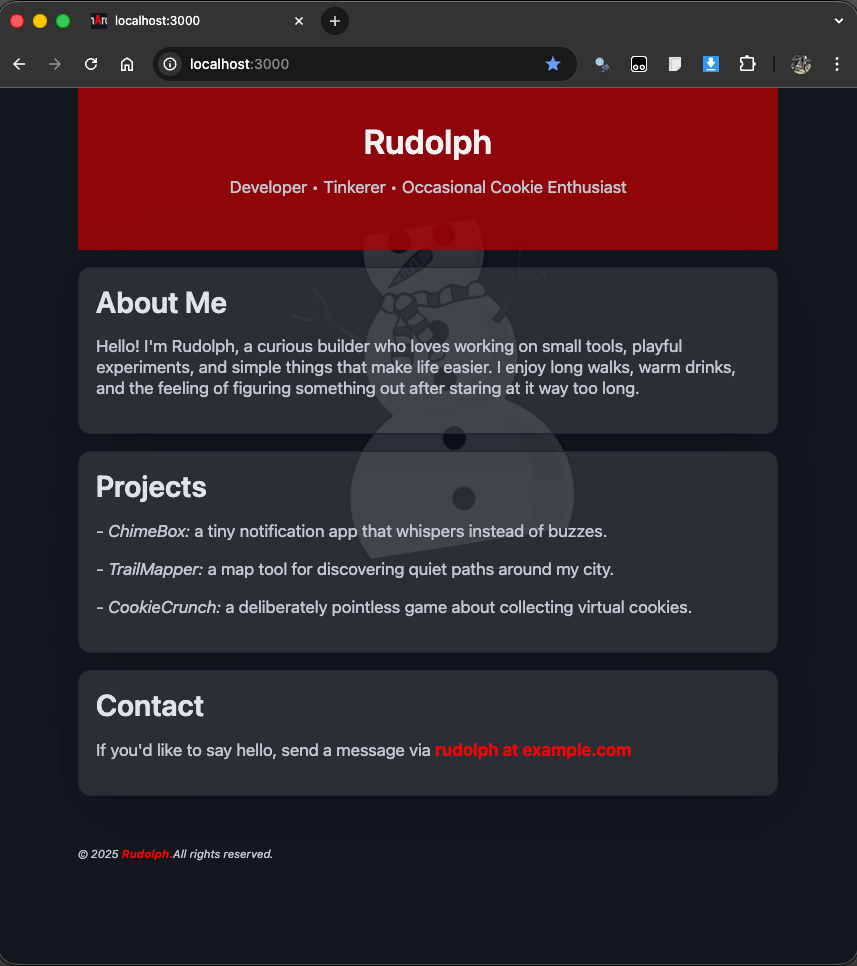
Here’s where we left off – with a complete single page website:
Now Vixen, the sharp-eyed little doe, noticed that Rudolph had recut the code to use the markdown() routine where the content was mostly text, instead of sprinkling functional HMTL tags. Even cleaner. No surprise, since she knew that…
John Gruber created Markdown in 2004 with the explicit goal that people could write in an easy‑to‑read, easy‑to‑write plain text format and then convert it to structurally valid HTML or XHTML.
Here’s a reminder of how that looks:
Floating
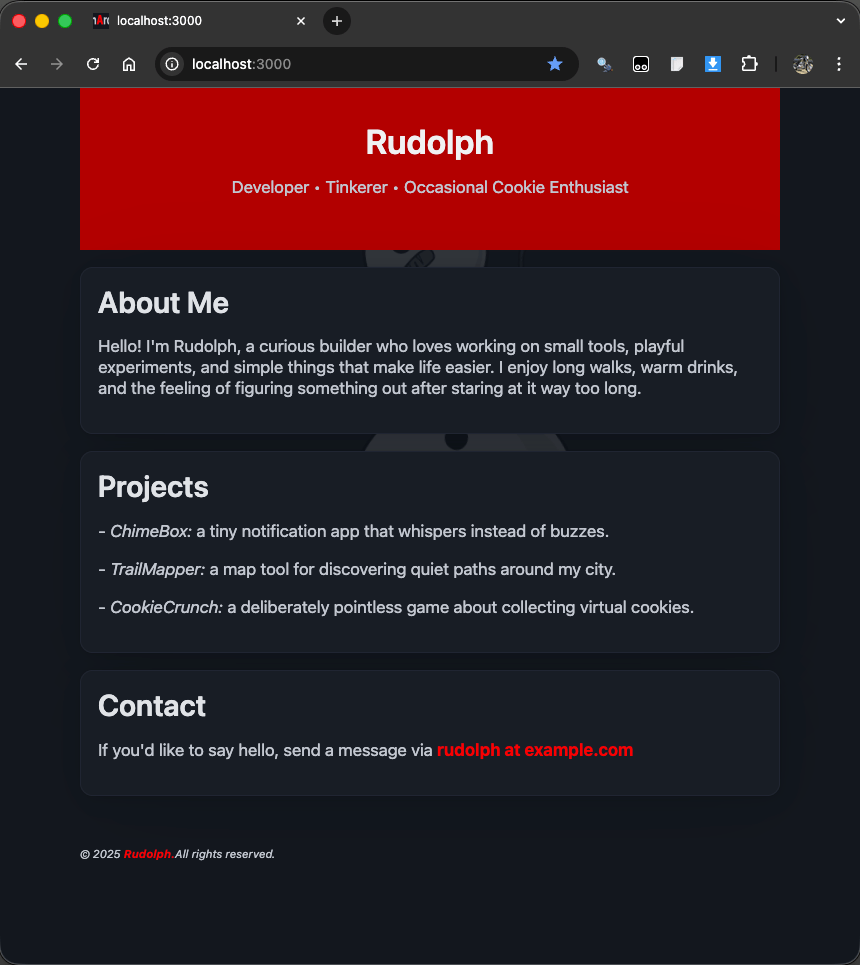
Yes, yes – but clean code won’t make it look pretty. How can we make it look more festive?
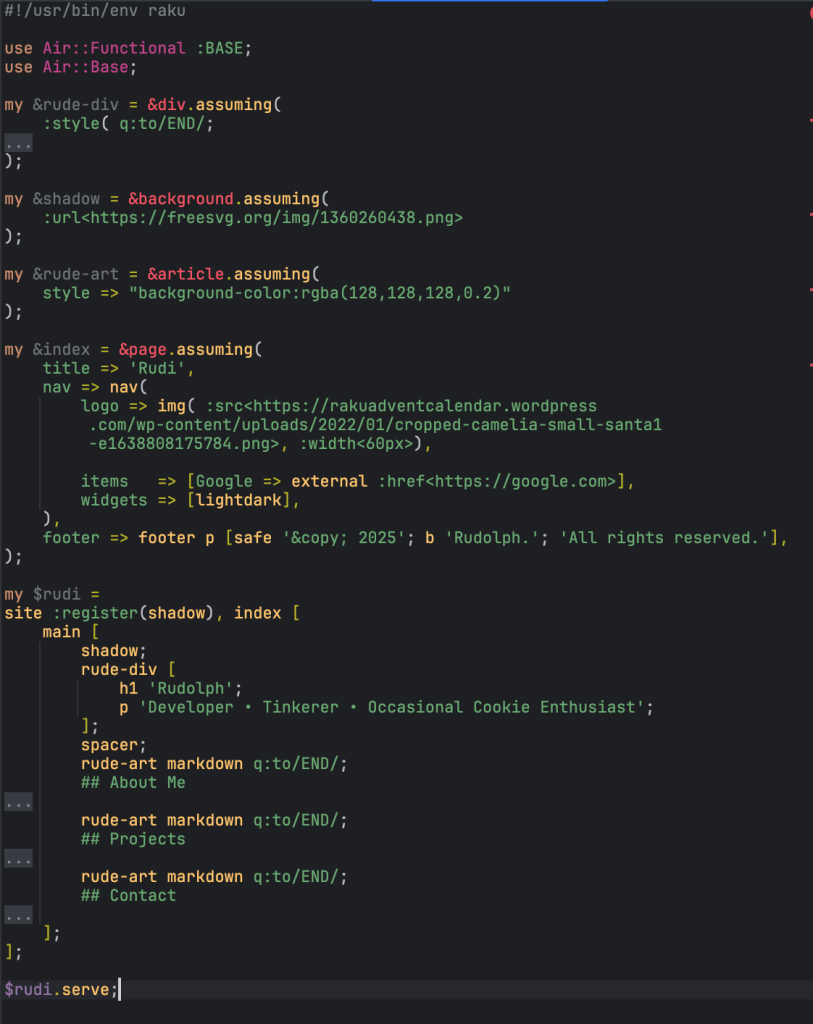
Rudi’s nose lit up – maybe a snowman background! In a whirr of hooves, he found a Community Commons licensed image and added two lines of code:
my &shadow = &background.assuming(
    :url<https://freesvg.org/img/1360260438.png>
);
plumbing in the background element like so:
my $rudi = site :register(shadow), page [
...
main [
        shadow;
        article markdown q:to/END/;
        ## About Me
Close, but no cigar.
Need to float those blocks in the Air he pondered and sprinkled some CSS into his Raku:
Note IntelliJ RIP shown here with folding
Okaaay – getting there.
Moonlit
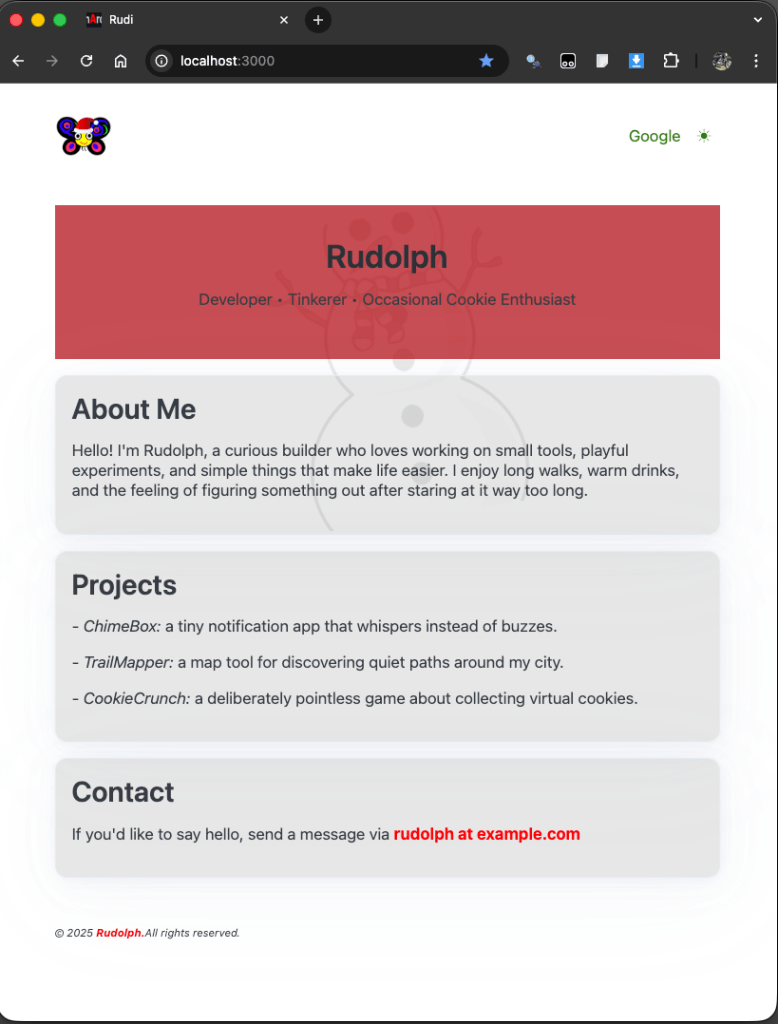
Vixen tapped Rudi on the haunch, “remember that Santa and Mrs Claus prefer their screen in light mode” she whinnied. Rudi had forgotten all about this – he needed dark mode to keep his night vision ready for flying in the dark.
Again, the hooves clattered away.
Here is the final result:
And, so with a tap on the moon:
All the content is done, but the style is a bit so-so…
Sleeping
Rudolph looked on with quiet satisfaction at his work – certainly worth a cigar before his preparation sleep for the big night.
Rudolph, bright and cozy, beneath the northern star, draws slow on a mellow cigar that glows like Yule afar.
Welcome, weary traveler. It is known that you come bearing earnest questions and we congratulate you on managing to arrive here, on this precipice of doom. Not a brutal doom, nor even a fearful doom, but a doom as in a fate open to you.
See, your arrival here stands foretold. In fact, we built this very precipice in anticipation of you. Since we expected you to come from many different paths, we laid out long and sturdy carpets in untallied directions.
There has been a long-standing contrast observed, that Perl was the Hobbit to Raku’s Lord of the Rings. While somewhat amusing, I have always felt that this analogy failed in two key ways.
First, it fails to give Perl’s legacy its due. Perl’s presence is felt in the deepest firmaments of our operating systems. If it must play the role of a ‘smaller sibling,’ using the Hobbit as reference just feels too under-stated. It’s an amazing book, but especially with today’s often almost anti-rose-tinted perspective on Perl’s contributions on everything from build systems, bug report tools, testing frameworks, centralized distribution of modules, even to our very understanding of DNA… I think we can do better by Perl.
Second, comparing Raku to the Lord of the Rings… while it is an indisputably impressive work of singular imagination, this comparison nevertheless fails to describe the sheer, nigh unbelievable audacity that the project — the dream — that is now known as Raku actually represents.
I’d like to take this opportunity to explore a new spin on all of this. If Perl 1-4 represents the Hobbit, then Perl 5 (now, at-last-and-once-again known as simply Perl) is the Lord of the Rings. Perl has certainly gone to Mount Doom and back. And when it finally arrived back home, it found that its position in the world had been irrevocably changed.
That is also to say that Perl represents an achievement of similar scope and magnitude as to Tolkien’s genre-defining series. Nothing that came after it ever looked or felt quite the same. But none would ever again dare to arrive without (hash)maps in place!
But where does that leave Raku? Raku is Dungeons and Dragons. D&D’s very existence hinges on works like Lord of the Rings (see Appendix N for the larger context of influences). Dungeons and Dragons is also certainly audacious: it’s essentially an audacity amplifier! Whatever scope you can envision, you can make possible. That fits pretty well into our famous position: “make the hard things easy and the impossible things feasible.” (How’s that for audacity? Also, this is my personal paraphrase. Use responsibly!)
All you need is a group of like-minded people who agree to both take it seriously and have a whole lot of fun while doing so.
It is understandable if you feel a bit trepidatious. It’s a known crossover effect from the fact that you may have already made the choice, though it is only now presented before you… beyond the threshold, into the darkness of the deep… some greater force urges you on, compelling you to strive forth and make a place for your name in the Great Hall of CONTRIBUTORS.
A megadungeon is a specific type of role-playing “adventure path” designed to be a permanent fixture of a larger campaign. Player characters can dip in and out of the megadungeon as they please, exploring it to whatever depth feels appropriate. But a key feature of a megadungeon is that it (almost) always has another level, another staircase leading into seemingly-unknown-yet-also-clearly-already-ventured-upon corridors and chasms. (Maybe I just took the first step in creating my own heartbreaker RPG system called Chasms & Corridors?)
The “almost” qualifier is that every megadungeon does have a last level, at least as designed. You can theoretically get there. But the chances of Real Life allowing it are minimal. And so the comparison to D&D also fits the historical record of Raku, especially if you consider core development to be a megadungeon.
It is not uncommon for our core developers to reach a point in their journey where they find they must turn back in order to find their way again. Their paths may or may not ever venture back into Mount Camelia, but the marks they left remain and endure and shape the experience of all who come after. We are all so very grateful to have had the time with you that you chose to share, and wish you nothing but the best in all of your new adventures.
At the risk of belaboring this metaphor, I’ll leave on a note of highlighting the stratification of core development in this context. Work can be done by those lovely creatures blessed with darksight (read: C skills and compiler mind) at the MoarVM level. The fact that they can get into the lowest areas of Mount Camelia and emerge with treasure is a testament to either their fortitude, their foolhardiness, or both.
Meanwhile, there has been a years long project to create an entirely new compiler front-end, essentially building a brand new way of existing and traveling throughout the megadungeon that is Raku core development. And all the while, progress and improvements have been made to the implementation of the core setting.
With regards to the new front end: We are close, maybe very close. But even so… for those of us still delving the nooks and crannies of our respective levels, we know that once we get there, it will be as it ever was: just as we put the last of our current efforts to polish, we will inevitably see some glimmer in the dark to once again drive us on.
You will then, as always, be welcomed to come along, for a spell or for a song, as we carve a dream of it.
This post is dedicated to all of us who have put heart, mind, and/or life into this audacious dream of ours. We love you, we miss you, we are happy for you, wherever you are.
The first elf language is the sharing of emotions. Next comes their mother tongue. When elves start speaking their first programming language, then they are already onto their third language!
Santa imagines raku draws inspiration from many principles of Unix philosophy In particular, localization of raku plays into the robustness principle.
When writing to Santa, it doesn’t matter which language you write your wishlist in — for Santa is learning all the languages he can:
say 'Hello, World!' # English, or
sê 'Hallo, Wêreld!' # Afrikaans
It is kinder thought Santa — especially to those writing their first list — to get their feet wet by writing in a language closer to their heart.
TLDR
use L10N::AF;

# Trim whitespace (leading and trailing)
sit .sny vir '/pad/na/lêer'.IO.lyne

# List lines containing specified text
.sit as .bevat: 'soekteks' vir '/pad/na/lêer'.IO.lyne
Install
To speak with the alf elf, the summoning charm is via zef:
$ zef install L10N::AF
To write your wishlist in Afrikaans, don’t forget to include use L10N::AF near the top of your list. Or use the prepaid postage envelopes labelled afrku or lekker:
$ lekker -e 'sê "Hallo, Wêreld!"'
Hallo, Wêreld!
Other languages
The talkative elves have discovered that between them they already speak eleven languages. To find an elf that speaks your language, replace XX in use L10N::XX with the elf’s nickname:
Language
ISO 639 Set 1
Afrikaans
AF
Dutch
NL
Esperanto
EO
French
FR
German
DE
Hungarian
HU
Italian
IT
Japanese
JA
Portuguese
PT
Chinese
ZH
Welsh
CY
Preservation Of Huffmanization
Santa doesn’t much like chimneys as they are too long. Why huff and puff when he can send his smaller elves down, like sê, so, vra and met:
use L10N::AF;

#| Pangram test / Toets vir 'n pangram
sub is-pangram ($sin = vra 'Sin: ') {
    sê so .kl.bevat: alle 'a'..'z' met $sin
}

is-pangram q :tot /GEDIG/;
    Bask with grammars,
    Coax via allomorphs,
    Sequences of huffmanized joy.
GEDIG
# True
Decorations
Festive elves sprinkled decorations on some of the presents, like sê (say) and reël (rule). This did not slow Santa as the first four things he gathered from the explosion at the old ASCII factory were U, T, F and 8. Diacritics are also fun to input when you configure your keyboard to use a compose key. The keystroke sequences often form a visual composition then, for example:
Character
Keystrokes
ê
Compose + e + ^`
ë
Compose + e + "
Dual Translations
Some elves couldn’t make up their minds what they wanted for Xmas. Santa has allowed them to wrap their own gifts twice which has made them happy again for now:
Afrikaans
English
basisnaam
basename
aanpas-lêermodus
chmod
aanpas-lêerskap
chown
gids
dir
gidsnaam
dirname
sif
grep
kop
head
koppel
link
maak-gids
mkdir
drukf
printf
skrap-gids
rmdir
slaap
sleep
sorteer
sort
stert
tail
ontkoppel
unlink
( Words in common shell usage have been kept as alternate translations — either can be used. )
Arrays
Some elves need help remembering which end of the sleigh they are servicing and whether they are loading or unloading:
Santa decided to label both ends of the sleigh and split the elves into fore and aft teams:
English
Afrikaans
pop, push
trek-einde, druk-einde
shift, unshift
trek-begin, druk-begin
Composable
Raku and Afrikaans share a composable aspect. Santa’s elves giggle when making associations between concepts:
Afrikaans
English
Waar, Onwaar
True, False
skrap, skrap-nl, skrap-gids
delete, chomp, rmdir
maak-oop, maak-toe, maak, maak-gids
open, close, make, mkdir
gee, teruggee, opgee, gegewe, vergewe*
return, returns, fail, given, forgiven*
afrond, afrondaf, afrondop
round, floor, ceiling
stop, stopsein
die, fatal
Slang::Forgiven by Mustafa Aydın merges for and given into forgiven. Santa wonders how to localize this new gift.
Sensitivity
Abuse by coercive control is not yet addressed by the Inclusive Naming Initiative. It is recognized in law in England and Wales (2015) and Ireland (2019). Santa is peaceable and so with his awareness of escalatory metaphors and imprecise terminology of the non-elves, he has tried to find translations that are more descriptive, less disproportionate and better suited to a programming language.
In programming context, the word “coerce” is used to change a value between types. Here Santa chose herskep (recreate) rather than “dwang” (coerce). This ties in with the root term skep (create) and with omskep (map/convert). Santa wondered if his de-escalations mattered:
Lizzybel was walking the corridors of North Pole Central when Steve, the Physics Elf, came up to her. “Have you seen my issue on this very nice module of yours?”, he asked.
“Oof, I guess I must have missed that, sorry!”, said Lizzybel, while thinking to herself “I really should look more at my modules every now and then”. “What is the issue about?” “Well, you know my nice App::Crag module? Well, in some cases it just generates some warnings that do not make a lot of sense in that context, so I’d like to be able to get rid of them. But I can’t”, said Steve, “It’s the CodeUnit module”.
Lizzybel tried to hide her blush, but to no avail. Steve saw that, and said: “No worries, it’s but a nuisance” and hurried away smiling, as all of the working at the North Pole don’t just work out by themselves.
CodeUnit
“Ah, yes, CodeUnit, a module that provides a unit for execution of code”, thought Lizzybel, “that cute one that I abstracted from the REPL module I worked on earlier this year. Ah, and there’s Steve‘s issue!”.
Time to look at the code! So why did setting $*ERR to /dev/null not work? Aaah… found it:
CONTROL {
    when CX::Warn {
        .gist.say;
        .resume;
    }
}
“Stupid Lizzybel“, she thought. Control messages (of which warnings are of type CX::Warn) where caught in the CONTROL block, but then output on STDOUT with .say. That should have been .note! Ok, that’s easy enough to fix.
More Options
Thinking about this some more, Lizzybel decided to make it slightly more configurable. “Why not add a :keep-warnings flag and attribute to indicate that you don’t want warnings to be shown immediately, but when you want it?”, she thought to herself. Why not indeed!
A little bit of hacking later, that piece of the code now read:
CONTROL {
    when CX::Warn {
        $!keep-warnings ?? @!warnings.push($_) !! .gist.note;
        .resume;
    }
}
So, now if we don’t want to keep warnings, they are shown on STDERR (because of .note). And if we want to keep warnings, the warning in $_ will be added to the warnings. Now for a way to get the warnings from the CodeUnit object.
method warnings() {
    @!warnings ?? @!warnings.splice.List(:view) !! BEGIN ()
}
And with that it’s also possible to obtain any warnings, and reset them at the same time!
Now the only thing to do, was to update the documentation, add some more tests and release the new version of the CodeUnit module to the Raku ecosystem with mi6 release! And so it was done.
But, but, but, how?
A few hours later, Steve came running to Lizzybel, alerted by the closing of his issue, and a little short of breath, said: “That’s all very nice, and thank you. But what magic is .splice.List(:view) and BEGIN ()?”.
“Ah, yes. Maybe a little bit too core-ish for a module. But then again, that module is already bound tightly to the Rakudo implementation of the Raku Programming Language“, she answered, “so it felt ok to do that here”.
“So the .splice method without any arguments is an optimized way to both return the whole invocant array and reset that array to not having any elements. The :view named argument to the .List method is an implementation detail that provides an optimized way to change an Array into an immutable List. Provided, of course, that the underlying Array doesn’t change, and no attempts are made to change any element in the List.”, she continued. “Hmm…”, said Steve, not entirely convinced.
Lizzybel continued further: “If there are no warnings, then we could also convert the Array to a List, but that felt a bit wasteful. So why not return an empty List with () in that case?”.
“But why the BEGIN then?”, asked Steve. “Well, an empty List currently in Rakudo is equivalent to List.new, so creates a new object each time. But conceptually speaking, all empty Lists are the same. So why not always return the same one, created at compile time with the BEGIN phaser”, Lizzybel lectured. “That feels like that should be done automatically by the compiler”, said Steve, while wandering away again, busy as ever. “You’re probably right”, thought Lizzybel, “I should make that happen for RakuAST“.
Inspiration
And while Steve was walking away, Lizzybel realized she finally had a subject to write a Raku Advent post about!















 Raku Advent Calendar