Day 16: Writing faster Raku code, Part II

By Wim Vanderbauwhede

This is the follow-on article about writing an expression parser in Raku. In the previous article, I explained the background looked at some basic performance comparisons relating to data structures for parsing and ways to process them: lists, parse trees, recursive descent and iteration.

In this article, we’ll have a look at the performance of various ways of processing strings, and then see how it all fits together in the expression parser.

String processing: regular expressions, string comparisons or list operations?

How should we parse the expression string in Raku? The traditional way to build an expression parser is using a Finite State Machine, consuming one character at a time (if needed with one or more characters look-ahead) and keeping track of the identified portion of the string. This is very fast in a language such as C but in Raku I was not too sure, because in Raku a character is actually a string of length one, so every test against a character is a string comparison. On the other hand, Raku has a sophisticated regular expression engine. Yet another way is to turn the string into an array, and parse using list operations. Many possibilities to be tested:

constant NITERS = 100_000;
my $str='This means we need a stack per type of operation and run until the end of the expression';
my @chrs =  $str.comb;
if (CASE==0) { # 5.8 s
    for 1 .. NITERS -> $ct {
# map on an array of characters        
        my @words=();
        my $word='';
        map(-> \c { 
            if (c ne ' ') {
                $word ~= c;
            } else {
                push @words, $word;
                $word='';
            }
        }, @chrs);
        push @words, $word;
    }
} elsif CASE==1 { # 2.7 s    
     for 1 .. NITERS -> $ct {
# while with index through a string        
        my @words=();
        my $str='This means we need a stack per type of operation and run until the end of the expression';
        while my $idx=$str.index( ' ' ) {
            push @words, $str.substr(0,$idx);
            $str .= substr($idx+1);
        }
        push @words, $str;
    }         
} elsif CASE==2 {  # 11.7 s
    for 1 .. NITERS -> $ct {
# while on an array of characters        
        my @words=();
        my @chrs_ = @chrs; 
        my $word='';      
        while @chrs_ {
            my $chr = shift @chrs_;
            if ($chr ne ' ') {
                $word~=$chr;
            } else {
                push @words, $word;
                $word='';
            }
        }
        push @words, $word;
    }
} elsif CASE==3 { # 101 s
    for 1 .. NITERS -> $ct {
# while on a string using a regexp        
        my @words=();
        my $str='This means we need a stack per type of operation and run until the end of the expression';
        while $str.Bool {
            $str ~~ s/^$<w> = [ \w+ ]//;
            if ($<w>.Bool) {
                push @words, $<w>.Str;
            }
            else {
                $str ~~ s/^\s+//;
            } 
        }
    }   
} elsif CASE==4 { # 64 s
    for 1 .. NITERS -> $ct {
# reduce on an array of characters        
        my \res = reduce(
        -> \acc, \c { 
            if (c ne ' ') {
                acc[0],acc[1] ~ c;
            } else {
                ( |acc[0], acc[1] ),'';
            }
        }, ((),''), |@chrs);
        my @words = |res[0],res[1];
}

For the list-based version, the overhead is 1.6 s; for the string-based versions, 0.8s.

The results are rather striking. Clearly the regexp version is by far the slowest. This was a surprise because in my Perl implementation, the regexp version was twice as fast as next best choice. From the other implementations, the string-based FSM which uses the index and substr methods is by far the fastest, without the overhead it takes 1.9s s, which is more that 50 times faster than the regexp version. The map based version comes second but is nearly twice as slow. What is surprising, and actually a bit disappointing, is that the reduce based version, which works the same as the map based one but works on immutable data, is also very slow, 64 s.

In any case, the choice is clear. It is possible to make the fastest version marginally faster (1.6 s instead of 1.9 s) by not reducing the string but instead moving the index through the string. However, for the full parser I want to have the convenience of the trim-leading and starts-with methods, so I choose to consume the string.

A faster expression parser

With the choices of string parsing and data structure (nested arrays with integer identifiers, see the first article) made, let’s focus on the structure of the overall algorithm. Without going into details on the theory, we use a Finite State Machine, so the basic approach is to loop through a number of states and in every state perform a specific action. In the Perl version this was simple because we use regular expressions to identify tokens, so most of the state transitions are implicit. I wanted to keep this structure so I emulate the regexp s/// operation with comparisons, indexing and substring operations.

my $prev_lev=0;
my $lev=0;
my @ast=();
my $op;
my $state=0;
while (length($str)>0) {
     # Match unary prefix operations
     # Match terms
     # Add prefix operations if matched
     # Match binary operators
     # Append to the AST
}

The matching rules and operations are very simple (I use <pattern> and <integer> as placeholders for the actual values). Here is the Perl version for reference:

  • prefix operations:
if ( $str=~s/^<pattern>// ) { $state=<integer>; } 
  • terms:
if ( $str=~s/^(<pattern>)// ) { $expr_ast=[<integer>,$1]; }
  • operators:
$prev_lev=$lev;
if ( $str=~s/^<pattern>// ) { $lev=<integer>; $op=<integer>; }

In the Raku version I used the given/when construct, which is as fast as an if statement but a bit neater.

  • prefix operations:
given $str {
    when .starts-with(<token>) { 
        .=substr(<length of token>); 
        $state<integer>; }
  • terms:
given $str
    when .starts-with(<token start>) { 
        $expr_ast=[<integer>,$term]; }
  • operators:
given $str {
    when .starts-with(<token>) { 
        .=substr(<length of token>); 
        $lev=<integer>; 
        $op=<integer>; 
    }

One of the more complex patterns to match is the case of an identifier followed by an opening parenthesis with optional whitespace. Using regular expressions this pattern would be:

if  $str ~~ s:i/^ $<token> = [ [a .. z] \w*] \s* \( // { 
    my $var=$<token>.Str;
    ... 
}

Without regular expressions, we first check for a character between ‘a’ and ‘z’ using 'a' le .substr(0,1).lc le 'z'. If that matches, we remove it from $str and add it to $var. Then we go in a while loop for as long as there are characters that are alphanumeric or ‘_’. Then we strip any whitespace and test for ‘(‘.

when 'a' le (my $var = .substr(0,1)).lc le 'z' {
    my $idx=1;
    my $c = .substr($idx,1);
    while 'a' le $c.lc le 'z' or $c eq '_' 
        or '0' le $c le '9' {
        $var~=$c;
        $c = .substr(++$idx,1);
    }
    .=substr($idx);
    .=trim-leading;
    if .starts-with('(') {
        ...
    }
}

Another complex pattern is that for a floating point number. In Fortran, the pattern is more complicated because the sub-pattern .e can be part of a floating-point constant but could also be the part of the equality operator .eq.. Furthermore, the separator between the mantissa and the exponent can be not just e but also d or q. So the regular expression is rather involved:

if (                    	
    (
        !($str~~rx:i/^\d+\.eq/) and
        $str~~s:i/^([\d*\.\d*][[e|d|q][\-|\+]?\d+]?)//        
    )        	
    or 
    $str~~s:i/^(\d*[e|d|q][\-|\+]?\d+)//
) {
    $real_const_str=$/.Str;
} 

Without regular expression, the implementation is as follows. We first detect a character between 0 and 9 or a dot. Then we try to match the mantissa, separator, sign and exponent. The latter three are optional; if they are not present and the mantissa does not contain a dot, we have matched an integer.

when '0' le .substr(0,1) le '9' or .substr(0,1) eq '.' { 
    my $sep='';
    my $sgn='';
    my $exp='';
    my $real_const_str='';

    # first char of mantissa
    my $mant = .substr(0,1);
    # try and match more chars of mantissa
    my $idx=1;
    $h = .substr($idx,1);
    while '0' le $h le '9' or $h eq '.' {
        $mant ~=$h;
        $h = .substr(++$idx,1);
    }
    $str .= substr($idx);

    # reject .eq.
    if not ($mant.ends-with('.') and .starts-with('eq',:i)) { 
        if $h.lc eq 'e' | 'd' | 'q' {
            # we found a valid separator
            $sep = $h;            
            my $idx=1;
            $h =.substr(1,1);
            # now check if there is a sign
            if $h eq '-' or $h eq '+' {
                ++$idx;
                $sgn = $h;
                $h =.substr($idx,1);
            }
            # now check if there is an exponent            
            while '0' le $h le '9' {
                ++$idx;
                $exp~=$h;
                $h =.substr($idx,1);
            }
            $str .= substr($idx);
            if $exp ne '' {
            $real_const_str="$mant$sep$sgn$exp";
            $expr_ast=[30,$real_const_str];
            } else {
                # parse error
            }
        } elsif index($mant,'.').Bool {
            # a mantissa-only real number
            $real_const_str=$mant;
            $expr_ast=[30,$real_const_str];
        }
        else { # no dot and no sep, so an integer
            $expr_ast=[29,$mant];   
        }
    } else { # .eq., backtrack and carry on
        $str ="$mant$str";        
        proceed;
    }            
}

A final example of how to handle patterns is the case of whitespace in comparison and logical operators. Fortran has operators of the form <dot word dot>, for example .lt. and .xor.. But annoyingly, it allows whitespace between the dot and the word, e.g. . not .. Using regular expressions, this is of course easy to handle, for example:

if $str~~s/^\.\s*ge\s*\.//) {
    $lev=6;
    $op=20;
} 

I check for a pattern starting with a dot and which contains a space before the next dot. Then I remove all spaces from that substring using trans and replace this original string with this trimmed version.

when .starts-with('.') and  .index( ' ' ) 
    and (.index( ' ' ) < (my $eidx = .index('.',2 ))) {
    
    # Find the keyword with spaces
    my $match = .substr(0, $eidx+1);
    # remove the spaces
    $match .= trans( ' ' => '' );
    # update the string
    $str = $match ~ .substr( $eidx+1);
    proceed;
}

Conclusion

Overall the optimised expression parser in Raku is still very close to the Perl version. The key difference is that the Raku version does not use regular expressions. With the above examples I wanted to illustrate how it is possible to write code with the same functionality as a regular expression s/// operation, using some of Raku’s built-in string operations:

  • substr : substring
  • index : location a a substring in a string
  • trim-leading : strip leading whitespace
  • starts-with
  • ends-with
  • trans : used to remove whitespace using the ' ' => '' pattern
  • lc : used in range tests instead of testing against both upper and lower case
  • le, lt, ge, gt: for very handy range comparisons, e.g. 'a' le $str le 'z'

The resulting code is of course much longer but arguably more readable than regular expressions, and currently four times faster.

All code for the tests is available in my GitHub repo.

Day 15: Rudolph on Raku

Finding a way home to the North pole with Physics::Navigation

So, Rudolph has been worried about getting Santa and the other reindeer back home to the North Pole after an exhausting flight to visit all the (well-behaved) Children on the Globe.

He has heard a rumour that the North Pole keeps moving due to the precession of molten iron at the Earth’s core and that every year it creeps around a bit with relation to Santa’s workshop, which lies at the True North Pole.

Luckily he has been on a navigation skills course and has learned about how to specify a position on the globe using a combination of Latitude and Longitude. However, these seem all of a muddle as they are alike and yet different. What Rudi needs is a way to structure his navigation to ensure that he does not mix them up. Even better, he is good friends with Larry and knows that he can trust the Raku type system to get him home. In fact, Raku has a lot of ways to make the life of a reindeer|developer better, find out more at https://www.raku.org.

Let’s see how he does it:

use Physics::Unit;
use Physics::Measure;

class NavAngle is Angle {
  has Unit  $.units is rw where *.name eq '°';
	
  multi method new( Str:D $s ) {
    my ($decimal, $compass) = NavAngle.defn-extract( $s );
    my $type;
    given $compass {
      when <N S>.any   { $type = 'Latitude' }
      when <E W>.any   { $type = 'Longitude' }
      when <M T H>.any { $type = 'Bearing' }
      default          { nextsame }
    }
    ::($type).new( value => $nominal, compass => $compass );
  }
  
  method defn-extract( NavAngle:U: Str:D $s ) {
    #handle degrees-minutes-seconds <°> is U+00B0 <′> is U+2032 <″> is U+2033
    unless $s ~~ /(\d*)\°(\d*)\′?(\d*)\″?\w*(<[NSEWMTH]>)/ { return 0 };
    my $deg where 0 <= * < 360 = $0 % 360;
    my $min where 0 <= * <  60 = $1 // 0;
    my $sec where 0 <= * <  60 = $2 // 0;
    my $decimal = ( ($deg * 3600) + ($min * 60) + $sec ) / 3600;
    my $compass = ~$3;

    say "NA extracting «$s»: value is $deg°$min′$sec″, compass is $compass" if $db;
    return($decimal, $compass)
  }
  
  method Str {
    my ( $deg, $min ) = self.dms( :no-secs ); 
    $deg = sprintf( "%03d", $deg );
    qq{$deg° $.compass}
  }
}
#real code at https://github.com/p6steve/raku-Physics-Navigation (work in progress)

So Rudi has created a NavAngle class that inherits the Angle class provided by Physics::Unit by writing ‘NavAngle is Angle’ and created some general methods that ‘know’ that <N S> are Latitude and <E W> are Longitude. There’s also the notion of <M T H> for Bearing (more on that later). Here you can also see that Raku has a very flexible switch that uses ‘given-when-default’ keywords to specify control flow.

This new class ‘has’ one attribute defined – $.units. The Raku $. twigil indicates that this is a public attribute and automatically provides accessor get and set methods with no need for extra code. So when you to set the value, the ‘where’ constraint checks that $.units.name eq ‘°’. That way we enforce that our NavAngle objects are specified in degrees ‘°’ and prevent the use of other available Angle units such as radians or grads.

Having attended the Greenland Grammar school, he knows that the Raku regex capability and unicode support can make short work of degrees, minutes and seconds. Value constraints will stop him from flying off at 451 degrees.

A couple of other nice Raku capabilities are shown here (i) the ‘::($type)’ name interpolation allows types to be handled as variables and acted on programmatically, (ii) the parameter capture ‘( Str:D $s )’ checks the type and defined-ness of function parameters and (iii) the ‘= $1 // 0’ combination tests for defined-ness and thus assigns a default value. Rudolph is happy to see that all these tools sit nicely together in a comprehensible language syntax.

Latitude and Longitude

Now the basics are in place, Rudolph can easily define the Latitude and Longitude child classes using inheritance:

class Latitude is NavAngle {
	has Real  $.value is rw where 0 <= * <= 90; 
	has Str   $.compass is rw where <N S>.any;
}
class Longitude is NavAngle {
	has Real  $.value is rw where 0 <= * <= 180; 
	has Str   $.compass is rw where <E W>.any;
}

The constraints are adjusted – now the children have their own $.value and $.compass attributes – to reflect the different value limits of each child class. The brackets are equivalent to (‘N’, ‘S’) – they are quicker to type since you do not have to use quotes around every word.

Rudolph can set his Latitude position by creating a new instance of the Latitude class with the standard Raku constructor: my $lat = Latitude.new( value => 45, compass => <N> ); say ~$lat; #OUTPUT 43° N

But this is quite long winded and he is impatient to get home. Great news, he can create a Raku custom operator to let him easily specify and initialise new instances from a quoted string. In this case, he decides to use a unicode pisces ’emoji’ – ♓️ …

multi infix:<♓️> ( Any:U $left is rw, Str:D $right ) {
$left = NavAngle.new( $right );
}

Now he can quickly hoof in his coordinates:

my $lat ♓️ <55°30′30″S>; say ~$lat; #OUTPUT 55°30.5 S
my $long ♓️ <45°W>; say ~$long; #OUTPUT 45° W

Magnetic vs. True North

Now he knows where he is, Rudolph can set a course to steer home to the North Pole. But wait, how can he adjust for the difference between Magnetic north on his Compass and True North, his destination?

Rudolph has another trick up his (antler) sleeve:

class CompassAdjustment { ... }         #predeclare since we want to refer to this class before we write it

#keyword 'our' used to declare package-wide variables
our $variation = 0;			#optional variation (Compass-Adjustment)
our $deviation = 0;			#optional deviation (Compass-Adjustment)

#| Bearing embodies the identity 'M = T + Vw', so...
#| Magnetic = True + Variation-West [+ Deviation-West]
class Bearing is NavAngle {
	has Real  $.value is rw where 0 <= * <= 360;	#must be between 0 and 360 degrees
	has Str   $.compass where <M T>.any;		#either Magnetic or True

	method M {			#output method always returns the Magnetic Bearing
		if $.compass eq <M> { return( self ) } 
		else { return( self + ( $variation + $deviation ) ) }
	}
	method T {			#output method always returns the True Bearing
		if $.compass eq <T> { return( self ) } 
		else { return( self - ( $variation + $deviation ) ) }
	}

   sub check-same( $l, $r ) {		#can only add/subtract where both are Magnetic or both are True
	if $r ~~ CompassAdjustment { 
		return 
	}
        if ! $l.compass eq $r.compass {
            die "Cannot combine Bearings of different Types!"
        }    
    }
    
    #these math methods override the ones provided by Physics::Measure::Angle
    #they handle the custom +/- infix operators defined in Physics::Measure
    #they extend the (grand)parent methods with logic to handle the $.compass attributes
    method add( $r is rw ) {
        my $l = self;
        check-same( $l, $r );
        $l.value += $r.value;
 	$l.compass( $r.compass );
        return $l
    }    
    method subtract( $r is rw ) {
        my $l = self;
        check-same( $l, $r );
        $l.value -= $r.value; 
	$l.compass( $r.compass );
        return $l
    }
}

# now we can finally write our CompassAdjustment class
# we had to wait until now since is also is a child of Bearing

class CompassAdjustment is Bearing {
	has Real  $.value is rw where -180 <= * <= 180;			#the adjustment is up to 180 degrees either way

	#we override the parent compass accessors since we want to provide extra logic for <W E>
	#we want add/subtract to add W variations and subtract E variations
	#we do this by storing the value as a signed Real and negating the return value when its <E>
	
	multi method compass {						#get compass
		given $.value {
			when * >= 0 { return <W>, 0 }
			when * < 0  { return <E>, 1 }
		}
	}
	multi method compass( Str $compass ) {				#set compass
		given $compass {
			when <W>   { }		#no-op
			when <E>   { $.value = -$.value }
			default    { die "Compass-Adjustment must be <W E>.any" }
		}
	}
}

Now, after setting the compass variation, Rudolph can enter in their magnetic compass reading and get back the Bearing to True North.

$Physics::Navigation::variation = CompassAdjustment.new( value => 7, compass => ‘W’);

my $bear ♓️ <43°30′30″M>;

say ~$bear; #OUTPUT 43°30.5 M

say ~$bear.T; #OUTPUT 43°37.5 T

Santa could even steer to starboard or port by doing addition or subtraction of the course change Bearing. It can be surprising to have non standard behaviour of +/- depending on the object type – that’s one benefit of ♓️ unicode operators … they act as a warning that language mutations are lurking in these code regions.

And should Santa be bringing home a sleigh full unwanted ferrous Christmas presents (bikes, climbing frames, Meccano sets and so on), then this can be accommodated with the $Physics::Navigation::deviation setting.

And finally Santa, Rudolph and the other reindeer can rest their weary bones around the glowing fire at home after a long night’s work!

Merry Christmas to one and all (and any) p6steve. (p6 is pronounced “Physics”)

Day 14: Writing Faster Raku code, Part I

By Wim Vanderbauwhede

Last year, in Perl land, I discussed the result of my attempts to optimize the performance of an expression parser which is part of my Perl-based Fortran source-to-source compiler. An expression parser takes strings representing expressions in a programming language (in my case Fortran) and turns it into a data structure called a parse tree, which the compiler uses for further analysis and code generation.

I have recently been writing quite a bit of Raku code but so far I had not looked at its performance. Out of curiosity I decided to rewrite and optimise this Fortran expression parser in Raku.

Expression parsing

What I loosely call an expression parser is actually a combination of a lexer and a parser: it turns a string of source code into a tree-like data structure which expresses the structure of the expression and the purpose of its constituents. For example if the expression is 2*v+1, the result of the expression parser will be a data structure which identifies the top-level expression as a sum of a multiplication with the integer constant 1, and the multiplication of an integer constant 2 with a variable v.

So how do we build a fast expression parser in Raku? In this first part of the article, I look at some of the choices and trade-offs to be considered. In the follow-up article, I will discuss the actual implementation of the expression parser.

Raku performance testing

The Raku documentation has a page on performance which offers good advice in general terms. But for my needs I did not find the answers about the specific trade-offs that I might have to make. So I created some simple test cases to find out more. I used Rakudo version 2020.09 built on MoarVM version 2020.09, the most recent one when I ran the tests, but the results should be quite similar for slightly earlier and later versions, at least until the new RakuAST model is finished, as this will likely have a lot of impact on the performance.

I test the performance using a series of small testbenches with different cases, controlled by a command line argument, using the time command to obtain the wall clock time, and taking the average over 5 runs. For example,

$ time raku test_hash_vs_regex.raku 1

There is more than one way to do it, but only one will be the fastest

Parsing involves taking strings and turning them into other data structures, so there are many decisions to be made about the data structures and the ways to turn strings into them and manipulate them. Here are some results of performance comparisons that influenced design decisions for the compiler. I was curious to see if they would turn out different in Raku.

Hash key testing is faster than regexp matching

Fortran code essentially consists of a list of statements which can contain expressions, and in my compiler the statement parser labels each of the statements once using a hashmap. Every parsed line of code is stored as a pair of the original string $src_line with this hashmap, called $info:

my $parsed_line = [ $src_line, $info ];

The labels and values stored in $info depend on the type of statement. It is not a priori clear if matching a pattern in $src_line using a regex is faster or slower than looking up the corresponding label in $info. So I tested the performance of hash key testing versus regexp matching, using some genuine FORTRAN 77 code, a READ I/O call, labelled in $info as ReadCall:

my $str = lc('READ( 1, 2, ERR=8, END=9, IOSTAT=N ) X');
my $info = {};   
if ($str~~/read/) {
    $info<ReadCall> = 1;
}
my $count=0;

constant NITERS = 10_000_000;
if CASE==1 {
    for 1..NITERS -> $i {
# regexp        
        if ($str~~/read/) { 
            $count+=$i;
        }
    }
} elsif CASE==2 {
    for 1..NITERS -> $i {
# hash lookup        
            if ($info<ReadCall>:exists) {
                $count+=$i;
            }
    }   
} elsif CASE==3 {
    for 1..NITERS -> $i {
# overhead        
                $count+=$i;
    }    
}

Without the if-condition in its body (CASE==3), the for 1..NITERS loop takes 3 s on my laptop. The loop with with the hash key existence test takes 5 s; the regexp match condition takes 53 s. So the actual condition evaluation takes 2 s for hash key existence check and 50 s for regexp match.

Result: Testing hash keys is 25 times faster than simple regexp matching. So we trade some memory for computation: we identify the statement once using a regexp, an store the identifying label in $info for subsequent passes.

A fast data structure for the parse tree: integer versus string comparison

The choice of the data structure for the parsed expression matters. As we need a tree-like ordered data structure, it would have to either an object or a list-like data structure. But objects in are slow, so I use a nested array.

['+',
    ['*',
        2,
        ['$','v']
    ],
    1
]

This data structure is fine if you don’t need to do a lot of work on it. However, because every node is labelled with a string, testing against the node type is a string comparison. Simply testing against a constant string or integer is not good enough as the compiler might optimise this away. So I tested this as follows to make sure $str and $c get a new value on every iteration:

if CASE==1 { # 7.3 - 5.3 = 2 s net
    for 1 .. NITERS -> $i {
# string equality        
        my $str = chr($i % 43);
        if $str eq '*' {
            $count+=$i;
        }
    }
} 
elsif CASE==2 { # 3.3 - 3.1 = 0.3
    for 1..NITERS -> $i {
# int equality        
        my $c = $i % 43;
        if $c == 42 {
            $count+=$i;
        }
    }
} elsif CASE==3 { # 5.3
    for 1..NITERS -> $i {
# string equality overhead        
        my $str = chr($i % 43);
    }
} elsif CASE==4 { # 3.1
    for 1..NITERS -> $i {
# int equality overhead
        my $c = $i % 43;
    }
}

I populate the string or integer based on the loop iterator and then perform a comparison to a constant string or integer. By subtracting the time taken for the assignment (cases 3 and 4) I obtain the actual time for the comparison.

On my laptop, the version with string comparison takes 2 s net, the integer comparison 0.3 s. So doing string comparisons is at least 5 times slower than doing integer comparisons. Therefore my data structure uses integer labels. Also, I label the constants so that I can have different labels for string, integer and real constants, and because in this way all nodes are arrays. This avoids having to test if a node is an array or a scalar, which is a slow operation.

So the example becomes :

[ 3,
  [ 5,
    [ 29, '2' ],
    [ 2, 'v' ]
  ],
  [ 29, '1' ]
]

Less readable, but faster and easier to extend. In what follows, what I call the parse tree is this data structure.

Result: String comparisons is at least 5 times slower than doing integer comparisons.

Custom tree traversals are faster

I tested the cost of using higher-order functions for parse tree traversal (recursive descent). Basically, this is the choice between a generic traversal using a higher-order function which takes an arbitrary function that operates on the parse tree nodes:

sub _traverse_ast_with_action($ast_, $acc_, &f) {
    my $ast=$ast_; my $acc=$acc_;
    if <cond> { 
        $acc=&f($ast,$acc);
    } else { 
        $acc=&f($ast,$acc);
        for  1 .. $ast.elems - 1  -> $idx {
            (my $entry, $acc) = 
                _traverse_ast_with_action($ast[$idx],$acc, &f);
            $ast[$idx] = $entry;
        }
    }
    return ($ast, $acc);
} 

or a custom traversal:

sub _traverse_ast_custom($ast_, $acc_) {
    my $ast=$ast_; my $acc=$acc_;
    if <cond> { 
        $acc=< custom code acting on $ast and $acc>;
    } else { 
    $acc=< custom code acting on $ast and $acc>;
        for 1 .. $ast.elems - 1  -> $idx {
            (my $entry, $acc) = 
                _traverse_ast_custom($ast[$idx],$acc);
            $ast[$idx] = $entry;
        }
    }
    return ($ast, $acc);
} 

For the case of the parse tree data structures in my compiler, the higher-order implementation takes more than twice as long as the custom traversal, so for performance this is not a good choice. Therefore I don’t use higher-order functions in the parser, but I do use them in the later refactoring passes.

Result: Higher-order implementations of recursive descent take more than twice as long as custom traversals.

The fastest way to process a list

The internal representation of a Fortran program in my compiler is an list of [ $src_line, $info ] pairs and the $info hash stores the parse tree as a nested array. So iterating through lists and arrays is a major factor in the performance.

Raku has several ways to iterate through a list-like data structure. I tested six of them, as follows:

constant NITERS = 2_000_000;
if CASE==0 { # 6.2 s
# map
    my @src = map {$_}, 1 .. NITERS;
    my @res = map {2*$_+1}, @src;
} elsif CASE==1 { # 7.9 s
# for each elt in list
    my @res=();
    my @src=();
    for 1..NITERS -> $elt {
        push @src, $elt;
    }
    for @src -> $elt {
        push @res, 2*$elt+1;
    }
} elsif CASE==2 { # 6.2 s
# for with index
    my @res=();
    my @src=();
    for 0..NITERS-1 -> $idx {
        my $elt=$idx+1;
        @src[$idx] = $elt;
    }
    for 0..NITERS-1 -> $idx {
        my $elt=@src[$idx];
        @res[$idx] = 2*$elt+1;
    }
} elsif CASE==3 { # 11.0
# loop (C-style)
    my @res=();
    my @src=();
    loop (my $idx=0;$idx < NITERS;++$idx) {
        my $elt=$idx+1;
        @src[$idx] = $elt;
    }
    loop (my $idx2=0;$idx2 < NITERS;++$idx2) {
        my $elt=@src[$idx2];
        @res[$idx2] = 2*$elt+1;
    }
} elsif CASE==4 { # 3.7 s
# postfix for with push
    my @src = ();
    my @res=();
    push @src, $_ for 1 .. NITERS;
    push @res, 2*$_+1 for @src;
} elsif CASE==5 { # 3.5 s
# comprehension
    my @src = ($_ for 1 .. NITERS);
    my @res= (2*$_+1 for @src);
}

The fastest way is to use list comprehension (case 5, 3.5 s), very closely followed by the suffix-style for (case 4, 3.7 s). The C-style loop construct (case 3) is the slowest (11 s). The map version performs the same as the index-based for loop (both 6.2 s). It is a bit odd that the list-based for loop, probably the most common loop construct, is slower than these two (7.9 s).

Result: List comprehensions are fastest, almost twice as fast as for-loops or maps. C-style loop is very slow.

Conclusions so far

With this set of rather diverse experiments, we have learned the following:

  • Testing hash keys is 25 times faster than regexp matching, so match once and store in a hash.
  • String comparisons is at least 5 times slower than doing integer comparisons, so if you care about speed, prefer integer comparisons.
  • Higher-order implementations of recursive descent take more than twice as long as custom traversals. So copy-paste is faster than abstract out.
  • List comprehensions are fastest, almost twice as fast as for-loops or maps. C-style loop is very slow. So for fastest list iteration, use a comprehension.

Apart from the last one, these conclusions are the same as for Perl. In the follow-on article we’ll look at the performance of parsing strings and the final design of the expression parser.

All code for the tests is available in my GitHub repo.

Day 13 – Helping the Github Action elves

As a Raku Programming Language module developer, you are sometimes surprised by the tools that you use. In this case, yours truly was surprised by a recent update of the excellent App::Mi6 tool by Shoichi Kaji. After an upgrade, it started adding a .github/workflows/test.yml file to new distributions. And this in turn caused Github to test the distribution after each commit using Github Actions. Which is great, especially if it finds problems!

So what did this file consist of?

    name: test

    on:
      push:
        branches:
          - '*'
        tags-ignore:
          - '*'
      pull_request:

    jobs:
      raku:
        strategy:
          matrix:
            os:
              - ubuntu-latest
              - macOS-latest
              - windows-latest
            raku-version:
              - 'latest'
        runs-on: ${{ matrix.os }}
        steps:
          - uses: actions/checkout@v2
          - uses: Raku/setup-raku@v1
            with:
              raku-version: ${{ matrix.raku-version }}
          - name: Install Dependencies
            run: zef install --/test --test-depends --deps-only .
          - name: Install App::Prove6
            run: zef install --/test App::Prove6
          - name: Run Tests
            run: prove6 -l t

Quite a lot of YAML in there! But the gist is basically clear: run the tests of this module on the latest Ubuntu / MacOS / Windows operating systems, and use the latest Raku version for that. It was really great to see how easy it was to automatically get Continuous Integration support for your module.

And of course, as a module developer, you will get a notice (an email in this case) if testing of a module would fail. That’s how I found out that many modules that rely on NativeCall-calls to C-library functions that depend on POSIX semantics, will simply fail on Windows.

Loving the green lights

It’s always great to see green, like in the test results of Hash::LRU. But something struck yours truly: more than 5 minutes for testing? Looking at the timing of each step shows that the “Install App::Prove6” step took over 3 minutes! While the actual tests of the module only ran for two seconds. It looked like there was a lot of overhead involved, especially if a module did not have any external dependencies.

Now, when I am testing out modules locally, I usually do it like this:

    raku -Ilib t/01-basic.t
    # or whatever test-file that shows a problem

Why? Well, really because this allows one to directly add any debugging code to the test-file in case of failures, to more easily track the bug down. And if there’s an execution error, --ll-exception usually gets added to the call as well to get a more revealing backtrace, like so:

    raku -Ilib --ll-exception t/01-basic.t
    # make sure we get a *full* backtrace

However, if Continuous Integration testing comes up with an execution error, then you don’t get a full backtrace usually, which often does not help tracing the issue. Especially if you cannot reproduce the problem locally.

Making things faster, better and more economic

So, why not embed this manual workflow in a nice script, and add that to the distribution? And make sure that only that script gets run? That seems like an easy idea to implement. And it was! The script (called run-tests) basically became (slightly shortened for this blog post):

    my @failed;
    my $done = 0;

    for "t".IO.dir(:test(*.ends-with: '.t' | '.rakutest')).map(*.Str).sort {
        say "=== $_";
        my $proc = run "raku", "--ll-exception", "-Ilib", $_, :out, :merge;
        if $proc {
            $proc.out.slurp;
        }
        else {
            @failed.push($_);
            if $proc.out.slurp -> $output {
                say $output;
            }
            else {
                say "No output received, exit-code $proc.exitcode()";
            }
        }
        $done++;
    }

    if @failed {
        say "FAILED: {+@failed} of $done:";
        say "  $_" for @failed;
        exit +@failed;
    }

    say "\nALL {"$done " if $done > 1}OK";

And the final 6 lines of the YAML file were changed to:

      - name: Run Tests
        run: raku run-tests

Total timing of testing the Hash::LRU module typically dropped to below one minute. That’s a lot of time and CPU cycles saved! Of course, this will be less time saved if there are dependencies that need to be installed. But the shorter turn-around time, as well as seeing complete backtraces if something goes wrong, have definitely helped yours truly! And as a bonus, testing locally has now also become easier and cleaner, especially if all goes well:

    Welcome to Rakudo(tm) v2020.11.
    Implementing the Raku(tm) programming language v6.d.
    Built on MoarVM version 2020.11.

    Testing Hash-LRU
    === t/01-basic.t

    ALL OK

So should you copy this test-file to your distribution and adapt the Github Actions YAML accordingly? Perhaps. But perhaps it is better to find out what works best for you as module developer. And build on this idea. Perhaps start by copying the run-tests script and adapt it to your liking. Whatever works best for you!

New to Raku?

If you’re new to Raku, you might appreciate some explanation of what the run-tests script actually does. So here goes:

    my @failed;
    my $done = 0;

Sets up an array @failed for keeping the names of test-files that failed somehow, and a $done counter for the number of test-files that were done.

    for "t".IO.dir(:test(*.ends-with: '.t' | '.rakutest')).map(*.Str).sort {

This may be the hardest to grok if you’re new to Raku. What it does, is that it basically looks into the “t” directory "t".IO, then starts looking for files .dir( that either have the “.t” or “.rakutest” extension :test(*.ends-with: '.t' | '.rakutest')), change the resulting IO::Path objects to strings .map(*.Str), then .sort these and loop over them for ... {.

        say "=== $_";
        my $proc = run "raku", "--ll-exception", "-Ilib", $_, :out, :merge;

Show which test-file is being tested say "=== $_"; and run the actual actual test file run "raku", "--ll-exception","-Ilib", $_, and make sure that its STDOUT and STDERR output become available as a single stream :out, :merge; and put the resulting Proc object into my $proc.

        if $proc {
            $proc.out.slurp;
        }

If the run of the test file was successful if $proc, then simply eat all output and don’t do anything with it $proc.out.slurp.

        else {
            @failed.push($_);
            if $proc.out.slurp -> $output {
                say $output;
            }
            else {
                say "No output received, exit-code $proc.exitcode()";
            }
        }

If not successful else, then add the name of the failed test file to the list of failed tests @failed.push($_). If there was any output if $proc.out.slurp, store it in a variable -> $output and show it to the world say $output. If there was no output else, let the world know there was none with the exitcode say "No output received, exit-code $proc.exitcode()".

        $done++;
    }

Remember that we’ve done a test-file, regardless of whether successful or not $done++.

    if @failed {
        say "FAILED: {+@failed} of $done:";
        say "  $_" for @failed;
        exit +@failed;
    }

If there was any test-file that failed if @failed, tell the world how many failed say "FAILED: {+@failed} of $done:"and show the names of the test-files that failed say " $_" for @failed, and then exit the script indicating an error state exit +@failed in concordance with the TAP-protocol.

    say "\nALL {"$done " if $done > 1}OK";

If we made it here, it’s been all ok, so show that with the number of files, but only if it is more than one "$done " if $done > 1.

Some more information on the Raku features used in this program: .IO.dir.map*.Str.sortrunProcexit.

Conclusion

With a little bit of work, you can make it easier for yourself and the Github Action elves. And be more considerate of the environment as well, as too many elves working too hard is not good for the environment!

Day 12: That Raku feeling

When we talk about measuring time, we could be thinking of a number of different ways to measure a number of different things. But in principle, I suppose we could group them into two large categories:

  • We could be measuring the time that has passed in relation to some previous event, to see for example how much time has passed since (like how long it takes for you to count to 100); or
  • We could be measuring the time up to some future event, to see for example if some thing has happened before that (like if it’s time to take the cake out of the oven).

These scenarios being common enough, it’s no surprise Raku has them well covered:

Counting from the past

We can, for example, measure how long something took like this:

my $start = now;
my $prime = (^∞).grep(*.is-prime)[999]; # Do something slow...
say "Took { now - $start } seconds to find the 1000th prime: $prime";
# OUTPUT:
# Took 0.9206044 seconds to find the 1000th prime: 7919

We can do this because Raku has classes to help us get this right. The now routine returns an Instant, which represents a specific moment in time. And when we perform arithmetic on these objects (like when we did now - $start) we get a Duration object, which represents a length of time.

Many of the common time operations are well supported by these time classes (and other related ones), and their documentation is a good place to look for ideas on what they are capable of, and how they can be used.

Counting to the future

To “count down” to a future event, we need to be able to represent one, and Raku has this too. It’s called a Promise, and it represents the result of a process that has not yet ended. In a sense, a Promise is a placeholder value, a promise from the runtime that, when some pending process has finished, we’ll be able to find its result.

This may sound abstract, and this is because… it is! Unlike say an Instant or a Duration, which represent specific aspects of time, a Promise could represent whatever the result of that process is, for whatever process. This result could be a moment in time, but it could also be the text of a web page, or the outcome of some complicated mathematical operation, or anything, really.

To illustrate, here’s how we could use one of these Promise objects to measure the number of primes we can find before time runs out:

my $one-second-passed = Promise.in: 1;
my @primes = gather for (^∞).grep: *.is-prime {
    .take;
    last if $one-second-passed;
}
await $one-second-passed;
say "Found { @primes.elems } primes in 1 second";
# OUTPUT:
# Found 1057 primes in 1 second

We create a Promise that will be kept in one second to serve as our timeout, and we populate our list of primes inside a loop using gather and take. After adding a new prime to our list, we check if the Promise has been kept, and if so, we stop.

We can cover many simple cases with what we’ve mentioned so far, and a lot of the time solutions like these will likely be enough. But there are cases when these basic tools become insufficient.

A moving goalpost

Let’s say that, instead of measuring how long it takes for you to count to 100, the task is now to count how many times you can count to 100 in under a set amount of time.

Or if you’d like a more realistic example, think for instance of a connection to a server that sends a heartbeat every 30 seconds. If we’ve received no heartbeat after that time, we want to close the connection.

Or maybe a process that needs to batch requests to an external service. We want to wait up to a second after each request has been generated before firing off a batch and continue to wait for the next one.

These scenarios are a combination of the two cases we discussed above:

  • They measure from a point in the past: the point at which you started a new count, or received a heartbeat, or generated a request
  • They measure towards a point in the future: the point at which you’ll run out time to finish your count, or when we’ve decided no heartbeat is coming, or that it is time to send a new request batch

The key difference here is that the “deadline” in these cases is not a fixed one: if we do receive a new heartbeat under the time limit, the countdown is reset, and we start counting from scratch.

Promises and pie crust

As it turns out, the current design of a Promise makes this a bit awkward to represent, because they represent the placeholder for the result of a pending process. This means they have no direct control over that process. And this is the way it should be if we want them to be applicable to the largest number of scenarios.

Consider this naïve version of the code above:

my @primes;
await Promise.anyof(
    Promise.in(1),
    start { # See below for why this is a bad idea
        @primes.push: $_ for (^∞).grep: *.is-prime;
    },
);
say "Found { @primes.elems } primes in 1 second";
# OUTPUT:
# Found 1057 primes in 1 second

This bit of code will generate the same output as the one above, but it does not behave the same. The key difference (and problem) is that this code will never stop pushing elements to @primes (I’m sad to say I’ve learned this from experience). This is because the process that is started by the start keyword will continue to run for as long as it can, even if we are no longer paying attention.

Luckily, Raku is a language that is made to be extended, and it just so happens that a solution for this problem exists in the form of Timer::Breakable.

Timer::Breakable can be understood as a type of Promise that, like pie crust, is made to be broken.1 And with it, we can solve the problem of this moving goalpost:

use Timer::Breakable;

my $disconnect = Promise.new;
my $heartbeat  = Supply.interval(0.5).grep: { Bool.pick }

my Timer::Breakable $timeout;
react {
    whenever $disconnect { done }
    whenever $heartbeat {
        say '-- THUMP --';
        .stop with $timeout;
        $timeout = Timer::Breakable.start: 0.75, {
            say 'No heartbeat! Disconnecting...';
            $disconnect.keep;
        }
    }
}
# OUTPUT:
# -- THUMP --
# -- THUMP --
# -- THUMP --
# -- THUMP --
# -- THUMP --
# No heartbeat! Disconnecting...

We generate an irregular stream of heartbeats using a Supply (we’ll come back to this later, I promise) and listen to them within a react block. We also create a new Promise that will represent the connection: once it is kept, we can assume it’s safe to disconnect.

Every time we receive a new heartbeat, the .stop with $timeout checks whether we’ve already defined a timer and if so stops is (if we didn’t we’d interrupt the connection even if a new heartbeat had arrived on time). We then create a new timer that will wait for a set amount of time (0.75 seconds in this case) before keeping our Promise. Since we are waiting for that Promise (with the first whenever), that will allow us to detect when we can close the “connection”.

Where there is one there are many

There is one more scenario that we mentioned above as an example, and that we haven’t quite covered: the batching case.

Fundamentally, this is not different from the one we just looked at, with the difference that instead of completely disconnecting, what we want to do when the time runs out is to process the batch and continue to wait, this time for the next batch of items.

And this brings us to another of the limitations of a Promise: they represent the outcome of one pending process. Or, in other words, they can be kept or broken, but only once.

Like with the limitation we mentioned above, there is good reason for this to be the case: since Raku allows us to work with highly asynchronous code, having a Promise only change from Planned to some other state once limits a whole series of problems that we don’t need to worry about.2

However, in this particular case this creates a problem for us. And indeed one that we have already had to work around in the snippet above: every time we received a new heartbeat we had to create a new $timer. We cannot reset it.

Since Timer::Breakable wraps around a Promise, it’s no surprise it inherits this feature.

So in this case a Promise is not the right tool for the job. Instead, we can finally keep our promise made above, and reach for a Supply.

A Supply for every demand

A Supply is an asynchronous stream of data that can be used by multiple observers in our program. We used one already to represent our irregular series of heartbeats, and this time we’ll add one to represent the stream of batches ready to be processed:

use Timer::Breakable;

my $batcher = Supplier.new;
my $batch   = $batcher.Supply;
my $stream  = Supply.interval(0.5).grep: { Bool.pick }

my Timer::Breakable $timeout;
my @batch;
react {
    whenever $batch {
        say "Received a batch: { @batch.join: ' ' }";
        @batch = ();
    }
    whenever $stream {
        say "Queuing $_";
        @batch.push: $_;

        .stop with $timeout;
        $timeout = Timer::Breakable.start: 0.75, {
            $batcher.emit: True
        }
    }
}
# OUTPUT:
# Queuing 0
# Received a batch: 0
# Queuing 2
# Received a batch: 2
# Queuing 8
# Queuing 9
# Queuing 10
# Received a batch: 8 9 10
# ...

The code here is similar to the previous example, with the difference that instead of keeping a Promise to disconnect, when the timer runs out and we are ready to process the batch, we emit a signal to a Supplier. This triggers the processing of that batch, that gets reset, and we can wait for the next batch.

We need to add the code to manage the Supply because a Timer::Breakable is a sort of extended version of a Promise, and we’ve already established that a Promise is insufficient to directly represent what we are after.

For that we would need something that represents a stream of timed events (like a Supply) each of which may be cancelled (like a Timer::Breakable).

Something like Timer::Stopwatch.

Wrap around the clock tonight

The example above could be re-written using Timer::Stopwatch avoiding a lot of the signal-management boilerplate:

use Timer::Stopwatch;

my $stream = Supply.interval(0.5).grep: { Bool.pick }

my Timer::Stopwatch $timer .= new;
my @batch;
react {
    whenever $timer { # This implictly listens to $timer.Supply
        say "Received a batch: { @batch.join: ' ' }";
        @batch = ();
    }
    whenever $stream {
        say "Queuing $_";
        @batch.push: $_;
        $timer.reset: 0.75;
    }
}
# OUTPUT:
# Queuing 1
# Queuing 2
# Received a batch: 1 2
# Queuing 6
# Received a batch: 6
# Queuing 8
# Queuing 9
# Queuing 10
# Received a batch: 8 9 10
# ...

The difference here is that we have one whenever listening directly to the timer (which implicitly calls .Supply on it to wait on its internal Supply), and a separate one listening for events from the stream. When a new event arrives through the stream, we add it to out @batch and reset the timer.

This should make representing cases like this simpler, and for more complex cases it also includes ways to determine whether resetting a timer interrupted one that was running or not. It can be used as a count-down timer, like in this example, or as an open-ended timer. And just like it wraps around a Supply to represent the stream of events that go through it, it also wraps around a Promise to represent the lifetime of the timer, which can be irreversibly stopped.

Developers that have used Go before might find its interface to be familiar, since Timer::Stopwatch was designed to mimic much of the interface of Go’s time.Timer. And indeed, it has already proven to be very effective at translating behaviours that have been written in Go into much simpler Raku code that makes sensible use of the power provided by the Raku classes we’ve been talking about.

A feel for Raku

Before I started writing Raku in earnest, I’d often spend some time here and there browsing through the documentation, marvelling at the seemingly endless landscape of types and classes made to represent a surprising array of what seemed to me to be very subtle differences. I wondered if I’d ever know enough to be able to confidently decide whether a Map, a Bag, or a Hash was the right tool for the job (let alone a SetHash or a BagHash).

As it turns out, one of the most illuminating things I learned while writing Timer::Stopwatch was that, while sprawling, Raku was not unmanageable. And its versatility means that you can use the tools that you are familiar with, and take your time to explore new things if you are so inclined. This, after all, is the essence of there being more than one way to do it.

As you do, you’ll also get a feel for what the different types are meant to represent, and more importantly, what they are not. And with that a feel for the Raku language itself. I slowly feel like I’m coming to understand what feels Rakuish.

If you’re getting started with Raku, the concepts I’ve mentioned in this article might seem confusing. It might seem sometimes like there are too many options, too many possibilities, and that might be intimidating. I know it was for me.

But I guarantee that Raku feels larger from the outside, and once inside its size feels less like a threat, and more like an invitation.

Who knows what lies waiting beyond the next click of a mouse?

Only time will tell.

Notes

  1. Unfortunately for this pun, Promise objects already have have ways to represent that they can be kept or broken, so perhaps a more accurate name in this case would be something like “Timer::Cancellable”. But we wouldn’t want accuracy to get in the way of a pun, now would we?
  2. We even have access to restrict what parts of the code are allowed to keep or break a Promise with the use of a vow.

Day 11: Santa Claus TWEAKs with a Class

Prologue

Santa [1][2] was browsing the eTrade magazines on his iPad one morning and came across an article referenced in the latest O’Reilly Programming Newsletter about how ancient COBOL is the programming language still used for the bulk of the world’s business software.

He had been aware of that since his huge operations with millions of elves [3] had always been at the forefront of big business practice over the cenruries, and he was very proud of the cutting edge efficiencies in his maximally-automated toy factories.

He had been keeping a keen eye (filled with a twinkle 🎅) on Larry Wall’s new Raku language since its formal release on Christmas Day in 2015, and decided it was time to incorporate its use in his new five-year plan. (After all, he mused, it is supposed to be the “100 year language.”) He soon called a meeting of his IT staff leaders to get the ball rolling.

At the meeting he handed out copies of Dr. Juan Merelo’s new book, Raku Recipes, to inspire the coding cowboys in the crowd. “Now people, let’s start at the beginning and teach Raku as the initial programming language for IT students at the North Pole University. In the meantime, make sure all current IT coders have a copy of JJ’s book, and I expect them to start learning to use Raku in their spare time,” he said with a chuckle. “And have them all join the #raku IRC channel,” he added.

A Class on Class

[Some weeks later, Santa was the guest instructor in a beginning Raku class. We listen in as he deals with class design. Santa is speaking…]

And Raku has an easy-to-use but powerful class construction syntax. For example, look at this simple example of a Circle class with the following characteristics:

  • immutable after construction
  • user enters either the radius or diameter during construction
  • area is calculated during construction
  • circumference is calculated during construction
  • an error is thrown if neither radius nor diameter are entered
$ cat circle-default
class Circle {
    has $.radius;
    has $.diam;
    has $.area = $!radius.defined
        ?? ( $!diam = $!radius * 2; pi * $!radius ** 2 )
        !! $!diam.defined
            ?? ( $!radius = $!diam * 0.5; pi * $!radius ** 2 )
            !! die "FATAL: neither radius nor diam are defined";
    has $.circum = $!radius.defined
        ?? ( $!diam = $!radius * 2; pi * $!radius * 2 )
        !! $!diam.defined
            ?? ( $!radius = $!diam * 0.5; pi * $!radius * 2 )
            !! die "FATAL: neither radius nor diam are defined";
}
say "== enter radius";
my $radius = 3;
my $c = Circle.new: :$radius;
say "radius: {$c.radius}";
say "diam: {$c.diam}";
say "area: {$c.area}";
say "circum: {$c.circum}";

say "== enter diam";
my $diam = 6;
$c = Circle.new: :$diam;
say "radius: {$c.radius}";
say "diam: {$c.diam}";
say "area: {$c.area}";
say "circum: {$c.circum}";

What do you notice about the construction? Complicated default generation handling?

What happens with more complicated geometric figures? It gets worse, right?

How can you handle them? Yes, there are submethods that can help: BUILD and TWEAK.

I’m not going to bore you with the gory details but you can read all about them in the fine “docs” to which I’ll refer you later.

Instead, I recommend jumping straight to using TWEAK. It was added soon after the Christmas release because it eases the burden of creating immutable, practical classes.

Take a look at a rewrite of the Circle class using TWEAK.

$ cat circle-tweak
class Circle {
    has $.radius;
    has $.diam;
    has $.area;
    has $.circum;

    submethod TWEAK {
        # Here we have access to all attributes and their values entered
        # in the new method!
        if $!radius.defined  {
            $!diam = $!radius * 2
        }
        elsif $!diam.defined {
            $!radius = $!diam * 0.5
        }
        else {
            die "FATAL: neither radius nor diam are defined"
        }
        $!area   =  pi * $!radius ** 2;
        $!circum =  pi * $!radius * 2;
    }
}
say "== enter radius";
my $radius = 3;
my $c = Circle.new: :$radius;
say "radius: {$c.radius}";
say "diam: {$c.diam}";
say "area: {$c.area}";
say "circum: {$c.circum}";

say "== enter diam";
my $diam = 6;
$c = Circle.new: :$diam;
say "radius: {$c.radius}";
say "diam: {$c.diam}";
say "area: {$c.area}";
say "circum: {$c.circum}";

In those two short examples, a wc comparison of the class definition code gives:

$ wc circle-default-class-only circle-tweak-class-only
 14  90 541 circle-default-class-only
 19  59 430 circle-tweak-class-only
 33 149 971 total

The default class version does have fewer lines, but it has more words and characters than the TWEAK version. Not only is the TWEAK version a bit less wordy, I think it’s much easier to maintain and extend. Why optimize whan clarity is much more important? Remember the famous quote by Dr. Donald Knuth, the world-renowned computer scientist and mathemetician, “premature optimization is the root of all evil.”

Now let’s look at a practical case for class submethods. We are rewriting our page layout software for our publishing department. As you may know, we have now started writing PDF directly using David Warring’s excellent, but voluminous, Raku PDF modules, but we also do a lot of automated document production with PostScript. In both cases we use the convention of describing the location of page objects (text, images, etc.) as a 2D reference of x,y coordinates with the default origin at the lower-left corner of the page with the positive x and y axes pointing to the right and up, respectively.

For today’s class exercise, divide yourselves into two-elf teams and come up with a Raku class to describe rectangular areas on a page that will contain text or images. You all had geometry in high school, but perhaps a little review is in order.

A rectangle is a quadrilateral (a four-sided plane figure) with opposite sides parallel and adjacent sides at right angles to each other. Adjacent sides may be of different lengths. Note we will not consider rectangles with zero-length edges as valid.

A free-floating rectangle can be precisely defined by its width and length. A fixed rectangle on an orthogonal x,y plane must have one of its diagonals defined by either the coordinates of its two endpoints or one endpoint and the diagonal’s angle from one of the positive x-axis.

The requirements of our class are as follows:

  • immutability after consruction via the default new method
  • defined by the lower-left corner and either (1) the upper-right corner or (2) its width and height

For our exercise observe the following constraints:

  • the rectangle’s edges are always parallel to the x or y axes
  • the rectangle’s edges have finite length

Your work should have at least the necessary attributes to define and position your class. You should also have code to show the creation of an instance of your class.

Note that as I designed my version of the Box class, I wrote a test for it at the same time. Then I refined each as I continued until I was satisfied with both. The test actually specifies my design, much the same as is done with the Raku language which is defined by its extensive test suite, referred to as roast. I will check your work with that test.

You may start and will have a few minutes to complete the assignment. Raise your hands when finished—the first group to finish gets a candy cane. 🍬

Okay, group A show your class.

$ cat BoxA.rakumod
class Box is export {

                        ;
                       ;;;
                        ;
                       ;;;
                      ;;;;;
                     ;;;;;;;
                    ;;has$.h;
                   ;;;;;;;;;;;
                  ;;;has$.urx;;
                 ;;;;;;;;;;;;;;;
                ;;;has$.ury;;;;;;
               ;;;;;;;;;;;;;;;;;;;
              ;;;;;;;;;;;;has$.w;;;
             ;;;has$.llx;;;;;;;;;;;;
            ;;;;;;;;;;;;;;;;;;;;;;;;;
           ;;;;;;;;;;;;;;has$.lly;;;;;
          ;;;;;;;;;;;;;;;;;;;;;;;;;;;;;
                       ;;;
                     ;;;;;;;

    method width {
        $!urx - $!llx
    }
}

Ho, ho, ho! Quite the little ASCII artistes aren’t we? 👏 👍 🤣 ­

Let’s see Python top that! 😁 Now lets try it out…

$ cat testA.raku
use lib '.';
use BoxA;
my ($llx, $lly, $urx, $ury) = 0, 0, 2, 3;
my $o = Box.new: :$llx, :$lly, :$urx, :$ury;
say $o.width;
$ raku testA.raku
2

Hm, I see at least one problem. You’ve added all the attributes, but the width method relies on attributes that may not have been initialized. What if the user had done this:

$ cat testA2.raku
use lib '.';
use BoxA;
my ($llx, $lly, $w, $h) = 0, 0, 2, 3;
my $o = Box.new: :$llx, :$lly, :$w, :$h;
say $o.width;
$ raku testA2.raku
Use of uninitialized value of type Any in numeric context
  in method width at BoxA.rakumod (BoxA) line 24
0

Boom! We got an invalid answer plus an error message! How can you change your code to handle the width and length properly? avoid an exception? Another group please take that code and modify it accordingly.

And remove the ASCII art or the reindeer 🦌 may think it’s something good to eat, ho, ho, ho! 😁

Any one? Yes, group C, please show your solution.

$ cat BoxC.rakumod
unit module BoxC;
class Box is export {
    has$.llx;
    has$.lly;
    has$.urx;
    has$.ury;
    has$.w;
    has$.h;
    method width {
        if $!urx.defined {
            $!urx - $!llx
        }
        elsif $!w.defined {
            $!w
        }
    }
}

And the same test:

$ cat testC.raku
use lib '.';
use BoxC;
my ($llx, $lly, $w, $h) = 0, 0, 2, 3;
my $o = Box.new: :$llx, :$lly, :$w, :$h;
say $o.width;
$ raku testA2.raku
2

Okay, great. That solution will work, but why are we not taking advantage of Raku’s default methods to show the values of public attributes? We shouldn’t have to add our own width method, or any other method. Any ideas?

[Santa hears a faint chime from his pocket watch ⏱ and checks its face…]

Okay, Christmas people, Santa is running behind schedule and I have to leave you soon. Besides, I don’t know much more than you do and you’ll have to dig into the “docs” about class construction in order to get the gory details on submethods BUILD and TWEAK and their differences.

Also seek help from more experienced Rakoons (the friendly community of Raku users) on IRC channel #raku.

Well done, all! And I’m not going to leave you with an unfinished task.

I’m a pragmatic programmer and business man and “the bottom line in practical class construction is to “cut to the chase,” use the TWEAK submethod and “take care of business.”

Please see my final solution on my friend <@tbrowder>’s Github site here. [4] It’s my idea of a practical, robust, and immutable class with the aid of the TWEAK submethod. As they say on IRC, “YMMV” (your mileage may vary).

Now I’m handing out candy canes and sugar plums for everyone in the class, ho, ho, ho! 😁 I do ❤️ Raku!

Have a very Merry Chistmas 🎄, and a Happy New Year 🥂 🎉 to you and your families! Raku on, upward and onward all (and you, too, Rudolf)! 🎅

Santa’s Epilogue

Don’t forget the “reason for the season:” ✝

As I alway end these ruminants 🦌, er, sorry, too many reindeer around, ruminations, in the words of Charles Dickens’ Tiny Tim, “may God bless Us , Every one![5]

Footnotes

Day 10: My 10 commandments for Raku performances

1. The profiler you will use

Raku has a nice visual profiler.

No excuse to ignore it, it is extremely simple to use.

Just run the profiler with raku --profile=myprofile.html foo.raku then open the generated HTML file in your favorite browser (for instance firefox myprofile.html &).

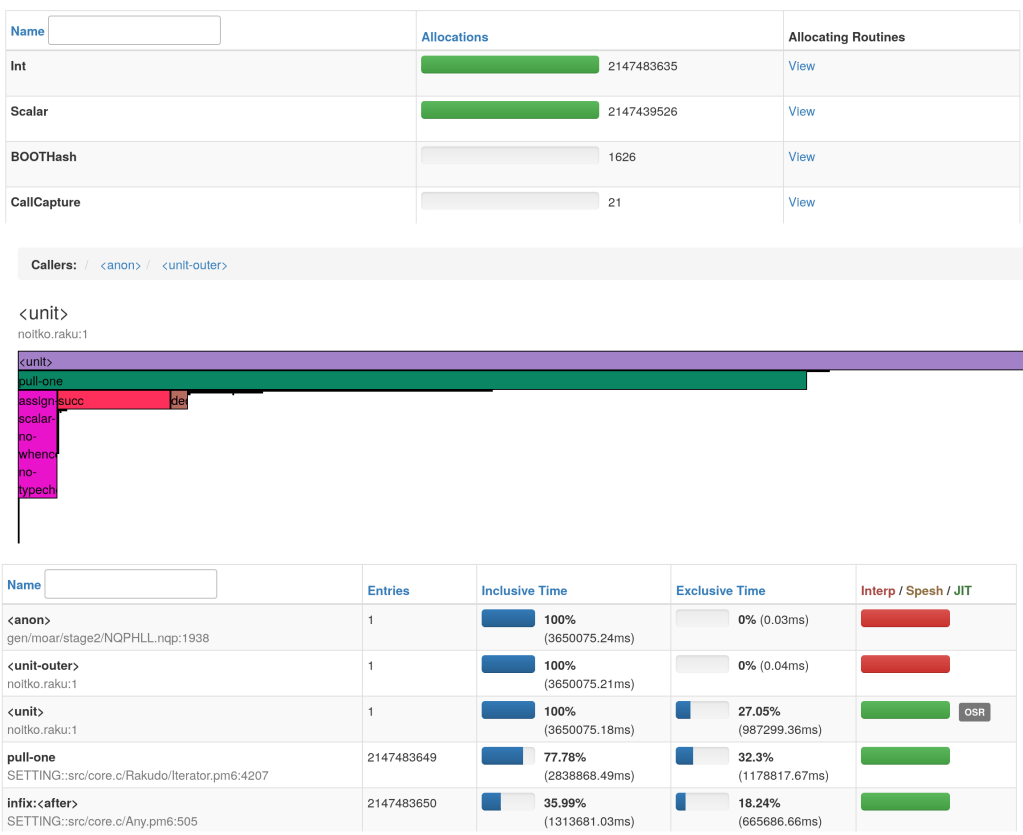
This is an overview of what you can have in the profiling report :

Even better, you can use Moarperf with SQL profiles : use raku --profile=myprofile.sql foo.raku and after raku -I . services.p6 myprofile.sql

“SQL profile” is an output format of profiles that is compatible with moarperf.

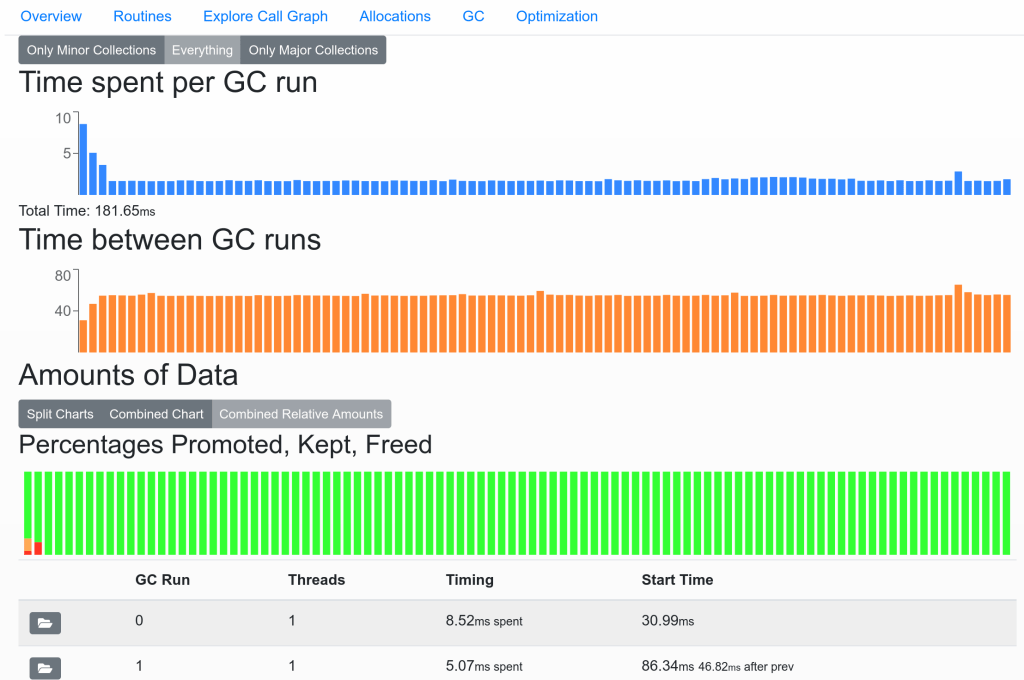
Below is an overview of one of the panels of MoarPerf :

“GC” refers to Garbage Collection which is an internal mechanism of the virtual machine when it comes to cleaning/unfragmenting memory.

You can check if some runs are very long, if the runs are too frequent and finally the way the “cells” are managed (the items have a “lifetime” called “generational garbage collection” where items move from one space to another and change their “state”)

If you want to have more info in the call graph, do not use named loops (MYLOOP: won’t help) but use subs !

sub myloop() {
    ...
    ...
}

Like this working example:

my $result = 42;

sub mybody($i) {
    if $i % 2 {
        $result += 2;
    }
}

sub myloop() {
    USELESS: for (0..1000) -> $i {
        mybody($i);
    }
}

myloop();
say $result;

The “sub trick” will produce some overhead (call stack) but can help you investigate.

2. Native type you will venerate

It’s written everywhere, in BIG LETTERS, use native types for performances ! 😀

This is true, it gives you blazing fast Raku scripts ! (but you have to be rigorous)

To convince you, start with implicit types :

my @a = ();
for (1..10_000_000) -> $item {
    @a.push($item);
}

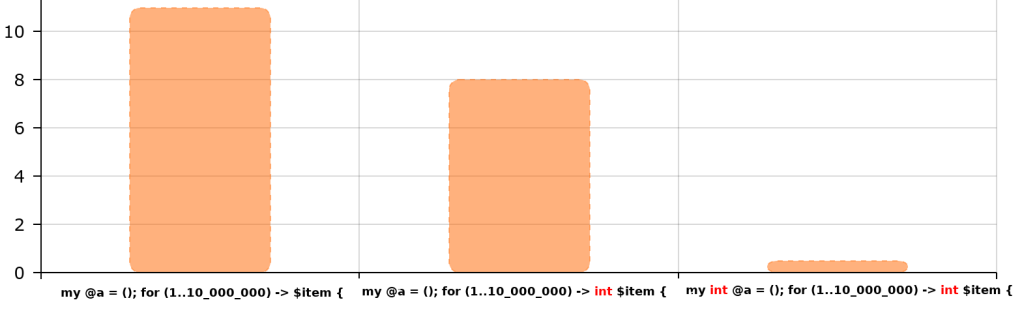
That is slow :

# real 0m11.073s
# user 0m10.614s
# sys  0m0.520s

Then change to native type of the item we want to push :

my @a = ();
for (1..10_000_000) -> int $item {
    @a.push($item);
}

It is slightly better, but still bad because only the item is declared as a native int:

# real 0m9.007s
# user 0m8.469s
# sys  0m0.600s

Finally the “full” native int version (container + item) :

my int @a = ();
for (1..10_000_000) -> int $item {
    @a.push($item);
}

That performs very very well :

# real 0m0.489s
# user 0m0.454s
# sys  0m0.105s

(y-axis are seconds taken from time reports, I used amcharts to draw the graphs)

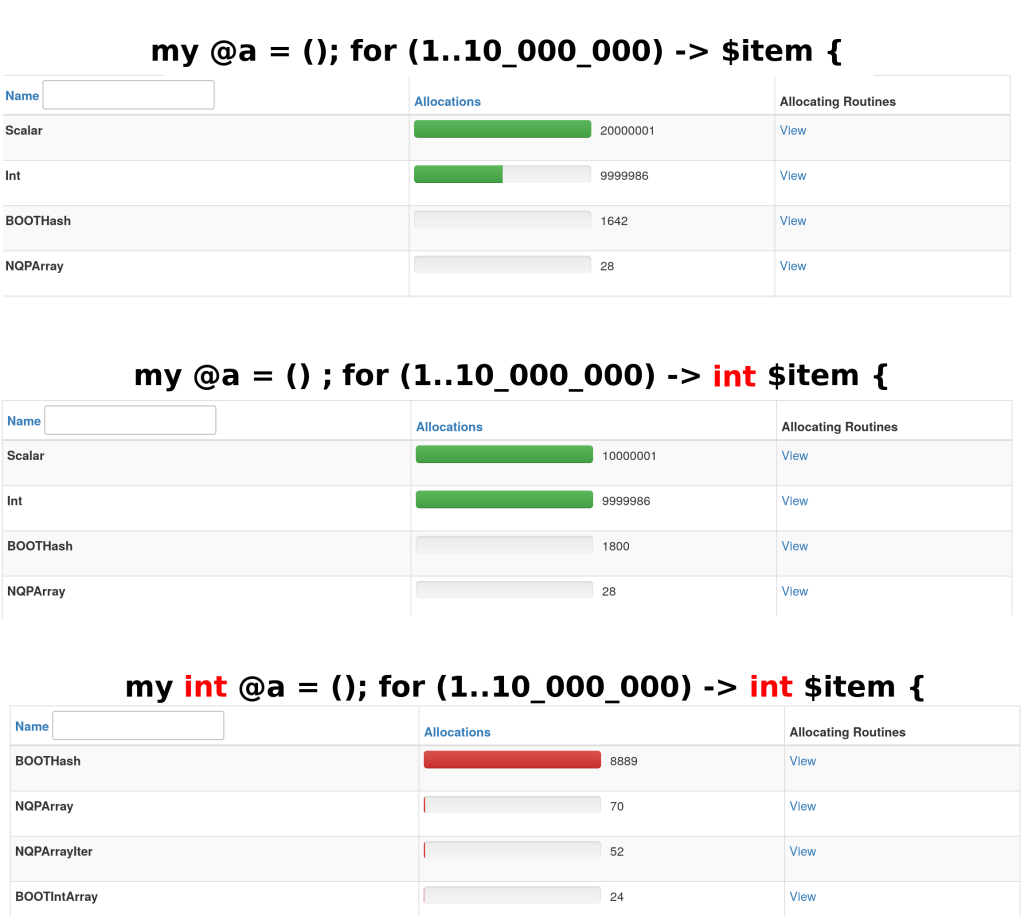
On the allocations side, this is what happen :

If you wonder what is BOOTHash, it is a lower-level hash class used in some internals for instance to pass arguments to methods.

To know what produced the BOOTHash allocations (SPOILER: @a.push($item)), you can click on View :

3. In the power of spesh (and JIT) you will believe

Spesh and JIT are MoarVM optimizations.

Spesh is more like trying to translate methods/attributes… to cheaper versions.

JIT means Just-In-Time compilation. It is used by MoarVM to compile “hot” code to binary (not bytecode).

The apparently simple loop :

for (1..1_000_000_000) -> $item {

Runs fast with default opts :

# real 0m6.818s
# user 0m6.843s
# sys  0m0.024s

Runs a bit slower without JIT (MVM_JIT_DISABLE=1) :

# real 0m22.555s
# user 0m22.562s
# sys  0m0.028s

Runs A LOT slower without JIT nor spesh (MVM_JIT_DISABLE=1, MVM_SPESH_DISABLE=1, MVM_SPESH_INLINE_DISABLE=1, MVM_SPESH_OSR_DISABLE=1) :

# real 5m21.953s
# user 5m21.434s
# sys  0m0.164s

What happens under the hood ?

Notice that call frame each time moved to a different optimization category.

4. In optimizations you will trust (again)

This time we play with empty loops, this is important to notice.

Look a these 3 different sorts of loop iterator declaration :

No type at all

for (1..1_000_000_000) -> $item { }

No iterator or Int declared

for (1..1_000_000_000) { }
# Or
for (1..1_000_000_000) -> Int $item { }

Native type iterator

for (1..1_000_000_000) -> int $item { }

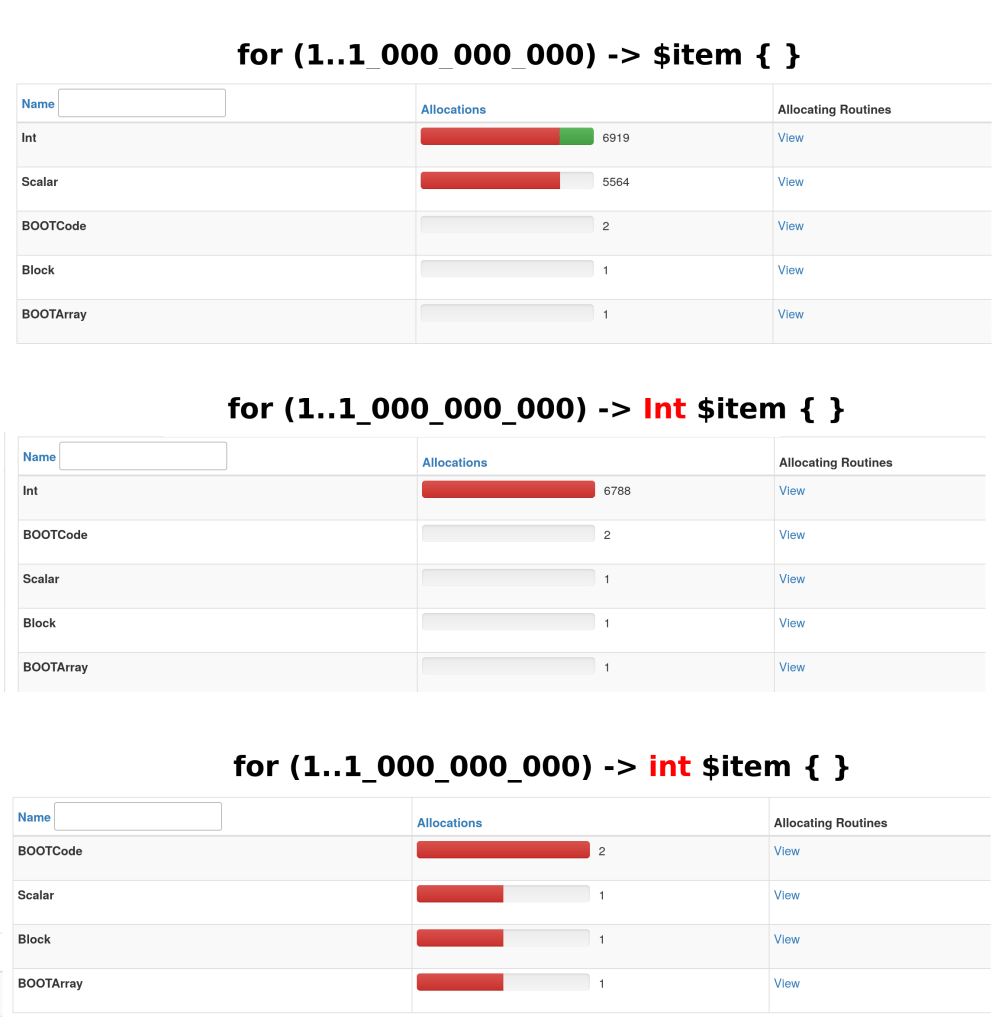
Each are allocating different objects (sometimes Int or even sometimes nothing at all).

As you can see, the number of allocations is not the actual number of loop iterations, the optimizer has done a good job.
Remember it’s an empty loop, if you use $item in the body then the allocations number will increase a lot !

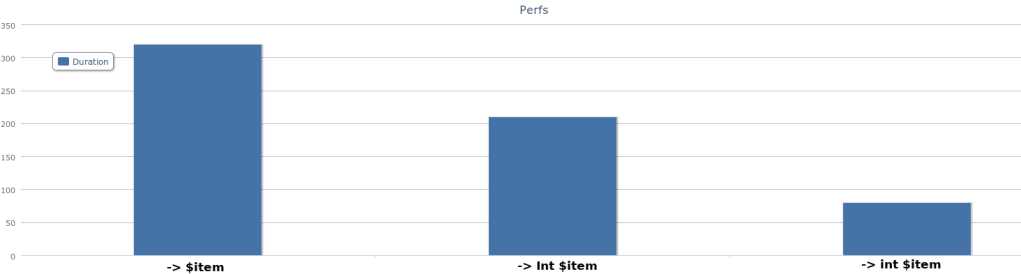
This is why (empty loop + optims), with optimizations enabled, they surprisingly all perform the same.

But when optimizations are disabled, it is another story 🙂

No explicit type (for (1..1_000_000_000) -> $item { }) :

# real 5m1.962s
# user 5m1.592s
# sys  0m0.152s

Explicit Int object type (for (1..1_000_000_000) -> Int $item { }) :

# real 3m32.763s
# user 3m32.647s
# sys  0m0.076s

Native int (for (1..1_000_000_000) -> int $item { }) :

# real 2m18.874s
# user 2m18.787s
# sys  0m0.037s

5. All kinds of loops you will cherish* the same way

*or hate, it depends

Basic loop ?

loop (my int $i = 0; $i < 1000; $i++) { }

Or foreach with a range (there is maybe some allocs here ?) ?

for (1..1000) -> int $item { }

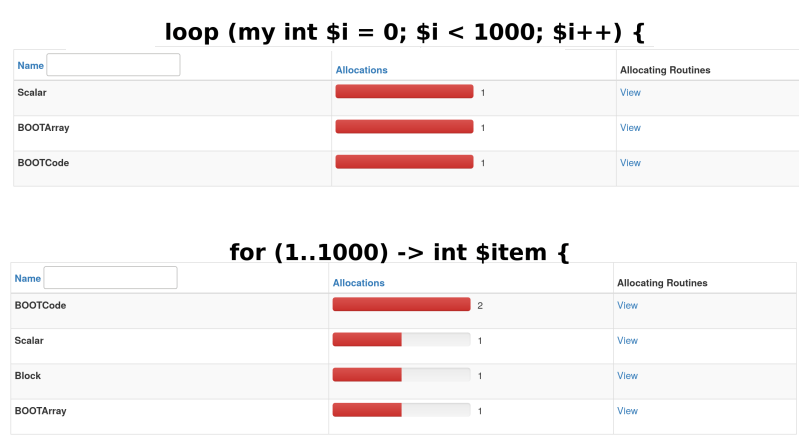
Choose what you prefer, they do not do the same but seems to perform almost the same ! 😀

6. From some bad builtins you will hide

With native types, raku performs very well, even better than several competitors.

But on the other hand, some builtins just perform bad than others. It is the case with unshift.

my int @a = ();
for (1..16_000_000) -> int $item {
    @a.unshift($item);
}

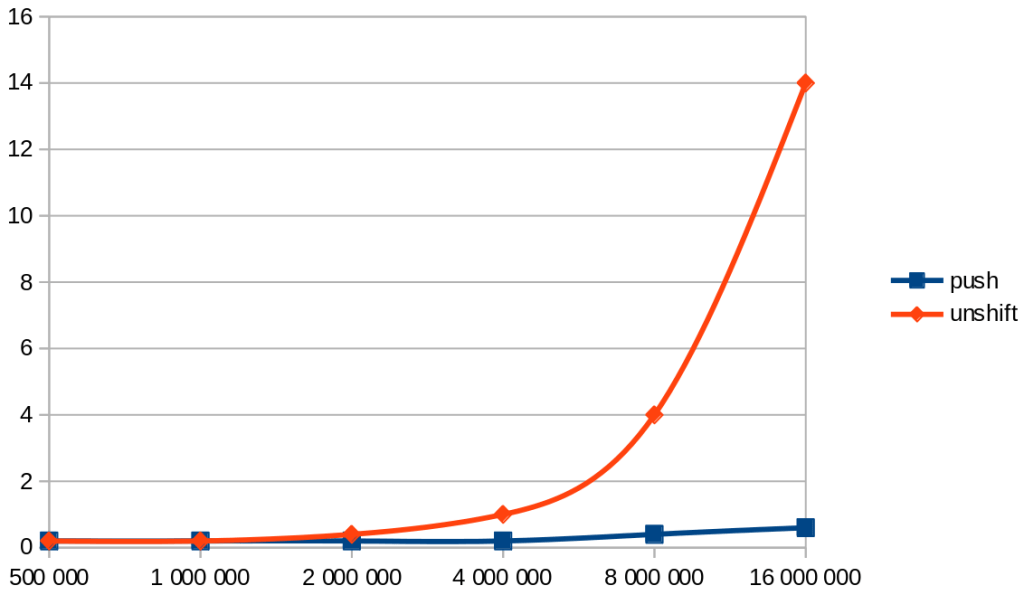
unshift gets bad performances relatively quickly.

#    500 000
# real 0m0.197s
# user 0m0.218s
# sys  0m0.037s

#  1 000 000
# real 0m0.209s
# user 0m0.223s
# sys  0m0.040s

#  2 000 000
# real 0m0.400s
# user 0m0.436s
# sys  0m0.036s

#  4 000 000
# real 0m1.076s
# user 0m1.087s
# sys  0m0.053s

#  8 000 000
# real 0m3.712s
# user 0m3.697s
# sys  0m0.072s

# 16 000 000
# real 0m14.544s
# user 0m14.430s
# sys  0m0.192s

If we look at push in comparison…

my int @a = ();
for (1..4_000_000) -> int $item {
    @a.push($item);
}

#   500 000
# real 0m0.216s
# user 0m0.258s
# sys  0m0.021s

#  1 000 000
# real 0m0.209s
# user 0m0.231s
# sys  0m0.032s

#  2 000 000
# real 0m0.224s
# user 0m0.223s
# sys  0m0.057s

#  4 000 000
# real 0m0.249s
# user 0m0.259s
# sys  0m0.045s

#  8 000 000
# real 0m0.410s
# user 0m0.360s
# sys  0m0.108s

# 16 000 000
# real 0m0.616s
# user 0m0.596s
# sys  0m0.108s

The overall idea is “prefer good performers builtins”

unshift perfs were even worse until very recently, but it’s not very fair to mention it since these terrible performances were not something “normal” but a bug in MoarVM that I reported and that was quickly fixed since then (thank you !!).

Another example is everything that is related to regex.

This first code is very slow because of ~~ :

my $n = 123;
my $count = 0;

for (1..10_000_000) {
    if $^item ~~ /^$n/ {
        $count++;
    }
}

# real 1m12.583s
# user 1m12.189s
# sys  0m0.064s

Simply replacing ~~ per starts-with drastically improves performances :

my $n = 123;
my $count = 0;
for (1..10_000_000) {
    if $^item.starts-with($n) {
        $count++;
    }
}

# real 0m3.440s
# user 0m3.470s
# sys  0m0.044s

This last idea was stolen from this cool presentation 🙂

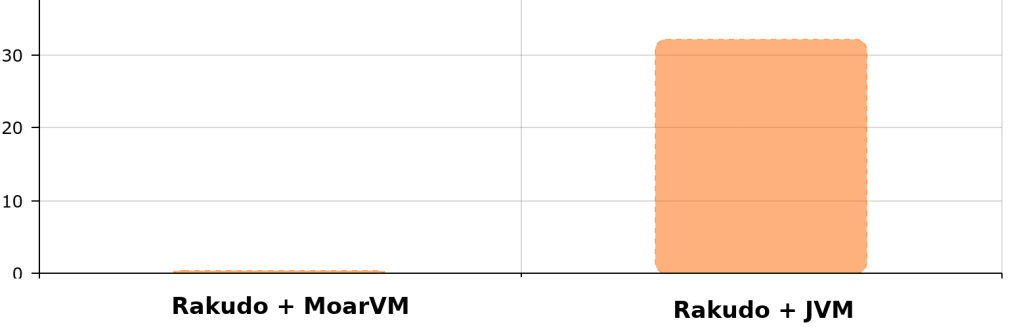
7. MoarVM over JVM you will prefer

The reference code

for (1..10000000) -> Int $item { }

running in Rakudo + MoarVM :

# real 0m0.388s
# user 0m0.287s
# sys  0m0.047s

versus Rakudo + JVM :

# real 0m21.290s
# user 0m32.255s
# sys  0m0.588s

Extra good reasons to not use JVM :

  • JVM support is incomplete (from rakudo news)
  • JVM startup time is much much longer

8. With big integers you will not deal

We have performance penalties for big numbers.

for (1..2147483646) { }
# real 0m15.421s
# user 0m15.429s
# sys  0m0.040s

To compare with

for (1..2147483647) { }
#                ^
# real 17m1.909s
# user 16m59.627s
# sys  0m0.396s

It is especially highlighted with this code sample (huge penalty for very small leap) :/

Again, this particular example is not fair (I reported an issue about it), but you get the idea that dealing with big int (even native types) won’t cost the same than dealing with small int…

9. Better algorithms you will always search

VM, compiler, optimizations… Nothing can help with bad code logic !

Stay far from costly builtins or greedy allocation algorithms and think that everything inside a loop is important to optimize.

10. Heisenberg effect you should never forget

Sadly, profiling could make change the :

  • behaviour of your execution
  • duration of your execution (sometimes making it 10 times slower…)

Having threads can also confuse the profiler (reporting up to 90% spent in garbage collection…). This is the kind of typical issue that you can have for instance if you try to install and use Unix signals to interrupt a running profiling session.

Conclusion

Raku with its profiler is a very cool playground for performance optimizations 🙂

According to me, in 2020, there are still some areas to improve (optims) but native types already allow you to get often much better performances than competitors, and that is very nice.

Day 9: Getting Windows Memory Usage with NativeCall

Raku NativeCalls provide a way to interact with dynamic libraries that follow the C calling convention and are very useful for obtaining information from the operating system, such as memory usage.

In this article we will see how to get the memory usage from a Windows system.

The MEMORYSTATUSEX C++ structure

Win32 API provides the MEMORYSTATUSEX structure:

typedef struct _MEMORYSTATUSEX {
  DWORD     dwLength;
  DWORD     dwMemoryLoad;
  DWORDLONG ullTotalPhys;
  DWORDLONG ullAvailPhys;
  DWORDLONG ullTotalPageFile;
  DWORDLONG ullAvailPageFile;
  DWORDLONG ullTotalVirtual;
  DWORDLONG ullAvailVirtual;
  DWORDLONG ullAvailExtendedVirtual;
} MEMORYSTATUSEX, *LPMEMORYSTATUSEX;

that contains information about the current memory in bytes, including:

  • Total physical memory: ullTotalPhys
  • Available physical memory: ullAvailPhys

These two members will allow us to calculate the memory usage by substracting ullAvailPhys from ullTotalPhys.

The MEMORYSTATUSEX structure has the dwLength member that needs to be set before calling the function GlobalMemoryStatusEx that populates the MEMORYSTATUSEX structure.

Declaring the MEMORYSTATUSEX Class with NativeCall

Raku Nativecalls use the repr('CStruct') trait into a declaration class to interact with C structures. We can declare this class to use the C++ MEMORYSTATUSEX structure as follows:

class MEMORYSTATUSEX is repr('CStruct') {    
  has uint32 $.dwLength is rw; 
  has uint32 $.dwMemoryLoad;    
  has uint64 $.ullTotalPhys;
  has uint64 $.ullAvailPhys;
  has uint64 $.ullTotalPageFile;
  has uint64 $.ullAvailPageFile;
  has uint64 $.ullTotalVirtual;
  has uint64 $.ullAvailVirtual;
  has uint64 $.ullAvailExtendedVirtual;
};

It’s important mapping the member types between C++ and Raku:

  • The Raku type uint32 is equivalent to C++ Win32 DWORD type.
  • The Raku type uint64 is equivalent to C++ Win32 DWORDLONG type.

The $.dwLength member is rw (read and write) to set the size of the structure later.

The GlobalMemoryStatusEx C++ function

This C++ function populates the MEMORYSTATUSEX structure using as argument the LPMEMORYSTATUSEX pointer type:

BOOL GlobalMemoryStatusEx( LPMEMORYSTATUSEX lpBuffer );

Raku doesn’t use pointers to perform a Native Call to this function, instead it uses a Raku function with the native trait as we will see below.

Building the Native function

Raku Native Calls allows to use the C++ GlobalMemoryStatusEx function as follows:

use NativeCall;

sub GlobalMemoryStatusEx(MEMORYSTATUSEX) is native('Kernel32') returns int32 { * };

  • use NativeCall loads the Raku NativeCall context.
  • GlobalMemoryStatusEx is the function name and must be the same as the original name in C++.
  • MEMORYSTATUSEX is the name of the class we have declared before to interact with the C++ struct that will contain the members we need ($.ullTotalPhys and $.ullAvailPhys). Actually, this class acts as the pointer that goes into the argument of the C++ GlobalMemoryStatusEx function.
  • The trait is native('Kernel32') exposes the Win32 library that contains the GlobalMemoryStatusEx function.
  • This function returns a bool value that is represented by the int32 type.

Getting the results

To use the MEMORYSTATUSEX class with the GlobalMemoryStatusEx Native function we need to instanciate it in an object, $data for example:

my MEMORYSTATUSEX $data .=new;

Also, let’s not forget to pass the size of the structure (or $data object) setting the $data.dwLength member with the current size. The structure size is the $data object size and we can get it with the function nativesizeof:

$data.dwLength = nativesizeof($data);

Now we are ready to populate the MEMORYSTATUSEX struct ($data object) calling the GlobalMemoryStatusEx Native function with the $data object as argument:

GlobalMemoryStatusEx($data);

The $data object acts like the C++ LPMEMORYSTATUSEX pointer.

Finnaly, the results that we need are in the values of the members of the $data object:

my $memoryUsage = $data.ullTotalPhys - $data.ullAvailPhys;

say "Current Memory Usage: $memoryUsage Bytes.";

Here you have available this example applied in a Raku module.

As we have seen in this example, the use of Raku Native Calls allows extending the Raku’s functionality to the universe of the operating system through its dynamic libraries. Furthermore, by making the appropriate calls to different operating systems, we can create applications that work on any of them.

More information about Raku Native calling interface in the Raku documentation.

Day 8: Raku web templating engines: boost up the parsing performance

Modern Raku web templating engines

A templating engine basically provides tools for effective metadata interpolation inside static files (templates). At web application runtime, the engine parses and replaces variables with actual content values. Finally client gets a HTML page generated from the template, where all metadata (variables, statements, expressions) has been processed.

Raku ecosystem has a few modern templating engines: Template::Mojo (last commit on 12 Jun 2017), Template::Mustache (last commit on 25 Jul 2020 — it’s alive!), Template6 (last commit on 20 Nov 2020 – active maintenance), Template::Classic (last commit on 11 Apr 2020), Template::Toolkit (by @DrForr, unfortunately it idles now) and HTML::Template (last commit on 28 Oct 2016).

Also there is the handy multi-module adapter Web::Template — a simple abstraction layer, providing a consistent API for different template engines.

What engine should you choose? My criteria was: the project should be alive and be the part of Rakudo Star Bundle distributive. Well, Template::Mustache is the chosen one innocent.

What are web templates?

Web templates are HTML documents with additional metadata (markup), that’s going to be processed by templating engine — in simple templates metadata is presented by variables (e.g., Template6 templating engine interpolates variable to [% varname %] and Template::Mustache to {{ varname }}). After the web template is processed all metadata variables are replaced with actual content values.

Сomposite web template includes the links (bindings) to another templates. For example canonical Mustache templates could perform import with {{> template_name }} (see Partials). By the way, it’s possible to use links at imported template, so recursive partials are accepted.

A web template with logic (inline programs) uses extended meta markup. We can write simple layout management programs right inside the template. Template6 engine successfully «executes» constructions like [% for item in list %][% item %]\n[% end %] or [% if flag %]foo[% else %]bar[% end %].

Regular practice for the most of web applications — templating with simple and composite templates. We use only variables and import dependencies (header, footer, comments block, feedback form, etc…). All extended logic (that could be implemented with inline programs) should be excluded as much as possible, or put onto web application layer.

In this article we will consider the most trivial case — web template with variables (no imports, no inline logic).

Performance

As I have mentioned above, my criteria to choose a templating engine were the project support and accessibility. But the in real life actually the important criteria is performance. Well, no matter the project is very much alive or is included into all known distros — if the client waits a few second for page rendering, we have to seek another module or solution.

So, to test the performance i have used the Pheix CMS embedded template as a one of the most trivial. In my opinion — if the templating engine will easily deal with it, we can go to the next step of testing — for example, inline programs.

Notes: the template has 14 variables and 2 of them are using the extended Mustache syntax {{{ varname }}}. Triple curly braces are telling the engine to skip the escaping inside the content block we are replacing into.

The test suite is based on the processing script, where the render() method from helper module Pheix::View::TemplateM is used. The sources are quite simple and as close as possible to documentation guidelines. We are profiling the render() method and measuring the execution time (no compiling, loading, object initialization, etc… time is considered). Also we use automated bash helper to run tmpl-mustache.raku in loop for 100 iterations and count average run time.

Tests are performed on MacBook Unibody Core2Duo 2.6 GHz, 8Gb RAM platform (consider it like the mid-performance VPS):

mustache render time: 1.8555348 sec

In other words, if the web application works as the classic CGI instance (no caching, no available workers, no proxies — every run is from the scratch), the request will be rendered at least in 2 seconds (network latency + duty cycle + templating [+ server resource throttling]). Actually this time may be more than 10 seconds (a few parallel clients case) — absolutely bad.

The same test is performed for Template6:

template6 render time: 0.5481035 sec

This module is x3 faster. Sources: template and script.

First optimization

The first idea on optimization was: «ok, it seems that the considered modules are heavy for this task — let’s write something simple». And I have implemented my own render() method, based on generic regular expressions:

method fast_render(Str :$template is copy, :%vars) returns Str {
for %vars.keys -> $key {
if $key ~~ /tmpl_timestamp/ {
$template ~~ s:g/ \{\{\{?: <$key>: \}\}\}?: /%vars{$key}/;
}
else {
$template ~~ s/ \{\{\{?: <$key>: \}\}\}?: /%vars{$key}/;
}
}
$template;
}

Sources: script, helper module.

Result:

regexpr render time: 0.2721529

This is a 2x increase in performance compared to Template6 and 6x increase compared to Template::Mustache.

Second optimization

The next idea was: «well, let’s parse HTML template to the tree and replace/substitute required blocks». I have used the XML module for this task.

This approach requires a little bit tricky template: as the template is parsed to the tree, we need to address the blocks to interpolate. In case of Template6 or Template::Mustache we use meta markup, but it fails on XML validation.

Well, I add the XML markup into the basic template instead of meta markup:

  • specific tags: <pheixtemplate variable="tmpl_pagetitle"></pheixtemplate>;
  • specific attributes:
    • <link href="resources/skins/akin/css/pheix.css" pheix-timestamp-to="href" rel="stylesheet" /> — this means the timestamp value will be concatenated to string from href attribute;
    • <meta name="keywords" content="" pheix-variable-to="content" pheix-variable="tmpl_metakeys" /> — this means the tmpl_metakeys value will be inserted to content attribute.

Also specific tags should have pre-built HTML code and bindings to existed tree nodes, specific attributes just have to be defined — this is done so straight-forward at initialization step:

my %tparams =
title => {
name => 'tmpl_pagetitle',
new => make-xml('title', "This is the page title"),
existed => Nil,
value => q{}
},
mkeys => {
name => 'tmpl_metakeys',
new => Nil,
existed => Nil,
value => 'This is meta.keywords data'
},
...
;
for %tparams.keys -> $k {
%tparams{$k}<existed> =
$xml.root.elements(:TAG<pheixtemplate>, :variable(%tparams{$k}<name>), :RECURSE, :SINGLE);
if !%tparams{$k}<existed> {
%tparams{$k}<existed> = $xml.root.elements(:pheix-variable(%tparams{$k}<name>), :RECURSE, :SINGLE);
}
}

Timestamps blocks are collected with:

my @timestampto = $xml.root.elements(:pheix-timestamp-to(* ~~ /<[a..z]>+/), :RECURSE);

And processed by (as trivial as possible):

for (@timestampto) {
my Str $attr = $_.attribs<pheix-timestamp-to>;
if $attr {
$_.set($attr, ($_.attribs{$attr} ~ q{?} ~ now.Rat));
%report<timestamps>++;
}
}

Variable tags are processed with:

for %tparams.keys -> $k {
if %tparams{$k}<new> {
%tparams{$k}<existed>.parent.replace(%tparams{$k}<existed>, %tparams{$k}<new>);
%report<variables>++;
}
else {
my Str $attr = %tparams{$k}<existed>.attribs<pheix-variable-to>;
if $attr {
%tparams{$k}<existed>.set($attr, %tparams{$k}<value>);
%report<variables>++;
}
}
}

Yeah! Let’s run the script:

$ raku html-2-xml.raku

# processing time: 0.15519139
# added 6 timestamps
# replaced 8 variables

Average result on 100 iterations:

xml render time: 0.1550534 sec

This is a 2x increase in performance compared to custom RegExpr, x4 increase compared to Template6 and 12x increase compared to Template::Mustache exploding_head.

HTML::Template

Canonical usage (following guideline)

Just for fun I have measured the performance of the old and forgotten HTML::Template module. Test sources: template, script (toggle comments Pheix::View::TemplateH to Pheix::View::TemplateH2), helper module.

Average result on 100 iterations:

htmltmpl render time: 0.1911648 sec

Well, it’s quite fast out-of-the-box.

Make it ~ x100 faster

HTML::Template module provides simple grammar, so the third idea was «yep, let’s parse HTML template into the variable (according the given grammar) at initialization stage and substitute at runtime».

Test sources: template, script (toggle comments Pheix::View::TemplateH2 to Pheix::View::TemplateH), helper module.

Average result on 100 iterations:

htmltmpl render time: 0.0021661 sec

This is a 100x increase in performance compared to canonical usage tada tada tada.

Need more boost?!

Modern web development techniques involve the backend templating engine load balancing.

The common technique is based on idea of distributing template rendering task between the server and the client: depending on server load, the template is fully rendered by backend or backend just does the fast generation. It pulls the template file and concatenates its content with the data to be replaced (represented in JSON). Usually this data is added to end of template as the JavaScript code inside the <script></script> tag.

On the next step JavaScript template engine (for example, RIOT.js) does the full page rendering right inside the client’s browser.

This approach could be effective in case we use Template::Mustache as the primary templating engine on backend. Template variables for server-side rendering are marked as {{ varname }} or {{{ varname }}}, client-side rendering variables are marked as { props.varname }. So, this is the way we get the consistency of template source code and basic semantic integrity.

Conclusion

Why does the latency matter?

Client’s point of view: nobody likes slow websites.

Developer’s point of view: if we will minimize latencies and bottlenecks at routine tasks — and template rendering is the such one, — we will free the space for resource-intensive or slow technologies.

For example, blockchain. This humble research was inspired by the development of Pheix web content management system with data storing on Ethereum blockchain. Some of the ideas outlined here are put into code of public β-version — it will be released by the end of this year.

Summary

All sources considered in this post are available at https://gitlab.com/pheix-research/templates. The final scores are (in seconds):

1. htmltmpl pre-parse render time: 0.0021661
2. xml render time:                0.1550534
3. htmltmpl native render time:    0.1911648
4. regexpr render time:            0.2721529
5. template6 render time:          0.5481035
6. mustache render time:           1.8555348

Raku driven web applications

I’m sure, we can use Raku as web programming language. We can create fast, reactive and scalable Raku driven backends. On other side it requires a little bit more practice and time: combining different techniques and approaches we can get more performance improvements. The sad things — the ecosystem is still raw and when we want to use some module in our project, we should profile it, compare with analogs, maybe fork and tweak. The optimistic things — we can get our Raku driven web application work fast, so it can be released to production.

Day 7: Mixing Bash and Raku Using Sparrow

Sparrow is a Raku automation framework which could be easily integrated with many other programming languages. So if you come from no knowledge of the Raku language – you’re welcome.

In this post I’ll show you have one can effectively mix Bash scripts and Raku language using Sparrow.

The idea of Sparrow – to choose the language that fits best to your domain and let Raku orchestrate your code on a high level.

Let’s get started.


Installing Sparrow

Sparrow comes as a Raku module, so one has to use zef package manager to install it:

zef install --/test Sparrow6

Once Sparrow is installed you’ll get a s6 utility available in PATH so that you can execute Sparrow related tasks:

s6 --help

Create a Bash task

You start with a Bash script that does some useful job. The requirement is to name a script as a task.bash.

Let’s start with a simple example:

** task.bash **

echo "hello from Bash"

Now let’s run this script using Sparrow:

s6 --task-run .
[sparrowtask] :: run sparrow task .
[sparrowtask] :: run thing .
[.] :: hello from Bash

So the script is executed and we could see an output.

It’d be silly to stop here, what is the reason to just run Bash script through Sparrow?

Here comes the most exiting part. Keep reading.

Handling input parameters

Say, we want to pass some input parameters to a Bash script. Handling input parameters with Bash could be a hassle, but not with Sparrow. Let’s update our script:

echo "hello from $(config language)"

Now we can run the script with parameters:

s6 --task-run .@language=Bash
[sparrowtask] :: run sparrow task .@language=Bash
[sparrowtask] :: run thing .
[.] :: hello from Bash

Easy? We don’t need to create args parser in Bash. It’s done by Sparrow by default!

We can even set default values for input parameters ( which are applied if one does not explicitly pass any parameters ).

Let’s just create a YAML format file named config.yaml which will contain all the default parameters:

** config.yaml **

language: Shell

And then run the script again without parameters:

s6 --task-run .
[sparrowtask] :: run sparrow task .
[sparrowtask] :: run thing .
[.] :: hello from Shell

So default parameter Shell is applied from config.yaml file.

To pass multiple parameters through a command line, use comma delimiter:

s6 --task-run .@language=Raku,version=2020.11

Running Bash script as a Raku function

What makes a usage of Sparrow really interesting is that one can run the same Bash script as a Raku function.

Let’s create a Raku scenario named run.raku which is Raku equivalent to the command line above:

** run.raku **

use Sparrow6::DSL;

task-run ".", %(
  language => "Raku"
);

Let’s run run.raku script by using Raku:

raku run.raku
[.] :: hello from Raku

We have the same output.

Thus, Sparrow allows to run scripts as functions, which is pretty funny. Depending on a context, one can run the same code as a command line or as a function written on Raku.

Checking STDOUT

Sometimes when I write tests for command line tools, I’d like to verify that some script’s output contains certain lines.

The same way as Linux people would use | grep construction to check if a command produces given output.

Sparrow provides an equivalent for that operation called task checks.

Let’s create a file named task.check in the same directory with Bash script:

** task.check **

regexp: Bash || Shell || Perl || Python || Raku

The file contains rules defined in format of plain strings or Raku regular expressions. This syntax is a Sparrow Task Check DSL and explained in Sparrow documentation.

Let’s apply a task check to our task.bash script by running run.raku:

raku  run.raku 
[.] :: hello from Raku
[task check] stdout match  True

As one could see Sparrow has validated that script output for having at least one of the five words:

Bash, Shell, Perl, Python or Raku.

In case a task check fails, Sparrow will notify a user by throwing a proper exception.

Let’s see that by passing a Basic language parameter ( sorry Basic users 🙂 )

s6 --task-run .@language=Basic
[.] :: hello from Basic
[task check] stdout match  False
=================
TASK CHECK FAIL
echo $?
2

Thus, if a task check fails this results in none zero exec code, notifying that the whole script finished with a failure.

Script hooks

Those who are familiar with git source control system know that it allows to define scripts hooks – small tasks gets executed before a data gets send to a remote server. Those tasks could encompass, for example, unit tests or linters. This is handy if you want to ensure that code changes are valid and correct before you send actual data to a server.

The same way Sparrow allows to define hooks for users scripts. Those hooks – are also Sparrow tasks that get executed before a main script.

Let’s take a look at the example, where we have main script – task.bash and hook that triggers additional task named tasks/triggers/http/task.bash

To implement this Sparrow needs a dedicated dir tasks/ where all hook scripts exist:

mkdir tasks/triggers/http

** tasks/triggers/http/task.bash **

curl 127.0.0.1:3000 -o /dev/null -s && echo "I am triggered"

And a dedicated bash files named hook.bash that run a hook script, using run_task function:

** hook.bash ***

run_task triggers/http

Now let’s get it run:

s6 --task-run .
[sparrowtask] :: run sparrow task .
[sparrowtask] :: run thing .
[.] :: I am triggered
[.] :: hello from Shell
[task check] stdout match  True

In this scenario we hit a URL (curl 127.0.0.1:3000) before we run a main script (that just prints out “hello from Shell”).

Overall, hooks provides one a way to split big Bash script into smaller independent ones.

It’s even possible to pass parameters between main script and a additional one. Let’s pass a parameter named param to tasks/triggers/http/task.bash script:

** nano hook.bash **

run_task triggers/http param value


A hook script reads a parameter passed to it as $param variable:

** tasks/triggers/http/task.bash **

curl 127.0.0.1:3000 -o /dev/null -s && echo "I am triggered. You passed me param: $param"
$ s6 --task-run .
[sparrowtask] :: run sparrow task .
[sparrowtask] :: run thing .
[.] :: I am triggered. You passed me param: value
[.] :: hello from Shell
[task check] stdout match  True

Packaging things up

Finally, last but not the least Sparrow’s feature is packaging.

Packaging allows users distribute their scripts by using Sparrow plugins mechanism.

A script could be packaged and uploaded to a Sparrow repository – remote server which distributes scripts to users.

Let me show how can we do that, step by step.

Initialize Sparrow repository

First of all we need to create an internal file structure for our Sparrow repository where all the plugins are going to be stored.

It’s done by simple command of Sparrow cli. The command takes one argument – path to a repository file system root folder:

s6 --repo-init ~/repo
[repository] :: repo initialization
[repository] :: initialize Sparrow6 repository for /home/melezhik/repo

Create a plugin

Once a Sparrow repository is initialized, let convert our Bash script into a Sparrow plugin. To do that we need to create a plugin meta file named sparrow.json that contains all the package details.

The file should written in JSON format and placed on the same directory where we have the Bash script:

** sparrow.json **

{
  "name" : "hello-language",
  "version" : "0.0.1",
  "description" : "hello language plugin"
}

The meta file structure is pretty simple, and self-explanatory. A minimum parameters would be a plugin name, plugin version and short description.

Now let’s upload the plugin to a Sparrow repository by using s6 cli:

s6 --upload
[repository] :: upload plugin
[repository] :: upload hello-language@0.0.1

The command will archive and copy all plugin files into a repository file system.

Run a web server

To make a plugin available for end user, we need to spin up a web server that will serve a repository files. It could be any web server, the only requirement it should have a document root of a repository root folder. Here is an example for caddy http server:

caddy --root ~/repo --listen=192.168.0.1

Install a plugin

Now a user can install and run a plugin by using Sparrow command line.

First, let’s setup a remote Sparrow repository and fetch repository index file. The operation is similar to the one Linux user would execute when using standard Linux package managers (e.g for Debian: apt-get update ):

export SP6_REPO=http://192.168.0.1
s6 --index-update
[repository] :: update local index
[repository] :: index updated from file://home/melezhik/repo/api/v1/index

Once a repository is set up, use s6 to install and run a plugin. A user can choose between command line approach:

s6 --plg-run hello-language@language=Python
[repository] :: install plugin hello-language
[repository] :: installing hello-language, version 0.000001
[task] :: run plg hello-language@language=Python
[task] :: run thing hello-language
[hello-language] :: I am triggered. You passed me param: value
[hello-language] :: hello from Python
[task check] stdout match  True

Or Raku API:

** run.raku **

use Sparrow6::DSL;

task-run "hello language", "hello-language", %(
  language => "Raku"
)
raku run.raku
[hello language] :: I am triggered. You passed me param: value
[hello language] :: hello from Raku
[task check] stdout match  True

Different distribution protocols

Sparrow repositories support various protocols for scripts distribution, including http, https, rsync and ftp.

Public Sparrow repository – Sparrowhub.io

An official Sparrow repository is sparrowhub.io – contains a lot of examples of real plugins that could be handy to solve daily developers tasks. Check it out! It could be also a good way to get familiar with Sparrow.

Conclusion

As one can see Sparrow provides a lot of features for people using plain Bash scripting.

With reasonable amount of Raku code we can develop, manage and distribute Bash scripts efficiently.

As a result Sparrow allows to do things in Bash style where Bash is more appropriate while having Raku as as great glue and orchestration tool. If you find Sparrow interesting reach out Sparrow GH page as source for documentation, examples and links to dependent projects.


Merry Christmas!