Day 18 – Dissecting the Go-Ethereum keystore files using Raku tools

Generally the Ethereum (Web3) keystore file is a kind of container for the private key, it has the specific structure mostly related to encryption details. Actually you will not find the private key there as a plain text, but the keystore file has everything to decrypt the private key… with some tricks surely.

When you work with Geth as a backend to access the blockchain, you have to work with accounts and therefore the «address/password» pairs or relevant private keys. Honestly, use of credential pairs is good enough for the most of the tasks, but since you want to boost the performance of your application and use it with authentication-less endpoints — you have to get some Geth-specific features directly in your app. Transaction signing, for example.

Transactions must be signed by a private key obviously, so you can somehow get private key and store it somewhere you want, but more flexible approach — manage existed keystore files.

Also you might be interested in Geth accounts management via keystore file direct access — fortunately Geth reloads keystores on the fly. Of course, I have to warn you about these hacking practices: you can corrupt or delete your account and eventually lose the access to your data on blockchain, but as a research or experiment — it’s ok 😜.

What is the Ethereum (Web3) keystore file

Overview

Roughly speaking, a keystore file is an encrypted representation of the private key. By structure — it is a JSON file with the following content:

{ "address": "92745e7e310d18e23384511b50fad184cb7cf826", "crypto": { "cipher": "aes-128-ctr", "ciphertext": "6eaf8f9485a714ed30cf38c8ebbb78dc52c0fe4120adb998c0d0b70fe64d6aee", "cipherparams": { "iv": "fda483b2d6595dde7f2157a6e3611a03" }, "kdf": "scrypt", "kdfparams": { "dklen": 32, "n": 262144, "p": 1, "r": 8, "salt": "5a1dba123aed0b365371b84b83af0be5691b06d4411d750144eabbb59be0efac" }, "mac": "9e5bab612ac8c325c29ead18f619163edf41d831a1ef731a51ce4649c0e7d49e" }, "id": "845c31f0-ac2c-4216-b8eb-76886eaa0cc1", "version": 3 }

The main member is the version. It defines the version of the keystore file and hence the encryption approach. I focus on the latest (3rd) generation of Ethereum keystores.

The other JSON members in keystore file are:

  • id is the random universally unique identifier generated on keystore file creation. Importing an account with Geth from a keystore file (and exporting it if needed) will by default lead to keystore with different id. If this is not desired, you have to use 3rd-party tools allow to reuse or explicitly define id;
  • address relies on private key and might be fetched with Bitcoin::Core::Secp256k1 module;
  • crypto has all enctyption details to get private key from the keystore file, encrypted private key is stored in ciphertext.

Actual scope (real world tasks)

I mentioned a few real world tasks we can solve via direct keystore management, but let me show a hot one at least. I maintain a few full nodes for Sepolia test network. On node deployment there are two options for address management: use automatically generated address or import an existing one.

Both cases have their own specifics. The common thing: both need a positive account balance (some available funds) to start interacting with test network.

Tools (aka hacks) to get private key from keystore file

The first case (automatically generated address) is the trivial one if you do not want to manage (track) your balance with the 3rd party wallet: you just need to get some funds from the faucet (I use the faucet by Alchemy) and track funds transfer with Etherscan.

The magic happens when you want to add your automatically generated address to 3rd-party wallets. You have to fetch somehow private key from the keystore file initially generated in Geth and import it, for example, into MetaMask. I wrote a simple Node.js script as a hacker tool for that task. It’s a bit excessive and obviously not flexible approach — you should have Node.js installed, also script needs Keythereum package as a primary dependency. So eventually I had to install all that stuff to my Sepolia node server, added a few symlinks (script looks for keystore file in keystore folder explicitly) and run script from privileged user:

node file2privkey.js # 632735b66ad875108deef039be855aae7f702653fcc2b2efb1e5666c1306f2fd

Another hacking approach — use Python. It’s a bit more scalable than Node.js: Python is pre-installed in the most of the popular Linux distributions and the script has just a single external dependency:

python3 file2privkey.py # 632735b66ad875108deef039be855aae7f702653fcc2b2efb1e5666c1306f2fd

Since you got the raw private key, you can easily import it into Metamask and manage/track your account (balance at least) via a friendly UI.

Importing new accounts (private keys) into Geth client

The second case (import existing private key) into Geth client has two options under the hood as well. We can use Node.js again for raw private key to keystore file conversion (dependence to ethereumjs-wallet package). Another approach: built-in Clef account manager — new accounts might be added via the command line:

clef --advanced --stdio-ui --loglevel=6 --keystore=/ethereum-local-network/geth.local/geth-node2/keystore/ importraw /pk

Input argument --keystore points to folder, where Geth stores its keystore files; importraw option triggers raw private key import; /pk is just the path to the sample text file with raw private key. Import via clef is used in Pheix CI/CD at GitLab.

Implementation in Raku

I started with the quick research — how it’s implemented in Geth client written in Go.

Initial state (it looks promising)

Not a lot of work and it looks like Raku has everything in its ecosystem for straight-forward implementation:

  • Parse JSON with JSON::Fast module;
  • Decrypt V3 key:
    • get derived key with Crypt::LibScrypt module;
    • get keccak hash from derived key and keystore’s ciphertext with Node::Ethereum::Keccak256::Native module;
    • decrypt ciphertext by derived key and keystore’s input vector with AES128: with OpenSSL or Gcrypt modules [ref1, ref2];
  • verify decrypted V3 key (raw private key) and get Ethereum address with Bitcoin::Core::Secp256k1 module;
  • generate UUID v4 with Crypt::Random module — in case we want to create keystore file from raw private key.

Problems (are on the most important steps)

The main issues are at decryption, unfortunately the most important step. First issue is at Crypt::LibScrypt: custom KDF parameters could not be used because of module limitations. By default only scrypt-hash is implemented, it uses KDF constants hardcoded in Crypt::LibScrypt. Obviously those constants impact hash generation, so to get it working with Geth keystores we have to add binding to libscrypt_scrypt function from Native libscrypt library.

Next issue is at OpenSSL and Gcrypt, both do not include AES128-CTR implementation. I will consider details below. Finally I found the problem at Bitcoin::Core::Secp256k1 — compression was not configurable there, but we need to support SECP256K1_EC_UNCOMPRESSED alongside SECP256K1_EC_COMPRESSED.

Let’s raise a few Pull Requests

Crypt::LibScrypt

On initial step I added a few principal updates to Crypt::LibScrypt module, as it was mentioned above we need a binding to internal hashing function libscrypt_scrypt. Finally the next bindings (and exported wrappers) were added:

  • libscrypt_salt_gen — method for salt generation, «must-have» feature for keystore file generation;
  • libscrypt_scrypt — main libscrypt‘s hashing method, totally configurable via user-defined KDF (Key Derivation Function) parameters;
  • libscrypt_mcf — method to transpose raw hash buffer to modular crypt format (MCF), stringified hash in MCF might be verified by scrypt-verify;

Pull request: https://github.com/jonathanstowe/Crypt-LibScrypt/pull/1/files.

OpenSSL

Updates to OpenSSL are quite straight-forward: I added AES128-CTR binding EVP_aes_128_ctr and implemented new encrypt and decrypt multi methods with mandatory :$aes128ctr argument (to call EVP_aes_128_ctr from).

Pull request: https://github.com/sergot/openssl/pull/103/files.

Yet another binding for GNU Libgcrypt

Initially I tried Gcrypt as the module with AES128-CTR in place. Gcrypt is the great set of bindings for GNU libgcrypt. My expectation was: Gcrypt has a bindings for AES family with all available modes. Quote from module README:

The first finding was: the mode switch is broken in Gcrypt since it was released. Just a typo in Gcrypt/Constants.rakumod: enum with modes is defined as Gcrypt::CipherMode, but in generic Gcrypt::Cipher class, mode is set up from Gcrypt::CipherModes 🤷. So looks like none tested it before, a bit of a dangerous beginning.

I did a quick fix and started tests, but decryption bellow gives wrong $secret buffer:

my buf8 $secret = Crypt::LibGcrypt::Cipher.new(:algorithm(GCRY_CIPHER_AES), :key($derivedkey.subbuf(0, 16)), :mode('CTR'), :iv($iv)).decrypt($ciphertext, :bin(True));

To debug that, I wrote simple C-application, where I compared libgcrypt and libssl decryption — it worked 100% similar to Raku implementation, libssl gave correct secret and libgcrypt gave incorrect one (but the same as I got from Raku script). That finding showed that I missed something in libgcrypt implementation, so I started investigation (googling actually). Next finding was: in libgcrypt embedded tests for AES in CTR mode counter vector ctr was used instead of initial vector iv. So I modified my C-application and 🎉 I finally got correct secret via libgcrypt.

So what updates should be added to Raku Gcrypt module eventually? Actually a few ones:

  • fix Gcrypt::CipherModes typo;
  • add binding to gcry_cipher_setctr;
  • set counter vector with setctr multi method;
  • constructor upgrade — set up counter vector if needed.

While working on Gcrypt, my pull requests for Crypt::LibScrypt and OpenSSL were still pending (now are pending as well), so I decided to fork Gcrypt to Crypt::LibGcrypt, because another one stuck PR will frustrate me finally.

Upgrade secp256k1 Raku binding

The quickest step! I’m the maintainer of Bitcoin::Core::Secp256k1, so I just pushed the updates to the source base 😍. The idea behind: add an option to get uncompressed key with serialize_public_key_to_compressed method. Looks a bit controversial (from naming perspective), but it’s just the feature for key serialization without compression.

Manage keystore files with 🤫

So looks like we got all «puzzles» working and finally after an evening spent on Node::Ethereum::KeyStore::V3 module coding, we are ready for 👇

Quick start

This module has everything under the hood to manage your keystore files and raw public keys. You can easily decrypt existed keystore:

use Node::Ethereum::KeyStore::V3; my $password = 'node1'; my $decrypted = Node::Ethereum::KeyStore::V3.new(:keystorepath('./data/92745E7e310d18e23384511b50FAd184cB7CF826.keystore')).decrypt_key(:$password); $decrypted<buf8>.say; $decrypted<str>.say; # Buf[uint8]:0x<63 27 35 B6 6A D8 75 10 8D EE F0 39 BE 85 5A AE 7F 70 26 53 FC C2 B2 EF B1 E5 66 6C 13 06 F2 FD> # 632735b66ad875108deef039be855aae7f702653fcc2b2efb1e5666c1306f2fd

New keystore file could be generated from raw public key via a few calls:

use Node::Ethereum::KeyStore::V3; my $secret = '632735b66ad875108deef039be855aae7f702653fcc2b2efb1e5666c1306f2fd'; my $password = 'node1'; my $ksobject = Node::Ethereum::KeyStore::V3.new(:keystorepath('./sample-keystore.json')); my $keycrypto = $ksobject.keystore((:$password, :$secret); $ksobject.save(:$keystore);

Command line utility

Node::Ethereum::KeyStore::V3 module distribution has ethkeystorev3-cli utility onboard. After the module installation it’s available via command line:

ethkeystorev3-cli # Usage: # ethkeystorev3-cli --keystorepath= --password= [--privatekey=]

Keystore file decryption:

ethkeystorev3-cli --keystorepath=$HOME/sample-keystore.json --password=111 # 632735b66ad875108deef039be855aae7f702653fcc2b2efb1e5666c1306f2fd

Keystore file generation:

ethkeystorev3-cli --keystorepath=$HOME/sample-keystore-gen.json --password=111 --privatekey=632735b66ad875108deef039be855aae7f702653fcc2b2efb1e5666c1306f2fd # keystore /home/user/sample-keystore-gen.json is successfully saved

Dependencies

Since my pull request to Crypt::LibScrypt is still pending, I decided to maintain my fork of Crypt::LibScrypt with personal auth. For now Node::Ethereum::KeyStore::V3 module depends on Crypt::LibScrypt:ver<0.0.7+>:auth<zef:knarkhov> (available in fez ecosystem).

Afterword

Ethelia service

Ethelia is a secure, authoritative and reliable Ethereum blockchain storage provider for different kinds of lightweight data.

Blockchain technology gives decentralization, security and resistance against data corruption or falsifying out of the box, and Ethelia delivers to end user the ability to store tamper-proof and sensitive data there.

Сonsider a network with functionally different nodes: IoT, programmable logic controllers, smart home systems, micro-services, standalone multi-threading or mobile applications. Every node runs own duty cycle with state changes and events emission.

In general non-critical state changes or usual events should not be logged, but once the node detects some anomaly or exceptional behavior, importance of logging increases exponentially. Such events might be stored on blockchain by Ethelia and the fact of storing will guarantee the data integrity and consistency.

Ethelia is live and runs Raku-driven backend.

Registering via Telegram Bot

I like sign up/in approach from Midjourney — do it via Discord. For Ethelia it’s done the same way, but Telegram is used instead. Registration model is described here.

Basic idea is — customer has to pass the registration interview with the bot and if interview is passed, bot registers new customer on Ethelia’s node. Telegram bot is written in Raku, the module for interviewing is at early beta and still under developing, currently I’m trying to combine static questions with the dynamic GPT4 ones (generated on the fly according the interview flow).

Node::Ethereum::KeyStore::V3 module is used there at the final step for actual account creation (keystore file generation to Geth keystore folder).

Since you are registered, you can post your lightweight data to a different Ethereum networks (our private PoA, Sepolia and mainnet) via Ethelia’s endpoint. The only limitation for this moment — API access token is available only during the auth session in web control panel.

Demo pitch

You are welcome to try it out! Thank you for reading. Happy Xmas 🎄🎅☃️🎁⛄🦌🎄

Day 17 – Writing some horrible Raku code this Christmas!

Santa only had a few days left to make sure everything was ready to go, but with all the stress of the season, he needed a break to recharge. He grabbed some cocoa and hid away in a nook to relax his body and distract his mind, tuning into one of his favorite Youtubers, Matt Parker.

Parker finds interesting mathematical problems that he attempts to untangle and present to the audience in a tractable way, and as he analyzes the problems, he often has to write “some horrible python code.” Santa, of course, will use his favorite language instead: the Raku Programming Language!

Maybe if Santa’s brain was working on one of these puzzles, it’d help him stop thinking about all the other work he was supposed to be doing.

The Problem

So, what to work on in this precious downtime? Santa wants to work on something a little practical, so he doesn’t feel too guilty about taking some time off – let’s figure out how much we’re going to have to expand the shop in the next few years!

A quick google search gets us to some UN data – surely that’s a good start. Santa creates a sandbox folder, and manually downloads and unzips it. For small projects like this, Santa likes to attack the problem in chunks rather than map the whole project at once. First, he makes sure he can read the data at all:

my $data-file  = "data.csv".IO;
my $data = $data-file.lines;
my $headers = $data[0];
dd $headers.split(',');
("SortOrder", "LocID", "Notes", "ISO3_code", "ISO2_code", "SDMX_code", "LocTypeID", "LocTypeName", "ParentID", "Location", "VarID", "Variant", "Time", "MidPeriod", "AgeGrp", "AgeGrpStart", "AgeGrpSpan", "PopMale", "PopFemale", "PopTotal").Seq

Alright, the CSV starts with a row of headers, so we read it in, grab the first row, and do a data dump of that row. We ignore all the possible complexity of CSV, we’ll deal with that if we need to.

Filtering

We are only interested in getting estimates on kids, so let’s filter through the data. Santa can ignore anything where the starting age is 15 or higher, at least for this project.

We peeked at the headers, we know which columns the data we need is in, so we’ll hardcode it for now. Santa gets the age first since that’s our filter, and only prints out the data if the row is good!

my $data-file  = "data.csv".IO;
my $data = $data-file.lines;
my $headers = $data[0];
my $count = 0;
for @($data) -> $line {
    $count++;
    next if $count == 1; # skip the headers
    my @row = $line.split(',');

    my $age  = @row[15];
    next if $age >= 15;
    my $year = @row[12];
    my $pop  = @row[19];
    dd $year, $age, $pop;
}
Cannot convert string to number: imaginary part of complex number
must be followed by 'i' or '\i' in '0-4⏏' (indicated by ⏏)

What? There’s imaginary numbers in here? Santa adds some debug output to print the line before processing it, and sees:

15,934,g,,,,5,Development group,902,"Less developed regions, excluding least developed countries",2,Medium,1950,1950,0-4,0,5,113433.383,107834.33,221267.713

Not so simple

Ah, biscuits. Looks like our horribly simple start caught up with us, we do have to care about more complicated CSV data after all.

Rather than spending any more time on improving our CSV “parser” (currently only split), let’s get out the big hammer:

$ zef install Text::CSV

Santa quickly checks out the docs and updates his code:

use Text::CSV;

my $csv = Text::CSV.new;
my $io = open "data.csv", :r;

my @headers = $csv.header($io).column-names;

while (my @row = $csv.getline($io)) {
    my $age = @row[15];
    next if $age >= 15;
    my $year = @row[12];
    my $pop  = @row[19];
}

He’s still using column numbers, but now that he’s switched over to Text::CSV, at least we can process the whole file.

Speed?

Problem with this version is it’s a little slow. To be fair, it is over 900,000 lines with 20 colums of CSV data. Santa is willing to cheat a little here: he’s just looking for some estimates, after all.

Maybe the Text::CSV has to do enough extra processing per line that it adds up, or maybe Raku’s default line iteration is more efficient than manually calling getline a bunch of times.

We’re impatient, so we’ll try addressing both at once: .lines to walk through the file, and then only using the CSV parser if it we know we got the wrong column count back. We may miss a line or two but this is good enough for our rough estimate. Santa adds up all the data for each year and prints out some samples.

use Text::CSV;

my $csv = Text::CSV.new;

my @lines = "data.csv".IO.lines;
my $headers = @lines.shift.split(',');
my $cols = $headers.elems;

my %estimate;
for @lines {
   my @row = $_.split(','); # simple CSV
   if @row.elems != $cols {
       @row = $csv.getline($_); # real CSV
   }
   my $year = @row[12];
   next if $year <= 2023;
   my $age = @row[15];
   next if $age >= 15;
   my $pop = @row[19];
   %estimate{$year}+=$pop; 
}
say %estimate{2024};
say %estimate{2050};
19110349.077
19204147.428

Ah, much better. Now we can see we can expect a few more deliveries in 2050! Let’s improve the formatting a little and filter to output each decade and see how much we need to expand!

Pretty print

use Text::CSV;

my $csv = Text::CSV.new;

my @lines = "data.csv".IO.lines;
my $headers = @lines.shift.split(',');
my $cols = $headers.elems;

my %estimate;
for @lines {
   my @row = $_.split(','); # simple CSV
   if @row.elems != $cols {
       @row = $csv.getline($_); # real CSV
   }
   my $year = @row[12];
   next if $year <= 2023;
   next unless $year %% 10; 
   my $age = @row[15];
   next if $age >= 15;
   my $pop = @row[19];
   %estimate{$year} += $pop; 
}

for %estimate.keys.sort -> $year {
    say "$year: %estimate{$year}.fmt('%i')";
}
2030: 18838469
2040: 18926239
2050: 19204147
2060: 18816096
2070: 18281171
2080: 17819389
2090: 17111136
2100: 16315984

Oh! It’s a good thing we checked, looks like 2050 will be the peak, and then the projections go back down! Maybe we can avoid expanding the shop for a while!

Speed?

Even though we have our answer now, this still takes a few seconds to get through all the data, so one last round of changes! We can:

  • add some concurrency to race through the processing, we don’t care what order we process the data
  • use some Seq methods to deal with the first line of headers more cleanly
  • specify a type for the data we’re extracting
  • use a Mix instead of a Hash to handle the addition
  • change the logic a bit to grab all the data and only print what we want – makes it easier if we want to change our reporting later
use Text::CSV;

my $io      = "data.csv".IO;
my $headers = $io.lines.head.split(',');
my $cols    = $headers.elems;

my %estimate is Mix = $io.lines.skip.race(batch => 1024).map: {
    my @row = .split(','); # simple CSV
    if @row.elems != $cols {
        @row = Text::CSV.new.getline($_); # real CSV
    }
    my int $year = @row[12].Int;
    my int $age  = @row[15].Int;
    my int $pop  = @row[19].Int;
    $year => $pop if $year > 2023 && $age < 15;
}
for %estimate.keys.grep(* %% 10).sort -> $year {
    say "$year: %estimate{$year}.fmt('%i')";
}

This does a little more work in about 40% of the time of the previous version since Santa made the work happen on multiple cores!

Other improvements?

Having gotten the quick answer he was looking for, Santa throws together a TODO file for next year’s estimator script:

  • Pull the file from the UN and unzip it in code if we haven’t already – and see if there’s an updated file name each year
  • Switch to a full Text::CSV version and figure out the best API to use for parallel processing. If we ever get embedded newlines in this CSV file, our cheat won’t work!
  • Use column headers instead of numbers to future proof against changes in the data file!
  • Wrap this into a MAIN sub so we can pass in the config we have hardcoded in the script

Wrapup

Now that Santa’s exercised his brain on this code, he’s ready to get back to the real work for the season!

Santa’s recommendation to you is to write some “horrible” Raku code, just like Matt Parker would. Of course, it’s not actually horrible, more “quick and dirty”. Remember, it’s OK to write something that just gets the job done, and not start with something polished.

It’s OK if you don’t necessarily understand all the nuances of the language (it’s big!), you just need enough to get the job done. You can always go back later and polish or iteratively improve it.

Raku even has this attitude baked in with gradual typing – you can add type strictures as you need. Much like writing a blog post, it’s easier to start with something and revise it than it is to face that blank file.

Remember, when optimizing your project, sometimes it’s OK to optimize for developer time!

Day 16 – It’s Too Generic; Please Instantiate!

As the Christmas approaches, the time for unwrapping presents is near. Let’s review a present Rakudo release 2023.12 is going to have for you.

Long ago I once got a question related to type capturing. Don’t remember the question itself, but remember the answer Jonathan Worthington gave to it (rephrasing up to what my memory managed to keep): “You can use it, but it’s incomplete.” This is what they call “to be optimistic”. Anyway, a lot has changed in this area since then.

Why

WWW::GCloud family of modules is inevitably heavily based on two whales: REST and JSON. The former is in strong hands of the Cro framework. For JSON I ended up with creating my own JSON::Class variant, with lazy deserializations support and many other features.

Laziness in JSON::Class is also represented by special collection data types: sequences and dictionaries. Both are not de-serializing their items until they’re read from. This is a kind of virtue that may play big role when dealing with, say, OCR-produced data structures where every single symbol is accompanied with at least its size and location information.

In a particular case of Google Vision it’d be the Symbol with this representation in my Raku implementation. The problem is that the symbols are barely needed all at once. Where JSON::Fast manages very well with these, producing a full tree of objects is costly. But while converting WWW::GCloud for using JSON::Class:auth<zef:vrurg> I stumbled upon a rather unpleasant issue.

Google APIs use a common pattern when it comes to transferring long lists of items, which involves paginating. A structure, that supports it, may look like ListOrgPoliciesResponse, or like an operations list, or many other of their kind. Since the nextPageToken field is handled consistently by all similar APIs, it makes sense to provide standardized support for them. Starting with a role that would unify representation of these responses. Something like:

role Paginatable[::ITEM-TYPE] {
    has Str $.nextPageToken;
	has ITEM-TYPE:D @.items;
}

See the real thing for more details, they are not relevant here. What is relevant is that for better support of JSON::Class laziness I’d like it to look more like this:

role Paginatable[::LAZY-POSITIONAL] {
	has Str $.nextPageToken;
	has @.items is LAZY-POZITIONAL;
}
class OpList is json(:sequence(Operation:D)) {}
class Operations is json does Paginatable[OpList] {}

Or, perhaps, like this:

role Paginatable[::RECORD-TYPE] {
	my class PageItems is json(:sequence(RECORD-TYPE)) {}
	has Str $.nextPageToken;
	has @.items is PageItems;
}
class Operations is json does Paginatable[Operation:D] {}

Neither was possible, though due to different causes. The first one was failing because the LAZY-POSITIONAL type capture was never getting instantiated, resulting in an exception during attempt to create an @.items object.

The second case is even worse in some respect because under the hood JSON::Class creates descriptors for serializable entities like attributes or collection items. Part of descriptor structure is the type of the entity it represents. There was simply no way for the PageItems sequence to know how to instantiate the RECORD-TYPE generic.

Moreover, even if we know how to instantiate the generic, @.items would has to be rebound to a different type object, which has descriptors pointing at nominal (non-generic) types. As you can see, even to explain the situation takes time and words. And that is not to mention that the explanation is somewhat incomplete yet as there are some hidden rocks in these waters.

How

Rewinding forward all the doubts, like not wanting to invest into the legacy compiler, and all the development fun (and not so fun too), let’s skip to the final state of affairs. Before anything else is being said, please, keep in mind that all this is still experimental. Not like something, to be covered with use experimental pragma, but like something that might eventually be torn up from Rakudo codebase for good. OK, let’s get down to what’s been introduced or changed.

Instantiation Protocol

The way generics get instantiated is starting to receive a shape as a standard. Parts of the protocol will be explained below, where they relate to.

Generic Classes

This change is conceptual: a class can now be generic; even if a class is not generic, an instance of it can be.

If the latter doesn’t make sense at first, consider, for example, a Scalar, where an instance of it can be .is_generic().

What does it mean for a class to be generic? From the class developer point of view – just about anything. From the point of view of Raku metaobject protocol it means that GenericClass.^archetypes.generic is true. How would class’ HOW know it? By querying the is-generic method of GenericClass:

role R[::T] {
	my class GenericClass {
		method is-generic { True }
	}
	say "Class is generic? ", ?GenericClass.^archetypes.generic;
}
constant RI = R[Int];

So far, so good, but what does role do up there? A generic is having very little sense outside of a generic context, I.e. in a lexical scope that doesn’t have access to any type capture. The body of R[::T] role does create such context. Without it we’d get a compile time warning:

Potential difficulties:
    Generic class 'GenericClass' declared outside of generic scope

An attempt to use the class would, for now, very likely end up with a cryptic error ‘Died with X::Method::NotFound’. It’s an LTA that is to be fixed, but for currently it’s a ‘Doctor, it hurts when I do this’ kind of situation. Apparently, having distinct candidates of is-generic for definite and undefined cases lets one to report different states for classes and their instances:

multi method is-generic(::?CLASS:U:) { False }
multi method is-generic(::?CLASS:D:) { self.it-depends }
  • Note 1 Be careful with class composition times. An un-composed class doesn’t have access to its methods. At this stage MOP considers all classes as non-generics. Normally it has no side effects, but trait creators may be confused at times.
  • Note 2 Querying archetypes of a class instance is likely to be much slower than querying the class itself. This is because instances are run-time things, whereas the class itself is mostly about compile-time. An instance can change its status as a result of successful instantiation of generics, for example.

Instantiation Method

OK, a class can now be a generic. How do we turn it into a non-generic? This would be a sole responsibility of INSTANTIATE-GENERIC method of the class. What the method does to achieve the goal and how it does it – we don’t care. Most typically one would need two candidates of the method: one for the class, one for an instance:

multi method INSTANTIATE-GENERIC(::?CLASS:U: $typeenv) {...}
multi method INSTANTIATE-GENERIC(::?CLASS:D: $typeenv) {...}

For example, instantiation of a collection object might look like:

multi method INSTANTIATE-GENERIC(::?CLASS:D: $typeenv) {
	::?CLASS.INSTANTIATE-GENERIC($typeenv).STORE(self)
}

Instantiation of a class… Let me put it this way: we don’t have a public API for this yet.

All this is currently a newly plowed field, a tabula rasa. It took me a few hours of trial-and-error before there was working code for JSON::Class that is capable of creating a copy of an existing generic class, which is actually subclassing the original generic but deals with instantiated descriptors.

Eventually, I extracted the results of the experiment into a Rakudo test, which is free of JSON::Class-specifics and serves as a reference code for this task. It’d be reasonable to have that test in the Roast, but it relies on Rakudo implementation of Raku MOP, where many things and protocols are not standardized yet.

What’s next? I’d look at where it all goes, what uses people may find for this new area. Everything may take an unexpected turn with RakuAST and macros in place. Either way, some discussion must take place first.

Type Environment

It used to be an internal thing of the MOP. But with introduction of the public instantiation protocol we need something public to pass around.

What is “type environment” in terms of Raku MOP? Simply, it’s a mapping of names of generic types into something (likely) nominal. For example, for any of R[::T] role declaration when it gets consumed by a class as, say, R[Str:D] the type environment created by role specializer would have a key "T" mapping into Str:D type object.

There is a problem with the internal type environment objects: they are meaningless for Raku code without use nqp pragma and without using corresponding NQP ops. Most common case is when the environment is a lexical context of role’s body closure.

A new TypeEnv class serves as an Associative container for the low-level type environments. As an Associative, it provides the standard (though rather basic) interface, identical to that of the Map class:

say $typeenv<T>.^name; # outputs 'Str:D' in the context of the R[Str:D] example above

The class is now supported by the MOP making it possible to even create own type environments:

my %typeenv is TypeEnv = :T1(Foo), :T2(Bar);
my \instantiation = GenericClass.^instantiate_generic(%typeenv);

Instantiation In Expressions

Let’s consider a simplified example:

role R[::T] {
    my class C {...} # Generic
	method give-it-to-me {
		C.new
	}
}

If no special care taken by the compiler, the method will try to create an instance of a generic class C. Instead, Rakudo is now pre-instantiating the class as soon as possible. In today’s situation, this happens when the role gets specialized as this is the earliest moment when type environment takes its final shape. The pre-instantiation is then referenced at run-time.

Are We There Yet?

Apparently, far from it. I’m not even sure if there is an end to this road.

When first changes to Rakudo code started showing promising results I created a draft PR for reviews and optimistically named it with something about “complete instantiation”. Very soon the name was changed to “moving close to complete instantiation”.

The most prominent missing part in this area for now is instantiation of generic parameters in signatures, and signatures themselves. Having all we already have, this part should be much easier to implement. Or may be not, considering the current signature binding implementation.

And then there is another case, which I spotted earlier, but forgot to leave a note to myself and can’t now remember what it was about.

Speaking of the future plans, I wouldn’t say better than one person formulated it once in the past:

I Don’t Know The Future. I Didn’t Come Here To Tell You How This Is Going To End. I Came Here To Tell You How It’s Going To Begin. 

So, let’s go straight to the…

Conclusion

Quoting another famous person:

Ho-Ho-Ho!

Hope you like this present! I guess it might not be up to what you expected from it. But we can work together to move things forward. In the meantime I would have to unwind my stack of tasks back to the project, where all that started a while ago… Quite a while…

Have a merry happy Christmas everybody!

Day 15 – An Object Lesson for the Elven

This post is a continuation of Day 5 – The Elves go back to Grammar School, you may recall that our elfin friends had worked out how to parse all the addresses from the many, many children who had emailed in their wish lists.

edited by L. H. Jones, Public domain, via Wikimedia Commons

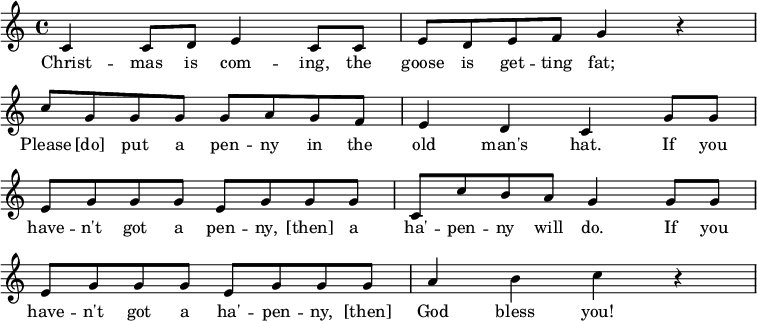
Now, as they sing along to “Christmas is Coming”, they realise that their AddressUSA::Grammar parser only covers mainland addresses in the USA. But what about Europe? What about the rest of the world? Oh my…

Could they use Object Orientation of the Raku Programming Language to handle multi-country names and addresses?

Peeking at the Answer

As is traditional for elves, we will start this post with the result:

use Data::Dump::Tree;
use Contact;
my $text;
$text = q:to/END/;
John Doe,
123, Main St.,
Springfield,
IL 62704
END
ddt Contact.new(:$text, country => 'USA');
$text = q:to/END/;
Dr. Jane Doe,
Sleepy Cottage,
123, Badgemore Lane,
Henley-on-Thames,
Oxon,
RG9 2XX
END
ddt Contact.new(:$text, country => 'UK');

This parses each address according to the Grammar in part I and then loads our Raku Contact objects, like this:

.Contact @0
├ $.text =
│ Dr. Jane Doe,
│ Sleepy Cottage,
│ 123, Badgemore Lane,
│ Henley-on-Thames,
│ Oxon,
│ RG9 2XX
│ .Str
├ $.country = UK.Str
├ $.name = Dr. Jane Doe.Str
├ $.address = .Contact::Address::UK @1
│ ├ $.house = Sleepy Cottage.Str
│ ├ $.street = 123, Badgemore Lane.Str
│ ├ $.town = Henley-on-Thames.Str
│ ├ $.county = Oxon.Str
│ ├ $.postcode = RG9 2XX.Str
│ └ $.country = UK.Str

Christmas is saved, now Santa has the structured address info to load into his SatNav … we leave the other geos as an exercise for the elves.

Contact

Here’s the top level Contact.rakumod code:

use Contact::Address;
role Contact {
has Str $.text is required;
has Str $.country is required
where * eq <USA UK>.any;
has Str $.name;
has Address $.address;
submethod TWEAK {
my @lines = $!text.lines;
$!name = @lines.shift;
$!address = AddressFactory[$!country].new.parse:
@lines.join("\n");
}
method Str { ... }
}

Key takeaways here are:

  • we use the built in TWEAK method to adjust our attributes immediately after the object is constructed … in this case parcelling out name and address construction
  • we choose to use the relaxed style of raku OO with public attributes so that (eg.) you can go say $contact.address.street if that’s what you want

Address

Now here is the Contact::Address code:

role Contact::Address is export {
method parse(Str $) {...}
method Str {...}
}
role Contact::AddressFactory[Str $country='USA'] is export {
method new {
Contact::Address::{$country}.new
}
}
class Contact::Address::USA does Contact::Address {
has Str $.street;
has Str $.city;
has Str $.state;
has Str $.zip;
has Str $.country = 'USA';
method parse($address is rw) {
#load lib/Contact/Address/USA/Parse.rakumod
use Contact::Address::USA::Parse;
my %a = Contact::Address::USA::Parse.new: $address;
self.new: |%a
}
method Str { ... }
}
class Contact::Address::UK does Contact::Address {
has Str $.house;
has Str $.street;
has Str $.town;
has Str $.county;
has Str $.postcode;
has Str $.country = 'UK';
method parse($address is rw) {
#load lib/Contact/Address/UK/Parse.rakumod
use Contact::Address::UK::Parse;
my %a = Contact::Address::UK::Parse.new: $address;
self.new: |%a
}
method Str { ... }
}

You might recognise these classes from the previous post … now we have refactored the classes into a single common Address module and this gives the coding flexibility to keep all classes & methods separate, or to evolve them to move common code into composed roles.

Highlights are:

  • Girl, that’s really clear! It shows how raku objects can be used to contain real-world data, keeping the “labels” (house, street, city, etc) as has attributes.
  • It shows the application of an API definition role that stubs required methods with the { … } syntax (these methods are then mandatory for any class that does the role
  • It shows the application of a parameterized role – in this case the $country parameter can be specified via a Factory class pattern (with suitable default)
  • This allows for USA and UK variants (and, in future, others) to be checked with a where clause and then to be instanced as consumer of the Contact::Address role
  • Each branch of the factory will create a country-specific instance such as class Contact::Address::UK, class Contact::Address::USA, and more can be added
  • Each of these child objects has a .parse method as required by the API and that, in turn, loads the implementation with (eg.) use Contact::Address::UK::Parse, which loads the class Contact::Address::UK::Parse child to perform the Grammar and Actions specific to that country

This code is intended to make it’s way into a new raku Contact module … that’s work in progress for now, but you are welcome to view / raise issues / make PRs if you would like to contribute…

https://github.com/librasteve/raku-Contact

There are some subtleties in here…. for one, I used an intermediate Hash variable %a to carry the attribute over from the parser to the object:

my %a = Contact::Address::UK::Parse.new: $address;
self.new: |%a

The following line would have been more compact, but I judge it to be less readable code:

self.new(Contact::Address::UK::Parse.new: $address).flat;

Tree

And since no Christmas is complete without a tree, this is how it all looks in the Raku Contact module lib:

raku-Contact/lib > tree
.
├── Contact
│   ├── Address
│   │   ├── GrammarBase.rakumod
│   │   ├── UK
│   │   │   └── Parse.rakumod
│   │   └── USA
│   │   └── Parse.rakumod
│   └── Address.rakumod
└── Contact.rakumod

5 directories, 5 files

This gives us a clear class & role hierarchy with extensibility such as more attributes of Contact (email, phone anyone?) and international coverage (FR, GE and beyond).

It keeps the Grammar and Action classes of the country-specific parsers together since they have an intimate context. And, since they are good citizens in the Raku OO model, they sit naturally in the tree.

Fröhliche Weihnachten!

…said Père Noël. Dammit, said the naughty elf, we’ve hardly started on the anglophone addresses and now we need to cope with all these accents and hieroglyphs (not to mention pictographic addresses).

Stay cool said Rudi, for he knew a thing or two about Raku’s super power regexes and grammars with Unicode support built right in.

And off he went to see if his Goose was cooked.

<Merry Christmas>.all

~librasteve

Day 14 – The Magic Of Q (Part 2)

A few days after having done The Magic Of Q presentation, Lizzybel was walking through the corridors of North Pole Grand Central and ran into some of elves that had attended that presentation. When will you do the final part of your presentation? one of them asked. We could do it now if you want, Lizzybel answered, while walking to the presentation room and opening the door.

The room was empty. Most of the elves entered, one of them asked: Will there be a video? Lizzybel thought for a moment, and said: No, but there will be a blog post about it! That elf hesitated a bit, then said: Ok, I will read it when it gets online, and went the away. The others sat down and Lizzybel continued:

There are two other adverbs that haven’t been covered yet, and there’s a new one if you’re feeling brave. Let’s start with the two already existing ones:

short   long      what does it do
===== ==== ===============
:x :exec Execute as command and return results
:to :heredoc Parse text until terminator

Shelling out

The :x (or :exec) adverb indicates that the resulting string should be executed as an external program using shell. For example:

say q:x/echo Hello World/; # Hello World␤

And since you can skip the : if there’s only one adverb, you could also have written this as the maybe more familiar:

say qx/echo Hello World/; # Hello World␤

Of course, you can also have variables interpolated by using qq:

my $who = 'World';
say qqx/echo Hello $who/; # Hello World␤

But one should note that this is a huge security issue if you are not 100% sure about the value of the variable(s) that are being interpolated. For example:

my $who = 'World; shutdown -h now';
say qqx/echo Hello $who/; # Hello World␤

would produce the same output as above, except it could possibly also shutdown your computer immediately (if you were running this with sufficient rights). Now imagine it’d be doing something more permanently destructive! Ouch!

So generally, you should probably be using run (which does not use a shell, so has fewer risks) or go all the way with full control with a Proc object, or possibly even better, with a Proc::Async object.

Until the end

The :to (or :heredoc) adverb does something very special!

Different from all other adverbs, it interprets the text between // as the end marker, and takes all text until that marker is found at the start of a line. So it basically stops normal parsing of your code until that marker is found. And this is usually referred to as a “heredoc“.

Of course, if so needed you can also interpolate variables (by using qq rather than q), but these variables would be interpolated inside the heredoc, not in the marker. For instance:

my $who = 'World';
say qq:to/GREETING/;
Hello $who
GREETING
# Hello World␤

It is customary, but not needed in any way, to use a term for the marker that sort of describes what the text is about.

As you may have noticed, the resulting string of a heredoc always ends with a newline (““). There is no adverb to indicate you don’t want that. But you can call the .chomp method on it like so:

my $who = 'World';
say qq:to/GREETING/.chomp;
Hello $who
GREETING
# Hello World

You can indent the end marker for better readability, for instance if you’re using it inside an if structure. That won’t affect the resulting string:

my $who = 'World';
if 42 {
    say qq:to/GREETING/;
    Hello $who
    GREETING
}
# Hello World␤

The text inside will have the same amount of whitespace removed from the beginning of each line, as there is on the start of the line with the end marker.

What many people don’t know, is that you can have multiple heredocs starting on the same line. Any subsequent heredoc will start immediately after the previous one. You can for instance use this in a ternary like so:

my $who = 'Bob';
say $mood eq 'good' ?? qq:to/GOOD/ !! qq:to/BAD/;
Hi $who!
GOOD
Sorry $who, the VHS is still broken.
BAD

Depending on the $mood, this will either say “Hi Bob!␤” or “Sorry Bob, the VHS is still broken.␤“.

Formatting

Since the 2023.06 release of the Rakudo Compiler, the 6.e.PREVIEW language version contains the Format class. This RakuAST powered class takes a printf format specification, and creates an immutable object that provides a Callable that takes the expected number of arguments. For example:

printf "%04d - %s\n", 42, 'The answer'; # 0042 - The answer␤

You can now save the logic of the format in a Format object, and call that with arguments. Like so:

use v6.e.PREVIEW;
my $format = Format.new("%04d - %s\n");
print $format(42, 'Answer'); # 0042 - Answer␤

Now, why would this be important, you might ask? Well, it isn’t terribly important if you use a format only once. But in many situations, a specific format is called many times in a loop. For instance when processing a log file:

for lines {
    m/^ (\d+) ':' FooBarBaz (\w+) /;
    printf "%04d - %s\n", $0, $1;
}

Because of the way printf formats are implemented in Raku, this is very slow.

This is because each time printf is called with a format string, the whole format is interpreted again (and again) using a grammar. During this parsing of the format, the final result string is created from the given arguments. This is much slower than calling a block with arguments, as that can be optimized by the runtime. In trial runs speed improvements of 100x faster, have been observed.

The new Format class can do this once, at compile time even! And by storing it in a constant with a & sigil we can use that format as if it is a named subroutine!

use v6.e.PREVIEW;
my constant &logged = Format.new("%04d - %s\n");
for lines {
    m/^ (\d+) ':' FooBarBaz (\w+) /;
    print logged($0, $1);
}

So what does this have to do with quoting adverbs, you might ask? Well, when the 6.e language level is released, this will also introduce:

short   long      what does it do
===== ==== ===============
:o :format Create Format object for the given string

If the given string is a constant string, then the above example can be written as (without needing to define a constant):

use v6.e.PREVIEW;
for lines {
    m/^ (\d+) ':' FooBarBaz (\w+) /;
    print qqo/%04d - %s\n/($0, $1);
}

And by this time the remaining elves were a bit flabbergasted.

Well, that’s about it. That’s it what I wanted to tell about the magic of Q! said Lizzybel. The elves had a lot of questions, but those questions did not make it to this blog post. Too bad.

Maybe the readers of the blog post will ask the same questions in the comments, thought Lizzybel after writing up all of these events.

Day 13 – Networks Roasting on an Open Fire, Part 3: Feeling Warm and Looking Cool

by Geoffrey Broadwell

In parts 1 and 2 of these blog posts, I roughed out a simple ping chart program and then began to refactor and add features to improve the overall experience.

It’s functional, but there’s a lot to improve upon — it doesn’t use the screen real estate particularly well, there are some common network problems it can’t visualize, and frankly it just doesn’t look all that cool.

So let’s fix all that!

Another Dimension

A simple way to improve the chart’s overall information density is to encode more information into each rendered grid cell. Instead of always using the same glyph for every data point — providing no information other than its location — the shape, color, attributes, or pattern can be adjusted to show more useful information in each rendered cell of the screen.

The version of ping-chart in parts 1 and 2 only shows a relatively short history, since each grid column only represents at most one measurement (and possibly zero, if the “pong” reply packet was never received). Simply placing several measurements before moving on to the next column would improve that, but then overlaps become ambiguous. If ten measurements rendered as just three circles on the screen, how often did the measured ping times land on each of those circles? Were the measurements spread roughly evenly? Did most of them land on the highest or lowest circle?

The chart already looks a bit like a trail of bubbles or pebbles, so why not change the size of each pebble to indicate how often the measurement landed on a particular grid cell? There are many mappings usable for this, depending on which glyphs are available in the terminal font; here are a few obvious options:

ASCII:    . : o O 0
Latin-1:  · ° º o ö O Ö 0
WGL4:     · ◦ ∙ ●
Braille:  ⠄ ⠆ ⠦ ⠶ ⠷ ⠿ ⡿ ⣿

I’ll use ASCII for now, since every terminal font supports it. Making this work requires only a few changes to the update-chart sub. Instead of the original X coordinate calculation, I instead use:

    state    @counts;
    constant @glyphs = « ' ' . : o O 0 »;
    my $saturation   = @glyphs.end;
    my $x = ($id div $saturation) % $width + $x-offset;

This creates the @counts state variable to track how many measurements have landed on a particular Y coordinate and defines the glyphs to be used (including a leading space in the zero slot). The saturation point — the most measurements that can be recorded in a single column before moving forward — is calculated as the last glyph index (@glyphs.end), and finally the calculated X coordinate is (integer) divided by that saturation level to slow the horizontal movement appropriately.

Then I simply need to clear the @counts every time the chart moves to a new column:

        # Clear counts
        @counts = ();

And update the Y coordinate handling and glyph printing:

    # Calculate Y coord (from scaled ping time)
    # and cell content
    my $y =
      0 max $bottom - floor($time / $chart.ms-per-line);
    my $c = @glyphs[++@counts[$y]];

    # Draw glyph at (X, Y)
    $grid.print-cell($x, $y, $c);

The tiny change to the calculation of $y ensures that it can never be negative, and thus is always a valid array index. It’s then used to update the @counts, select the appropriate glyph based on the latest count, and print the chosen glyph in the right spot.

It looks like this now; instead of identical pebbles, the trail looks much more like various-sized pebbles on a scattering of sand:

ms│.    .              .   .             .         .
  │
  │
80│
  │
  │
  │
  │
60│
  │
  │
  │                                                                            .
  │
40│
  │                                .   .
  │     .        .   .                          .     .      ..
  │            .                           .  .                     .
  │  ... .           ..  .         :: .  .                .    ..       . ....
20│o:::.:.:.o ::: .. o.:: ...:..:.o:.:.O:.O:. ::::..oO. .:.....o.:..:oo:...o:.:.
  │.o:::.ooo:oo:oOOO. o.oOooOoOOoo: ::o o:.:O0.o:oOo:.o0OooOOoo.o:Oo:::ooOo.:ooo
  │    .   . :         .  .      .   .        .                  . .
  │
  │
 0│                 ^

It’s much easier to see where the most common measurements lie, and where the outliers are. As a bonus the change to force the Y coordinate onto the chart grid makes it now possible to see how often large outliers appear; they are no longer simply ignored when printing, but rather appear as a smattering of dots at the very top.

As there were five non-blank glyphs chosen, this version now shows five times as much history at once — a bit more than six minutes of history in a default width-80 terminal window.

A wider selection of @glyphs could further improve on that, but there are rapidly diminishing returns — too many different glyphs and the glanceability is lost because it becomes hard to tell the difference between them just by visual size or “density”. This is why I didn’t just choose the digits 1..9; there is very little density distinction between them all, and the overall effect is more confusing than enlightening.

Heating Up

Instead of changing the particular glyph drawn, we could also change its color and brightness; a bright line through a dark-background chart (or a dark line through a light-background chart) would then show where most ping times were clustered.

The original 16 color ANSI palette supported virtually everywhere is completely awful for this purpose, especially since every operating system and terminal program uses a different mapping for these colors. Thankfully there’s a better replacement: most modern terminal emulators support the xterm-256color extended colors and map them all equivalently.

These added colors are mapped in two blocks: a 6x6x6 RGB color cube and a 24-level gray scale. By choosing appropriate points on the color cube, I can create a decent heat map gradient:

# Calculate and convert the colormap once
constant @heatmap-colors =
   # Black to brick red
  (0,0,0), (1,0,0), (2,0,0), (3,0,0), (4,0,0),
  # Red to yellow-orange
  (5,0,0), (5,1,0), (5,2,0), (5,3,0), (5,4,0),
  # Bright to pale yellow
  (5,5,0), (5,5,1), (5,5,2), (5,5,3), (5,5,4),
  # White
  (5,5,5);

constant @heatmap-dark =
  @heatmap-colors.map: { ~(16 + 36 * .[0] + 6 * .[1] + .[2]) }

The formula used in the map converts a color cube RGB triple into a single color index in the range 16 to 231, which is what the terminal expects to see as a color specifier.

Another consideration is that subtly colored circles will probably be hard to distinguish; it would be clearer to just color the entire contents of each grid cell. The easiest way to do this is to set the cell background on a blank cell by using the on_prefix for the color and a blank space for the “glyph”.

Let’s look at the calculations of $saturation and $c again:

    my $saturation = @heatmap-dark.end;
    # ...
    my $c = 'on_' ~ @heatmap-dark[++@counts[$y]];

Modifying the call to print-cell allows setting the color:

    $grid.print-cell($x, $y, { char => ' ', color => $c });

Here’s what that looks like (as an image screenshot rather than a text capture now, in order to show the colors):

It’s beginning to look better, with a vague fiery look and a clear bright band where the ping times are concentrated. Furthermore with fifteen non-black colors in the map, this version of the program now has another three-fold history expansion over the five-glyph version in the previous section — almost 20 minutes of history across a default terminal window.

Precision Flames

While the heat map version has considerably improved information density horizontally, it’s done nothing to change the vertical density; the ping time resolution is just as bad now as it was in the very first version. And because terminal fonts usually make monospace character cells twice as tall as they are wide, the whole chart looks like it’s been smeared vertically. Time to fix that.

Around 2004 Microsoft and various type foundries standardized a list of standard glyphs that modern fonts should supply, called Windows Glyph List 4 or WGL4 for short. This standard was very well supported as a minimum subset for fonts (both free and proprietary) and its full character repertoire was later included in the first stable version of Unicode, cementing it as a solid compatibility baseline.

Among the many very useful glyphs in WGL4 (and thus Unicode 1.1) are the “half blocks”, which split each character cell in half either horizontally or vertically, displaying the foreground color on one half and the background color on the other half. Using the horizontal half blocks can effectively double the chart’s ping time resolution and simultaneously get rid of the vertical smearing effect.

This time all the changes occur in the last few lines of the update-chart sub, starting with a new Y calculation:

    # Calculate half-block resolution Y coord from
    # scaled ping time
    my $block-y = floor(2 * $time / $chart.ms-per-line);
    my $even-by = $block-y - $block-y % 2;
    my $y       = 0 max $bottom - $even-by div 2;
    @counts[$block-y]++;

    # Determine top and bottom counts for
    # half-block "pixels"
    my $c1 = @counts[$even-by + 1] // 0;
    my $c2 = @counts[$even-by]     // 0;

    # Create an appropriate colored cell, using half
    $ blocks if needed
    my $c = $c1 == $c2
      ?? $grid.cell(' ', 'on_'  ~ @heatmap-dark[$c1])
      !! $grid.cell('▀',          @heatmap-dark[$c1] ~
           ' on_' ~ @heatmap-dark[$c2]);

    # Draw colored cell at (X, Y)
    $grid.change-cell($x, $y, $c);
    $grid.print-cell($x, $y);

Since each grid cell now represents two half-block “pixels”, it’s necessary to keep track of both the per-half-block counts and the actual cell Y coordinate that a given block falls into. In addition since each cell could be generated as either one flat color or as two different colors, the code takes care to make an optimal custom grid cell, assign it with change-cell, and print it.

Here’s the result:

Much better — lots more detail and no distracting smearing effect.

Errors and Outages

While the half-block chart does a pretty good job showing network latency when the connection is relatively stable, it doesn’t do a good job of showing various errors: outages, individual lost packets, reordered packets, and so on. These can be detected by watching the sequence IDs carefully, and can be displayed on the top line of the chart to give a glanceable view of such problems.

First the error count for the current column must be kept as a new state variable and reset when the @counts are cleared for each new column:

    state ($errors, @counts);
    # ...

        # Clear counts and errors
        @counts = ();
        $errors = 0;

Then the previous sequence ID must be kept as well, and used to detect sequencing problems and gaps:

    # Determine if we've had any dropped packets or
    # sequence errors, while heuristically accounting
    # for sequence number wraparound
    state $prev-id = 0;
          $prev-id = -1 if $prev-id > $id + 0x7FFF;

    $errors += $id  >  $prev-id + 1
      ?? $id - ($prev-id + 1)
      !! $id  <= $prev-id
        ?? 1
        !! 0;
    $prev-id = $id max $prev-id;

It’s not perfect — it can certainly get confused by particularly horrid conditions — but the above algorithm for sequence tracking is similar to the one used by ping itself and should be resilient to many common problems.

If there are any errors, they should be marked after the normal ping time colors are drawn:

    # Mark errors if any
    if $errors {
        my $color = @heatmap-dark[$errors min $saturation];
        $grid.print-cell(
          $x, 0, {char => '╳', color => "black on_$color"}
        );
    }

This will indicate individual errors within a single column, but won’t show errors on skipped columns during an extended outage. To handle that, the first part of the code for moving to a new column needs some adjustment to update the error count and then mark the errors if any. Because the update-chart is now going to do the exact same error marking in two different places, it can be wrapped in a private helper sub called where needed:

    # Helper routine for marking errors for a
    # particular column
    my sub mark-errors($x, $errors) {
        if $errors {
            my $color =
              @heatmap-dark[$errors min $saturation];
            $grid.print-cell($x, 0, {
              char => '╳', color => "black on_$color"
            });
        }
    }

    # ...

        # If there was a *valid* previous column,
        # finish it off
        if $prev-x >= $x-offset {
            # Missing packets are counted as errors
            $errors += 0 max $saturation - @counts.sum;
            mark-errors($prev-x, $errors);

            # Remove the old "current column" marker
            # if it hasn't been overdrawn
            $grid.print-cell($prev-x, $bottom, ' ')
              if $grid.grid[$bottom][$prev-x] eq '^';
        }

    # ...

    # Mark errors if any
    mark-errors($x, $errors);

Here’s what an outage of a little less than a minute looks like now, showing a bright error bar on the top of the chart during the outage:

One Last Bug

There is a remaining subtle bug in the handling of long ping times. Counts are adjusted individually for each (quantized) ping time seen, but long times could map to a quantization bucket arbitrarily far off the top of the chart. Given only fifteen chances in each column, it’s unlikely that any two overlong times will map to the same (off screen) @counts bucket. So even though $y is forced onto the chart before printing, it will likely only ever show the darkest red color even if several very long pings were measured in that column.

To fix this, all of the overlong pings should be counted in a single bucket and be displayed appropriately in the top chart row. As with $errors, let’s track the number of overlong pings in a given column with a new state variable, and reset it when moving to a new column:

    state ($errors, $over, @counts);
    # ...

        # Clear counts and errors
        @counts = ();
        $errors = 0;
        $over   = 0;

Then it’s simply a matter of special-casing the top row when drawing the ping time results:

    my $c = $y  <= 0
      ?? $grid.cell('▲', @heatmap-dark[++$over])
      !! $c1 == $c2
        ?? $grid.cell(' ', 'on_'  ~ @heatmap-dark[$c1])
        !! $grid.cell('▀',          @heatmap-dark[$c1] ~
             ' on_' ~ @heatmap-dark[$c2]);

Since this happens before the call to mark-errors, an actual error in a given column will replace any overlong mark that was already there. This is intentional: The top row of the chart is used for “problems”, lost packets have a worse effect on user experience than slow replies, and there’s not enough value in using the top two rows of the screen to separate the two problem types visually.

Here’s the final result, my network roasting on an open fire when the ping time variance has got rather bad for a while:

A Final Present

If you’ve made it this far, I’ve got one last little trick for you. You can change the window title by printing a short escape sequence, so that it’s easier to identify in the giant mess of windows on the typical desktop. (What, you’re going to try to claim your desktop doesn’t have dozens of windows open? Mine certainly does!)

Just add this right after initializing Terminal::Print in MAIN:

    # Set window title
    my $title = "$target - ping-chart";
    print "\e]2;$title\e\\";

And that’s it! Happy holidays to all!

Appendix: (Possibly) Frequently Asked Question

But, but … color theory! The color map isn’t perceptually even!

Well yes, I did gloss over that a bit didn’t I?

In terms of perceptual distance between colors, it would seem much better to jump directly from bright yellow to white without the fine details of light yellows. The perceptual differences in light yellows are much less obvious than in the reds and oranges, so a color palette made from the heat map above appears to have 10 clearly different reds and oranges, and then a subtly-varying “smear” of light yellow. Jumping directly from bright yellow to white sets the two apart decently (though still not as much as the reds and oranges), so the color swatches would look more evenly spaced.

However in practice such a “corrected” map looks worse for the actual ping chart! Ping time jitter makes it unlikely that the top couple colors in the map will actually be shown, as that would require (nearly) every ping time to map to the very same pixel, and thus absolutely rock steady network performance. Aside from perhaps the loopback interface (the computer talking to itself), this is rather unlikely in actual practice. Thus to be able to produce the characteristic bright band of a mostly steady connection, the lightest colors need to be over-emphasized in the color map, which it happens the smooth walk through the light yellows achieves nicely.

Day 12 – Perspectives on RakuDoc Version 2

Just in time for Christmas

This project started with the modest aim of documenting parts of Rakudoc V1 (what used to be called POD6 that had been specified, but not included in the original documentation.

Except … some parts of the specification had not been implemented in the Pod::To::HTML renderer. And some parts were outdated. So a little bit of trimming was needed.

Also … a couple of extra bits could be added, and tables have always been a problem.

Since the next Raku language level is going to be based on RakuAST, and the parser was being refactored, why not look through the whole specification? The redesign was more extensive than originally planned.

We (Damian Conway, Elizabeth Mattijsen, Aliaksandr Zahatski, and I) started this project in August, opened the consultation to the community and hoped to finish in November. But in fact we have only just completed the specification- we hope – in time for Christmas!

A rendered version of the complete specification can be found on the new-raku deployment site. The rendering is not perfect because some of the components have yet to be implemented.

Documentation seems a theme this year, with Kay Rhodes discussing some views and mentioning the new design. I thought I’d take the conversation further.

I remember attending the London launch of a magazine called Personal Computer World. The magazine no longer exists, and the new products it discussed can now be found in museums. An engineer involved in the development of the first general purpose chip (Intel’s 8008) gave a talk about how the Altair computer came about. A comment of his that I remember to this day was that in time the cost of the hardware would fall to near zero, and that it would be the software which would generate more revenue. At the time, his prediction seemed ridiculous; now it seems obvious.

His logic was that because the chips were still being developed, they were all expensive. As the pace of development slowed, the low material cost of the hardware would dominate. But software requires innovation, human input, and would constantly evolve.

My thought is that a similar trend can now be seen in software development. As new applications were developed, code was expensive. New versions of Windows, for example, brought radical new innovations, but more recently, there is little radical or world changing in operating systems.

Compared to when I first started coding, it was fairly standard to write your own sort procedures and algorithms were fundamental to good programming. Now it is simply a waste of effort to re-invent the wheel if a standard library has been implemented. Coding costs will fall because most coding will be about stitching libraries together (I’m simplifying of course for rhetorical effect).

What will matter – I would argue – is how to use the software, and that means documentation. So my prediction is that the success (and ultimately the retail price) of hardware/software combinations will depend on the quality of the documentation.

Another consideration is accessibility. Coding has to the present been dominated by English-language software engineers. But a substantial population of the planet does not speak or read English as a first language.

My view is that documentation systems, such as product support websites, should be designed to incorporate other languages from the ground up. The current paradigm is create the website in English (sometimes Japanese or Chinese), then to translate pages and have an ad hoc language switcher.

This paradigm means that the state of the page (where the browser cursor is located) is not mapped between pages because translation is not a simple word mapping. But for this to be possible, the base language and the translated supporting texts need to be synchronised at a section level (eg. Japanese documents order material differently, so even a sentence level or paragraph level mapping is not idiomatic!).

In order to create documentation like this, the underlying tools have to be robust and customisable, and the text structures need to contain meta data. RakuDoc V1 already contained many of these qualities, but all good designs can be improved. I’ll discuss some of these enhancements below.

Documentation culture

It remains a major hassle for me as an active user of Raku that when I need to refer to a module that I want to use, even if it is installed on my local system, I have to go online. Not only that, but the main source of readily accessible information is the README.

Despite having a great documenting tool in RakuDoc V1, it is underused and documentation is difficult to access. The two are unsurprisingly related: why spend so much time writing documentation if its almost impossible to access the documentation? For my Raku::Pod::Render module, I have four major documentation files, and they are interlinked, but there is no way for them to be made accessible unless they are rendered into Markdown and in the root directory of the distribution.

Even though there is directory doc specified for the META6.json file, it (or rather its content files) are not accessible programmatically when zef installs the distribution. The upshot is that automatically finding the documentation files, even if they have been written, is not easy.

A documentation goal of mine in the new year is a Collection plugin so that a local website can be generated using the documentation files of all installed modules. The website will be similar to the Raku documentation suite, with the same search functionality.

Inline documentation already exists

When I began to use the Comma IDE, I noticed that hovering over variable names (and other names) pulled up information attached at declaration. This has led me to document all my variables.

Once there is a use for the documentation technique, in this case RakuDoc declarator blocks, I began to use them extensively. It is interesting how my documentation habits have changed since using Comma, which leverages RakuDoc’s instructions.

Automatic documentation tools

Even though I document most declared things, I miss separately documenting subs, methods, roles and so on. It would be useful to have a tool to do this. For example, given a distribution with a META6.json file, the documentation tool would go through each of the provides items, extract all sub/class/method/rule etc declaration and create a separate ‘DISTRIBUTION.rakudoc’ file under docs with a =head1 block and the declaration, and then a stub text.

By creating headings with the declaration keywords (eg. sub, method, role), the Collection plugin that generates the data for the search for the Raku documentation suite will add these headings to the search engine for the locally installed modules website.

These suggestions are not a part of the RakuDoc specification, but should form a part of our coding culture.

What has changed between RakuDoc V1 and V2?

In one respect, almost nothing has changed. Anything that has been written in RakuDoc V1 will be rendered in RakuDoc V2 (as opposed to what could theoretically have been written in V1). However, the specification and the documentation of RakuDoc are now merged into the same document.

The experience of rendering the whole of the Raku documentation suite, together with the experience of implementing RakuDoc without using Raku (the Podlite project), raised questions that led to re-evaluations and clarification.

There are some new features, such as a new table syntax, but the most important change is a clearer distinction between the various components of RakuDoc, and the different use-cases (more below).

Kay Rhodes commented in their article about the documenting of variables and subroutines. To be honest I really liked this feature when I was working with Octave. It was included from the start in RakuDoc V1 and, as I have indicated above, they are called declarator blocks. However, I am totally unsurprised that Kay did not refer to them as part of POD6 because the description of them and how they were to be used escaped me too. I even implemented them in Raku::Pod::Render without knowing what they were used for. It was only when I saw them in action with Comma that I finally grokked them.

In addition, RakuDoc V1 has the =finish and =data constructs which replace Perl‘s __DATA__ constructs. Rakudo even implemented these constructs, but they were never documented, so no one really knew.

By re-writing the documentation and the specification, we were able to clarify what had always been in RakuDoc V1. In a sense, what we were able to do was to subject the first specification to a good edit, and to go back to the author for clarification and a better understanding of the initial design.

It quickly became clear that RakuDoc has at least two perspectives. One to an IDE, with constructs such as declarator blocks, =finish and =data, and the other to a text oriented documentation renderer, with constructs such as =head=item=table, and so on.

The re-writing also made other things much clearer, and so more extensible. RakuDoc always had directivesblocks (sub-divided into built-insemantic, and custom), format codes, and meta data, but the distinction between directives and blocks was not obvious. Format codes included text that was modified, but also included data that was transformed, such as links and aliases. So, we changed the name to markup codes and these became in-line containers to be filled with text, whilst blocks indicated text that was broken into paragraphs and could contain other blocks.

Meta data options are probably the most powerful aspect of RakuDoc. In V1 they appear only to change some aspects of the way a block is rendered. However, meta data act in the same way as parameters do for methods or functions: they provide data to the block handler.

Standard meta data options include :toc, which indicates whether a block is included in a Table of Contents, and :caption – the text to be included with the block, say a Table.

For the purposes of synchronisation, every block may have its own :anchor, and blocks can be linked into sections. This means that sections within a text can be linked to similar sections in other documents.

Seeing the forest from the trees

There is a difference between the documents that form the text form part of a suite [individual trees], and the collection of all the documents that constitute the whole suite [the forest].

Take for example the Raku documentation suite. There are several hundred individual documents, one for every Type, core module, fundamental concept, and others for tutorials and orientation guides.

The whole collection needs to be tied together, a search function added, index pages constructed, and so on. Originally the index pages for the website were crafted from HTML, and links to each of the individual pages were generated from meta data associated with each source document. At one point in time, the information for the ‘language’ page was even held in a YAML configuration file.

However, it became clear that by creating custom RakuDoc blocks, which were rendered using data collected from all the source files, all of the pages in the website could be created using RakuDoc.

Documentation as the killer application

All websites contain text dispersed with images and active components, such as buttons. Modern websites use a variety of Markdown for the text components. But Markdown is minimalist by design, and has had to be extended to meet the need for Tables of Content, web services and so on. Each extension is bespoke, so there is a Github Markdown, and a WordPress Markdown.

Markdown fails when it comes to associating meta data to blocks of text, or adding inline components with side effects (this tends to be where bespoke extensions take over).

RakuDoc, by contrast, has always had the possibility of meta data, and new inline components.

Complex documents tend to be created with custom formats, such as rtfdocx, or otf. The problem with these formats is that there was never an intention that documents would be created manually, the formatting was always to be done with word-processors.

RakuDoc comes in between complex machine readable formats, and overly simplistic markup languages.

The very close combination of Raku as the processing language and RakuDoc as the markup language could create a niche application for documentation, yet because documentation has so many uses … .

Conclusion

The revision of RakuDoc was not motivated by a desire to improve, so much as a desire to clarify. The driving motivation has been to create the base for a documentation system that can be multilingual and handle complex text.

As one of the authors of the new revision, I strongly believe we have a specification that can be used to create documentation systems, not just for Raku software, but also for a much wider problem domain.

Day 11 – Networks Roasting on an Open Fire, Part 2: Axes to Grind

by Geoffrey Broadwell

In part 1 of these blog posts, I roughed out a simple ping chart program that produced output like this as it ran:

                                                            o
                      o                                o  o     o
  o o      o o       o o o        o   oo                o  o o o  o o  o       o
 o o oooooo o ooooooo   o o oooooo ooo  ooooooooooooooo  o    o  o o oo ooooooo
o                          o

         ^

This is over-minimalist; a user couldn’t even tell the scale of the latency measurements. It’s not at all obvious whether this is a fast or slow connection, and whether the jitter in the results is something to worry about.

A Sense of Scale

One change that would help considerably is to show a Y axis with labels for various latency thresholds; as long as it is not overdrawn, it’s only necessary to draw this once.

Here’s a routine to do that:

#| Draw a Y axis with latency labels; returns width
#| of axis marks (to be used as a left offset for
#| the actual chart content)
sub draw-y-axis(Terminal::Print::Grid:D :$grid!,
                UInt:D :$ms-per-line!,
                UInt:D :$tick-every = 5
                --> UInt:D) {
    # Compute dimensions
    my $bottom      = $grid.h - 1;
    my $last-label  = $bottom - $bottom % $tick-every;
    my $label-width =
      2 max ($last-label * $ms-per-line).chars;
    my $x-offset    = $label-width + 1;

    # Add labels and axis line
    for ^$grid.h .reverse -> $y {
        my $is-tick = $y %% $tick-every;
        my $value   = $y * $ms-per-line;
        my $label   = $is-tick
          ?? $value.fmt("%{$label-width}d")
          !! ' ' x $label-width;
        $grid.print-string(0, $bottom - $y, "$label│");
    }

    # Show that the Y-axis scale is in milliseconds
    $grid.print-string(
      0, 0, 'ms'.fmt("%{$label-width}s") ~ '│'
    );

    # Return computed x-offset
    $x-offset
}

This draw-y-axis sub starts off by determining the required label size (which must be at least 2 because of the ms unit name printed at the top), and then prints the axis labels starting at the bottom (with a  character on each line for the axis itself). Finally it prints the ms on the first line and returns the computed x-offset for the actual chart content.

With default settings on a default size terminal window, it would look like this:

ms│
  │
  │
80│
  │
  │
  │
  │
60│
  │
  │
  │
  │
40│
  │
  │
  │
  │
20│
  │
  │
  │
  │
 0│

DRY: Good for Kindling and for Code

The above version of draw-y-axis is certainly functional, and could be used as-is in a pinch. But it also has a rather verbose interface, demonstrating a problem that would quickly spread throughout the program:

sub draw-y-axis(Terminal::Print::Grid:D :$grid!,
                UInt:D :$ms-per-line!,
                UInt:D :$tick-every = 5
                --> UInt:D) {

Here draw-y-axis is taking separate arguments for several different values, as well as returning the x-offset to be used elsewhere in the program. Each of these values would need to be plumbed through the interfaces of MAINping-chart, and update-chart too, just to make sure those values are available everywhere they are needed.

This violates the DRY principle: Don’t Repeat Yourself. It shouldn’t be necessary to copy all this information everywhere, but instead to just define it once. In fact I can head this problem off by defining a simple structure to hold any relevant configuration for the chart and passing that around rather than the individual values; then if future features require more config values, I can just add them to the structure.

If you’re thinking “Sounds like objects!” … well yes, but that’s actually a bigger hammer than I intend to use here. For this task I don’t need full object-oriented generality but rather a simple Data Record that can be treated as a unit (also known as a Passive Data Structure or Plain Old Data). Essentially, it’s a class without any methods:

#| All of the configuration and state for a ping chart
class Chart {
    has Terminal::Print::Grid:D $.grid is required;

    has UInt:D $.ms-per-line    = 4;
    has UInt:D $.tick-every     = 5;
    has UInt:D $.x-offset is rw = 0;
}

Packaging these details in a data record simplifies the interface to draw-y-axis a bit, and requires a couple changes in its code to reference those details via the record. Here’s a full rewrite for clarity:

sub draw-y-axis(Chart:D $chart) {
    my $grid        = $chart.grid;
    my $bottom      = $grid.h - 1;
    my $last-label  = $bottom - $bottom % $chart.tick-every;
    my $label-width =
      2 max ($last-label * $chart.ms-per-line).chars;
    $chart.x-offset = $label-width + 1;

    # Add labels and axis line
    for ^$grid.h .reverse -> $y {
        my $is-tick = $y %% $chart.tick-every;
        my $value   = $y * $chart.ms-per-line;
        my $label   = $is-tick
          ?? $value.fmt("%{$label-width}d")
          !! ' ' x $label-width;
        $grid.print-string(0, $bottom - $y, $label ~ '│');
    }

    # Show that the Y-axis scale is in milliseconds (ms)
    $grid.print-string(
      0, 0, 'ms'.fmt("%{$label-width}s") ~ '│'
    );
}

One-time interface changes to ping-chart and update-chart allow them to accept a Chart record rather than raw values:

sub ping-chart(Chart:D :$chart!, Str:D :$target!) {
    # unchanged until ...
              update-chart(:$chart, :$id, :$time);
    # likewise unchanged ...
}

sub update-chart(
  Chart:D :$chart!, UInt:D :$id!, Real:D :$time!
) {
    my $grid   = $chart.grid;
    # unchanged beyond this point ...
}

The Chart record of course has to be created in MAIN and passed in to draw-y-axis and ping-chart:

# Draw a ping chart on the current screen grid
my $grid  = T.current-grid;
my $chart = Chart.new(:$grid, :$ms-per-line);
draw-y-axis($chart);
ping-chart(:$chart, :$target);

Back On Track

With that refactoring done, a few simple changes in update-chart can now accommodate the x-offset computed by draw-y-axis so that the chart content doesn’t try to overwrite the Y axis and its labels:

    my $grid     = $chart.grid;
    my $x-offset = $chart.x-offset;
    my $bottom   = $grid.h - 1;
    my $right    = $grid.w - 1;
    my $width    = $grid.w - $x-offset;
    my $x        = $id % $width + $x-offset;

    # ...
    state $prev-x  = $x-offset - 1;
    # ...
        $grid.print-cell($prev-x, $bottom, ' ')
          if $prev-x >= $x-offset
          && $grid.grid[$bottom][$prev-x] eq '^';
    # ...
        $prev-x = $x-offset if ++$prev-x > $right;

Here’s what the full program’s output looks like now:

ms│
  │                               o
  │
80│
  │
  │
  │                         o
  │
60│
  │
  │
  │
  │
40│           o                                      o
  │
  │                                    o                    o         o
  │                                                                        o
  │               o                            o  o    ooo         o     o
20│o ooo         o   oooo oo        o   ooo ooo     o o   o  o   o             o
  │ o   oooo o oo  oo    o   o ooo   oo         o  o       o  ooo o oo oo o ooo
  │         o
  │
  │
 0│                      ^

Scale Adjustments

When I’m connected via direct cabling to my home ISP and it’s having a good day, most ping times are short enough to display reasonably in the chart with its default scaling. But when my ISP is having a bad day or I’m tethered via my cell phone, latency increases several times over and the chart marks no longer stay below the top of the terminal.

One quick fix for this is to add a command-line option to set the vertical scale in milliseconds per screen line, and respect that setting in update-chart. Here’s what the MAIN changes look like:

sub MAIN($target = '8.8.8.8',    #= Hostname/IP address to ping
         UInt :$ms-per-line = 4, #= Milliseconds per screen line
        ) {
    # ...
    my $chart = Chart.new(:$grid, :$ms-per-line);
    # ...
}

The change in update-chart is even simpler, just part of one line:

    my $y = $bottom - floor($time / $chart.ms-per-line);

Here’s the new USAGE:

$ ./ping-chart -?
Usage:
  ./ping-chart [--ms-per-line[=UInt]] [<target>] -- Slowly draw a chart of ping times

    [<target>]              Hostname/IP address to ping [default: '8.8.8.8']
    --ms-per-line[=UInt]    Milliseconds per screen line [default: 4]

And here it is in action:

$ ./ping-chart --ms-per-line=20


 ms│
   │
   │
400│
   │
   │
   │
   │
300│
   │
   │
   │
   │
200│
   │
   │
   │      o o
   │o                                                                          o
100│       o                             o   o                                o
   │                                       o   o o                           o
   │ o o o                                                                  o
   │  o o    o   o
   │          ooo                    o oo o         o  ooooooooooooooooooooo
  0│             ^ooooooooooooooooooo o     o o o oo oo

Note how the vertical scale has changed, and the Y axis labels and x-offset have automatically compensated. The low ping times are when connected via the local ISP (it’s doing OK tonight). The much higher and spread out values are when I switched to cell phone tethering; many would have been invisible without the rescaling.

For Next Time

The changes in this part have improved both functionality and maintainability, but haven’t addressed the chart’s low information density (or its overall lack of “cool”). I’ll pick that up in part 3.

Appendix: (Probably) Frequently Asked Question

Why not switch entirely to OO design, using proper methods?

I wanted to demonstrate how the (really old school) Data Record concept can be used to do just enough refactoring to permit some improved maintainability and DRY compliance without forcing a full code rewrite. This complexity threshold is very commonly reached when developing something that started as a small proof of concept, but need not cause a daunting — and thus probably never actually accomplished — full OO rewrite.

Day 10 – The Magic Of Q

Santa continued their dabbling in the Raku Programming Language, but got confused by single quotes, double quotes, and all the things that start with q/. So they decided to have Lizzybel do an exposé about the mechanisms behind quoting.

But I already did that 9 years ago! Lizzybel exclaimed! Well, I certainly don’t remember that, said Santa, and we got a bunch of new elves, so maybe it will be of help to them as well.

Lizzybel thought: I guess it is a good idea, since an exciting new feature is on the horizon. After a little work, they called Santa and the new elves together, and started presenting:

Quoting strings in Raku

In the Raku Programming Language, one can indicate static strings with single quotes. And one can easily interpolate scalar variables in any string with double quotes:

my $a = 42;
say 'a = $a'; # a = $a
say "a = $a"; # a = 42

Both of these quoting constructs are just a special case of a much more generic and malleable quoting construct, named Q.

Note that say will always add a newline after the string: for the sake of this presentation, these will not be shown in the examples.

Q’s Basic Features

In its most generic form, Q just copies the string without any changes or interpretation:

my $a = 42;
say Q/foo $a \n/; # foo $a \n

You can add adverbs to Q/…/, to change the way the resulting string will be formatted. For instance, if you want to have interpolation of scalars, you can add :s. If you want interpretation of backslashes like \n, you can add :b. And you can combine them:

my $a = 42;
say Q:s/foo $a\n/;   # foo 42\n
say Q:b/foo $a\n/;   # foo $a␤
say Q:s:b/foo $a\n/; # foo 42␤

If you wonder what a  is, it is a U+2424 SYMBOL FOR NEWLINE [So] (␤) and should be show up in your browser as a character containing an N and an L as a visible representation of a new line character. This is done in these examples because you wouldn’t be able to really see newlines otherwise.

In fact, the list of adverbs of basic quoting features is:

  short   long        what does it do
===== ==== ===============
:q :single Interpolate \\, \q and \'
:s :scalar Interpolate $ vars
:a :array Interpolate @ vars
:h :hash Interpolate % vars
:f :function Interpolate & calls
:c :closure Interpolate {...} expressions
:b :backslash Interpolate \n, \t, etc. (implies :q at least)

The :q (or :single) adverb gives you single quoted string semantics. And to make life easier for you, Q:q/present/ can be shortened to q/present/, and would be the same as the more familiar 'present'.

The other adverbs together give you typically the functionality that you would expect from double quoted strings. If you really want to be verbose on your double quoted strings, you can write them like this:

my $a = 42;
say Q :scalar :array :hash :function :closure :backslash /foo $a\n/; # foo 42␤

Of course, you can also specify the short versions of the adverbs, and not separate them by whitespace. So, if you want to be less verbose:

my $a = 42;
say Q:s:a:h:f:c:b/foo $a\n/; # foo 42␤

As with any adverbs (which are just named arguments, really), the order does not matter:

my $a = 42;
say Q:f:s:b:a:c:h/foo $a\n/; # foo 42␤

.oO( is that Franz Sebastian, a brother of Johann Sebastian? )

Actually, the story about the order of the named arguments is a little bit more complicated than this. But for this set of adverbs, it does not matter in which order they are specified.

But seriously, that is still a mouthful. So an even shorter shortcut is provided: :qq.

  short   long        what does it do
===== ==== ===============
:qq :double Interpolate with :s, :a, :h, :c, :b

So these are all essentially the same under the hood:

my $a = 42;
say Q:double/foo $a\n/; # foo 42␤
say Q:qq/foo $a\n/;     # foo 42␤

All that for simply doing a double quoted string with interpolation?

Well, because people are using double quoted strings a lot, the simple " (U+22 QUOTATION MARK) remains the quickest way of interpolating values into a string. However, underneath that all, it’s really Q:qq, which in turn is really Q:f:s:b:a:c:h (or Franz Sebastian Bach, as a mnemonic).

But what about a double quoted string that has double quotes in it, you might ask? That’s one of the use cases for the Q:qq form! But that is still quite verbose.

Fortunately, all simple quote-like forms derive from Q with adverbs! Which means we can shorten the Q:qq in that last example to qq (and thus have double quotes in the double quoted string without any problems):

my $a = 42;
say qq/foo "$a"\n/; # foo "42"␤

Both q// and qq// also support (the same) adverbs as Q. This initially seems the most useful with q//, for instance in combination with :s, which would allow you to interpolate (just) scalars:

my $a = 42;
say q:s/foo "$a"\n/; # foo "42"\n

However, adverbs (just as named parameters) are just a shortcut for a Pair: :s is really s => True. And :!s is really just s => False. Can we also apply this to quoting constructs? The answer is: yes, you can!

say qq:!s:!c/foo "$x{$y}"\n/; # foo "$x{$y}"␤

In this example, even though we specified qq//, the scalar is not interpolated, because of the :!s adverb. And the scope is not interpolated, because of the :!c. This can for instance be handy when building strings to be EVALled.

So, if you want all quoting features except one or more, you can easily de-activate that feature by negating the appropriate adverbs.

Non-stringy quoting

All of the above quoting adverbs produce a single string. But some quoting adverbs actually produce something else! They are:

  short   long         what does it do
===== ==== ===============
:v :val Process result(s) with val()
:w :words Split text as words (no quote protection)
:ww :quotewords Split text as words (with quote protection)

The :v adverb causes the result(s) of the quoting construct to be passed to the val() function, which will produce an allomorph if possible.

say q:v/foo/;        # foo
say q:v/foo/.^name;  # Str
say q:v/42/;         # 42
say q:v/42/.^name;   # IntStr
say q:v/42e0/;       # 42e0
say q:v/42e0/.^name; # NumStr
say q:v/42.0/;       # 42.0
say q:v/42.0/.^name; # RatStr
say q:v/42i/;        # 42i
say q:v/42i/.^name;  # ComplexStr

Note that unless you really look carefully (in this case by using the ^name method that shows the name of the class of the object) you would not see the difference with an ordinary string.

The :w and :ww adverbs both split the string on whitespace. If there is only one part found, it will produce a Str of that one part found. Otherwise it will produce a List with those parts, which could be an empty List if the string consisted of whitespace only, or was empty.

say q:w/foo bar  baz/;  # (foo bar baz)
say q:ww/foo bar  baz/; # (foo bar baz)

So what is the difference between :w and :ww? The :ww adverb applies so-called “quote protection“. This means that if a balanced quoting construct is found in the string, it will be preserved. For example:

say q:ww/foo 'bar  baz'/; # (foo bar  baz)
dd  q:ww/foo 'bar  baz'/; # ("foo", "bar  baz")

Note that we also used dd to show the result, because otherwise it would be hard to see the difference with :w.

Single adverb shortcut

If you want to use a quoting construct with just a single short adverb, you can write that without the colon. Some examples you might encounter in existing code:

  long      short    notes
==== ===== =====
q:w/…/ qw/…/ word quoting
q:ww/…/ qww/…/ word quoting with quote protection
qq:w/…/ qqw/…/ word quoting with interpolation
qq:ww/…/ qqww/…/ Word quoting with interpolation & quote protection
q:s/…/ qs/…/ Scalar value interpolation only

So these are not completely different quoting constructs, they are just shortcuts.

Quoting without q

So far, we’ve seen two types of quoting that do not start with q (or Q):

  quote    Q-repr    q-repr   notes
===== ====== ====== ===============
'…' Q:q/…/ q/…/ No escaping except \, q and /
"…" Q:qq/…/ qq/…/ Alternately: Q:f:s:b:a:c:h

There are a number of other shortcuts for often used quoting constructs that you may find familiar.

  quote    Q-repr        q-repr     notes
===== ====== ====== ===============
「…」 Q/…/ No escaping whatsoever
<…> Q:q:w:v/…/ qw:v/…/ Split on ws, do val() processing
<<…>> Q:qq:ww:v/…/ qqww:v/…/ Same, but keep quoted string
«…» Q:qq:ww:v/…/ qqww:v/…/ Same as << >>, using non-ASCII

Any other quoting constructs using unicode alternatives to the single quote and the double quote, act as their ASCII counterparts….


Santa had started to move around their chair nervously, while some of the elves started fidgeting. I think that’s quite enough for one day, Santa said while getting up, Let’s do the rest another day! Lizzybel was a bit disappointed, as they were just getting up to speed.

On the other hand, it was a lot of stuff to fully grasp. I hope you all got the basics so far?, Lizzybel asked. The mumbling from the class was undeterminable, and the elves also started leaving. If at least one elf got what I just tried to teach, it’ll be a net gain, thought Lizzybel, while closing the presentation room after the last elf had left.

Day 9 – Networks Roasting on an Open Fire, Part 1: Whipuptitude

by Geoffrey Broadwell

My home Internet connection is less than ideal. On the good days it’s fine I suppose, but on the bad days — and there are a lot of them — well, my ISP seems to be doing its darnedest to be earning coal in its collective stockings. Meanwhile I hear shouts across the house of “DAAAD, the INTERNEEEET!” and have to diagnose yet again what’s causing the fuss.

Experience has shown that my ISP is easily overwhelmed by weekend and holiday traffic levels, but it degrades in all sorts of interesting ways:

  • High latency
  • High jitter
  • Reduced bandwidth
  • Reordered packets
  • Lost packets
  • Intermittent connectivity

Some of these are easy to work around: “Kids, stop streaming extra stuff you’re not actually paying attention to, and kindly save the giant game updates for after peak hours!” Other problems (the last two especially) are miserable for everyone no matter how you slice it, and much more difficult to work around.

This year I decided to whip up a little display to let me know at a glance exactly how our Internet connection was failing, without having to investigate from scratch each time. First I needed a tool to measure with, something that could produce a stream of data I could analyze to produce the glanceable display. Thankfully such a tool is quite easy to find.

Internet Ping Pong

Since the days of yore, just about every Internet-connected system has come with a simple utility called ping, which as its name implies acts a bit like a unidirectional sonar. It sends out a small “ping” packet and looks for a “pong” response; if there is one, it reports the time taken to send and receive. By default it sends a new ping once a second repeatedly, reporting on each pong received. The output format varies a bit depending on operating system, but here’s what it looks like on a modernish Linux system:

$ ping 1.1.1.1
PING 1.1.1.1 (1.1.1.1) 56(84) bytes of data.
64 bytes from 1.1.1.1: icmp_seq=1 ttl=55 time=19.8 ms
64 bytes from 1.1.1.1: icmp_seq=2 ttl=55 time=14.3 ms
64 bytes from 1.1.1.1: icmp_seq=3 ttl=55 time=21.0 ms
64 bytes from 1.1.1.1: icmp_seq=4 ttl=55 time=17.7 ms
64 bytes from 1.1.1.1: icmp_seq=5 ttl=55 time=14.3 ms
64 bytes from 1.1.1.1: icmp_seq=6 ttl=55 time=15.5 ms
^C
--- 1.1.1.1 ping statistics ---
6 packets transmitted, 6 received, 0% packet loss, time 5009ms
rtt min/avg/max/mdev = 14.292/17.099/21.016/2.621 ms

Much of what ping prints is not terribly useful for my immediate needs. The repeated info about target IP address and packet sizes doesn’t tell me much that I don’t already know, and the summary info is only printed when the pings stop; they’re not updated on the fly.

What I can easily use are the per-pong result lines, the ones that look like this:

64 bytes from 1.1.1.1: icmp_seq=4 ttl=55 time=17.7 ms

The time measurements will let me visualize latency and jitter problems, and the sequence numbers (icmp_seq) will let me track reordered or lost packets and periods of lost connectivity. Perfect; now I just need a UI.

Sketching Out the Basics

I normally keep quite a few terminal windows open on my desktop, so keeping one more open to continuously chart the pingresults seemed like a good place to start. Besides, Raku has long had a simple module for producing custom full-terminal displays, Terminal::Print, which treats the terminal window as a grid of single-character cells, each with optional color and style info.

Sketching out the top level of the program was thus pretty easy:

#!/usr/bin/env raku

use Terminal::Print <T>;

#| Slowly draw a chart of ping times
sub MAIN($target = '1.1.1.1', #= Hostname/IP address to ping
        ) {
    # Initialize Terminal::Print and show a blank screen
    T.initialize-screen;

    # Draw a ping chart on the current screen grid
    my $grid = T.current-grid;
    ping-chart(:$grid, :$target);

    # Shut down, restore the original screen, and exit
    T.shutdown-screen;
}

#| Set up a `ping` child process and convert the ping times
#| to a Terminal::Print::Grid chart asynchronously
sub ping-chart(Terminal::Print::Grid:D :$grid!,
               Str:D :$target!,
              ){
    # To be written ...
}

The MAIN sub sets our basic command line arguments and options, and the Terminal::Print module provides the T alias for terminal control. The simple logic in MAIN initializes full screen control, hands off drawing to the ping-chart sub, and shuts down and restores the original screen on exit.

As a side note, it’s not actually necessary to pass the grid explicitly to the drawing routine — ping-chart could just assume it should use the current screen grid always — but it’s a good habit to get into, as more advanced UIs will likely have multiple different visual grids and drawing routines will then need to know which one to draw on.

Saving this as ping-chart, here’s what I have so far:

$ ./ping-chart -?
Usage:
  ./ping-chart [<target>] -- Slowly draw a chart of ping times

    [<target>]    Hostname/IP address to ping [default: '1.1.1.1']

$ ./ping-chart
# Nothing appears to happen yet, but the program exits cleanly

Nothing appears to happen yet when the program is run without options, except maybe showing a quick flash of blank terminal. On my system the program runs fast enough that the terminal emulator just elides the flash completely.

Asynchronous Reactions

Next up, I filled in the ping-chart sub with some simple event reaction code:

# Prepare a `ping` child process that the reactor
# will listen to
my $ping = Proc::Async.new('ping', $target);

# Run main event reactor until interrupt signal
# or `ping` exits
react {
    # Parse `ping` results
    whenever $ping.stdout.lines {
        if $_ ~~ /'seq=' (\d+) .*? 'time=' (\d+ [\.\d+]?)/ {
            my ($id, $time) = +$0, +$1;
            update-chart(:$grid, :$id, :$time);
        }
    }

    # Quit on SIGINT (^C)
    whenever signal(SIGINT) { done }

    # Quit on child process exit
    whenever $ping.start    { done }
}

Starting an asynchronous child process is quite easy with Proc::Async, which takes the name of the program to run and its arguments, and produces a process object that is waiting to be started.

In order to process the ping output, I use the standard Raku react block to handle three different types of events:

  • Whenever a new line arrives from ping‘s standard output, try to parse it and display the result in the chart.
  • Whenever the user sends an interrupt signal (SIGINT, usually the result of pressing ^C), stop the reactor using done.
  • Whenever the started child process exits on its own (i.e. $ping.start returns to the caller), likewise stop the reactor using done.

Of course stopping the reactor will cause execution to leave the ping-chart sub, and the last line of MAIN will then shut down and restore the normal terminal screen using T.shutdown-screen.

The parsing reaction code looks a bit hairy, but is conceptually simple:

  1. Use a regular expression match on the current output line to try to capture the sequence number and recorded ping/pong time using capturing parentheses; if this fails, ignore the line and wait for another.
  2. Convert the resulting Match objects to regular numbers (with prefix + ).
  3. Call update-chart to actually do the charting work using those numbers.

Here’s a minimal implementation of update-chart:

#| Update the chart with a new ping result
sub update-chart(Terminal::Print::Grid:D :$grid!,
                 UInt:D :$id!,
                 Real:D :$time!) {
    my $x = $id % $grid.w;
    my $y = $grid.h - 1 - floor($time / 4);

    $grid.print-cell($x, $y, 'o') if $y >= 0;
}

The simple steps are as follows:

  1. Select an X coordinate based on the sequence ID, wrapping around the grid width using % $grid.w.
  2. Select a Y coordinate based on the recorded ping/pong time, accounting for terminal Y coordinates increasing from top to bottom instead of bottom to top as you might expect.
  3. Draw a circle on the chart at that (X, Y) location.

Here’s what this minimal charting produces when the program is run without arguments:

o       o   o                   o
          o  o              o    oo    o
 ooooo o o o  oooooooooooooo ooo   oooo oooo
      o

Nothing all that fancy, but right off it’s obvious there’s some base latency plus some occasional timing jitter on top of that. Unfortunately, here’s what the screen looks like after the program is allowed to run for a few minutes:

                      o
                                          o
                                                                o
                            o                          o

                     o    o                          o
       o   o                                       o
                           o                o               o                  o
 o  o                  o     o       o              o   oo        o  o o  o  o
oooo  oooo oooo  o oooo oooo  o o  ooo o o ooo oo ooooo oo  oo  o  oo  ooo  oooo
oooooooooooooooooooooooooooooooooooooooooooooooooooooooooooooooooooooooooooooooo
ooo   oo o             o            o  o                o   o o o o

Since old cells are never cleared when the X coordinate wraps around, the most commonly detected ping times quickly fill up a solid band, though even this is somewhat useful as the scale of the outliers starts to be more obvious. Still, left long enough this would just fill a fair portion of the terminal solidly with circles with no indication of what the current connection status is — in fact the connection could completely go down at any point, and there’d be no obvious change!

Keeping the Screen Clean

There’s so little code in the minimalist update-chart above that it’s fairly easy to just rewrite it from scratch:

#| Update the chart with a new ping result
sub update-chart(Terminal::Print::Grid:D :$grid!,
                 UInt:D :$id!,
                 Real:D :$time!) {
    # Calculate chart edges (from grid size) and X coord
    # (from wrapped ID)
    my $bottom = $grid.h - 1;
    my $right  = $grid.w - 1;
    my $x      = $id % $grid.w;

    # Each time we start a new column, clear it and move
    # the "current column" marker; also make sure to
    # handle longer connection failures that might move
    # forward several columns at a time.
    state $prev-x  = -1;
    while $prev-x != $x {
        # Remove the old "current column" marker if it
        # hasn't been overdrawn
        $grid.print-cell($prev-x, $bottom, ' ')
          if $prev-x >= 0
          && $grid.grid[$bottom][$prev-x] eq '^';

        # Move prev-x forward, chasing current x; wrap
        # at right edge
        $prev-x = 0 if ++$prev-x > $right;

        # Clear the new column to blank
        $grid.print-cell($prev-x, $_, ' ') for ^($grid.h);

        # Move the "current column" marker to the newly
        # cleared column
        $grid.print-cell($prev-x, $bottom, '^');
    }

    # Calculate Y coord (from scaled ping time)
    my $y = $bottom - floor($time / 4);

    # Draw circle at (X, Y)
    $grid.print-cell($x, $y, 'o') if $y >= 0;
}

This does much better when left to run for several minutes:

                                                            o
                      o                                o  o     o
  o o      o o       o o o        o   oo                o  o o o  o o  o       o
 o o oooooo o ooooooo   o o oooooo ooo  ooooooooooooooo  o    o  o o oo ooooooo
o                          o

         ^

Rather than continuously building up into a solid bar, the chart now shows only the new measurements from the last horizontal pass (rather like a heart monitor does). Furthermore the ^ marker shows which measurement is changing and helps to show how large the “latency floor” is, since the marker is always printed on the bottom line of the screen grid.

More To Do

There’s still a lot more to be desired from the current output:

  • There are no axis ticks to give a sense of scale and help the eye determine how bad the ping latency has actually been.
  • It can be hard to see if there is a gap in the marks, and there’s no indication of other types of errors (such as reordered packets or ping times so long they are off the chart).
  • The chart only shows the last screen-width seconds (80 for a default terminal); it would be nice to show additional history without having to open an extremely wide terminal window to do so.
  • The vertical (ping time) detail is fairly poor as well; moving from pure ASCII glyphs to full Unicode provides a few ways around that problem.

I’ll take a look at each of these in the following parts. Until then, may your packets flow freely this holiday season!

Appendix: (Potentially) Frequently Asked Questions

Why use 1.1.1.1 as the default ping target?

That’s the primary public DNS server address for Cloudflare, a very large CDN (Content Delivery Network). It’s fairly responsive in most parts of the world, and if it’s down a fair portion of the Internet at large will be quite unhappy. There are quite a few other public DNS servers with similar properties, such as 8.8.8.8 for Google DNS; a community-curated list of commonly used public DNS servers can be found at Duck Duck Go using this query:

https://duckduckgo.com/?q=public+dns+servers&t=lm&ia=answer&iax=answer

Note: Some of those servers are highly likely to be untrustworthy or actively privacy invading. Do some research and caveat hacker.

State variables: Aren’t they concurrency bugs waiting to happen?

update-chart is only ever called from a whenever block within the main event reactor. Raku guarantees that only one thread at a time can ever be running a whenever block inside a particular react or supply. So update-chart can freely use state variables all it wants, and there can never be a problem caused by concurrent access to them.